Introduction
Welcome back! In our last lesson, we successfully built a UDP echo client and server. A key detail was that the client code required a server address to function—we used localhost, but in a real-world scenario, this could be an IP address like 142.250.191.14. This raises a crucial question: how often do you type an IP address into your browser? Almost never. Instead, you use memorable names like google.com.
This brings us to the focus of today's lesson. We will explore the system that makes this convenience possible. Your learning outcome is to explain the purpose of the Domain Name System (DNS) in translating domain names to IP addresses. We'll uncover why this system is essential for the internet to function as we know it, connecting your C programming experience with the high-level services that make the web user-friendly.
The Fundamental Problem: Names vs. Numbers
The internet's core communication protocol, the Internet Protocol (IP), identifies every connected device—from massive web servers to your own laptop—using numerical IP addresses. When your client program from the last lesson wanted to send a UDP packet, it needed the server's IP address to form the packet's destination.
However, humans are not good at remembering long strings of numbers. Imagine having to memorize 140.82.121.4 for GitHub or 13.224.247.104 for Amazon. It would be incredibly cumbersome. We are much better at remembering names.
This creates a fundamental conflict:
- Humans operate with memorable, alphabetic names (e.g.,
wikipedia.org). - Networks operate with numerical, hierarchical addresses (e.g.,
208.80.154.224).
How do we bridge this gap? We need a service that can act as a translator. The following video provides an excellent introduction to this problem and the system designed to solve it.
How DNS translates domain names to IP addresses
Watch this short clip from PieterExplainsTech to see a clear explanation of the problem that DNS was created to solve.
Watch the first minute of the video (00:00 - 01:07). Focus on the core challenge: why you can't just ask the internet to 'contact example.net' and why a translation to an IP address is necessary.
DNS: The Phonebook of the Internet
As the video explained, the solution is the Domain Name System (DNS). The most common and effective analogy for DNS is that it serves as the phonebook of the internet.
When you want to call a friend, you look up their name in your contacts to find their phone number. You don't need to memorize the number itself, just the name associated with it. DNS does the exact same thing for the internet: it maps human-readable domain names to their corresponding machine-readable IP addresses.
To get a more formal definition and understand the components involved at a high level, let's turn to a well-regarded source.
This article from Cloudflare provides a clear and concise explanation of what DNS is and why it's a cornerstone of the internet.
Read the first two sections, 'What is DNS?' and 'How does DNS work?'. Pay attention to the 'phonebook' analogy and how the text explicitly states that DNS eliminates the need for humans to memorize IP addresses.
A Brief History: Life Before DNS
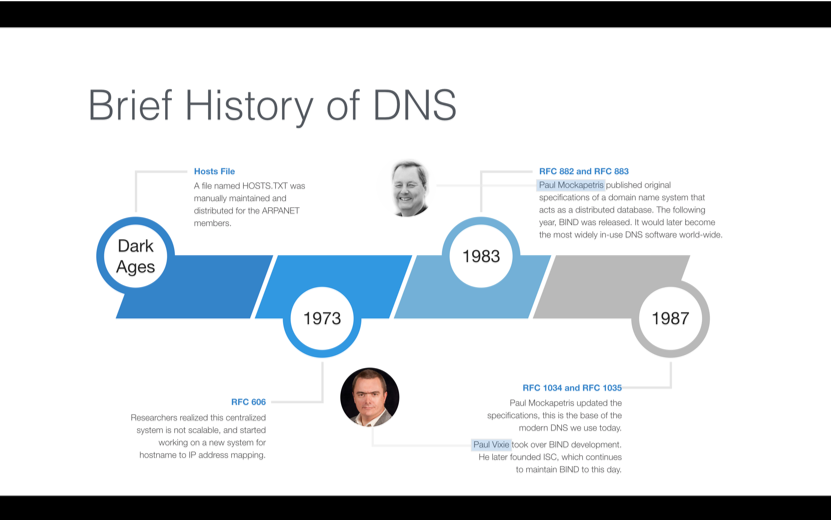
Given your interest in how the internet was created, it's worth looking at what came before DNS. In the early days of ARPANET (the internet's precursor), the network was very small. The translation from names to addresses was handled manually with a single text file called HOSTS.TXT.
This file, maintained by the Stanford Research Institute, contained a list of all known hosts and their numerical addresses. Every time a new computer was added to the network, the file had to be manually updated and distributed to every other computer on the network.
As you can imagine, this system quickly became a bottleneck. It was not:
- Scalable: The file grew larger and updates became more frequent and chaotic.
- Efficient: Distributing the entire file for every small change was wasteful.
- Timely: There was a significant delay between a host being added and everyone on the network knowing about it.
The clear limitations of this centralized approach led to the creation of a new system: a distributed, hierarchical, and automated database. This was the birth of the DNS we use today.
The Solution: A Distributed System
The key innovation of DNS is that it is not one massive server or file. It is a distributed system, meaning the responsibility for maintaining the "phonebook" is spread across thousands of servers worldwide. When your computer needs to resolve a domain name, it doesn't query a single master server. Instead, it participates in a query process that typically involves several types of specialized servers working together.
We will explore this process in detail in the next lesson, but for now, it's enough to understand that this distributed design is what allows DNS to be so scalable and resilient. It solved the problems of the old HOSTS.TXT file by delegating control and avoiding a single point of failure.
Hands-On: Using nslookup
Now, let's connect this theory to practice. Your own computer has tools to perform DNS lookups. The most common one is nslookup (which stands for "name server lookup"). It allows you to directly query the DNS system to find the IP address associated with a domain name.
Open your terminal or command prompt and try the following commands:
# Look up the IP address for Google
nslookup google.com


# Look up the IP address for GitHub
nslookup github.com


# Try your university's website or another favorite site
nslookup wikipedia.org
Interpreting the Output
When you run nslookup google.com, you will see output similar to this (the addresses may vary):
Server:  1.1.1.1
Address: 1.1.1.1#53

Non-authoritative answer:
Name:    google.com
Address: 142.250.191.14
Let's break this down:
ServerandAddress: This tells you which DNS server your computer sent the query to. In this case, it's Cloudflare's public DNS server (1.1.1.1) on port53(the standard port for DNS).NameandAddress: This is the answer to your query! The DNS server is reporting that the IP address forgoogle.comis142.250.191.14.
By running this simple command, you have manually performed the exact translation process that your web browser does automatically millions of times a day. You've used the internet's phonebook.
Conclusion
In this lesson, we've established the fundamental purpose of the Domain Name System. We've seen that while the internet is built on numerical IP addresses, DNS provides the crucial translation service that allows us, as humans, to interact with it using memorable names.
Key Takeaways:
- The Core Problem: Networks use numerical IP addresses, but humans find it easier to remember names.
- The Purpose of DNS: To translate, or "resolve," human-readable domain names (like
google.com) into machine-readable IP addresses (like142.250.191.14). - The "Phonebook Analogy": DNS is often called the internet's phonebook, as it maps names to numbers.
- Why DNS is Distributed: The early, centralized system (
HOSTS.TXT) could not scale. DNS was designed as a distributed, hierarchical system to handle the internet's explosive growth. nslookup: This command-line tool allows you to perform DNS lookups manually, demonstrating the name-to-address translation in real time.
Preview of the Next Lesson:
We've answered the "why" of DNS. Next, we'll begin to answer the "how." Now that you know DNS is a distributed system, the next logical question is: what are its components? In our next lesson, we will describe the DNS hierarchy, exploring the roles of root servers, Top-Level Domain (TLD) servers, and authoritative servers that work together to find the right IP address.