Introduction
Hello! In our last lesson, we walked through the theory of how a TCP client initiates a connection. We covered the sequence of socket() to create an endpoint and connect() to establish a link to a listening server. This "active open" is the crucial first step for any client program.
Today, we're moving from theory to practice. Your goal is to implement a simple TCP echo client in C that sends and receives data. An "echo" client is a fundamental network programming exercise: it sends a message to a server and then waits to receive the exact same message back. This allows us to verify that the entire communication loop—client to server and back again—is working correctly.
By the end of this lesson, you will have written, compiled, and run your first TCP client, bringing the concepts of sockets, ports, and connections to life with your own C code.
The Client's Lifecycle: From Connection to Conversation
Let's quickly review the lifecycle of a TCP client, which we'll be translating into code. The diagram below shows the sequence of API calls. We covered socket() and connect() conceptually last time; now we'll add send() and recv() to handle the actual data exchange.
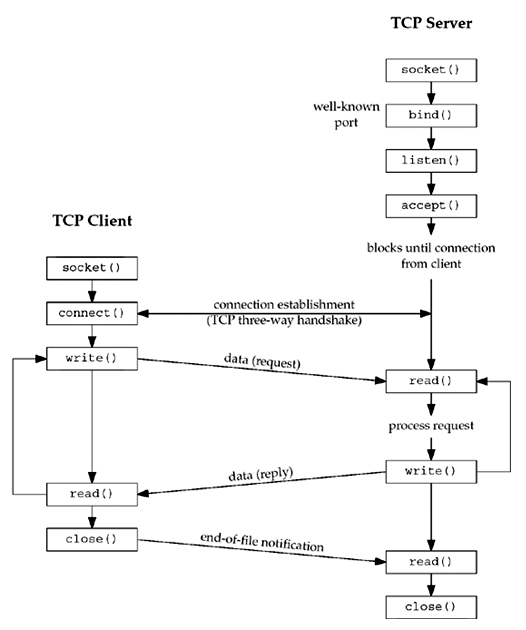
The workflow for our echo client will be:
socket(): Create a socket.connect(): Connect to the echo server's IP address and port.- Loop:
- Read a line of text from the user's keyboard.
send(): Send that text to the server.recv(): Receive the echoed text from the server.- Print the echoed text to the screen.
close(): Close the socket when done.
Building the TCP Echo Client, Step by Step
Your C programming background will be very useful here, as you'll recognize the standard structure of a C program. Our main task is to correctly use the socket API functions within that structure.
Let's watch a video that walks through the creation of a TCP echo client. It will provide a great overview of the code we're about to write.
This video, 'Tcp Echo Client Using Sockets' from TheSecurityTube channel, explains and demonstrates a complete TCP echo client. Pay attention to the main function calls: socket, connect, send, and recv.
Watch from the beginning to 04:53. The video will cover: The overall algorithm for the client. Setting up the variables, including the sockaddr_in struct for the server's address. Creating the socket and using connect(). The main while loop that uses fgets, send, and recv to communicate with the server.
Now, let's break down the implementation into its core parts.
1. Headers and Initial Setup
Like any C program, we start with our includes. For socket programming on a Linux-based system, you'll need several specific headers for function definitions and data structures.
#include <stdio.h>      // For standard I/O (printf, fgets)
#include <stdlib.h>     // For exit()
#include <string.h>     // For memset(), strlen()
#include <unistd.h>     // For close()
#include <sys/types.h>    // For data types used in socket calls
#include <sys/socket.h> // For socket function calls (socket, connect, etc.)
#include <netinet/in.h> // For sockaddr_in structure
#include <arpa/inet.h>  // For inet_addr()
2. Creating the Socket and Preparing the Server Address
Inside main(), our first steps are to get a socket and prepare the sockaddr_in struct that specifies which server we want to connect to.
int sockfd;
struct sockaddr_in servaddr;

// 1. Create the socket
if ((sockfd = socket(AF_INET, SOCK_STREAM, 0)) < 0) {
    perror("socket error");
    exit(1);
}

// 2. Prepare the server address structure
memset(&servaddr, 0, sizeof(servaddr));
servaddr.sin_family = AF_INET;
servaddr.sin_port = htons(PORT_NUMBER); // e.g., 10000

// Convert dotted-decimal IP address to network byte order
if (inet_pton(AF_INET, "127.0.0.1", &servaddr.sin_addr) <= 0) {
    perror("inet_pton error");
    exit(1);
}
Note on inet_pton: This function converts an IP address string (like "127.0.0.1") into the binary format required by the sockaddr_in struct. It's a more modern and safer alternative to inet_addr().
3. Connecting to the Server
With the socket created and the server's address prepared, the connect() call does the heavy lifting of establishing the TCP connection.
// 3. Connect to the server
if (connect(sockfd, (struct sockaddr *) &servaddr, sizeof(servaddr)) < 0) {
    perror("connect error");
    exit(1);
}
4. The send/recv Loop
This is the heart of the client. Once connected, we enter a loop to send user input and receive the server's echo. We'll use fgets to read a line from standard input, send to transmit it, and recv to get the reply.
char sendline[1024], recvline[1024];

printf("Connected to server. Type a message and press Enter:\n");
while (fgets(sendline, sizeof(sendline), stdin) != NULL) {

    // 4. Send the user's message to the server
    send(sockfd, sendline, strlen(sendline), 0);

    // 5. Receive the echo from the server
    if (recv(sockfd, recvline, sizeof(recvline), 0) == 0) {
        // Server closed the connection
        printf("Server terminated prematurely\n");
        break;
    }

    printf("Echo from server: %s", recvline);

    // Clear the buffers for the next message
    memset(sendline, 0, sizeof(sendline));
    memset(recvline, 0, sizeof(recvline));
}
5. Closing the Socket
Finally, once the loop terminates (e.g., the user presses Ctrl+D), we close the socket to release the resources.
// 6. Close the connection
close(sockfd);
A Complete Example and Practical Exercise
The best way to learn is by doing. The following resource from Dartmouth College provides a complete, working TCP echo client and a companion echo server.
Socket Programming - Dartmouth Computer Science
Let's study a complete implementation from Dartmouth's CS department. This will serve as our reference code. Then, we will compile and run it.
Find the section titled 'TCP Echo Client' and carefully read through the echoClient.c source code. Compare it to the snippets we've just discussed. It combines all these pieces into a single main function.
Now for the hands-on part. You'll need both the client and the server code to test this.
Your Task:
-
Get the Code:
- From the Dartmouth page, find the
echoClient.csource code and save it to a file namedechoClient.c. - Find the
echoServer.csource code (just below the client) and save it to a file namedechoServer.c.
- From the Dartmouth page, find the
-
Compile the Programs:
Open a terminal and compile both files usinggcc.gcc -o echoClient echoClient.c gcc -o echoServer echoServer.c -
Run the Server:
In your terminal, start the server. It will run in the background and print a message that it's waiting for connections../echoServer &You should see:
Server running...waiting for connections. -
Run Your Client:
In the same terminal, run your client, telling it to connect to the server running on your own machine. The IP address for your local machine is127.0.0.1../echoClient 127.0.0.1 -
Test the Connection:
Your client is now connected! Type a message and press Enter. The server should echo it back.Hello, network! String received from the server: Hello, network! This is C socket programming. String received from the server: This is C socket programming. -
Clean Up:
PressCtrl+Cto stop the client. Then, find the process ID of the server and stop it.ps -ef | grep echoServer # Find the process ID (PID) kill -9 <PID> # Replace <PID> with the number you found
This exercise directly fulfills your goal of connecting "book knowledge" with a real, working program.
A Note on Robust Sending
In simple examples, send() often transmits all your data at once. However, in real-world networks, the OS might only send a portion of your data. A robust client must be prepared to handle "partial sends."
"Beej's Guide to Network Programming" provides an excellent helper function to ensure all data is sent.
Beej's Guide to Network Programming
For a more robust implementation, it's good practice to ensure all bytes you intend to send are actually sent. Let's look at a helper function from Beej's Guide that handles this.
Read the section 'Handling Partial send()s'. Study the sendall() function. Understand its logic: it loops, repeatedly calling send() with the remaining part of the buffer until everything has been sent or an error occurs.
While not essential for our simple echo client, this sendall() function is a key technique for building reliable network applications.
Conclusion
Congratulations! You have successfully implemented, compiled, and tested a TCP echo client. You've taken the theoretical concepts of sockets and transformed them into a C program that communicates over a network.
Key Takeaways:
- A TCP client follows a
socket()->connect()->send()/recv()->close()sequence. - The
sockaddr_instruct is essential for specifying the server's address (IP and port). - The
htons()andinet_pton()functions ensure data is in the correct network byte order and format. - The actual conversation happens in a loop, using
send()to transmit data andrecv()to receive it. - Testing a client requires a running server to connect to, even if it's on the same machine (
127.0.0.1).
Preview of the Next Lesson:
You've built the client, but what about the program it was talking to? In the next lesson, we will complete the picture by focusing on the other side of the connection. You will implement a simple TCP echo server in C that handles a client connection, giving you full control and understanding of both endpoints.