Introduction
Hello! In the last lesson, we explored the server's role in establishing a TCP connection. We saw how a server uses socket(), bind(), listen(), and accept() to passively wait for clients to initiate contact. This is like a business setting up a phone line and waiting for calls.
Today, we'll switch perspectives and look at the client's side of the equation. How does a program actively reach out and connect to a listening server? This lesson covers exactly that, focusing on the two key system calls a TCP client uses. Your goal for this lesson is to describe the sequence of socket API calls for a typical TCP client (socket, connect).
By the end of this lesson, you'll understand the "active open" process that complements the server's "passive open," completing the picture of how a TCP connection is born.
The Client's Lifecycle: Actively Seeking a Connection
While a server listens, a client initiates. Think of it as making a phone call. You know the number you want to dial (the server's IP address and port), you pick up your phone (create a socket), and you dial the number (connect).
This sequence is simpler than the server's:
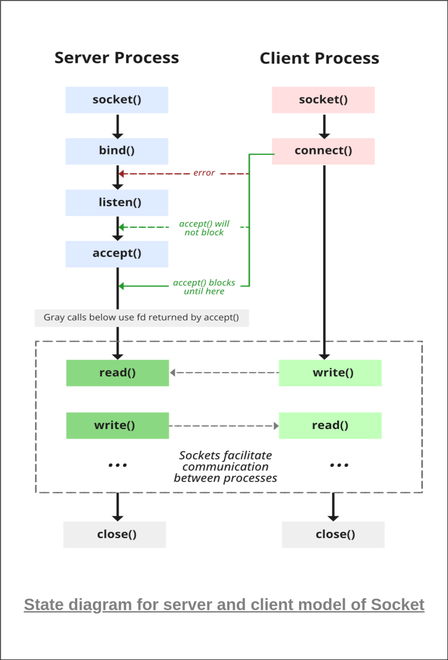
socket(): Get a communication endpoint from the operating system. This is identical to the server's first step.connect(): Use that socket to establish a connection with a specific server at a known address and port.
The diagram below illustrates this client-side flow in contrast to the server's flow, which we covered last time. Today, we're focusing on the "Client" column.
Step 1: socket() - Creating the Endpoint (A Recap)
Just like the server, the first thing a client must do is request a socket from the operating system.
#include <sys/types.h>
#include <sys/socket.h>

int sockfd = socket(AF_INET, SOCK_STREAM, 0);
As a brief reminder from our last lesson:
AF_INETspecifies the IPv4 Internet protocol family.SOCK_STREAMspecifies a reliable, stream-oriented socket (TCP).0lets the OS choose the default protocol, which is TCP forSOCK_STREAM.
This call returns a socket descriptor (sockfd), an integer that acts as a handle for our endpoint. At this stage, it's just a generic endpoint, not associated with any destination.
Step 2: connect() - Initiating the Connection
This is the pivotal step for the client. The connect() function takes our newly created socket and attempts to establish a connection with a remote server.
#include <sys/socket.h>

int connect(int sockfd, const struct sockaddr *addr, socklen_t addrlen);
Let's break down the parameters:
sockfd: The file descriptor returned by our call tosocket().addr: A pointer to astruct sockaddrcontaining the destination server's IP address and port number.addrlen: The size of the address structure.
Preparing the Server Address
Before you can call connect(), you must first populate a structure with the server's address information. In modern C programming, the best way to do this is with the getaddrinfo() function. It's a powerful helper that handles looking up domain names (like www.google.com) and preparing the sockaddr structures for you, and it works seamlessly with both IPv4 and IPv6.
The following guide is an excellent, comprehensive resource for socket programming. We will refer to it frequently.
Beej's Guide to Network Programming
Let's turn to the renowned "Beej's Guide to Network Programming" to understand the modern approach for preparing address structures. This section explains getaddrinfo() and shows how a client uses it to look up a server's address.
Read the section 'getaddrinfo()—Prepare to launch!'. Focus on the client example, which shows how to set up the hints struct and call getaddrinfo() to get a linked list of potential addresses for a server.
Making the Call
Once getaddrinfo() provides you with a valid address structure (servinfo in Beej's example), you can finally call connect().
The connect() call is a blocking call. When you call it, your program execution pauses, and the operating system takes over to perform the TCP three-way handshake (SYN, SYN-ACK, ACK) with the server.
- If successful: The handshake completes, the connection is established, and
connect()returns0. Your socket is now ready forsend()andrecv()(orwrite()andread()). - If it fails: The server might not be running, a firewall might block the connection, or the address could be wrong. In this case,
connect()returns-1, and you should check theerrnovariable to find out why.
A key point for clients is that you typically do not need to call bind(). The OS will automatically choose an unused local port (an "ephemeral port") for your end of the connection when you call connect().
The following clip provides a fantastic analogy for what the connect() call accomplishes under the hood.
The Linux socket API explained
In this video, 'The Linux socket API explained', the connect function is compared to 'installing the door'. It abstracts away all the complexity of the three-way handshake, just as a carpenter handles the details of hanging a door.
Watch from 04:32 to 05:43. Pay close attention to how connect takes the abstract socket and the server's address and turns them into a ready-to-use, reliable connection.
A Practical Walkthrough: Building a Web Client
Theory is great, but seeing it in action solidifies the concepts. Let's watch a video where the author builds a simple web client—a program that connects to a web server and fetches the content of a webpage. This is a perfect real-world example of a TCP client.
How to build a web client? (sockets)
This video, 'How to build a web client? (sockets)' from Jacob Sorber's channel, provides a step-by-step C implementation. It will walk you through the entire client process, from creating the socket to connecting and then communicating with a server.
Watch from 02:26 to 04:32. This segment covers the exact sequence we've discussed: socket() (02:26 - 03:17): Creating the socket endpoint. Preparing the Address (03:17 - 04:08): Filling the sockaddr_in struct with the server's IP and port. (Note: This video uses the older inet_pton method, but the principle is the same as with getaddrinfo). connect() (04:08 - 04:32): Making the actual connection to the server.
For a complete, copy-paste ready code example, you can also refer to the simple stream client in "Beej's Guide".
Beej's Guide to Network Programming
To see all the pieces put together in a complete program, review the simple client example from "Beej's Guide". This code uses getaddrinfo(), loops through the results, and attempts to socket() and connect() to the first one that works.
Read the code under the section 'A Simple Stream Client'. Trace the logic: getaddrinfo(), for loop, socket(), connect(). This is a robust pattern for writing client code.
Conclusion
You have now learned the complete sequence of API calls for a TCP client. The process is a straightforward, active initiation of a conversation with a listening server.
Key Takeaways:
- A TCP client's setup sequence is
socket()followed byconnect(). socket()creates the client's endpoint, returning a socket descriptor.- Before connecting, the client must prepare a
sockaddrstructure containing the server's IP address and port, preferably usinggetaddrinfo(). connect()is a blocking call that initiates the TCP three-way handshake. Upon success, the socket is fully connected and ready for data transfer.- The client does not need to call
bind(); the kernel assigns a temporary local port automatically.
Preview of the Next Lesson:
You now understand the theory behind both the TCP server and client setup. In the next lesson, we will get our hands dirty with code. You will implement a simple TCP echo client in C that sends data to a server and prints the response, putting the concepts from today's lesson into direct practice.