Hello! Welcome to our seventh module, "Interactive Querying and Data Lake Governance."
In our last lesson, we focused on using Amazon Athena workgroups to manage access and control costs. You learned how to isolate teams, enforce query result settings, and set up both per-query and workgroup-wide data scan limits. This gave you a powerful tool for coarse-grained governance—controlling who can query and how much they can scan.
Now, we're going to address a more granular and central challenge in data governance: controlling precisely what data users can see. This lesson introduces AWS Lake Formation, the service at the heart of modern AWS data lake security. Our goal is to describe the role of AWS Lake Formation for centralizing data lake governance. While your experience with Athena and S3 gives you context for why this is needed, this lesson will provide the structured, exam-focused understanding of how Lake Formation solves this problem.
The Governance Challenge in a Traditional Data Lake
Before Lake Formation, securing a data lake primarily involved a combination of:
- IAM policies: To control which users or services could call APIs for services like Athena or Glue.
- S3 bucket policies: To control access to the underlying data files in S3.
This approach presents several challenges, especially as a data lake grows:
- Complexity: Managing hundreds of intricate IAM and S3 policies becomes difficult and error-prone.
- Lack of Granularity: S3 policies operate at the object level (files), not at the level of database tables, columns, or rows. Implementing column-level security was complex and often required creating different versions of the data.
- Decentralization: Security policies were scattered across different services (IAM, S3), with no single place to view or manage data access.
To understand how AWS Lake Formation was designed to address these issues, watch the introduction to the following video.
Deep Dive Into AWS Lake Formation - Level 300 (United States)
The speaker in this 'Deep Dive Into AWS Lake Formation' video from AWS Events does an excellent job of framing the business problem that Lake Formation solves. Pay attention to the steps a data engineer would traditionally take and how they present challenges that Lake Formation addresses directly.
Watch the first 3 minutes of the video (00:00 - 03:03) to understand the 'why' behind Lake Formation.
What is AWS Lake Formation?
As you just saw, Lake Formation was created to simplify and centralize data lake governance.
AWS Lake Formation is a service that helps you centrally govern, secure, and share data for analytics and machine learning. It provides a single place to manage fine-grained access controls for your data in Amazon S3 and the metadata about that data in the AWS Glue Data Catalog.
Think of it as a security layer that sits on top of your data lake. Instead of managing complex S3 bucket policies, you use Lake Formation to grant and revoke permissions in a style similar to a relational database management system (RDBMS), using GRANT/REVOKE logic on databases, tables, and columns.
To get a concise, authoritative overview of its capabilities, please review the following section from the official AWS documentation.
This page from the AWS documentation, titled 'What is AWS Lake Formation?', introduces the service's core purpose and features.
Read the introductory paragraph under the main heading, and then read the section 'Security management' to see a summary of the key governance features like access controls, audit logging, and tag-based security. We will explore these in more detail.
How Lake Formation Enforces Permissions: A Two-Part Check
A critical concept for the exam is understanding that Lake Formation augments, not replaces, IAM. For a user to successfully access data, they must pass two sets of permission checks:
- IAM Permissions: The user or role must have IAM permissions to use the querying service (e.g.,
athena:StartQueryExecution) and to call the Lake Formation API (lakeformation:GetDataAccess). - Lake Formation Permissions: The user or role must have been granted Lake Formation permissions on the specific Data Catalog resources (e.g.,
SELECTon a table).
So, how does Lake Formation enforce its permissions on data in S3 without requiring you to give users direct S3 access? The answer is a mechanism called credential vending.
This article provides an excellent explanation of the workflow.
AWS Lake Formation For Data Governance and Security
This article, 'AWS Lake Formation For Data Governance and Security', clearly explains the technical workflow behind Lake Formation's permission model.
Read the section titled 'Lake Formation permissions management workflow'. Focus on the numbered steps and the diagram that illustrates the flow from a user query to data retrieval. This process is key to understanding how Lake Formation works under the hood.
Here is a summary of the credential vending process, also illustrated in the diagram below:
- A user submits a query through an integrated service like Athena.
- Athena asks the AWS Glue Data Catalog for the table's metadata. The Data Catalog checks with Lake Formation to see what metadata (e.g., which columns) the user is allowed to see.
- Athena, knowing the data is managed by Lake Formation, requests data access from Lake Formation.
- Lake Formation validates the user's permissions for the requested data. If authorized, it vends temporary, short-lived, scoped-down credentials to Athena.
- Athena uses these temporary credentials to read the specific data from S3.
- Athena returns the final, filtered results to the user.

This process means you can remove direct S3 read/write permissions from your data analysts' IAM roles, significantly strengthening your security posture. They access data only through the permissions you define in Lake Formation.
Core Pillars of Lake Formation Governance
Lake Formation provides several key capabilities that work together to create a robust governance framework.
1. Fine-Grained Access Control
This is the cornerstone of Lake Formation. You can grant permissions at the following levels:
- Database
- Table
- Column
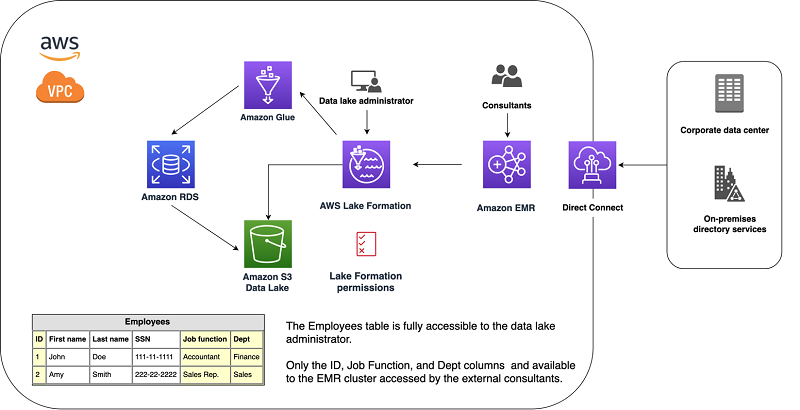
- Row (using data filters)
- Cell (a combination of row and column filters)
The following video demonstrates how a data lake administrator can grant a manager full access to a table while restricting an analyst's view to exclude a sensitive column.
Deep Dive Into AWS Lake Formation - Level 300 (United States)
This segment from the 'Deep Dive' video provides a practical demonstration of granting table and column-level permissions. It clearly shows how different users see different views of the same underlying data.
Watch the section from 16:40 to 20:37. Observe how the retail manager can grant access to the analyst but exclude the 'customer_name' column.
This ability to filter columns (and rows) without creating separate physical copies of the data is a massive simplification for data governance.
Test your understanding!
A data analyst has an IAM policy that allows the athena:StartQueryExecution action. In Lake Formation, they have been granted SELECT permission on all columns of the orders table except for the customer_pii column.
What happens when the analyst runs SELECT * FROM orders in Athena?
Show answer
The query will succeed, but the results returned will not include the customer_pii column. Athena, as an integrated service, respects the fine-grained permissions defined in Lake Formation. Even though the user requested all columns with *, Lake Formation ensures that only the authorized columns are processed and returned. The analyst is unaware that the customer_pii column even exists.
2. Scalable Governance with Tag-Based Access Control (LF-TBAC)
Granting permissions to individual users on hundreds of tables (the "named-resource" method) doesn't scale. To solve this, Lake Formation offers Tag-Based Access Control (LF-TBAC).
The concept is simple but powerful:
- Define LF-Tags: Create logical tags (key-value pairs) like
department:salesorconfidentiality:high. - Grant Permissions on Tags: Grant permissions to principals (users/roles) based on these tags. For example, give the
SalesTeamroleSELECTaccess on any resource with thedepartment:salestag. - Assign Tags to Resources: Attach your LF-Tags to databases, tables, or columns.
This decouples users from resources, allowing you to manage permissions at scale. When a new sales table is created, you simply tag it with department:sales, and the SalesTeam role automatically gets access.
AWS Tutorials - AWS Lake Formation - Tag Based Access Control
This video, 'AWS Lake Formation - Tag Based Access Control', explains why LF-TBAC is necessary and how it simplifies managing permissions at scale.
Watch from 00:15 to 14:59. The first part explains the scalability problem with named-resource permissions. The second part details the three-step LF-TBAC process and provides a clear example with sales and customer service teams.
3. Centralized Auditing
A key part of governance is being able to answer the question, "Who accessed what data, and when?" Lake Formation integrates seamlessly with AWS CloudTrail to provide detailed audit logs of all data access requests.
This central audit trail is invaluable for security analysis and compliance reporting. The final segment of the "Deep Dive" video demonstrates this capability.
Deep Dive Into AWS Lake Formation - Level 300 (United States)
This section shows how access events from Lake Formation appear in CloudTrail, providing a comprehensive audit log.
Watch from 25:21 to 27:50 to see how you can monitor and audit data access events.
Conclusion
In this lesson, you've learned how AWS Lake Formation acts as the central governance layer for an AWS data lake. It moves security from complex, decentralized IAM and S3 policies to a simplified, centralized, and fine-grained permissions model.
Key Takeaways:
- Centralized Governance: Lake Formation provides a single service to define and manage data access policies for your entire data lake.
- Fine-Grained Control: It enables permissions at the database, table, column, row, and cell level, which is not possible with S3 policies alone.
- Credential Vending: It securely grants access to data by providing temporary, scoped-down credentials to integrated services, removing the need for users to have direct S3 access.
- Scalable Management: LF-Tag-Based Access Control (LF-TBAC) allows you to manage permissions for thousands of resources efficiently.
- Comprehensive Auditing: Integration with AWS CloudTrail provides a complete audit log of data access for security and compliance.
Next Up:
Now that you understand the role and importance of Lake Formation, our next lesson will move from theory to practice. You will learn the first practical step in implementing this governance: how to register an S3 data lake location and configure a basic Lake Formation setup.