Hello! Welcome to the next lesson in our module on "Interactive Querying and Data Lake Governance."
In the last lesson, we established the crucial role of AWS Lake Formation as a centralized service for data lake security. We covered the "what" and "why": how it provides fine-grained permissions, uses a credential vending mechanism to secure data in S3, and simplifies governance at scale.
Now, we shift from theory to the essential first steps of implementation. Today's lesson will guide you through the foundational setup of Lake Formation. By the end of our session, you will be able to register an S3 data lake location and configure a basic Lake Formation setup. This is the practical starting point for bringing an S3 data lake under Lake Formation's governance, a fundamental skill for the certification exam.
Step 1: Designating a Data Lake Administrator
Before you can manage permissions or register locations, you must designate a Data Lake Administrator. This is a critical first step and a frequent topic in exam questions.
A key rule to remember is that the AWS account's root user cannot be a Data Lake Administrator. You must explicitly grant this administrative privilege to an IAM user or role. This administrator is the only principal who can initially grant Lake Formation permissions to other users, including themselves.
For a detailed walkthrough of this process, including the necessary IAM permissions, the official AWS documentation is the best resource.
This document, 'Set up AWS Lake Formation', outlines the official procedure for initial configuration. We'll focus on the first step: creating the administrator.
Read the section titled 'Create a data lake administrator'. Pay close attention to the required IAM policies, particularly AWSLakeFormationDataAdmin. Note the recommendation not to use a general IAM administrative user for this role.
To see this process in action, the following video provides a practical demonstration.
AWS Data Lakes 101 | Lesson 1: Configuring S3 for Lake Formation
This video, 'AWS Data Lakes 101', walks through the initial setup of a data lake. The first part demonstrates creating an IAM user and assigning them as the Lake Formation administrator.
Watch from 02:03 to 05:22. Observe how the presenter creates a new IAM user and then, from the root account, grants that user administrator privileges within the Lake Formation console.
Step 2: Upgrading the Data Catalog's Permission Model
By default, to ensure backward compatibility with existing AWS Glue workflows, Lake Formation starts with a setting that relies solely on IAM for access control. To unlock Lake Formation's fine-grained permissions (table, column, and row-level security), you must change this default behavior.
This involves two key actions:
- Changing Data Catalog Settings: You disable the "Use only IAM access control" settings. This tells Lake Formation that it should be the primary enforcer of permissions for new Data Catalog resources.
- Revoking
IAMAllowedPrincipals: You revoke the defaultCreate databasepermission from a virtual group calledIAMAllowedPrincipals. This ensures that only principals you explicitly authorize in Lake Formation can create new databases.
This is a one-time setup step for your data lake that is crucial for enabling robust governance.
This section of the AWS documentation explains how and why to change the default permissions model.
Read the section 'Change the default permission model or use hybrid access mode'. Focus on the steps under 'To change the default Data Catalog settings' to understand the console actions required.
Step 3: Registering Your S3 Data Lake Location
This is the core of our lesson. Registering an S3 path tells Lake Formation, "You are now in charge of governing access to the data stored here." Once a location is registered, Lake Formation can enforce its permissions on any data reads or writes performed through integrated services like Athena, Glue, and Redshift Spectrum.
You don't register individual files; you register an S3 bucket or a prefix (folder) within a bucket. Lake Formation will then manage everything under that path.
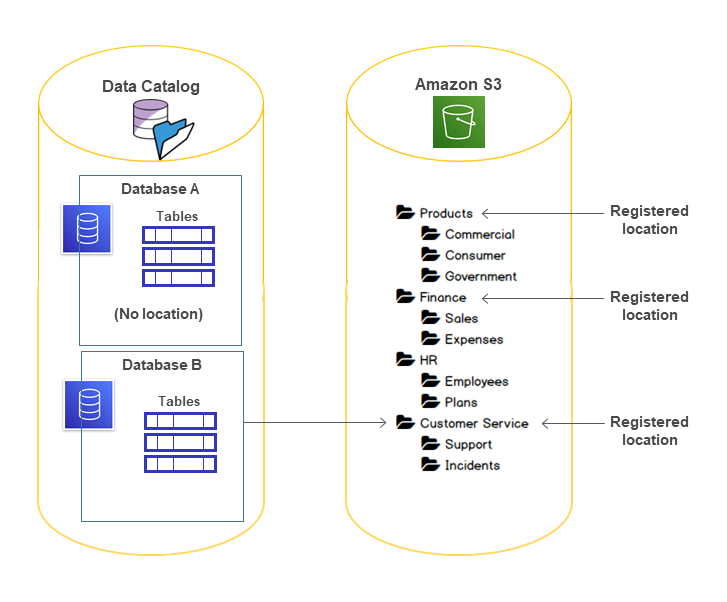
When you register a location, you must also specify an IAM role. Lake Formation assumes this role to obtain the necessary S3 permissions for its credential vending process, which we discussed in the last lesson. You can typically use the default service-linked role that Lake Formation creates for you.
The following video shows a complete, simple example of creating an S3 bucket and registering it.
AWS Data Lakes 101 | Lesson 1: Configuring S3 for Lake Formation
Continuing with the 'AWS Data Lakes 101' video, this segment provides a clear, practical demonstration of creating an S3 bucket and registering it as a data lake location.
Watch from 05:22 to 08:06. The presenter first creates an S3 bucket with a common bronze/silver/gold structure and then registers the entire bucket as a data lake location in Lake Formation.
The DataCamp tutorial below provides an excellent textual summary of the steps involved.
AWS Lake Formation and Glue Integration: A Step-by- ...
This DataCamp tutorial, 'AWS Lake Formation and Glue Integration', provides a clear, step-by-step guide to setting up Lake Formation. We'll focus on the section about registering the data location.
Read the short section titled 'Registering Data Lake locations'. It succinctly describes the steps to register your S3 bucket in the Lake Formation console.
Test your understanding!
You are tasked with securing a new data lake built on Amazon S3. An IAM policy has been created that gives a group of data analysts s3:GetObject permission on the entire data lake bucket. You then register the bucket with Lake Formation and use Lake Formation to deny the analysts access to a specific table.
Will the analysts still be able to read the data for that table? Why or why not?
Show answer
It depends on the permission model. If you have successfully upgraded the Data Catalog settings to use the Lake Formation permission model (by disabling "Use only IAM access control"), then the analysts will not be able to read the data.
This is because once Lake Formation is in control, access requires passing both the IAM check and the Lake Formation permission check. Even though their IAM policy allows s3:GetObject, Lake Formation's denial will block the request when they query through an integrated service like Athena. If the IAM-only model were still active, the IAM permissions would be sufficient, and Lake Formation's rules would be ignored.
Step 4: Creating a Database
Once your S3 location is registered, the final setup step is to create a database in the AWS Glue Data Catalog that points to this location. A database acts as a logical namespace or container for the tables you will later define.
When creating the database in Lake Formation, you will associate it with the S3 location you just registered. This links the logical database to the physical storage location.
Deep Dive Into AWS Lake Formation - Level 300 (United States)
This clip from the 'Deep Dive Into AWS Lake Formation' video shows the next logical step: creating a database that uses the registered S3 location.
Watch from 05:06 to 06:31. Note how the presenter creates a 'landing_db' and specifies the S3 location for it. This establishes the connection between the logical database and the physical data storage.
By completing this step, you have a fully configured foundation: an S3 location registered and a database ready to hold tables.
Conclusion
In this lesson, you have moved from understanding the concept of Lake Formation to executing its fundamental setup process. You now have the practical knowledge to prepare a data lake for centralized governance.
Key Takeaways:
- Administrator is Mandatory: A dedicated Data Lake Administrator (who is not the root user) must be created as the first step.
- Permission Model Upgrade: To use Lake Formation's fine-grained controls, you must disable the default "IAM-only" access settings in the Data Catalog.
- Registration is Key: Registering an S3 location tells Lake Formation to start managing access to the data within that path. This is the central action that enables governance.
- Databases Provide Structure: Creating a database in the Glue Data Catalog provides a logical container for your tables and links them to the physical S3 location.
Next Up:
With the foundation now firmly in place, our next lesson will build directly on this setup. You will learn how to start applying permissions by granting database- and table-level permissions to IAM principals using Lake Formation.