Hello! Welcome to the final lesson in our "Monitoring, Optimization, and Troubleshooting" module.
In our last session, we focused on optimizing storage costs by mastering S3 storage classes, lifecycle policies, and Intelligent-Tiering. Today, we turn our attention to the other major component of your data platform's budget: compute. Services like Amazon EMR and Redshift are powerful, but their cost can grow quickly if not managed effectively.
This lesson is designed to help you master the learning outcome: Evaluate cost optimization models (e.g., Savings Plans) for compute services like Redshift and EMR.
Understanding these models is crucial for the AWS Data Engineer - Associate exam, which often presents scenarios requiring you to select the most cost-effective architecture. For a data engineer, making informed decisions about compute pricing is a key responsibility that directly impacts the financial health of your data projects.
1. The Spectrum of AWS Compute Pricing
Before we dive into EMR and Redshift specifically, it's essential to understand the fundamental pricing models for AWS compute, which are based on Amazon EC2. Nearly all compute-intensive services, including EMR and Redshift, are built on top of EC2 instances, so their pricing models derive from these core concepts.
To get a clear overview of the main pricing options, please watch the following video.
Amazon/AWS EC2 Pricing Simply Explained | On-Demand, Spot, Reserved, Savings Plans
The video 'Amazon/AWS EC2 Pricing Simply Explained' from Tiny Technical Tutorials provides an excellent, concise breakdown of the four main pricing models.
Watch from 00:20 to 02:55. As you watch, focus on the core trade-off each model presents: On-Demand: Maximum flexibility, highest price. Spot Instances: Biggest discount, but can be interrupted. Reserved Instances (RIs): Discount for committing to a specific instance type. Savings Plans (SPs): Discount for committing to a certain amount of spend, with more flexibility than RIs.
To summarize, you have a spectrum from full flexibility with no commitment (On-Demand) to significant discounts in exchange for a long-term commitment (RIs and Savings Plans). Spot instances offer the deepest discounts but are only suitable for workloads that can tolerate interruption, like some fault-tolerant ETL jobs you might run on EMR.
2. Deep Dive: Reserved Instances vs. Savings Plans
The most important decision for managing costs of persistent or predictable compute workloads is choosing between Reserved Instances and Savings Plans. While both offer substantial discounts over On-Demand pricing in exchange for a 1- or 3-year commitment, they differ significantly in flexibility.
To understand these differences in detail, let's turn to a comprehensive guide.
A comprehensive cost optimization savings plans vs ...
The article 'A comprehensive cost optimization savings plans vs reserved instances' on the AWS Builders' Library provides an excellent breakdown of these two models.
Please read the first three sections of the article: 'What Are Savings Plans?', 'What Are Reserved Instances?', and 'Key Differences'. Pay close attention to the comparison table.
The core takeaway is that Reserved Instances lock you into a specific instance family, type, and region, while Savings Plans commit you to a dollar-per-hour spend that can be applied much more flexibly.
There are two main types of Savings Plans, which offer different levels of flexibility and discounts:
- Compute Savings Plans: These are the most flexible. They apply automatically to EC2 instance usage regardless of instance family, size, OS, tenancy, or AWS Region. They also apply to AWS Fargate and AWS Lambda usage. This flexibility comes with a slightly lower discount (up to 66%).
- EC2 Instance Savings Plans: These provide the deepest discounts (up to 72%) but are less flexible. You commit to using a specific instance family in a chosen AWS Region (e.g.,
m5instances inus-east-1). However, you still have the flexibility to change instances within that family (e.g., fromm5.xlargetom5.2xlarge).
For most data engineering workloads that may evolve over time, Compute Savings Plans are the preferred choice due to their flexibility.
3. Applying Cost Models to EMR and Redshift
Now let's apply these general concepts directly to our target services: Amazon EMR and Amazon Redshift.
Amazon Redshift
Redshift clusters are designed for long-running, steady-state workloads, making them prime candidates for commitment-based discounts.
- Reserved Nodes: Redshift offers Reserved Nodes, which are functionally identical to EC2 Reserved Instances. You commit to a specific node type (e.g.,
ra3.4xlarge) for a 1- or 3-year term to get a significant discount. This is ideal when you have a stable production data warehouse whose size and configuration are not expected to change. - Savings Plans: Your existing Compute or EC2 Instance Savings Plans can also apply to the EC2 instances that power your Redshift cluster. This provides more flexibility if you anticipate changing your node type in the future.
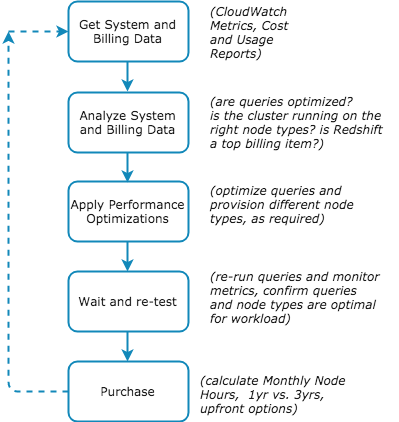
The decision to purchase reserved capacity should be the final step in an optimization process, not the first. You should first ensure your cluster is right-sized and your queries are optimized.
This flowchart illustrates a best-practice workflow for Redshift cost optimization that culminates in purchasing reserved capacity.
Amazon EMR
EMR costs are driven by the underlying EC2 instances, so the pricing models we've discussed apply directly. The best model depends entirely on your EMR usage pattern.
- Transient Clusters (e.g., daily ETL jobs):
- On-Demand: The standard choice for jobs that need to run reliably for a few hours each day.
- Spot Instances: An excellent choice for cost savings on fault-tolerant jobs. EMR's Instance Fleets feature allows you to combine Spot and On-Demand instances, ensuring your job completes even if Spot capacity is reclaimed.
- Persistent Clusters (e.g., an interactive Presto/Trino cluster):
- For a cluster that runs 24/7, using On-Demand pricing is not cost-effective.
- Savings Plans are often the best choice here. They provide the necessary cost savings while giving you the flexibility to upgrade or change the instance types in your cluster as your analytical needs evolve.
- Reserved Instances can also be used, but they lock you into a specific instance family, making them less ideal for EMR workloads that might change.
The AWS documentation on analytics cost optimization confirms these strategies.
Cost optimization in analytics services - AWS Documentation
Let's review the official AWS documentation to see how these models are applied to EMR and Redshift.
Read the subsections on 'Reserved instances and Savings Plan' under the Amazon EMR section, and 'Use Reserved nodes when possible' under the Amazon Redshift section. This will solidify how these models apply in practice.
Test your understanding!
A data engineering team runs two primary workloads:
- A daily, fault-tolerant Spark ETL job on EMR that runs for 4 hours to process new data. The job can be restarted if it fails.
- A 24/7 Amazon Redshift cluster (
ra3.4xlarge) that serves as the company's main data warehouse. Its workload has been stable for a year, and no architectural changes are planned for the next three years.
What is the most cost-effective pricing model for each workload?
Show answer
-
EMR ETL Job: Spot Instances. Since the job is fault-tolerant and transient, using Spot Instances will provide the maximum cost savings (up to 90%) with minimal risk.
-
Redshift Cluster: 3-year, All Upfront Reserved Nodes. The workload is stable, predictable, and long-term. Committing to a 3-year term with a full upfront payment for Reserved Nodes will yield the highest possible discount for this Redshift cluster.
4. A Practical Decision Framework
Choosing the right pricing model is a critical skill. For the exam, you'll need to quickly analyze a scenario and pick the most appropriate option.
Here’s a summary to guide your decisions:
| Model | Best For | Applies To (in Data Engineering) |
|---|---|---|
| On-Demand | Unpredictable, short-term workloads; development and testing. | Transient EMR jobs, initial cluster sizing. |
| Spot Instances | Fault-tolerant, stateless, and non-urgent transient workloads. | Cost-sensitive EMR batch processing, data transformation jobs. |
| Reserved Instances/Nodes | Extremely stable, predictable, long-running workloads (1-3 years). | Production Redshift clusters, persistent RDS databases. |
| Savings Plans | Consistent baseline of compute spend where flexibility is needed to change instance types/regions. | Persistent EMR clusters, mixed EC2/Lambda/Fargate workloads. |
The Hybrid Approach: In many real-world scenarios, the best strategy is a hybrid one. You can use a Compute Savings Plan to cover the baseline, predictable portion of your total compute usage across services. Then, you can layer on Reserved Instances for specific, ultra-stable workloads like your production Redshift cluster to achieve the maximum possible discount for that component.
Conclusion
You have now completed our module on monitoring, optimization, and troubleshooting. You started by learning how to react to failures with CloudWatch Logs Insights, then moved to proactively optimizing storage costs with S3, and have now finished by learning how to strategically manage compute costs with pricing models like Savings Plans and Reserved Instances.
Key Takeaways:
- Compute costs are a function of instance type and pricing model. Your goal is to pay only for the compute you need, using the most economical model for your workload's pattern.
- Commitment equals savings. For any stable, long-term workload (like a production Redshift or persistent EMR cluster), you should leverage a commitment-based model like Reserved Instances or Savings Plans.
- Flexibility has value. Savings Plans are often superior to Reserved Instances for data workloads because they allow you to adapt your architecture (e.g., upgrade instance types) without losing your discount.
- Match the model to the workload. Use Spot for interruptible transient jobs, RIs for fixed long-term nodes, and SPs for flexible long-term compute spend.
Next Up:
Cost optimization is one aspect of good architecture and governance. To effectively manage costs, you first need visibility into what you're spending and where. This requires proper resource tagging. In our next lesson, we will begin the "Data Governance and Auditing" module by focusing on how to "Apply data classification and tagging to AWS resources for governance purposes," a practice that is fundamental to both cost management and security.