Hello! Welcome to the next lesson in our "Monitoring, Optimization, and Troubleshooting" module.
In our last session, we focused on reactive problem-solving by using CloudWatch Logs Insights to diagnose ETL and data processing failures. Today, we shift our focus to a proactive and continuous process that is fundamental to a well-architected data engineering solution: cost optimization. As you know from your hands-on experience, S3 is the foundation of most data lakes on AWS, and managing its cost is a critical responsibility for any data engineer.
This lesson is designed to help you master the learning outcome: Design S3 cost optimization strategies using storage classes, lifecycle policies, and S3 Intelligent-Tiering.
While you're already highly proficient with S3, this lesson will concentrate on the strategic application of its features for cost management. This is a frequent topic in the AWS Data Engineer - Associate exam, where you'll be expected to choose the most cost-effective solution for a given scenario.
1. The Foundation of Cost Optimization: S3 Storage Classes
The core principle of S3 cost optimization is simple: don't pay for high-performance, frequent-access storage if your data doesn't require it. S3 provides a range of storage classes, each offering different trade-offs between storage cost, retrieval cost, retrieval time, and availability.
To start, let's get a structured overview of these classes and the key concepts of durability and availability.
Amazon S3 Storage Classes | AWS S3
The video 'Amazon S3 Storage Classes' by Digital Cloud Training provides a concise explanation of the different storage tiers and the factors that differentiate them.
Please watch from the beginning to 05:14. Pay close attention to: The distinction between durability (protection from data loss) and availability (ability to access data). The characteristics of the frequent access tiers (Standard) versus infrequent access tiers (Standard-IA, One Zone-IA). The use cases for the archival tiers (Glacier Instant Retrieval, Flexible Retrieval, and Deep Archive).
As the video explained, all S3 storage classes offer an exceptional 11 nines (99.999999999%) of durability, meaning your data is extremely safe from being lost. The main levers you control for cost are availability, access frequency, and retrieval latency.
Here’s a summary of the storage classes most relevant to data engineering workloads:
| Storage Class | Ideal Use Case | Key Characteristics |
|---|---|---|
| S3 Standard | Frequently accessed data; landing zones for raw data; staging tables for ETL. | High availability; low-latency access; most expensive storage price. |
| S3 Standard-IA | Data accessed less frequently but requiring rapid access when needed (e.g., processed data for monthly analytics). | Lower storage price than Standard; per-GB retrieval fee; 30-day minimum storage duration. |
| S3 One Zone-IA | Same as Standard-IA, but for non-critical, reproducible data (e.g., cached datasets). | Even lower storage price; data is stored in a single AZ; data will be lost if the AZ fails. |
| S3 Glacier Instant Retrieval | Long-term archival data needing immediate, millisecond access if retrieved (e.g., historical user profiles). | Low storage cost; higher retrieval fee than Standard-IA; 90-day minimum duration. |
| S3 Glacier Flexible Retrieval | Long-term backups and archives accessed 1-2 times a year. Retrieval takes minutes to hours. | Very low storage cost; flexible retrieval times; 90-day minimum duration. |
| S3 Glacier Deep Archive | Long-term data retention for compliance (7-10 years). The lowest cost storage. Retrieval takes hours. | Lowest storage cost in the cloud; retrieval within 12-48 hours; 180-day minimum duration. |
Choosing the right storage class is the first step. The next is automating the movement of data between them as its value and access patterns change over time.
2. Automating Data Movement with S3 Lifecycle Policies
A common pattern in data lakes is that data becomes "colder" over time. For example, raw logs are queried intensely for the first few days, then aggregated for monthly reports, and finally archived for compliance. It would be impractical to manually move these objects between storage classes.
This is where S3 Lifecycle Policies come in. They are rules you define to automatically transition objects to cheaper storage classes or expire (delete) them after a certain period.
Mastering amazon s3 lifecycle policies: A detailed guide to ...
To understand the core mechanics, let's review the article 'Mastering Amazon S3 Lifecycle Policies' by Charlotte Rhodes on Medium. It clearly explains the 'what' and 'why' behind lifecycle policies.
Read the first three sections: 'What is an s3 lifecycle policy?', 'Why should you use lifecycle policies?', and 'How do lifecycle transitions & expirations work?'. Focus on the two key actions: Transition and Expiration.
Now that you understand the concept, let's see it in action. The following video provides a practical demonstration of setting up lifecycle rules in the AWS console, which is invaluable for cementing your understanding.
How to set up S3 Lifecycle Rules to save on S3 costs
This video, 'How to set up S3 Lifecycle Rules to save on S3 costs,' demonstrates the entire process of creating a lifecycle rule, including rules for both current and non-current object versions.
Watch from 01:20 to 09:28. This covers: The conceptual flow of an object through different storage tiers over time. A step-by-step console demo for creating a rule for current object versions. A demo for managing non-current (previous) versions in a versioned bucket, which is critical for cost control.
As the video highlighted, managing non-current versions is a crucial aspect of lifecycle policies. If you have versioning enabled on a bucket (a common practice for data lakes), every update creates a new object version. Without a lifecycle policy to clean them up, these old versions will accumulate and lead to significant, unnecessary costs.
Key considerations for Lifecycle Policies:
- Filters: You can scope rules to specific prefixes (folders), object tags, or object sizes.
- Minimum Durations: You cannot transition objects before they have met the minimum storage duration of the source or destination class (e.g., 30 days for Standard-IA).
- Small Object Overhead: There are small, fixed costs associated with lifecycle transitions. Transitioning millions of very small files can sometimes be more expensive than simply keeping them in S3 Standard.
Test your understanding!
You are managing a data lake bucket that stores daily customer activity logs. The access pattern is as follows:
- Logs are frequently accessed for real-time analytics for the first 30 days.
- After 30 days, they are occasionally queried for monthly trend analysis for up to 180 days.
- After 180 days, they must be retained for 7 years for compliance but are almost never accessed.
Design a lifecycle policy to optimize storage costs for these logs.
Show answer
A suitable lifecycle policy would have the following transition actions:
- After 30 days: Transition objects from
S3 StandardtoS3 Standard-IA. This accommodates the need for occasional, fast queries. - After 180 days: Transition objects from
S3 Standard-IAtoS3 Glacier Deep Archive. This is the most cost-effective option for long-term archival where slow retrieval is acceptable. - After 2555 days (7 years): Expire the objects (permanently delete them).
This multi-step policy ensures that you are always using the most cost-effective storage class for the data's current value and access pattern.
3. The Hands-Off Approach: S3 Intelligent-Tiering
Lifecycle policies are perfect for data with predictable access patterns, like the logs in our exercise. But what about data with unknown, changing, or unpredictable access patterns? This is very common in a data lake shared by multiple teams, where a dataset might be popular for a project and then go untouched for months.
For these scenarios, S3 Intelligent-Tiering is the optimal solution. It's a special storage class that automatically moves your data between different access tiers based on actual usage, without you needing to configure any lifecycle rules.
Optimizing storage costs using Amazon S3
The official AWS page 'Optimizing storage costs using Amazon S3' provides the best explanation of this powerful feature.
Read the section 'Amazon S3 Intelligent-Tiering' and study the diagrams under 'How it works'. Focus on how objects move between the Frequent, Infrequent, and optional Archive access tiers.
To visualize this process, here is a diagram illustrating the flow:
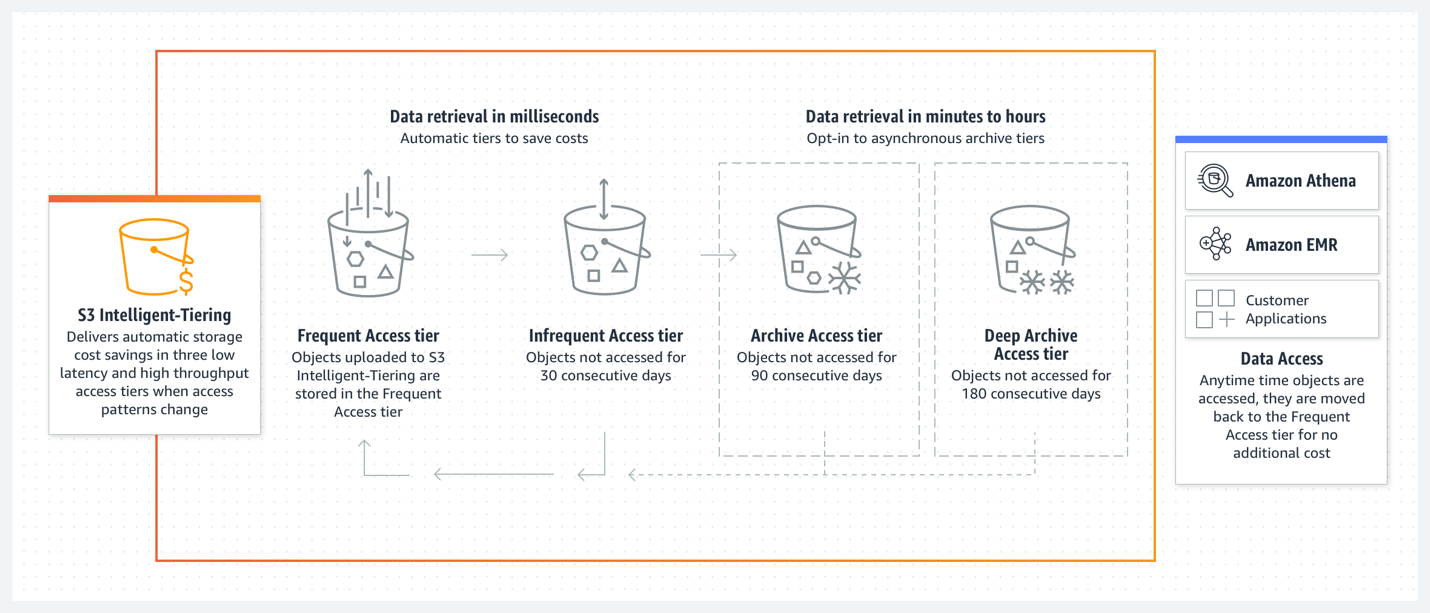
How Intelligent-Tiering Works:
- Objects are initially placed in the Frequent Access tier.
- If an object is not accessed for 30 consecutive days, it is automatically moved to the Infrequent Access tier (40% cost saving).
- If you opt-in, objects not accessed for 90 days can be moved to the Archive Access tier (similar to Glacier), and objects not accessed for 180 days can be moved to the Deep Archive Access tier.
- If an object in any of the lower-cost tiers is accessed, it is automatically moved back to the Frequent Access tier.
The key benefits are operational simplicity and automatic cost savings with no retrieval fees for moving data between the frequent and infrequent tiers. There is a small monthly monitoring and automation fee per object, so it's most effective for objects larger than 128KB.
Intelligent-Tiering vs. Lifecycle Policies
| Feature | S3 Lifecycle Policies | S3 Intelligent-Tiering |
|---|---|---|
| Best For | Predictable access patterns (e.g., time-based) | Unpredictable or unknown access patterns |
| Mechanism | You define fixed rules based on object age. | AWS automatically moves objects based on access patterns. |
| Retrieval Fees | Yes, for IA and Glacier classes. | No, between Frequent and Infrequent tiers. Yes, from Archive tiers. |
| Operational Overhead | Requires initial analysis and periodic tuning of rules. | "Set it and forget it" for the frequent/infrequent tiers. |
Conclusion
In this lesson, we explored the three primary pillars of S3 cost optimization for data lakes. You are now equipped to design a comprehensive storage strategy that minimizes costs while meeting performance and access requirements.
Key Takeaways:
- Storage Classes are your building blocks: Match your data's access pattern and value to the right storage class—from S3 Standard for hot data to S3 Glacier Deep Archive for cold archives.
- Lifecycle Policies automate for the predictable: Use lifecycle policies to transition and expire data when you have well-defined, time-based access patterns (e.g., "archive all logs after 90 days").
- Intelligent-Tiering automates for the unpredictable: Use S3 Intelligent-Tiering as your default for data with unknown or sporadic access patterns. It provides automatic savings with minimal operational overhead.
- A hybrid strategy is often best: You might use S3 Intelligent-Tiering for your main processed data zone, while using strict lifecycle policies on raw, immutable log buckets.
Next Up:
We've covered how to optimize costs for storage, but that's only one part of the equation in a data platform. The other major cost driver is compute. In our next lesson, we will move on to "Evaluate cost optimization models (e.g., Savings Plans) for compute services like Redshift and EMR," rounding out your knowledge of cost management in the AWS data ecosystem.