Hello! Welcome back to your preparation course for the AWS Certified Data Engineer - Associate exam.
In our last lesson, we explored how to use S3 Select and Glacier Select for efficiently retrieving subsets of data from your data lake. Now that we've seen how to access data, it's time to address a fundamental question: who, or what, should be allowed to perform that access?
Today’s lesson focuses on a cornerstone of AWS security. We'll be addressing the learning outcome: Construct IAM policies and roles with least-privilege permissions for data services. You've likely interacted with IAM policies in your work with S3 and DynamoDB, but today we will build a structured understanding of how to craft them securely and effectively—a critical skill for any data engineer and a frequent topic on the certification exam.
1. The Principle of Least Privilege (PLOP)
The core principle guiding all AWS security is the Principle of Least Privilege (PLOP). It's simple in theory but requires discipline in practice: grant only the permissions required to complete a specific task, and nothing more. This minimizes the "blast radius" if credentials are ever compromised, preventing an attacker or a misconfigured script from accessing or damaging resources unnecessarily.
Let's begin by watching a segment from an AWS re:Invent talk that introduces this concept and frames the "who can access what" challenge.
AWS re:Invent 2021 - A least privilege journey: AWS IAM policies and Access Analyzer
This video, 'A least privilege journey: AWS IAM policies and Access Analyzer', sets the stage for our discussion. The speaker introduces the core ideas of AWS Identity, the importance of roles and short-term credentials, and the principle of least privilege.
Please watch from 01:30 to 07:08. Pay close attention to: The distinction between permissions needed in a development vs. a production environment. The strong recommendation to use roles with short-term credentials over IAM users with long-term keys.
2. The Anatomy of an IAM Policy
As you just saw, permissions are specified using policies. An IAM policy is a JSON document that explicitly defines permissions. Understanding its structure is key. Most IAM policies can be understood through the PARC model:
- Principal: The entity that is allowed or denied access (e.g., a user, a role, an AWS service). Note: The Principal is only specified in resource-based policies, like an S3 bucket policy, or in a role's Trust Policy. It's implicit in identity-based policies.
- Action: The type of access being allowed or denied (e.g.,
s3:GetObject,dynamodb:PutItem). - Resource: The AWS resource(s) the action applies to, specified by an Amazon Resource Name (ARN) (e.g.,
arn:aws:s3:::my-data-bucket/raw-data/*). - Condition: (Optional) Circumstances under which the policy is in effect (e.g., restricting access to a specific IP address range or requiring a specific tag).
Let's continue with the same video to see a breakdown of the policy language and the different types of policies.
AWS re:Invent 2021 - A least privilege journey: AWS IAM policies and Access Analyzer
This next segment explains the PARC model in more detail and distinguishes between two primary ways to grant access: identity-based policies and resource-based policies.
Watch from 07:08 to 10:57. Focus on: The structure of a policy statement. The difference between an IAM principal policy (attached to a role) and a resource policy (attached to a resource like an S3 bucket). We will focus on the former today and cover the latter in our next lesson.
This infographic provides a helpful visual summary of the core IAM components we're discussing.

3. Understanding IAM Roles for Data Services
For data engineering workloads, you will almost always use IAM Roles. A role is an identity with permission policies that can be assumed by anyone or anything that needs it. Unlike an IAM user, a role does not have its own long-term credentials (password or access keys). When a role is assumed, it provides temporary security credentials.
A role has two critical policies attached to it:
- Permissions Policy: An identity-based policy that defines what the role is allowed to do (e.g., read from S3, write to DynamoDB). This follows the
Action,Resource,Conditionstructure. - Trust Policy: Defines which principals (users, applications, or AWS services) are allowed to assume the role and receive its temporary credentials.
Many AWS services, like Lambda, Glue, and EMR, require you to assign them a role so they can access other AWS resources on your behalf. These are called Service Roles.
The following video segment explains this concept and also covers the crucial topic of how AWS evaluates all these policies to make a final authorization decision.
AWS re:Invent 2021 - A least privilege journey: AWS IAM policies and Access Analyzer
Let's return to the re:Invent talk one last time to understand how services get permissions and how AWS makes authorization decisions.
Watch from 10:57 to 16:28. Concentrate on: The three ways AWS services get permission to act on your behalf, especially Service Roles (like for a Lambda function). The high-level logic of how different policies (identity, resource, etc.) are evaluated together.
This evaluation logic can be complex, but the diagram below provides a clear visual model. It shows that access is denied by default and requires an explicit Allow from the relevant policies to succeed.
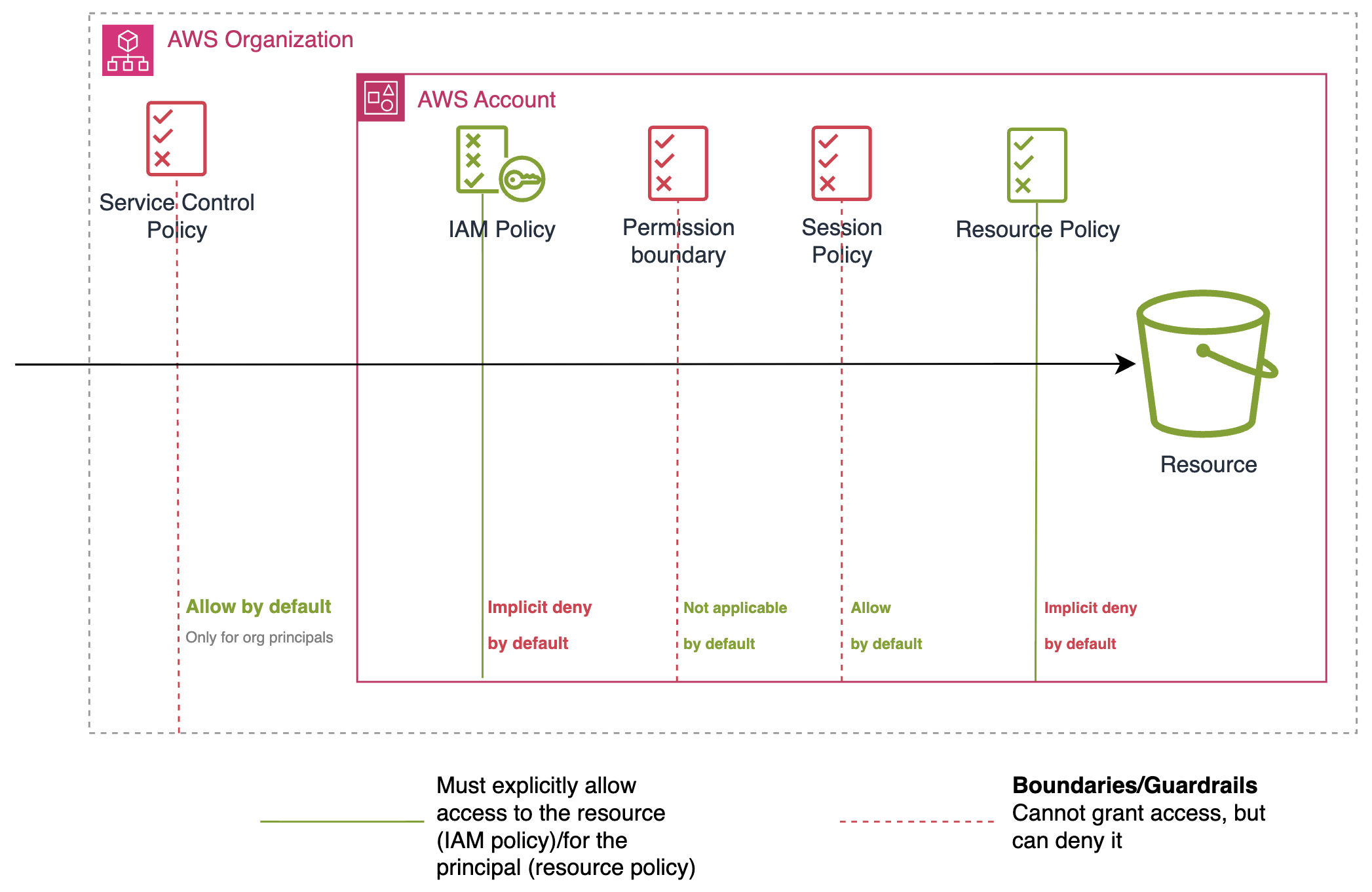
4. The Journey to Least Privilege: A Practical Guide
Crafting a perfect least-privilege policy from scratch can be challenging. A practical approach is to follow a lifecycle: start with slightly broader permissions in a development environment, analyze the exact permissions used, and then refine the policy.
Method 1: Start with an AWS Managed Policy and Refine It
AWS provides managed policies for common use cases (e.g., AmazonS3ReadOnlyAccess). These are great starting points, but they are intentionally broad. For production, you should copy the contents of a managed policy and scope it down.
Techniques for writing least privilege IAM policies
The official AWS Security Blog provides an excellent article on this topic. Let's read a section that demonstrates how to refine a broad S3 policy into a least-privilege one.
Read the section titled 'Starting with AWS managed policies'. This short section shows how to take the broad AmazonS3ReadOnlyAccess policy and narrow it down by: Specifying a more granular action (s3:GetObject instead of s3:Get* and s3:List*). Specifying a specific resource ARN (a single bucket and object prefix). Adding a Condition to further restrict access based on object tags.
Method 2: Generate Policies from Activity with IAM Access Analyzer
A more powerful and modern approach is to let AWS do the hard work for you. IAM Access Analyzer can analyze your AWS CloudTrail logs (which record all API activity) and generate a fine-grained policy based on the exact actions your application performed.
The following demo shows this feature in action for a Lambda function—a very common use case for data engineers.
AWS re:Invent 2021 - A least privilege journey: AWS IAM policies and Access Analyzer
In this final segment from the re:Invent talk, the speaker demonstrates the full lifecycle of generating a least-privilege policy for a Lambda function that audits a 'pasture' of resources.
Please watch from 16:28 to 27:30. This is a detailed demonstration that covers: The concept of the 'set, verify, refine' permissions lifecycle. How to request a policy from Access Analyzer based on a role's activity in CloudTrail. How to customize the generated policy template by filling in resource ARNs. How to attach the new, fine-grained policy and remove the old, broad one.
Test your understanding!
An ETL job, running as a Lambda function, needs to perform two tasks:
- Read source CSV files from
s3://data-eng-bucket/source-data/. - Write processed Parquet files to
s3://data-eng-bucket/processed-data/.
The current policy attached to the Lambda's role is overly permissive:
{
    "Version": "2012-10-17",
    "Statement": [
        {
            "Effect": "Allow",
            "Action": "s3:*",
            "Resource": "arn:aws:s3:::data-eng-bucket/*"
        }
    ]
}
Rewrite this policy to grant least-privilege permissions. You'll need to allow listing the bucket to find objects, but only the objects within the specific prefixes.
Show answer
A least-privilege policy would look like this. It separates permissions for listing the bucket from permissions for accessing the objects, which is a common and secure pattern.
{
    "Version": "2012-10-17",
    "Statement": [
        {
            "Sid": "AllowListBucket",
            "Effect": "Allow",
            "Action": "s3:ListBucket",
            "Resource": "arn:aws:s3:::data-eng-bucket",
            "Condition": {
                "StringLike": {
                    "s3:prefix": [
                        "source-data/*",
                        "processed-data/*"
                    ]
                }
            }
        },
        {
            "Sid": "AllowReadSourceData",
            "Effect": "Allow",
            "Action": "s3:GetObject",
            "Resource": "arn:aws:s3:::data-eng-bucket/source-data/*"
        },
        {
            "Sid": "AllowWriteProcessedData",
            "Effect": "Allow",
            "Action": "s3:PutObject",
            "Resource": "arn:aws:s3:::data-eng-bucket/processed-data/*"
        }
    ]
}
Note: The s3:ListBucket action is performed on the bucket resource itself, not the objects within it. The Condition ensures the Lambda can only list objects within the specified prefixes.
Conclusion
In this lesson, we took a deep dive into constructing secure IAM policies and roles for data services. Mastering this skill is non-negotiable for passing the certification exam and for building secure, robust data platforms on AWS.
Key Takeaways:
- Least Privilege is Paramount: Always grant only the minimum permissions necessary for a task.
- Use IAM Roles for Services: Grant permissions to AWS services like Lambda and Glue using IAM Roles with temporary credentials, not IAM users with long-term keys.
- Understand Policy Structure (PARC): Policies define permissions through
Principal,Action,Resource, andCondition. - Refine Permissions: Start with broader policies (like AWS managed policies) in dev and use tools like IAM Access Analyzer to analyze activity and generate fine-grained, least-privilege policies for production.
- Be Specific: A strong policy uses specific actions (e.g.,
s3:GetObjectinstead ofs3:*) and specific resource ARNs (e.g., a specific bucket prefix instead of*).
In this lesson, we focused on identity-based policies—policies attached to an identity like a role. In our next lesson, we will explore the other side: resource-based policies. We will implement S3 bucket policies for granular data protection, giving you another powerful tool for securing your data lake.