Hello! Welcome back to your preparation course for the AWS Certified Data Engineer - Associate exam.
In our last lesson, we covered how to build reactive data pipelines using S3 Event Notifications, which trigger workflows when data arrives in your data lake. Now, let's focus on what happens next: how to access that data efficiently.
Today's lesson addresses the learning outcome: Apply S3 Select and Glacier Select for efficient data retrieval from a data lake. We'll explore a powerful feature that allows you to query subsets of data directly within S3 objects, a technique that is fundamental for optimizing performance and reducing costs in your data pipelines. Given your deep experience with S3 and Athena, you'll quickly grasp the value proposition and key differentiators of this capability.
The Challenge: Retrieving Data from Large Objects
Traditionally, when you need data from a file in S3, you use a GET request to download the entire object. Your application—running on EC2, Lambda, or your local machine—then has to parse the entire file to find the specific rows or columns it needs.
Imagine a 1 GB compressed CSV file containing sales data for thousands of stores, and you only need the data for one specific store. The traditional approach would be:
- Download the full 1 GB file over the network.
- Decompress the file.
- Use application logic to scan the file and filter out the rows for your target store.
This process is inefficient, consuming unnecessary network bandwidth, compute resources, and time.
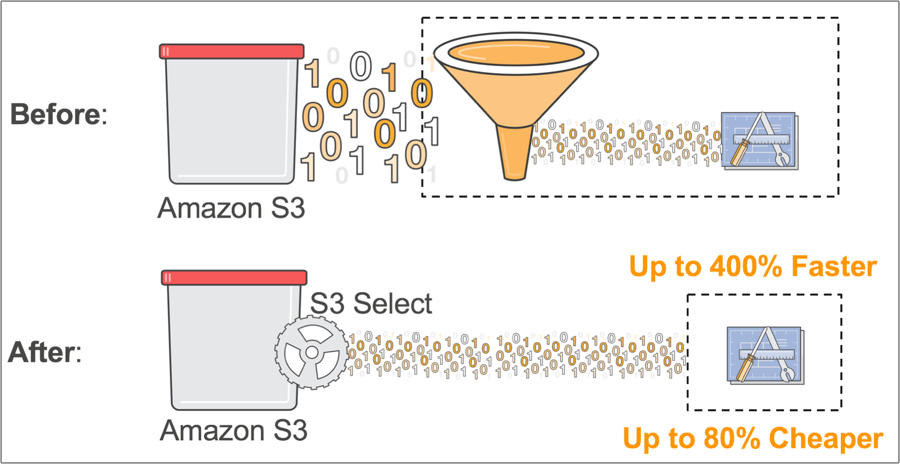
S3 Select: Querying Data in Place
S3 Select revolutionizes this process by allowing you to run simple SQL expressions directly against an S3 object. This "query in place" or "predicate pushdown" model means that the filtering happens on the S3 service side, and only the matched data is sent back to your application.
To understand the concept and its benefits directly from the source, let's watch a short segment from an AWS video.
Query Data in Place With Amazon S3 Select
In this video, 'Query Data in Place With Amazon S3 Select', an AWS product manager explains the core problem S3 Select solves and the motivations behind its creation.
Please watch the following two segments: Introduction to S3 Select (00:04 - 01:57): Focus on how S3 Select changes the data access paradigm from retrieving whole objects to retrieving specific data within them. Customer Motivation (05:03 - 07:27): Pay attention to the use cases discussed, particularly for AWS Lambda and general analytical workloads, where retrieving only a fraction of the data is common.
As you saw, S3 Select is designed for data retrieval, not complex analytics. It supports a subset of SQL, primarily SELECT, FROM, and WHERE clauses. Operations like JOINs or GROUP BY are not supported.
S3 Select works with objects in CSV, JSON, and Apache Parquet formats, and it can query objects compressed with GZIP or BZIP2 on the fly.
Using S3 Select
You can use S3 Select via the AWS Console, AWS SDKs, or the AWS CLI. The console provides a convenient way to test queries. Let's see a practical demonstration.
How to use SQL to query S3 files in AWS with S3 Select | Step by Step Tutorial
This video, 'How to use SQL to query S3 files in AWS with S3 Select', provides a clear, step-by-step tutorial on using S3 Select from the AWS Management Console.
Watch from 00:47 to 03:01. The presenter demonstrates how to: Configure the input settings for a JSON file. Write and execute a SQL query against the JSON object. Repeat the process for a CSV file, highlighting the different settings required (like specifying a header row).
Programmatically, using the AWS SDK (like Boto3 for Python) is common in data pipelines. For a closer look at the code, we can turn to the official AWS blog.
S3 Select and Glacier Select – Retrieving Subsets of Objects
The AWS News Blog post, 'S3 Select and Glacier Select – Retrieving Subsets of Objects', provides a concise overview and includes a practical Python code sample.
Please read the section titled 'S3 Select'. Pay close attention to the Python code example. Notice the key parameters in the select_object_content call: Expression: The SQL query to execute. InputSerialization: Defines the format of the source object (e.g., CSV, including whether it has a header). OutputSerialization: Defines the format for the results.
S3 Select vs. Amazon Athena: Choosing the Right Tool
Since you have a strong background in Athena, it's critical to understand when to use S3 Select and when to use Athena. This is a very common topic for exam questions.
- S3 Select is designed to query data within a single S3 object. Its scope is limited to one file at a time.
- Amazon Athena is a serverless, interactive query service designed to run complex ANSI SQL queries across many objects, prefixes, and partitions in your S3 data lake. It relies on a metadata store, like the AWS Glue Data Catalog, to understand the schema and location of your data.

Test your understanding!
You have a 500 GB dataset of time-series IoT data stored in S3, partitioned by year/month/day. The data is stored in thousands of individual Parquet files. You need to write a query to calculate the average temperature per day for the last month.
Which service should you use: S3 Select or Amazon Athena?
Show answer
You should use Amazon Athena.
The query needs to aggregate data (average temperature) across thousands of files spanning multiple partitions (/day for the last month). S3 Select operates on a single object at a time and cannot perform cross-object queries or aggregations like AVG(). Athena is specifically designed for this type of data lake query.
Glacier Select: Querying Archived Data
What happens when your data is moved to a colder storage tier for archival, like S3 Glacier or S3 Glacier Deep Archive? S3 Select cannot be used on these objects. This is where Glacier Select comes in.
Glacier Select applies the same "query in place" principle to objects stored in Glacier. However, the operational model is different because data in Glacier is not instantly accessible.
The process is asynchronous:
- You initiate a
selectjob against a Glacier archive. - You specify the SQL expression, input/output serialization, and a retrieval tier (Expedited, Standard, or Bulk). The tier determines the job completion time (minutes to hours) and cost.
- You also specify an S3 bucket as the output location.
- Once the job completes, Glacier Select writes the query results to the specified S3 bucket.
Let's refer back to the AWS blog post to see how this works.
S3 Select and Glacier Select – Retrieving Subsets of Objects
We'll now review the second half of the same AWS News Blog post to understand Glacier Select.
Please read the section titled 'Glacier Select'. Focus on the Python code example and contrast it with the S3 Select example. Note the different job parameters: Type: "select", the Tier, and the required OutputLocation where results will be stored.
The key takeaway is that Glacier Select unlocks the ability to analyze your archived data without performing a costly and time-consuming full restoration of terabyte-scale archives.
Conclusion
In this lesson, we've covered how to use S3 Select and Glacier Select to make data retrieval from your data lake far more efficient. By pushing query logic down to the storage layer, you can significantly improve application performance and reduce data transfer costs.
Key Takeaways:
- Query in Place: Use S3 Select and Glacier Select to filter data directly within S3 and Glacier objects, retrieving only the subset you need.
- Performance and Cost: The primary benefit is a drastic reduction in data transfer, leading to faster and cheaper data retrieval.
- S3 Select: A synchronous operation for querying a single object in S3 standard or infrequent access tiers. It supports CSV, JSON, and Parquet formats.
- Glacier Select: An asynchronous job for querying an archive in S3 Glacier. Results are delivered to an S3 bucket, and performance depends on the chosen retrieval tier.
- S3 Select vs. Athena: S3 Select queries data within one object. Athena queries data across many objects and is a full-fledged analytical service.
In our next lesson, we will shift our focus to a critical aspect of managing any data platform: security. We will learn how to construct IAM policies and roles with least-privilege permissions for data services, ensuring that services like S3 Select can be used securely.