Hello! Welcome back to our course on preparing for the AWS Certified Data Engineer - Associate exam.
In the last lesson, we built a solid foundation in AWS security by constructing IAM policies and roles using the principle of least privilege. We focused on identity-based policies—policies you attach to a user, group, or role to define what that identity can do.
Today, we'll look at the other side of the coin: resource-based policies. Our learning outcome is to implement S3 bucket policies for granular data protection. This is a critical skill for securing a data lake, allowing you to define precisely who can access a bucket and what they can do, especially when dealing with multiple teams, applications, or even different AWS accounts.
1. From Identity-Based to Resource-Based Policies
While an IAM policy is attached to an identity (a "principal"), a bucket policy is a JSON document attached directly to an S3 bucket. This shifts the focus from "What can this user do?" to "Who can access this resource?".
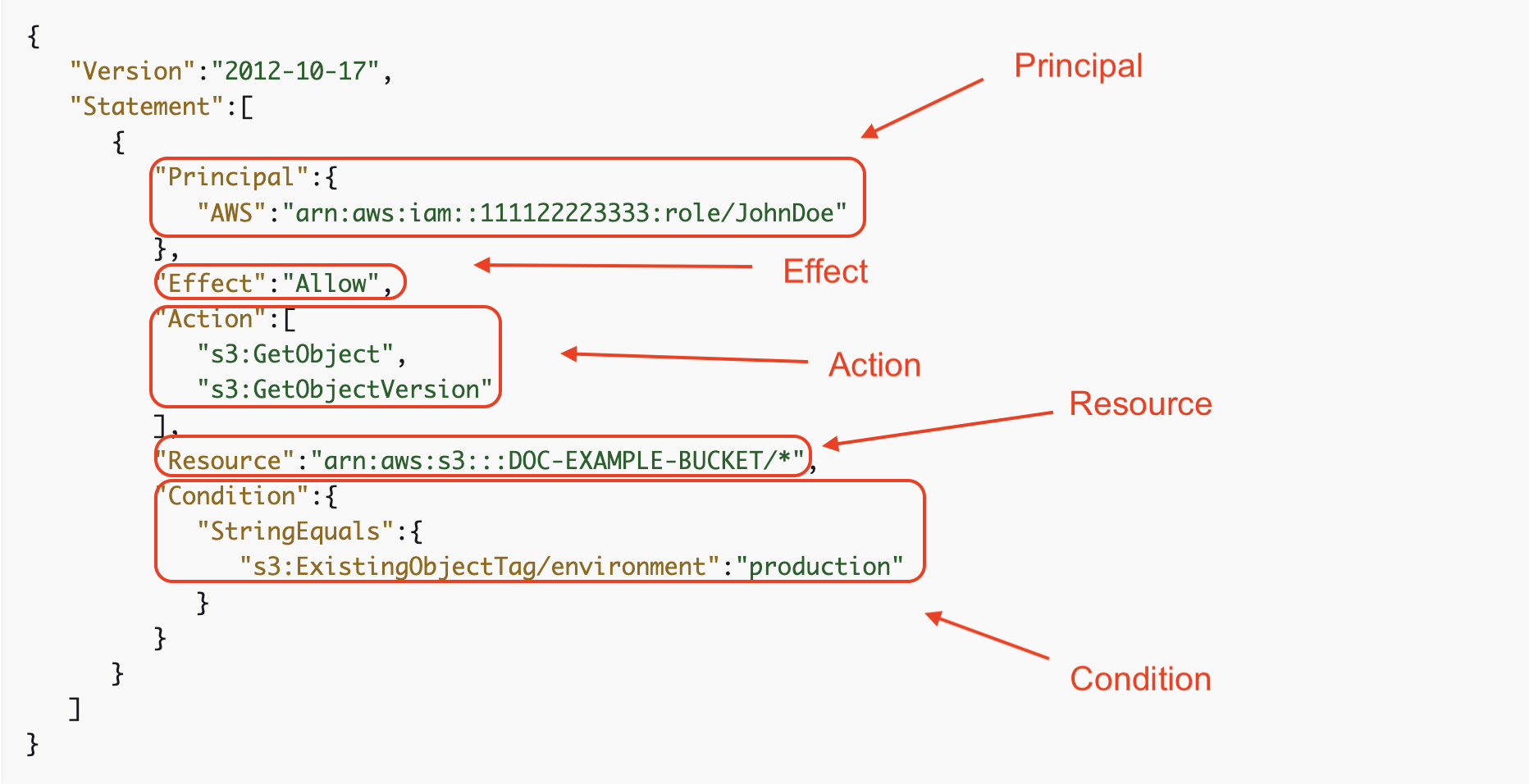
A bucket policy has a structure very similar to the IAM policies we saw previously, but with one crucial difference: you must explicitly state the Principal—the user, role, service, or account that the policy statement applies to.
Let's watch a short video that introduces the main access control mechanisms for S3 and clearly defines the role of bucket policies.
Amazon S3 Access Control - IAM Policies, Bucket Policies and ACLs
The video 'Amazon S3 Access Control' by Digital Cloud Training provides a concise overview of the different ways to secure S3. We'll focus on the part that defines S3 bucket policies.
Watch from 01:36 to 02:52. Pay close attention to how bucket policies are described as resource-based and how the Principal element is used to specify the user.
2. When to Use a Bucket Policy vs. an IAM Policy
Since both IAM policies and bucket policies can grant access to S3, a common exam question is knowing when to use which. The choice depends on your management and security goals.
| Feature | IAM Policy | S3 Bucket Policy |
|---|---|---|
| Attachment | To an identity (user, group, role) | To a resource (S3 bucket) |
| Scope | Can grant permissions to many different services (S3, DynamoDB, EC2, etc.) | Can only grant permissions to a single S3 bucket and its objects. |
| Policy Size Limit | 2 KB for users, 5 KB for groups, 10 KB for roles | 20 KB |
| Primary Use Case | Centrally managing permissions for a single identity across many resources. | Centrally managing access to a single resource from many identities. |
| Key Advantage | Centralized control over what a specific user or role can do throughout your AWS account. | The simplest way to grant cross-account access to your S3 bucket without using IAM roles. |
The most important distinction for data engineering scenarios is cross-account access. If a data processing job in Account B needs to read data from your data lake in Account A, a bucket policy is often the most direct way to grant that permission.
This video does an excellent job of summarizing these practical differences.
AWS S3 Bucket Policy vs IAM - What's the Difference?
Let's watch a segment from 'AWS S3 Bucket Policy vs IAM - What's the Difference?' by Be A Better Dev. It clarifies the ideal scenarios for using bucket policies.
Watch from 06:22 to 09:45. Focus on the two primary reasons to use a bucket policy: managing cross-account access and when you need a larger policy document.
3. Policy Evaluation: The Golden Rule
When both an identity-based policy and a resource-based policy apply to a request, AWS evaluates all of them to make a decision. The logic can be complex, but the most important rule is simple:
An explicit Deny in any applicable policy always overrides any Allow.
For access to be granted, there must be an explicit Allow from either the IAM policy, the bucket policy (or both), and there must be no explicit Deny statements in any policy.

4. Implementing Granular Control with Bucket Policies
Now, let's get practical. A key task in managing a data lake is granting access not to the entire bucket, but to specific "folders" or prefixes within it. For example, you might want an ingestion service to only be able to write to /raw and an analytics service to only read from /curated.
Understanding S3 "Folders"
First, it's crucial to understand that S3 doesn't have folders in the traditional sense. It has a flat structure of objects within a bucket. The "folders" you see in the AWS Console are a visual representation created by using a shared prefix in the object keys.
Writing IAM Policies: Grant Access to User-Specific Folders in an Amazon S3 Bucket
The AWS Security Blog post 'Writing IAM Policies: Grant Access to User-Specific Folders...' has an excellent, concise explanation of this concept. Though the article focuses on IAM policies, the principle of prefixes applies universally to S3.
Please read the section titled 'A brief lesson about Amazon S3 objects'. It clearly explains how prefixes like home/David/ in an object's key are used to simulate a folder structure.
Crafting a Granular Policy: A Walkthrough
Now that we understand prefixes, let's see how to use them in a bucket policy to grant specific permissions. The following video demonstrates creating a bucket policy that grants a user full permissions, but only within a specific confidential/ folder.
Amazon S3 Access Control - IAM Policies, Bucket Policies and ACLs
Let's return to the 'Amazon S3 Access Control' video for a hands-on demonstration that ties everything together.
Watch the detailed walkthrough from 16:33 to 19:35. Observe how a bucket policy is created and applied to: Specify a user as the Principal. Grant s3:* (all S3 actions). Restrict those actions to a specific resource path: arn:aws:s3:::your-bucket-name/confidential/*.
Here is an example of what such a policy looks like. This policy allows the role DataProcessingRole to read (GetObject) from the raw-data/ prefix and write (PutObject) to the processed-data/ prefix, but nowhere else in the bucket.
{
    "Version": "2012-10-17",
    "Statement": [
        {
            "Sid": "AllowReadFromRawData",
            "Effect": "Allow",
            "Principal": {
                "AWS": "arn:aws:iam::111122223333:role/DataProcessingRole"
            },
            "Action": "s3:GetObject",
            "Resource": "arn:aws:s3:::my-data-lake-bucket/raw-data/*"
        },
        {
            "Sid": "AllowWriteToProcessedData",
            "Effect": "Allow",
            "Principal": {
                "AWS": "arn:aws:iam::111122223333:role/DataProcessingRole"
            },
            "Action": "s3:PutObject",
            "Resource": "arn:aws:s3:::my-data-lake-bucket/processed-data/*"
        }
    ]
}
Notice a few key details:
- Two Statements: The policy uses two separate statements, each with a clear
Sid(Statement ID), to handle the different permissions for each prefix. - Principal: The same principal (the
DataProcessingRole) is specified in both statements. - Action: The actions are specific (
s3:GetObject,s3:PutObject), following the principle of least privilege. - Resource: The
ResourceARN uses a wildcard (/*) to apply the permissions to all objects within that prefix.
Test your understanding!
You manage a data lake in the bucket s3://customer-data-lake-789. You need to grant a partner organization's AWS account (444455556666) read-only access to a specific dataset located under the prefix shared-datasets/quarterly-reports/. They will be using various roles within their account to access this data.
Write an S3 bucket policy to grant this access.
Show answer
Here is a correct bucket policy.
{
    "Version": "2012-10-17",
    "Statement": [
        {
            "Sid": "GrantPartnerReadAccessToSharedDataset",
            "Effect": "Allow",
            "Principal": {
                "AWS": "arn:aws:iam::444455556666:root"
            },
            "Action": "s3:GetObject",
            "Resource": "arn:aws:s3:::customer-data-lake-789/shared-datasets/quarterly-reports/*"
        }
    ]
}
Explanation:
Principal: We specify the partner's account by using their root ARN (arn:aws:iam::ACCOUNT_ID:root). This allows any identity in that account with the corresponding IAM permissions to access the resource. It's a common and effective pattern for cross-account data sharing.Action:s3:GetObjectgrants the necessary read-only permission.Resource: The ARN is scoped down to the exact prefixshared-datasets/quarterly-reports/and includes/*to apply to all objects within it.
Conclusion
In this lesson, we explored S3 bucket policies as a powerful tool for resource-based permissions. By attaching a policy directly to your S3 data lake, you gain fine-grained, centralized control over who can access your data, which is essential for security and governance.
Key Takeaways:
- Bucket policies are resource-based policies attached directly to an S3 bucket.
- They are the preferred method for granting cross-account access to S3 resources.
- The
Principalelement is mandatory and specifies who the policy statement applies to. - You can achieve granular control by scoping the
ResourceARN to specific prefixes (folders) and using least-privilegeActions. - Remember the evaluation logic: an explicit
Denyin any policy always wins.
So far in this module, we've focused on controlling who can access data. In our next lesson, we'll shift our focus to protecting the data itself. We will configure server-side encryption for S3 objects using KMS and describe envelope encryption, ensuring that your data remains secure even if it falls into the wrong hands.