Hello! Welcome to the next lesson in your preparation for the AWS Certified Data Engineer - Associate exam.
In our last lesson, we focused on securing access to your data lake by implementing granular S3 bucket policies. We established how to control who can access your data and what they can do. Today, we shift from access control to data protection. We will address what happens if unauthorized access occurs, ensuring the data itself remains unreadable.
Our learning outcome for this session is to configure server-side encryption for S3 objects using KMS and describe envelope encryption. This is a non-negotiable security practice for any data lake and a frequent topic on the certification exam. We will explore how AWS's Key Management Service (KMS) provides a robust and auditable way to manage the keys that protect your most valuable asset: your data.
1. The Basics of Server-Side Encryption (SSE) in S3
Server-side encryption (SSE) means that data is encrypted at its destination by the service that receives it. For S3, this is called encryption at rest. When you upload an object, S3 encrypts it before saving it to disk and automatically decrypts it for you when you access it, provided you have the necessary permissions.
Amazon S3 provides a few options for server-side encryption, but for the exam, you should focus on these two:
- SSE-S3 (Server-Side Encryption with Amazon S3-Managed Keys): This is the default encryption setting for all new S3 buckets. S3 manages the encryption keys for you. It's seamless and requires no configuration, but it offers limited control and auditability.
- SSE-KMS (Server-Side Encryption with AWS Key Management Service Keys): This option provides more control. You use encryption keys that are managed within AWS KMS. This gives you centralized control over your keys, allows you to define who can use them via policies, and provides a detailed audit trail of key usage in CloudTrail.
As a data engineer building secure and compliant data lakes, SSE-KMS is the tool you will use most often.
2. Understanding AWS Key Management Service (KMS)
AWS KMS is a managed service that makes it easy for you to create and control the encryption keys used to encrypt your data. When using SSE-KMS, you have two types of keys to choose from:
- AWS Managed Keys: These are KMS keys in your account that are created, managed, and used on your behalf by an AWS service integrated with KMS (e.g., S3, Redshift). Their key policy is managed by the service and cannot be changed. You can track their usage in CloudTrail but cannot manage the key directly.
- Customer Managed Keys (CMKs): These are KMS keys that you create, own, and manage. You have full control over their key policy, can enable/disable them, set up automatic rotation, and manage them via aliases. For building a secure data lake that requires fine-grained access control and auditable key usage, CMKs are the standard.
3. The Core Concept: Envelope Encryption
A fundamental concept you must understand for the exam is envelope encryption. Directly using a single master key to encrypt and decrypt terabytes of data is inefficient and presents a significant risk if the key is compromised. Envelope encryption solves this.
The process is as follows:
- Your data is encrypted with a unique data key.
- That data key is then itself encrypted with a master key (your CMK in KMS).
- The encrypted data and the encrypted data key are stored together (e.g., as an S3 object and its metadata).
- The original, plaintext data key is destroyed.

To decrypt, the process is reversed: the service asks KMS to decrypt the encrypted data key using the master CMK. KMS returns the plaintext data key, which the service then uses to decrypt the actual data.
Let's watch a video that explains this process clearly.
The video 'Encrypting Data with AWS KMS' provides an excellent and concise explanation of how data keys and CMKs work together in envelope encryption.
Watch from 06:21 to 10:17. Focus on understanding the relationship between the Customer Master Key (CMK) and the data keys, and the roles they each play in the encryption and decryption process.
Now, let's look at how this applies specifically to S3.
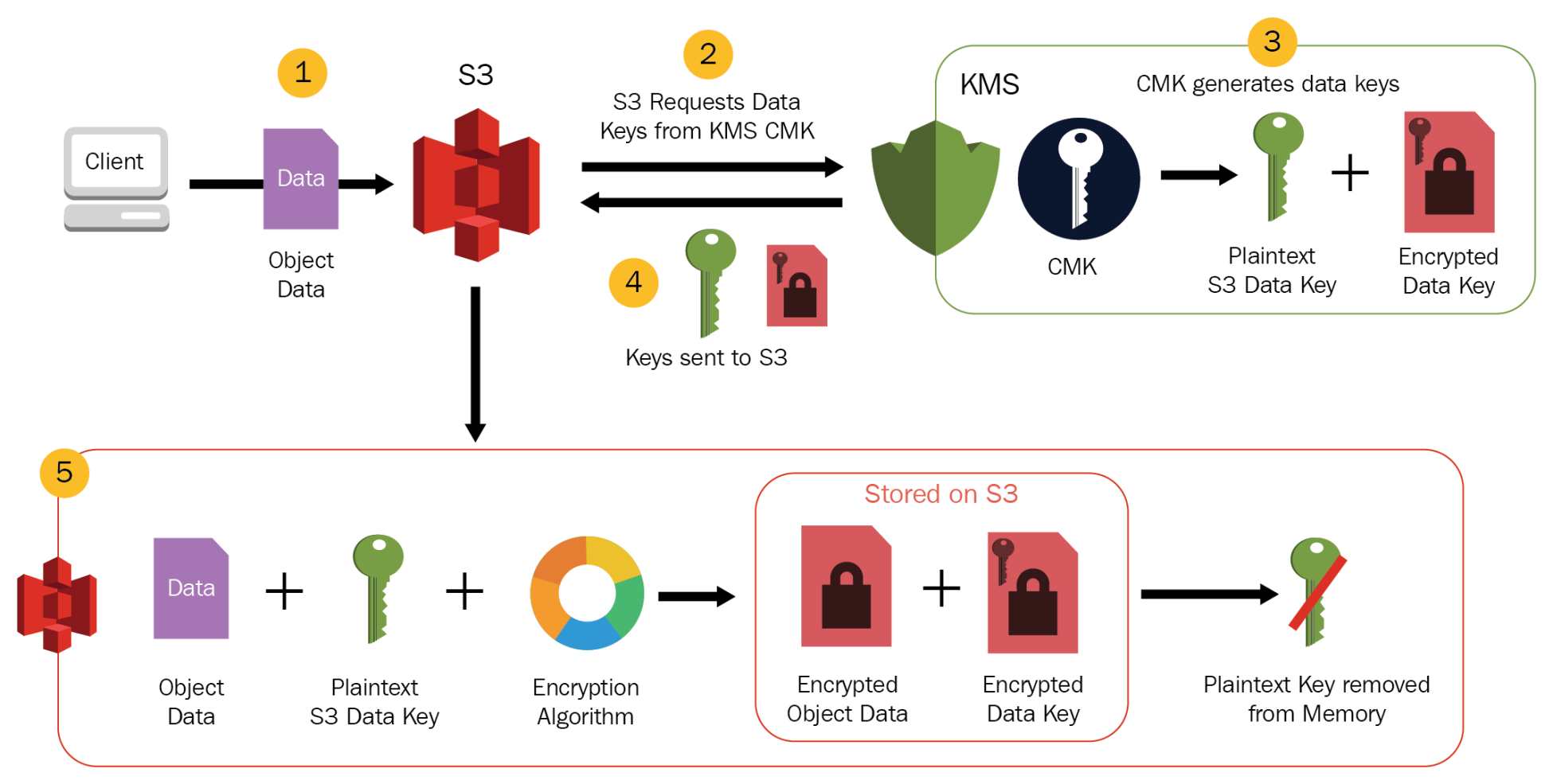
To solidify your understanding, please read the official AWS documentation that walks through this process step-by-step.
Using server-side encryption with AWS KMS keys (SSE-KMS)
The AWS S3 User Guide provides the definitive explanation of the SSE-KMS workflow. Reading this will reinforce what you just saw in the video.
Read the sections 'AWS KMS keys' and 'SSE-KMS encryption workflow'. Focus on the numbered steps that describe the encryption and decryption flow between S3 and KMS.
4. Implementing SSE-KMS: Policies and Permissions
A critical aspect of using SSE-KMS is understanding the permission model. Accessing an object encrypted with a CMK is a two-step process that requires permissions for both S3 and KMS.
- To upload an object (encrypt), the principal (user or role) needs
s3:PutObjectpermissions on the bucket andkms:GenerateDataKeypermissions on the CMK. - To download an object (decrypt), the principal needs
s3:GetObjectpermissions on the object andkms:Decryptpermissions on the CMK.
This is a common source of "Access Denied" errors and a frequent exam scenario. A user might have full S3 access but will be denied if they lack the necessary permissions to use the KMS key.
These KMS permissions can be granted in two places:
- IAM Policy: Attached to the user, group, or role.
- KMS Key Policy: A resource-based policy attached directly to the KMS key itself.
This video provides an excellent demonstration of this dual-permission requirement in action.
AWS KMS Key Management Service - Concepts Explained with Encryption Decryption Demo
The video 'AWS KMS Key Management Service - Concepts Explained' includes a detailed demo that perfectly illustrates how S3 and KMS permissions interact. Watching this will clarify why both are needed.
Watch from 39:10 to 45:10. The demonstrator logs in as different users with varying permissions. Observe how a user with full S3 permissions but no KMS permissions is denied access, and how another user with only kms:Decrypt can read but not write.
Test your understanding!
A data analytics application running with an IAM role needs to read data from s3://my-data-lake/processed/ and write new results to s3://my-data-lake/analytics-output/. All objects in the bucket are encrypted by default with a customer-managed KMS key (CMK).
The application can successfully write new files, but it receives an "Access Denied" error when it tries to read any file. What is the most likely cause of this issue?
Show answer
The most likely cause is that the application's IAM role has the kms:GenerateDataKey permission (allowing it to encrypt and write new objects) but is missing the kms:Decrypt permission for the CMK. Without kms:Decrypt, S3 cannot decrypt the object's data key, and therefore cannot return the object's content to the application.
5. Configuration and Cost Optimization with S3 Bucket Keys
You can configure SSE-KMS as the default encryption method for a bucket. This ensures all new objects uploaded without specific encryption headers will be encrypted using your chosen KMS key.
Specifying server-side encryption with AWS KMS (SSE-KMS)
The AWS documentation shows how to apply these settings using the console, CLI, and SDKs. We'll focus on the AWS CLI example as it's a common method in data engineering scripts.
Review the section with the AWS CLI examples. Notice the use of --server-side-encryption aws:kms and the optional --ssekms-key-id to specify your CMK.
A crucial feature for cost optimization is the S3 Bucket Key. Ordinarily, every GET or PUT request for an SSE-KMS encrypted object results in an API call to KMS. For a busy data lake, this can generate significant costs.
S3 Bucket Keys solve this by having S3 generate a temporary, short-lived key at the bucket level, derived from your CMK. S3 uses this bucket key to create the unique data keys for new objects, drastically reducing the number of requests to KMS. Enabling this feature can reduce your KMS costs by up to 99%. For the exam, remember S3 Bucket Key = Cost Reduction for SSE-KMS.
Conclusion
You have now learned one of the most important data protection mechanisms in the AWS ecosystem. Securing your data at rest is a cornerstone of a well-architected data lake.
Key Takeaways:
- SSE-KMS uses AWS Key Management Service to provide auditable, centralized control over the keys that encrypt your S3 objects.
- Envelope encryption is the core process where a master key (CMK) encrypts a data key, which in turn encrypts the actual data. This is both secure and efficient.
- Accessing KMS-encrypted objects requires a dual-permission model: you need permissions for both the S3 action (e.g.,
s3:GetObject) and the corresponding KMS action (kms:Decrypt). - For cost-sensitive, high-throughput workloads, enable S3 Bucket Keys to dramatically reduce API calls and costs associated with KMS.
In our next lesson, we will continue our journey through security by looking at another critical component of data pipelines: managing secrets. We will implement AWS Secrets Manager for securely managing credentials in data pipelines, ensuring that database passwords, API keys, and other sensitive information are never hardcoded in your applications.