Hello! Welcome to the next lesson in your preparation for the AWS Certified Data Engineer - Associate exam.
In our last lesson, we covered how to protect data at rest using server-side encryption with AWS KMS. We learned that securing the data itself is crucial. However, our data pipelines also need to interact with various services—databases, APIs, and other AWS services—that require credentials. Storing these credentials directly in your application code or configuration files is a significant security vulnerability.
Today, we address this challenge head-on. Our learning outcome is to implement AWS Secrets Manager for securely managing credentials in data pipelines. We will learn how to replace hardcoded secrets with a secure, auditable API call, a fundamental practice for building professional and secure data engineering solutions on AWS.
1. The Problem with Hardcoded Secrets
As a Data Engineer, your ETL jobs and applications frequently need access to sensitive information:
- Database connection strings (usernames and passwords)
- API keys for third-party services
- OAuth tokens
Hardcoding this information into your source code or configuration files poses several risks:
- Exposure: If your code is checked into a version control system like Git, even in a private repository, the secrets are exposed to anyone with access.
- Operational Overhead: Changing a password requires finding every instance of the hardcoded secret, updating it, and redeploying the application. This is slow and error-prone.
- Lack of Auditability: You have no easy way to know who or what is accessing a secret.
AWS Secrets Manager is designed to solve exactly these problems.
2. Introducing AWS Secrets Manager
AWS Secrets Manager is a service that helps you protect the secrets needed to access your applications, services, and IT resources. It enables you to easily rotate, manage, and retrieve database credentials, API keys, and other secrets throughout their lifecycle.
The core idea is simple: instead of embedding secrets in your code, you store them in Secrets Manager and have your application retrieve them programmatically via an API call at runtime.
To get a clear picture of what Secrets Manager is and how it works, let's watch a short video.
AWS Secrets Manager Service Overview with Demo
This video, 'AWS Secrets Manager Service Overview,' provides an excellent introduction to the problem of hardcoded secrets and how Secrets Manager provides a secure, centralized solution using IAM and KMS.
Watch from the beginning to 07:54. Pay close attention to how Secrets Manager uses IAM for access control and KMS for encryption—concepts that build directly on our previous lessons.
As the video explained, three AWS services work together to secure your secrets:
- Secrets Manager: Stores the secret (as key-value pairs or plaintext).
- AWS KMS: Encrypts the secret at rest. You can use an AWS-managed key or a customer-managed key (CMK) for more control.
- AWS IAM: Controls which principals (users, roles, or services like AWS Glue and Lambda) are permitted to retrieve the secret.
What to Store (and What Not to Store)
Secrets Manager is versatile, but it's important to use it for the right purpose. It's ideal for:
- Database credentials (for RDS, Redshift, or on-premises databases)
- Third-party API keys (e.g., Stripe, GitHub)
- SaaS application credentials
- Any custom secret in plaintext or JSON format
However, for some types of secrets, other AWS services are a better fit:
- AWS credentials: Use IAM roles instead of storing access keys.
- Encryption keys: Use AWS Key Management Service (KMS).
- SSL/TLS certificates: Use AWS Certificate Manager (ACM).
3. Secrets Manager vs. Systems Manager Parameter Store
For the exam, you must be able to differentiate Secrets Manager from another AWS service that can store secrets: AWS Systems Manager Parameter Store. Both can store sensitive strings, but they are designed for different use cases and have different cost structures.
| Feature | AWS Secrets Manager | SSM Parameter Store (Standard) | SSM Parameter Store (Advanced) |
|---|---|---|---|
| Primary Use Case | Managing highly sensitive credentials with lifecycle management. | Storing configuration data and less sensitive secrets. | Storing secrets and config, with more storage and policy features. |
| Automatic Rotation | Yes, native integration for RDS, Redshift, etc. | No | No |
| Cost | Per secret per month + per 10,000 API calls. | No charge for standard parameters. | Per advanced parameter per month + per 10,000 API calls. |
| Cross-Account Access | Simple, via resource-based policies. | More complex to set up. | More complex to set up. |
The key takeaway is to choose the service based on your needs:
- Use Secrets Manager when you need automatic password rotation or are managing your most critical credentials.
- Use SSM Parameter Store for general configuration data, feature flags, or less sensitive secrets to optimize costs.
This video offers a great breakdown of this decision-making process.
Day-23 | Secret Management on AWS | Most asked Interview question | #aws #abhishekveeramalla
The video 'Secret Management on AWS' clearly explains when to use Secrets Manager versus SSM Parameter Store, which is a common interview and exam question.
Watch from 04:27 to 10:20. The speaker provides a clear framework for choosing between the two services based on sensitivity, rotation needs, and cost.
Test your understanding!
You are designing an ETL pipeline in AWS Glue. The Glue job needs a database password for a Redshift cluster, which must be rotated every 90 days to meet compliance requirements. The job also needs to read the S3 path for the input data, which rarely changes. How should you store this information?
Show answer
- The Redshift password should be stored in AWS Secrets Manager. This is because Secrets Manager provides native, automatic rotation for Redshift credentials, which directly meets the 90-day rotation requirement.
- The S3 input path should be stored in AWS Systems Manager Parameter Store. Since this is configuration data that is not highly sensitive and doesn't require rotation, Parameter Store is the more cost-effective choice.
4. Implementing Secrets Manager in a Data Pipeline
Now let's focus on the "implement" part of our learning outcome. In a typical data engineering scenario, an AWS Glue job or a Lambda function needs credentials to connect to a data source or sink.
Here is a common architecture for an ETL pipeline:

To make this work, you need to:
- Store the secret in AWS Secrets Manager.
- Create an IAM Role for your Glue job or Lambda function.
- Attach a policy to the role granting it permission to retrieve the secret.
- Write code in your script to call the Secrets Manager API and fetch the secret.
Step 1 & 2: Storing the Secret and Creating the Role
You can create a secret easily via the AWS Console or CLI. When you create it, you typically provide a name and the secret value as key-value pairs.
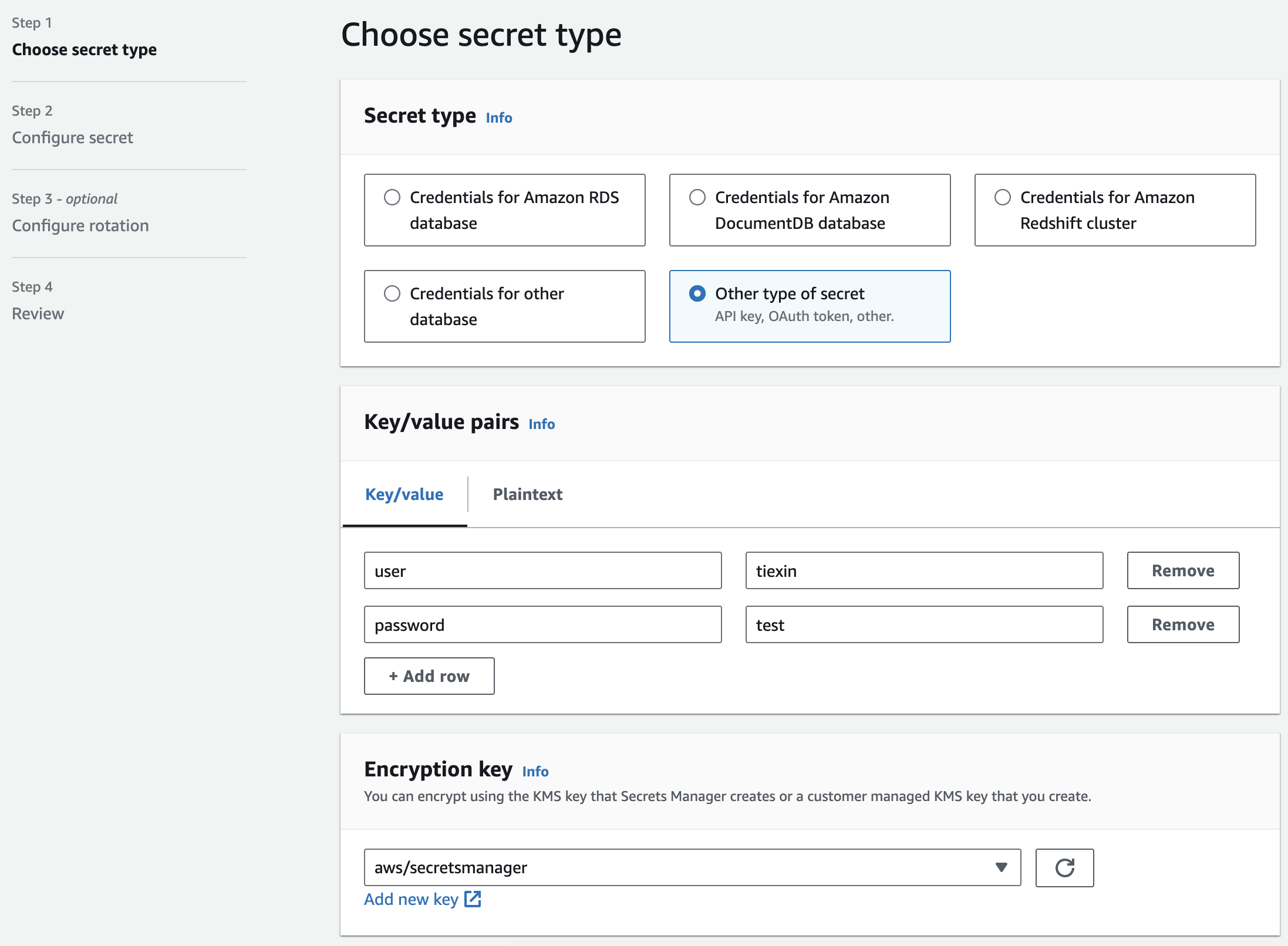
Next, you create an IAM Role that your service (e.g., AWS Glue) will assume.
Step 3 & 4: Granting Permissions and Retrieving the Secret
The IAM role needs a policy that allows it to perform the secretsmanager:GetSecretValue action. If your secret is encrypted with a customer-managed KMS key (CMK), the role will also need kms:Decrypt permissions on that key, linking back to our previous lesson.
Here is a sample Python code snippet using the boto3 library, which you would include in your Glue or Lambda script to retrieve the secret:
import boto3
import json

def get_secret(secret_name, region_name):
    """
    Retrieves a secret from AWS Secrets Manager.
    """
    # Create a Secrets Manager client
    session = boto3.session.Session()
    client = session.client(
        service_name='secretsmanager',
        region_name=region_name
    )

    try:
        get_secret_value_response = client.get_secret_value(
            SecretId=secret_name
        )
    except Exception as e:
        # Handle exceptions here
        print(f"Error retrieving secret: {e}")
        raise e
    else:
        # Decrypts secret using the associated KMS key.
        # Depending on whether the secret is a string or binary, one of these fields will be populated.
        if 'SecretString' in get_secret_value_response:
            secret = get_secret_value_response['SecretString']
            return json.loads(secret)
        else:
            # Handle binary secret if needed
            decoded_binary_secret = base64.b64decode(get_secret_value_response['SecretBinary'])
            return decoded_binary_secret

# --- Example Usage in your ETL script ---
secret_name = "prod/my-data-warehouse/creds"
region = "us-east-1"

# Fetch the credentials
credentials = get_secret(secret_name, region)
username = credentials['username']
password = credentials['password']

# Now use the username and password to connect to your database
# ... database connection logic ...
This approach completely decouples the secret from the code. If the password changes (either manually or through automatic rotation), you only update it in Secrets Manager, and the code will fetch the new value on its next run without any changes or redeployment.
For a practical guide with CLI commands and more code examples, you can refer to the following resource.
AWS Secrets Manager: A Quick Guide to Safe Credential ...
The article 'AWS Secrets Manager: A Quick Guide' provides useful code snippets and CLI commands for creating, retrieving, and managing secrets.
Review the section titled 'How To Easily Access Secrets in AWS Secrets Manager'. Focus on the Python example under 'From Applications Directly Using SDK' to see how the code and IAM permissions work together.
Conclusion
You have now learned how to handle one of the most common security challenges in application development and data engineering. By mastering AWS Secrets Manager, you can build data pipelines that are not only functional but also secure, scalable, and compliant.
Key Takeaways:
- Never hardcode secrets. Always store them in a dedicated secrets management service.
- AWS Secrets Manager securely stores, encrypts, and manages the lifecycle of credentials for your data pipelines.
- Choose between Secrets Manager and SSM Parameter Store based on the need for automatic rotation and cost considerations.
- Access to secrets is controlled by IAM permissions (
secretsmanager:GetSecretValue) and KMS permissions (kms:Decrypt). - In your data pipelines, services like AWS Glue and Lambda use an IAM role to retrieve credentials programmatically at runtime.
In our next lesson, we will shift our focus from protecting data and credentials to securing the network itself. We will configure VPC endpoints for private connectivity to AWS data services, ensuring that traffic between your applications and services like S3 never leaves the AWS network.