Hello! Welcome to the final lesson in our module on Data Lake and Security Foundations.
In our last lesson, we focused on securing credentials with AWS Secrets Manager, ensuring that your data pipelines can access resources without exposing sensitive information. We've now covered data encryption, access control, and credential management. The final piece of our security foundation is to secure the network itself.
Today's learning outcome is to configure VPC endpoints for private connectivity to AWS data services. We'll explore how you can ensure that traffic between your applications and AWS services like S3 or Kinesis never leaves the secure AWS network. This is a critical concept for building secure, high-performance, and cost-effective data solutions, and a frequent topic on the AWS certification exams.
1. The Default Path: Why Private Connectivity Matters
Imagine an AWS Glue job or an EC2 instance running in a private subnet of your Virtual Private Cloud (VPC). It needs to read data from an S3 bucket. Since the instance is in a private subnet, it has no direct route to the internet. The standard way to grant it internet access is by routing its traffic through a NAT (Network Address Translation) Gateway located in a public subnet.
This means the traffic flow looks like this:
Private EC2/Glue Job → NAT Gateway → Internet Gateway → Public S3 Endpoint
This approach works, but it has several drawbacks that are especially relevant for data engineering:
- Security: Your data traffic, even though encrypted, travels over the public internet. This increases the theoretical attack surface.
- Performance: Internet performance can be unpredictable. Relying on the AWS global network backbone provides more consistent, lower-latency performance.
- Cost: You are billed for the data processed by the NAT Gateway, which can become significant for data-intensive pipelines that move terabytes of data.
VPC Endpoints provide a solution to all these issues.
VPC Interface Endpoints vs. Gateway Endpoints in AWS
To understand the core benefits of VPC endpoints, let's start with a brief reading from the article 'VPC Interface Endpoints vs. Gateway Endpoints in AWS'.
Read the section titled 'Why VPC Endpoints Matter'. This section clearly outlines the security, performance, and cost advantages of keeping traffic within the AWS network.
2. Introducing VPC Endpoints: Your Private Network Doors
A VPC Endpoint allows you to create a private connection between your VPC and supported AWS services. Instead of going out to the internet, your traffic stays within the highly secure and performant AWS network.
There are two distinct types of VPC endpoints, and knowing which to use is essential for the exam.
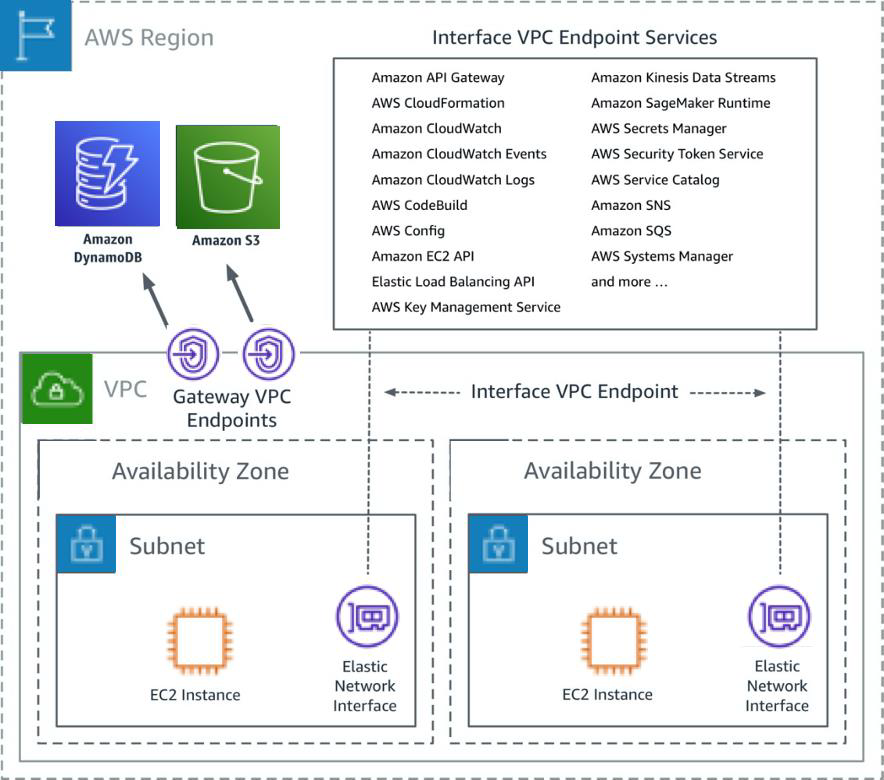
Let's use an analogy from the pkkolla article you just read to understand the difference:
- Gateway Endpoints are like a special, private express lane from your VPC directly to two specific, major destinations: Amazon S3 and Amazon DynamoDB.
- Interface Endpoints (powered by AWS PrivateLink) are like having a private office for various services (Kinesis, SQS, Lambda, etc.) inside your VPC. This office is an Elastic Network Interface (ENI) with its own private IP address.
3. Deep Dive: Gateway Endpoints
Gateway endpoints are the original type of VPC endpoint and are a simpler, highly efficient way to access S3 and DynamoDB.
AWS VPC Endpoints (What You Need To Know)
Let's watch a section of the video 'AWS VPC Endpoints (What You Need To Know)' that provides a technical overview of Gateway Endpoints.
Watch from 04:22 to 09:37. Focus on how gateway endpoints work by modifying the VPC route table and how they can be used for both in-VPC and on-premises access patterns (via a VPN/Direct Connect).
Here's a summary of the key characteristics of Gateway Endpoints:
| Feature | Description |
|---|---|
| Supported Services | Amazon S3 and Amazon DynamoDB only. |
| Mechanism | It creates a target for a specific service in your VPC route table. Traffic destined for the service is routed to the gateway endpoint instead of an internet gateway or NAT gateway. |
| Pricing | Free. There are no additional charges for using gateway endpoints. |
| Security | You control access through Endpoint Policies (an IAM resource policy attached to the endpoint) and Resource Policies (e.g., an S3 bucket policy) to specify which actions and resources are accessible. |
| Limitations | They cannot be accessed from on-premises networks over VPN or Direct Connect. They are also regional. |
Configuration in Practice
Watching a demonstration is the best way to see how these components fit together.
VPC Gateway Endpoints for Private S3 Bucket Connections
This short video provides a practical, step-by-step demonstration of creating an S3 Gateway Endpoint to allow a private EC2 instance to access an S3 bucket.
Watch the entire video (about 4.5 minutes). Pay close attention to the three key configuration steps: 1) selecting the service and VPC, 2) associating the endpoint with a specific subnet's route table, and 3) creating a custom endpoint policy for least-privilege access.
4. Deep Dive: Interface Endpoints (AWS PrivateLink)
For most other AWS services relevant to data engineering—like Kinesis, Glue, SQS, and Secrets Manager—you will use Interface Endpoints. These are more versatile but also have a different cost and operational model.
AWS VPC Endpoints (What You Need To Know)
Now let's return to the 'AWS VPC Endpoints (What You Need To Know)' video to understand Interface Endpoints.
Watch from 09:37 to 12:21. Focus on the key difference: an Interface Endpoint creates an Elastic Network Interface (ENI) with a private IP in your subnet. Note the mention of 'PrivateLink' as the underlying technology.
Here's a summary of Interface Endpoints:
| Feature | Description |
|---|---|
| Supported Services | A large and growing list of AWS services (Kinesis, SQS, Lambda, Glue, CloudWatch, etc.), marketplace partner services, and your own private services. |
| Mechanism | Provisions an Elastic Network Interface (ENI) with a private IP address in your subnet. Your applications connect to this private IP. |
| Pricing | Has a cost. You are charged an hourly rate for each endpoint ENI, plus a per-GB data processing charge. |
| Security | You control access using Security Groups attached to the ENI, in addition to Endpoint Policies and Resource Policies. |
| Key Feature | Can be accessed from on-premises networks over VPN or Direct Connect, extending private connectivity beyond the VPC. |
A crucial feature of Interface Endpoints is Private DNS. When enabled, AWS automatically resolves the standard public DNS name of the service (e.g., kinesis.us-east-1.amazonaws.com) to the private IP of your endpoint's ENI. This means you can use VPC endpoints without changing a single line of your application code.
Test your understanding!
A data pipeline, running on EC2 instances in a private subnet, needs to read large files from an S3 bucket and send records to a Kinesis Data Stream. To improve security and potentially lower costs, you decide to implement VPC endpoints and remove the NAT Gateway. What endpoint types should you configure?
Show answer
You should configure:
- A Gateway Endpoint for Amazon S3. This is the correct, cost-free choice for S3 access.
- An Interface Endpoint for Amazon Kinesis. Kinesis is not supported by Gateway Endpoints, so an Interface Endpoint is required.
5. Exam Corner: Common Pitfalls and Key Considerations
For the Data Engineer Associate exam, you need to understand not just what endpoints are, but also the nuances of their configuration.
VPC Interface Endpoints vs. Gateway Endpoints in AWS
The article 'VPC Interface Endpoints vs. Gateway Endpoints in AWS' has an excellent section on common mistakes. Mastering these will help you dissect exam questions.
Read the section 'Common Mistakes and Pitfalls to Avoid'. Pay special attention to point #8: 'Resource Policy vs. Endpoint Policy'. This is a classic exam scenario.
The most important takeaway for security policies: For a request to succeed, access must be permitted by ALL applicable policies. This includes:
- The IAM identity policy (on the user or role making the request).
- The VPC Endpoint policy.
- The resource-based policy (e.g., the S3 bucket policy).
- Security Groups (for Interface Endpoints).
If any one of these denies the request, it will fail.
Conclusion
Congratulations on completing the first module! You've built a solid foundation in securing a data lake environment on AWS. Today, you learned how to use VPC Endpoints to create private, secure network paths for your data services.
Key Takeaways:
- VPC Endpoints keep traffic between your VPC and AWS services on the private AWS network, improving security, performance, and cost-efficiency.
- Gateway Endpoints are a free, route-table-based solution for S3 and DynamoDB.
- Interface Endpoints are a paid, ENI-based solution powered by AWS PrivateLink that supports a wide range of services, including Kinesis, Glue, and SQS.
- Security is a layered approach. Access depends on a combination of IAM policies, endpoint policies, resource policies, and security groups.
With a firm grasp of how to secure storage, permissions, credentials, and network traffic, you are now ready to start building data pipelines. In our next lesson, we will begin Module 2 by diving into the world of real-time data ingestion, starting with a comprehensive look at the AWS Kinesis family of services.