Hello! Welcome to the final lesson in our module on Data Governance and Auditing.
In our previous lesson, we took a deep dive into AWS CloudTrail, establishing it as the definitive source of truth for auditing API activity in your account. We saw how configuring trails to capture both management and data events is fundamental for security analysis and troubleshooting.
Today, we will broaden our perspective to see how CloudTrail, along with a suite of other services, enables you to meet formal compliance requirements. This lesson addresses the learning outcome: Identify AWS services and features that support compliance frameworks (e.g., encryption, access logging, data residency). For the Data Engineer certification, you won't just be asked how to build pipelines, but how to build them in a way that is secure, auditable, and compliant with industry regulations like GDPR, HIPAA, or PCI DSS.
We will connect the dots between individual services and these overarching compliance goals, focusing on the key features AWS provides to make this possible.
1. Understanding Compliance in the Cloud
Before we can identify the right services, we must first understand the landscape of compliance and AWS's role within it.
What is Compliance?
Many industries (like finance, healthcare, and government) and regions (like the European Union) have strict regulations governing how data is handled, stored, and accessed. Compliance means adhering to these rules. Failing to do so can result in severe penalties and loss of trust.
AWS Security Explained: Shared Responsibility Model, Compliance and IAM | AWS Tutorial | KodeKloud
To start, let's watch a segment from the 'AWS Security Explained' video by KodeKloud. It provides a clear definition of compliance and introduces the foundational Shared Responsibility Model.
Please watch from 01:46 to 07:46. Pay close attention to: The explanation of the Shared Responsibility Model, which defines what AWS is responsible for versus what you, the customer, are responsible for. The examples of compliance frameworks like PCI DSS (for payment cards) and HIPAA (for healthcare).
The key takeaway from the video is that compliance is a shared responsibility. Just because you are using AWS, which is compliant with many standards, does not mean your application is automatically compliant. You are responsible for how you configure and use AWS services to secure your data.
AWS's Compliance Posture: AWS Artifact
AWS undergoes regular, independent, third-party audits to demonstrate its adherence to thousands of global compliance requirements. The reports from these audits are made available to customers through AWS Artifact. You can use these reports (e.g., AWS's SOC 2 report) to demonstrate to your own auditors that the underlying infrastructure you're using is compliant.
2. The Pillars of a Compliant Data Architecture
For the exam, you should be able to identify which AWS services and features map to specific compliance needs. Let's break this down into three core pillars.
Pillar 1: Access Logging, Monitoring, and Auditing
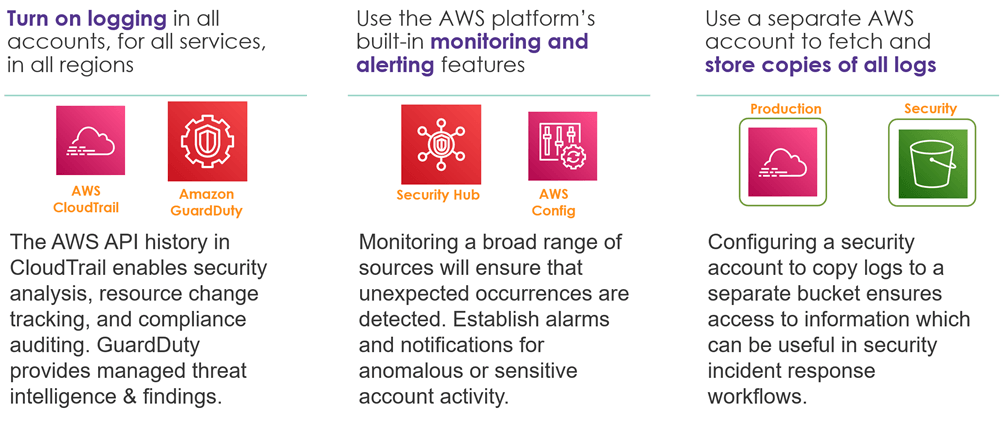
This pillar is about maintaining a complete, immutable record of all activity and being able to detect and react to suspicious events. As we saw in the last lesson, this is the domain of AWS CloudTrail.
However, CloudTrail is part of a larger ecosystem of monitoring services:
- AWS CloudTrail: The definitive audit log. It records API calls and answers: Who did what, when, and from where? It's essential for forensic analysis and proving that access controls are working.
- AWS Config: This service continuously monitors and records the configuration of your AWS resources. It helps answer: Is my S3 bucket still encrypted? Does this security group have any overly permissive rules? It's key for ensuring your configuration remains compliant over time.
- Amazon GuardDuty: A threat detection service that continuously monitors for malicious activity and unauthorized behavior. It analyzes data from CloudTrail Logs, VPC Flow Logs, and DNS logs using machine learning to identify threats.
- AWS Security Hub: This gives you a single place to view and manage security alerts and compliance status from across multiple AWS services, including GuardDuty, Config, and Amazon Macie.
Pillar 2: Encryption and Data Protection
Protecting data from unauthorized access is a core requirement of nearly every compliance framework. This is achieved through encryption, both for data in transit and at rest.
SOC 2 Cloud Compliance On AWS: Key Requirements & ...
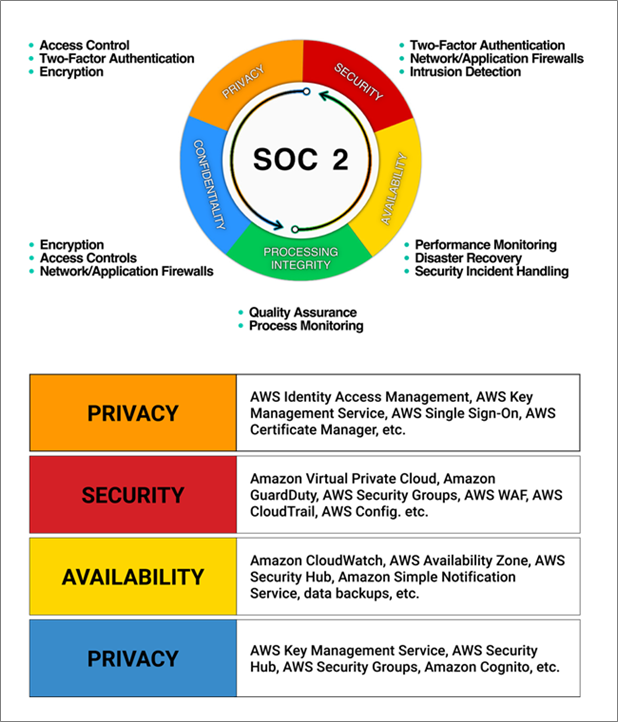
The 'AWS and SOC 2' article from Konfirmity provides an excellent mapping of compliance criteria to specific AWS controls. We'll focus on the sections that detail access controls and confidentiality.
Please read the two sections titled 'Access controls and identity management (CC6)' and 'Category-specific criteria: Availability, Processing Integrity, Confidentiality, and Privacy'. Focus on how services like IAM and KMS are used to enforce confidentiality through encryption and access restrictions.
As the article highlights, key services and features for this pillar include:
- Encryption in Transit: All communication with AWS service APIs is encrypted via TLS by default. You are responsible for enforcing TLS for data moving between your own application components.
- Encryption at Rest: Most AWS storage services (S3, EBS, RDS, DynamoDB, Redshift) offer built-in encryption. You simply need to enable it.
- AWS Key Management Service (KMS): This is the central service for creating and managing the cryptographic keys used to encrypt your data. By using IAM policies to control who can use which keys, you create a powerful layer of security.
- AWS Identity and Access Management (IAM): Enforces the principle of least privilege, ensuring that users and services only have the permissions absolutely necessary to perform their jobs. This is fundamental to preventing unauthorized data access.
Pillar 3: Data Residency
Data residency refers to the legal or regulatory requirement that certain types of data be stored within specific geographic boundaries (e.g., within the European Union for GDPR).
AWS makes this straightforward to implement:
- AWS Regions: AWS services are deployed in physically isolated Regions around the world. As the customer, you have complete control over the Region(s) where your data is stored.
- Service Design: When you create an S3 bucket, a DynamoDB table, or a Redshift cluster, you choose the Region where it will reside. The data you place in that resource stays in that Region unless you explicitly move or replicate it.
- Your Responsibility: It is your responsibility to select the appropriate Region(s) and to ensure your data pipelines and applications do not transfer data outside of those boundaries if you are subject to residency requirements.
General Data Protection Regulation (GDPR) Center
The AWS GDPR Center page explicitly discusses how customers retain control over their data, including storage location.
Read the section under the heading 'Customer control'. Note how it explicitly states that customers determine where their data will be stored, including the geographic region.
3. Services for Managing and Automating Compliance
Beyond the core pillars, AWS provides services designed specifically to help you manage, automate, and prove your compliance status.
- AWS Audit Manager: This service helps you continuously audit your AWS usage to simplify how you assess risk and compliance with regulations and industry standards. It automates evidence collection, mapping your resource configurations to predefined frameworks like PCI DSS or HIPAA.
- Amazon Macie: A data security service that uses machine learning to automatically discover, classify, and protect sensitive data in Amazon S3. For regulations like GDPR, which focus on protecting Personally Identifiable Information (PII), Macie is invaluable for identifying where that data lives.
- AWS Artifact: As mentioned earlier, this is a central resource for accessing AWS's own compliance reports.
AWS Security Explained: Shared Responsibility Model, Compliance and IAM | AWS Tutorial | KodeKloud
Let's return to the KodeKloud video, which provides a great introduction to these management services.
Watch from 07:46 to 12:35. This segment introduces AWS Artifact, Audit Manager, and AWS Config, explaining how each tool simplifies the process of achieving and maintaining compliance.
Test your understanding!
A healthcare startup is building a data analytics platform on AWS to process patient records. They must be compliant with HIPAA, which has strict requirements for:
- Controlling access to health information.
- Logging all access to data.
- Ensuring data is encrypted at rest.
Which combination of services and features would be most essential to meet these specific HIPAA requirements?
Show answer
To meet these HIPAA requirements, the startup would need to use:
- IAM Roles and Policies: To enforce least-privilege access, ensuring only authorized personnel and services can access patient data.
- AWS CloudTrail with Data Events: To create a complete audit trail of every access attempt (
GetObject) to the patient records stored in S3. - Amazon S3 Server-Side Encryption (SSE-KMS): To encrypt the patient records at rest, using keys managed by AWS KMS for an additional layer of access control and auditability on the keys themselves.
Conclusion
In this lesson, we've seen that meeting compliance requirements is not about a single service but about architecting a solution using a combination of AWS features. As a data engineer, understanding how these pieces fit together is crucial for building robust and trustworthy systems.
Key Takeaways:
- Compliance in the cloud is a Shared Responsibility. AWS secures the cloud, but you are responsible for securing what you put in the cloud.
- AWS Artifact is where you find AWS's compliance reports to share with your auditors.
- The key pillars of a compliant architecture are:
- Access Logging & Monitoring: Use CloudTrail for audit logs, AWS Config for configuration tracking, and GuardDuty/Security Hub for threat detection.
- Encryption: Use IAM for access control, enable encryption at rest on services like S3 and RDS, and manage keys with AWS KMS.
- Data Residency: Control where your data is stored by selecting the appropriate AWS Region.
- Services like AWS Audit Manager and Amazon Macie help automate evidence collection and data discovery to simplify compliance management.
Next Up:
This lesson concludes our module on Data Governance and Auditing. You've built a strong foundation, from data quality and lineage in Glue to access control in Lake Formation and auditing with CloudTrail.
Now, we move into our final module: Exam Preparation and Scenario Analysis. In the next lesson, we will introduce the AWS Well-Architected Framework. This framework provides a structured way to evaluate any AWS architecture against six key pillars, including Security and Operational Excellence. It will be the lens through which we synthesize everything you've learned to analyze complex, exam-style scenarios.