Hello! Welcome to the final lesson in our module on Data Governance and Auditing.
In our last lesson, we saw how AWS Lake Formation provides a central governance layer, combining a powerful permissions model with data lineage. We concluded by highlighting that for a complete audit trail, Lake Formation relies on its integration with AWS CloudTrail to log access events.
Today, we will dive deep into that foundational service. This lesson addresses the learning outcome: Configure AWS CloudTrail for auditing data access and API calls to data services. As a Data Quality Engineer, you understand the importance of having an immutable record of actions for traceability and troubleshooting. CloudTrail provides exactly that for your entire AWS environment. We'll explore how to set it up, what to log, and how to analyze the valuable information it collects.
1. What is AWS CloudTrail?
At its core, AWS CloudTrail is a service that records user activity and API usage across your AWS account. It acts as the definitive audit log, answering critical questions for security, compliance, and operational analysis:
- Who made a request?
- What action was performed?
- What resources were affected?
- When did the event occur?
- From what IP address was the request made?
These logs are indispensable for security investigations, troubleshooting operational issues, and demonstrating compliance with regulatory frameworks.
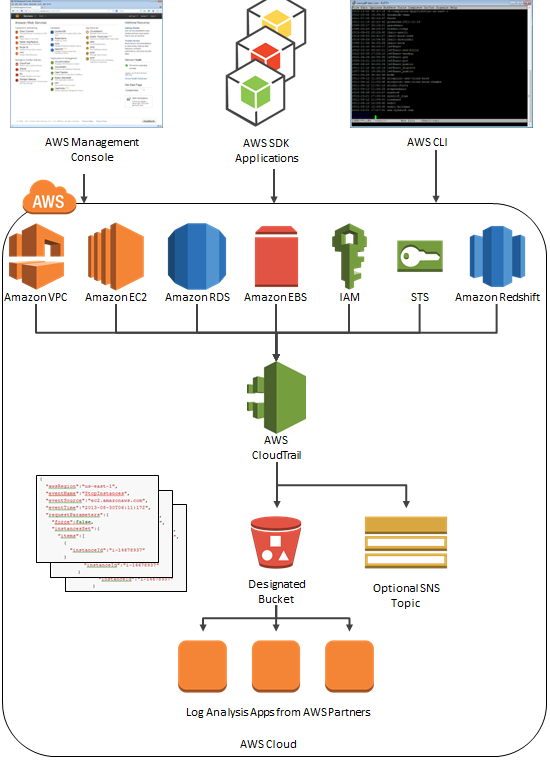
To get a foundational overview of CloudTrail's purpose and function, let's start with a short introductory video.
AWS CloudTrail Course: Tutorial on How to Secure your AWS Infrastructure with AWS CloudTrail
The video 'AWS CloudTrail Course' by QA North America provides a comprehensive introduction. Let's watch the initial segment where the instructor explains what CloudTrail is and the problems it solves.
Please watch from 00:18 to 06:14. Focus on understanding that CloudTrail captures API calls from any source (console, CLI, SDK, or other AWS services) and records them as 'events' in a log file stored in S3.
2. Core Concepts: Trails and Event Types
To use CloudTrail effectively, you need to understand its core components: Trails and Event Types.
Trails and Event History
Your AWS account has CloudTrail enabled by default. You can view the last 90 days of account activity in the CloudTrail console under Event history. This is useful for quick, recent lookups.
AWS CloudTrail Basics | Step-by-Step Tutorial for Beginners
The video 'AWS CloudTrail Basics' from Tiny Technical Tutorials offers a quick look at the Event History.
Watch from 01:35 to 02:39. Notice the key pieces of information available for each event: the event name, user, source, and resource.
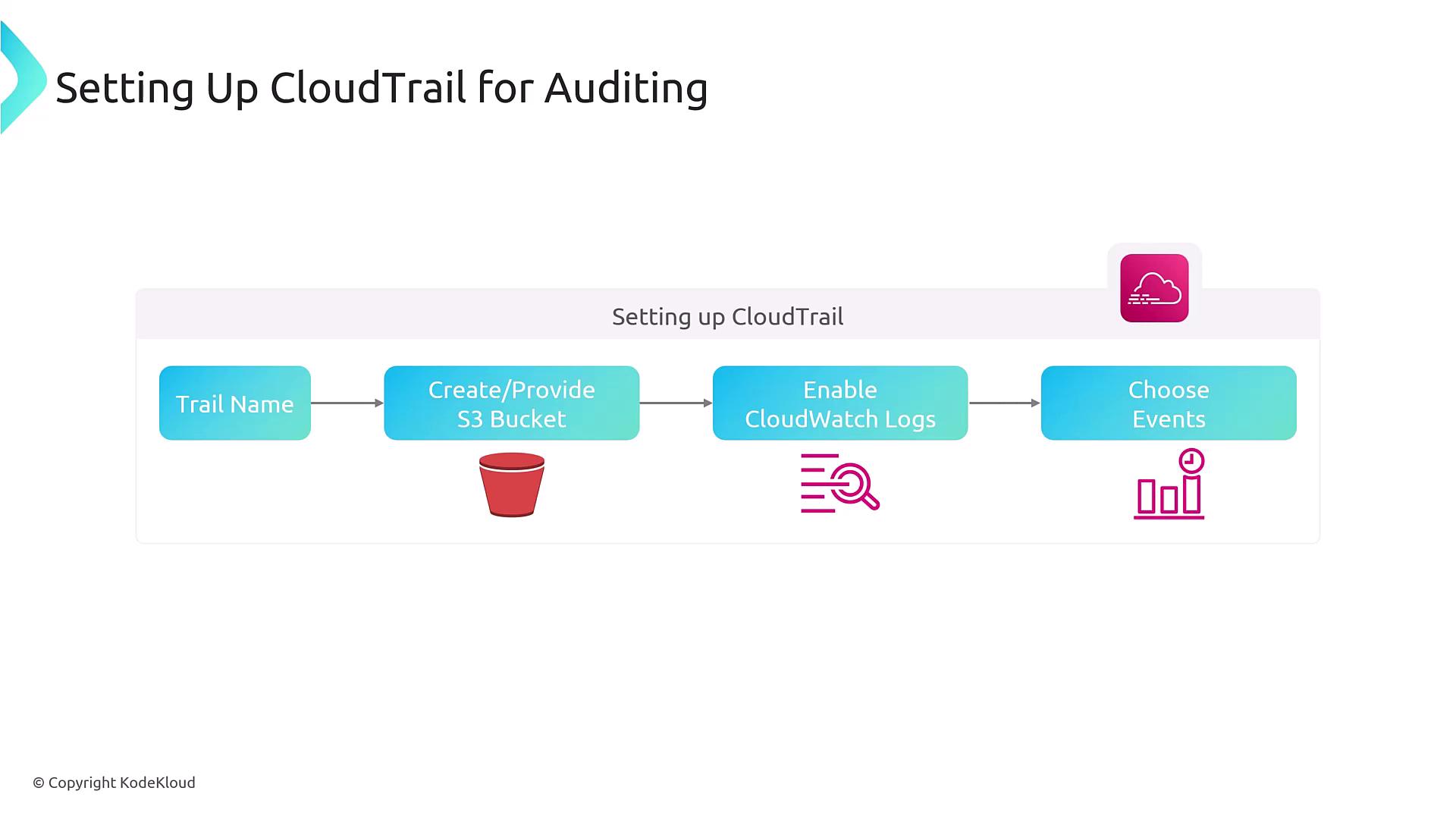
For long-term storage, auditing, and analysis, you must create a trail. A trail is a configuration that enables the continuous delivery of CloudTrail events to an Amazon S3 bucket. You can also configure it to send logs to CloudWatch Logs for real-time monitoring. It's a best practice to create a trail that applies to all regions to ensure you capture activity across your entire account.
Management Events vs. Data Events
This is the most critical distinction to understand when configuring CloudTrail for data services.
-
Management Events: These are operations on the control plane. They record management operations that are performed on resources in your AWS account, such as creating an S3 bucket, launching an EC2 instance, creating a Glue job, or modifying an IAM policy.
- A trail logs management events by default.
- The first copy of management events delivered by a trail is free.
-
Data Events: These are operations on the data plane. They record resource operations performed on or in a resource, such as reading an object from an S3 bucket (
GetObject), putting an item into a DynamoDB table (PutItem), or invoking a Lambda function (Invoke).- Data events are off by default because they are often high-volume.
- Logging data events incurs additional costs.
- For auditing data access, enabling data events is essential.
Logging data events - AWS CloudTrail
The official AWS documentation, 'Logging data events', provides the definitive explanation of data events and lists the services that support them.
First, read the introduction to understand the definition of data events (data plane operations). Then, scroll down to the table under the heading 'Data events supported by AWS CloudTrail'. You don't need to read the whole table, but scan it to appreciate the breadth of services covered. Pay particular attention to services relevant to data engineering, such as Amazon S3, DynamoDB, Lambda, Kinesis, and Glue.
Without data events, you can see that someone created a Glue crawler (CreateCrawler - a management event), but you can't see the crawler accessing your S3 data to infer a schema. For a data lake, you need data events to know who is accessing the objects themselves.
3. Configuring a Trail for Data Auditing
Now, let's walk through the process of creating a trail configured for comprehensive auditing.
AWS CloudTrail Course: Tutorial on How to Secure your AWS Infrastructure with AWS CloudTrail
We'll return to the 'AWS CloudTrail Course' video for a detailed, step-by-step demonstration of creating a trail in the AWS Management Console.
Watch from 22:12 to 35:26. As you watch the demonstration, pay close attention to these key configuration choices: Apply trail to all regions: This is a crucial best practice. S3 bucket for log storage: You can create a new bucket or use an existing one. Log file validation: This feature provides integrity checking to ensure your logs haven't been tampered with after delivery, which is vital for compliance and forensics. Encryption with KMS: An additional layer of security for your sensitive log files. Event selectors: This is where you configure what to log (Management vs. Data events). The video demonstrates how to configure both.
Example: Auditing AWS Glue
To make this more concrete, let's consider AWS Glue. As we learned, CloudTrail is integrated with Glue. When you create a trail, it captures API calls like CreateDatabase, StartJobRun, and DeleteCrawler. These are all management events.
Logging AWS Glue API calls with AWS CloudTrail
This documentation page, 'Logging AWS Glue API calls with AWS CloudTrail', confirms how Glue integrates with CloudTrail.
Read the first two sections: 'Logging AWS Glue API calls with AWS CloudTrail' and 'AWS Glue information in CloudTrail'. This reinforces that all Glue actions (API calls) are logged by CloudTrail, and creating a trail is the way to persist them.
Test your understanding!
A sensitive dataset in an S3 bucket was unexpectedly deleted. You need to identify who deleted the file, when it was deleted, and from what IP address. Your CloudTrail trail is configured to log all management events but was not configured to log data events for that S3 bucket.
Can you answer these questions with your current CloudTrail setup? If not, what specific configuration is needed for the future?
Show answer
No, you cannot answer these questions with the current setup.
The action of deleting an object from an S3 bucket is a DeleteObject API call. This is a data event, not a management event. Since your trail is only logging management events, the DeleteObject action was not recorded.
To be able to answer these questions in the future, you must edit your trail's event selectors to include data events. Specifically, you would need to enable logging for Write events on the S3 bucket containing the sensitive dataset.
4. Analyzing CloudTrail Logs
Once your trail is delivering logs to S3, you need a way to analyze them. Given your expertise, you'll be comfortable with both primary methods.
Method 1: Real-time Monitoring with CloudWatch Logs
You can configure your trail to send events to a CloudWatch Logs log group. This is ideal for real-time monitoring and alerting.
Your experience with CloudWatch Logs will make this straightforward. You can create metric filters to search for specific patterns in the logs (e.g., failed console logins, root user activity, specific API calls) and then create CloudWatch Alarms to trigger notifications (e.g., via SNS) when those patterns occur.
AWS CloudTrail Course: Tutorial on How to Secure your AWS Infrastructure with AWS CloudTrail
The 'AWS CloudTrail Course' video has an excellent end-to-end demonstration of this exact process. It shows how to configure the trail to send logs to CloudWatch, create a metric filter, and set up an alarm.
Watch from 52:50 to 01:05:32. This is a very practical, hands-on walkthrough that ties together CloudTrail, CloudWatch Logs, Metric Filters, and SNS alarms into a complete monitoring solution.
Method 2: Ad-Hoc Analysis with Amazon Athena
For deep, historical, or complex analysis, Amazon Athena is the perfect tool. Since your trail's log files are stored in your S3 bucket in a structured JSON format, you can use Athena to query them directly using standard SQL.
The process is simple:
- In the CloudTrail console, navigate to the Event history page. Click on Create Athena table.
- CloudTrail will automatically launch the Athena query editor with a pre-populated
CREATE TABLEstatement. You just need to specify the S3 location of your CloudTrail logs. - Run the query to create the table.
Once the table is created, you can run powerful queries to investigate incidents, audit access patterns, or generate compliance reports. For example, to find all read operations on a specific data lake bucket by a specific role:
SELECT
    eventtime,
    eventname,
    useridentity.arn AS user_arn,
    sourceipaddress,
    requestparameters
FROM
    "your_cloudtrail_table"
WHERE
    eventsource = 's3.amazonaws.com'
    AND eventname IN ('GetObject', 'HeadObject')
    AND requestparameters LIKE '%your-datalake-bucket-name%'
    AND useridentity.arn = 'arn:aws:iam::123456789012:role/your-data-analyst-role'
    AND eventtime > '2023-10-26T00:00:00Z'
ORDER BY
    eventtime DESC;
This is a pattern you'll find extremely useful as a data engineer for securing and auditing your data pipelines and storage.
Conclusion
In this lesson, we've unpacked AWS CloudTrail and its essential role in auditing and governance. You now have the knowledge to configure it correctly to capture the events that matter most for data security.
Key Takeaways:
- CloudTrail is the source of truth for all API activity in your AWS account, providing the foundation for auditing, compliance, and security analysis.
- A Trail is the configuration that captures events and durably stores them in Amazon S3. Always configure a trail for all regions.
- The distinction between Management Events (control plane) and Data Events (data plane) is critical. For auditing data access in S3, DynamoDB, or Lambda, you must enable data events.
- You can analyze CloudTrail logs in two primary ways:
- CloudWatch Logs for real-time monitoring and alerting.
- Amazon Athena for powerful, ad-hoc SQL-based analysis of historical logs.
Next Up:
This concludes our module on Data Governance and Auditing. You've covered classifying data, using Glue for quality and lineage, governing access with Lake Formation, and now auditing with CloudTrail.
In our next module, we will begin our final push toward exam readiness. We'll start by synthesizing all the knowledge from this course through the lens of the AWS Well-Architected Framework, learning how its six pillars apply to data engineering workloads. This will help you analyze complex scenarios and select the most appropriate AWS services, just as you'll be asked to do on the certification exam.