Hello! Welcome to our next lesson.
In our last session, you learned how to properly size and configure a Kinesis Data Stream by choosing a capacity mode and calculating the required number of shards. Now that you know how to build the "data highway," it's time to learn how to put traffic on it and process that traffic.
Today's lesson focuses on the heart of any Kinesis-based system: the applications that interact with the stream. Our learning outcome is to implement producer and consumer applications for Kinesis Data Streams using the AWS SDK and KCL. We will explore the different tools and patterns for writing data to a stream (producing) and reading data from it (consuming). Mastering these concepts is fundamental for answering exam questions about designing and implementing real-time data pipelines.
1. The Producer-Consumer Model in Kinesis
At its core, a Kinesis Data Stream facilitates an asynchronous, one-to-many communication pattern between applications.
- Producers are applications that create and send data records to a Kinesis Data Stream.
- Consumers are applications that read and process those records from the stream.
A single stream can have many producers and many consumers, each operating independently. Your role as a data engineer is to choose the right tool to build these applications based on requirements like throughput, latency, and operational complexity.
2. Producing Data: Sending Records to the Stream
There are two primary methods for building a producer application: using the AWS SDK directly or using the Kinesis Producer Library (KPL).
Method 1: AWS SDK (PutRecord and PutRecords)
The most direct way to send data is by using the AWS SDK for your programming language of choice (like boto3 for Python or the AWS SDK for Java). The SDK provides two key API calls:
PutRecord: Sends a single data record.PutRecords: Sends a batch of up to 500 records or 5 MB in a single request.
For any serious workload, you should always prefer PutRecords. Batching records significantly increases throughput, reduces API calls, and is more cost-effective. This is a common point of optimization tested in the certification exam.
Each record you send requires two main components:
Data: Your actual data, which must be a base64-encoded binary blob (up to 1 MB).PartitionKey: A string that Kinesis uses to group data by shard. As we discussed, all records with the same partition key will go to the same shard, guaranteeing in-order processing for that key.
An in-depth look at Amazon Kinesis and a comparison ...
For a detailed look at the mechanics of the PutRecords API call, let's refer to the article 'An in-depth look at Amazon Kinesis' from Kadeck.
Please read the sections titled 'Writing data with the Kinesis Data Streams API' and 'Error handling'. Focus on how the PutRecordsRequestEntry is constructed and the important point that a putRecords call is not atomic—you must handle partial failures.
Method 2: Kinesis Producer Library (KPL)
The KPL is a pre-built Java library that simplifies writing high-throughput producers. It's built on top of the AWS SDK but adds several powerful features automatically:
- Record Aggregation and Batching: It automatically collects records and sends them in batches using
PutRecordsto maximize throughput. It can even aggregate multiple small records into a single Kinesis record to get closer to the 1MB record size limit, further reducing costs. - Automatic Retries: It handles transient errors with a configurable backoff and retry mechanism.
- Asynchronous Operation: You add records to a buffer, and the KPL sends them in the background, allowing your main application thread to continue its work.
The main trade-off is increased latency. Because the KPL buffers records before sending them, it's not suitable for use cases that require sub-second, real-time guarantees. It is also a Java-based library, although it uses a C++ binary that can be invoked from other languages.
Practical Demonstration: Building a Producer
Let's see what this looks like in practice. The following video demonstrates creating a producer first with the Python SDK and then with the Java-based KPL.
AWS Kinesis Tutorial for Beginners [FULL COURSE in 65 mins]
The video 'AWS Kinesis Tutorial for Beginners' by Johnny Chivers provides a clear, hands-on walkthrough for building producers.
First, watch the demonstration of a Python producer using the SDK from 10:24 to 15:38. Note the simplicity of using boto3 to call put_record. Then, watch the KPL producer example from 15:38 to 22:24. Observe the additional setup required for the Java-based KPL, but also understand that it's doing more behind the scenes (like batching and retries).
3. Consuming Data: Reading Records from the Stream
On the consumer side, you have three main options, each with distinct advantages and use cases.
Method 1: AWS SDK (GetRecords)
Similar to producing, you can use the SDK directly with the GetRecords API call. However, this approach is complex and rarely recommended for production applications. You would be responsible for:
- Discovering shards in the stream.
- Getting a
ShardIteratorfor each shard. - Polling each shard with
GetRecordsin a loop. - Checkpointing: Keeping track of the last processed record's sequence number for each shard so you can resume after a failure.
- Worker Coordination: If you run multiple consumer instances for scalability, you must implement logic to distribute shards among them and handle rebalancing when an instance fails.
This manual approach gives you maximum control but introduces significant operational overhead.
Method 2: Kinesis Client Library (KCL)
The KCL is a library (available for Java, Python, .NET, etc.) specifically designed to solve the challenges of direct SDK consumption. It provides a robust framework for building scalable and fault-tolerant consumer applications.
When you use the KCL, it handles the hard parts for you:
- Shard Discovery and Distribution: It connects to the stream and balances the shards across all running consumer instances (workers).
- Lease Management: It uses a DynamoDB table to track which worker is processing which shard. If a worker fails, the KCL automatically reassigns its shard lease to another healthy worker.
- Checkpointing: It simplifies checkpointing by allowing you to save your progress to the same DynamoDB table.
Your job is to implement a record processor, which contains the business logic for what to do with the records you receive.
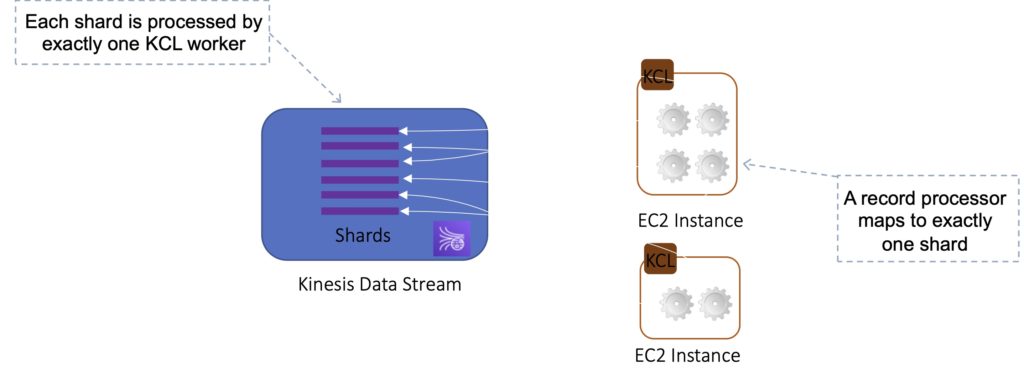
To understand the architecture and components of a KCL application, let's consult the AWS documentation.
Read through this tutorial page. You don't need to write the code yourself, but focus on understanding the key classes and methods described: KinesisAsyncClient, StockTradeRecordProcessorFactory, and the five required methods of the record processor (initialize, processRecords, leaseLost, shardEnded, shutdownRequested). This will give you a solid grasp of the KCL programming model.
Method 3: AWS Lambda
For many use cases, AWS Lambda is the simplest and most cost-effective way to consume data from Kinesis. You can configure a Kinesis stream as an event source for a Lambda function.
AWS manages the integration for you:
- Lambda polls the stream on your behalf.
- It invokes your function with a batch of records.
- It automatically handles checkpointing and retries.
- It scales by managing one concurrent Lambda invocation per shard by default. You can increase this with the "Parallelization Factor" setting.
This is a powerful serverless pattern. If your processing logic is stateless and can be executed within Lambda's time limits, it's often the best choice.
Test your understanding!
Your team needs to build a consumer application that analyzes stock trades in real-time. The application must maintain the average price of each stock over a rolling 5-minute window. This requires keeping state (the current average and count) between batches of records. The application will run 24/7.
Which consumer approach (direct SDK, KCL, or Lambda) would be most suitable and why?
Show answer
The most suitable approach would be the Kinesis Client Library (KCL).
Here's why:
- Stateful Processing: The requirement to maintain a rolling 5-minute average is a stateful operation. KCL is designed for long-running, stateful applications. A KCL worker running on EC2 or ECS can hold state in memory across multiple batches of records from the same shard.
- Long-Running Application: The application needs to run continuously. KCL applications are designed as persistent processes.
- Why not Lambda? While Lambda can process Kinesis records, it's primarily designed for stateless operations. Maintaining a 5-minute rolling state across different Lambda invocations is complex and requires an external state store like DynamoDB or ElastiCache, adding complexity and cost.
- Why not direct SDK? The direct SDK approach would require manually implementing all the complex logic for leasing, checkpointing, and worker coordination, which the KCL provides out of the box.
Comparing Consumer Options
| Feature | Direct AWS SDK (GetRecords) |
Kinesis Client Library (KCL) | AWS Lambda |
|---|---|---|---|
| Use Case | Low-level control, custom tools | Long-running, stateful, scalable apps | Event-driven, stateless/lightly-stateful processing |
| Complexity | Very High | Medium | Low |
| Scalability | Manual implementation | Automatic (via workers) | Automatic (managed by AWS) |
| Checkpointing | Manual | Built-in (uses DynamoDB) | Automatic (managed by AWS) |
| Cost Model | Pay for compute (e.g., EC2) | Pay for compute + DynamoDB | Pay-per-invocation + duration |
Conclusion
You have now surveyed the primary methods for getting data into and out of a Kinesis Data Stream. Understanding the trade-offs between these different producer and consumer patterns is crucial for designing effective and efficient data pipelines.
Key Takeaways:
- Producers: Use the AWS SDK (
PutRecords) for simplicity and low latency. Use the Kinesis Producer Library (KPL) for maximizing throughput, especially with many small records, at the cost of some latency. - Consumers:
- AWS Lambda is the go-to for simple, event-driven, and serverless processing.
- The Kinesis Client Library (KCL) is the standard for building robust, scalable, and stateful consumer applications that run continuously.
- Avoid using the direct AWS SDK (
GetRecords) for consumption unless you have a very specific reason and are prepared to handle all the underlying complexity.
In our next lesson, we'll look at a service that acts as a specialized consumer. We will explore how to implement a Kinesis Data Firehose delivery stream to Amazon S3, Redshift, or OpenSearch, which provides a fully managed way to load streaming data into destinations without writing any consumer code.