Hello! In our last lesson, we explored the Kinesis family of services and established Kinesis Data Streams (KDS) as the durable, flexible hub for real-time data ingestion. You learned to differentiate it from Data Firehose and Data Analytics by focusing on its core capability: retaining data for replay by multiple, independent consumer applications.
Today, we're diving into the mechanics of making KDS work for your specific needs. The central question for any data engineer using KDS is, "How much capacity do I need?" Answering this question is the focus of this lesson. Our learning outcome is to configure Kinesis Data Streams with appropriate shard capacity for streaming workloads. This is a critical concept for the certification exam, often appearing in scenario-based questions that test your ability to design cost-effective and performant solutions.
1. The Shard: The Building Block of a Kinesis Data Stream
To understand capacity, you must first understand the shard. A shard is the fundamental unit of throughput in a Kinesis Data Stream. Think of it as a single, ordered lane on a data highway. The total capacity of your stream (the number of lanes on the highway) is determined by the number of shards you configure.
Each shard has a fixed capacity:
- Write Capacity (Ingress): Up to 1 MB per second OR 1,000 records per second.
- Read Capacity (Egress): Up to 2 MB per second. This read capacity is shared among all standard consumers reading from that shard.
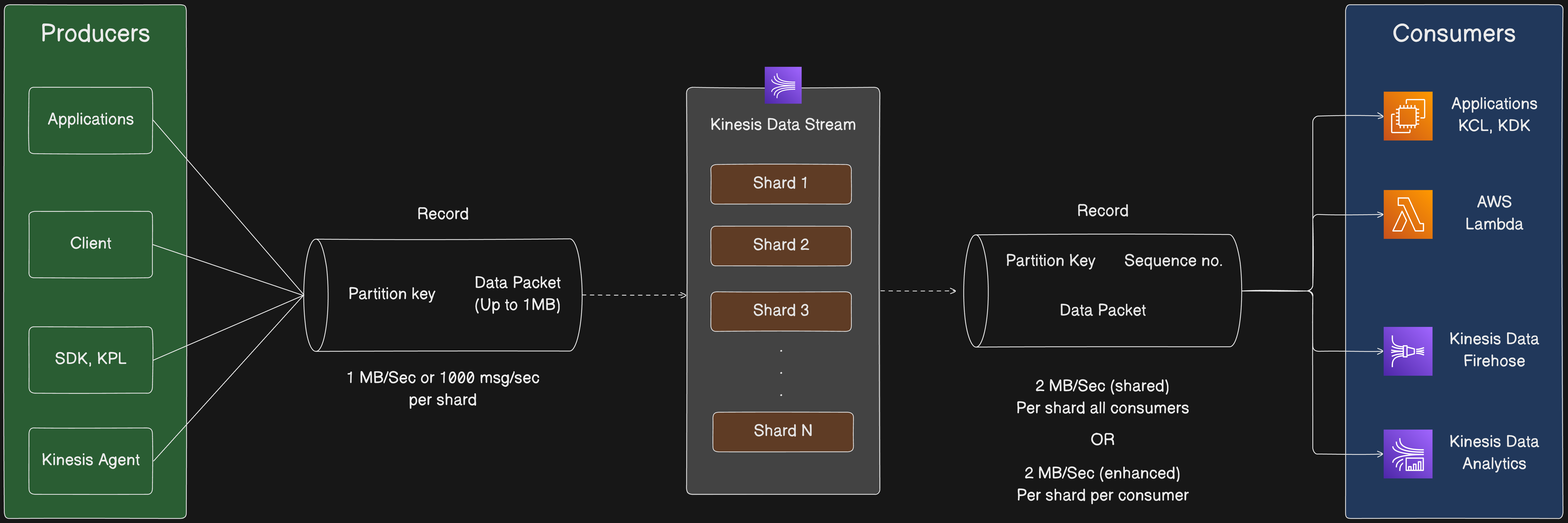
When a producer application sends a data record to Kinesis, it must include a partition key. Kinesis uses an MD5 hash of this partition key to determine which specific shard the record will be written to. This mechanism is crucial because it dictates how data is distributed across your available shards. We'll revisit this in a future lesson on performance, but for now, remember that an even data distribution is key to utilizing all your provisioned capacity.
2. Choosing Your Capacity Mode: Provisioned vs. On-Demand
AWS offers two primary capacity modes for Kinesis Data Streams. Choosing the right one depends entirely on the nature of your workload.
- Provisioned Mode: You manually specify and manage the number of shards for your stream. You are billed per shard-hour. This mode is best for predictable and stable traffic patterns where you can accurately forecast your capacity needs.
- On-Demand Mode: AWS automatically manages the shards for you, scaling capacity up and down based on your traffic. You are billed based on the volume of data written and read. This mode is ideal for unpredictable, spiky, or new workloads where operational ease outweighs the need for fine-grained cost control.
Amazon Kinesis Data Streams - Shards? Provisoned? On-demand? What does all this mean?
To see a clear comparison, let's watch a section of the video 'Amazon Kinesis Data Streams - Shards? Provisioned? On-demand?'. It provides excellent visual examples of different workloads and which capacity mode is the best fit.
Watch from 02:40 to 05:02. Pay close attention to the three workload graphs: 'stable', 'highly variable', and 'unpredictable'. These examples are key to understanding the trade-offs between over-provisioning in Provisioned mode versus the flexibility of On-demand mode.
As the video illustrates, choosing Provisioned mode for a highly variable workload can lead to significant waste, as you pay for peak capacity even during idle periods. Conversely, On-demand mode perfectly handles spiky traffic but might be more expensive than a well-tuned Provisioned stream for a very stable workload.
For the certification exam, you'll need to analyze scenarios and decide which mode is more appropriate from a cost and performance perspective.
3. Calculating Shard Requirements in Provisioned Mode
When you choose Provisioned mode, you must determine the initial number of shards. This is a common calculation you might face in the exam. To do this, you need to estimate your workload based on three variables:
- Average Record Size (in KB): The average size of a single data record you'll be sending.
- Records per Second: The maximum number of records you expect to write to the stream per second.
- Number of Consumers: The number of separate applications that will be reading from the stream.
With these inputs, you can calculate the required number of shards.
Amazon Kinesis Data Streams | High Level Architecture | Explained
The video 'Amazon Kinesis Data Streams | High Level Architecture | Explained' provides a detailed, step-by-step walkthrough of this calculation with a practical example.
Watch from 08:22 to 16:52. This section is crucial. It breaks down the formula for both incoming write bandwidth and outgoing read bandwidth and applies it to a real-world scenario. Follow the math closely to understand how each input variable affects the final shard count.
The Formula Summarized
As you saw in the video, the calculation involves determining the shards needed for both writing (ingress) and reading (egress) and taking the maximum of the two. Let's formalize the formulas presented in the video and found in the AWS documentation.
-
Calculate Incoming Write Bandwidth (KB/s):
-
Calculate Outgoing Read Bandwidth (KB/s):
-
Calculate Number of Shards:
A single shard provides 1024 KB/s of write capacity and 2048 KB/s of read capacity.The total number of shards is the maximum of these two values, rounded up to the nearest whole number.
You can also read more about this in the official AWS documentation.
Choose the right mode to stream in
For a definitive reference on capacity modes and the shard calculation formula, refer to the AWS Developer Guide.
Read the section titled 'Provisioned mode features and use cases'. It provides the official input values and the formula for calculating the number of shards, reinforcing what you learned from the video.

Test your understanding!
You are designing a data pipeline to process user activity events from a mobile application. You anticipate the following:
- A peak of 1,500 records per second.
- An average record size of 2 KB.
- There will be 3 consumer applications: one for real-time dashboarding, one for fraud detection, and one for archiving data to S3.
How many shards should you provision for this Kinesis Data Stream?
Show answer
Let's break it down step-by-step:
-
Calculate Incoming Write Bandwidth:
- 1,500 records/sec * 2 KB/record = 3,000 KB/s
-
Calculate Shards Needed for Write Capacity:
- Each shard handles 1,024 KB/s.
- 3,000 KB/s / 1,024 KB/s per shard ≈ 2.93 shards
-
Calculate Outgoing Read Bandwidth:
- 3,000 KB/s (Incoming) * 3 consumers = 9,000 KB/s
-
Calculate Shards Needed for Read Capacity:
- Each shard handles 2,048 KB/s.
- 9,000 KB/s / 2,048 KB/s per shard ≈ 4.39 shards
-
Determine Final Shard Count:
- We need the maximum of the shards required for write and read:
max(2.93, 4.39) = 4.39. - Since we can't have a fraction of a shard, we round up to the nearest whole number.
- Answer: 5 shards.
- We need the maximum of the shards required for write and read:
In this scenario, the read capacity required by the three consumers is the limiting factor, not the write capacity.
4. Adjusting Capacity: Scaling a Provisioned Stream
In Provisioned mode, your work isn't done after the initial setup. If your traffic patterns change, you may need to scale your stream. This is known as resharding. Kinesis provides APIs to adjust the shard count of an active stream without downtime.
- Splitting (
SplitShard): You can split an existing shard into two new shards. This increases the stream's total capacity and is useful when traffic grows. It's also used to isolate a "hot shard"—a shard that is receiving a disproportionate amount of data due to a popular partition key. - Merging (
MergeShards): You can merge two adjacent shards into a single shard. This decreases the stream's capacity and is useful for reducing costs when traffic decreases.
For more straightforward scaling, the UpdateShardCount API allows you to scale to a target number of shards, and Kinesis will perform the necessary splits or merges in the background.
Conclusion
You now have a comprehensive understanding of how to configure capacity for Kinesis Data Streams, a core skill for an AWS Data Engineer.
Key Takeaways:
- Shards are the base unit of capacity in KDS, each with a fixed write limit (1 MB/s or 1000 records/s) and read limit (2 MB/s).
- Provisioned Mode offers fine-grained control and is best for predictable workloads. You are responsible for calculating and managing the shard count.
- On-Demand Mode provides automatic scaling and is ideal for unpredictable or new workloads, simplifying operations.
- The number of shards in Provisioned mode is determined by calculating the capacity needed for both write throughput and read fan-out and choosing the greater of the two.
In our next lesson, we will shift our focus from configuring the stream to interacting with it. Now that you know how to build the data highway, it's time to learn how to drive on it. We will cover how to implement producer and consumer applications for Kinesis Data Streams using the AWS SDK and KCL.