Hello! Welcome back to our journey through Amazon Redshift.
In our last lesson, we mastered the COPY command, the most efficient way to load data from S3 into your Redshift cluster. This is a fundamental ETL pattern. But what if you want to query data that resides in your S3 data lake without moving it? This is a common requirement in modern data architectures where you might have petabytes of historical data in S3 that you only need to query occasionally.
This lesson directly addresses that scenario. We will focus on the learning outcome: Implement Redshift Spectrum to query data directly in your S3 data lake. Redshift Spectrum acts as a bridge, extending Redshift's powerful query engine to the virtually limitless storage of your S3-based data lake. This capability is central to building a "lake house" architecture on AWS, a key concept for the Data Engineer certification.
1. What is Redshift Spectrum?
Redshift Spectrum is not a separate service but a feature of Amazon Redshift. It allows you to run SQL queries against data stored in S3 as if it were in local Redshift tables. This provides tremendous flexibility in how you manage and access your data.
To understand the motivation and common use cases, let's watch a short video.
AWS Tutorials - Access Glue Catalog using Amazon Redshift Spectrum
This video from AWS Tutorials clearly explains the 'why' behind Redshift Spectrum. It discusses the typical data lake scenario, the cost-performance trade-offs between storing data in S3 vs. Redshift, and how Spectrum bridges the gap.
Watch the first 10 minutes and 37 seconds of the video (00:00 - 10:37). Focus on understanding: The different drivers (cost vs. performance) for storing data in S3 or Redshift. The common pattern of storing aggregated, 'hot' data in Redshift and detailed, 'cold' data in S3. How Spectrum enables seamless queries across both, for example, to perform a drill-down analysis.
As the video explained, you can combine "local" tables (data stored on Redshift nodes) and "external" tables (data in S3) in a single query. This is incredibly powerful.
Given your proficiency with Amazon Athena, you can think of Spectrum as a similar concept, but with a key difference:
- Athena is a standalone, serverless query service for S3.
- Redshift Spectrum is a feature within a Redshift cluster that allows it to query S3, crucially enabling joins between your Redshift data warehouse tables and your S3 data lake tables.

2. The Architecture: How It All Works
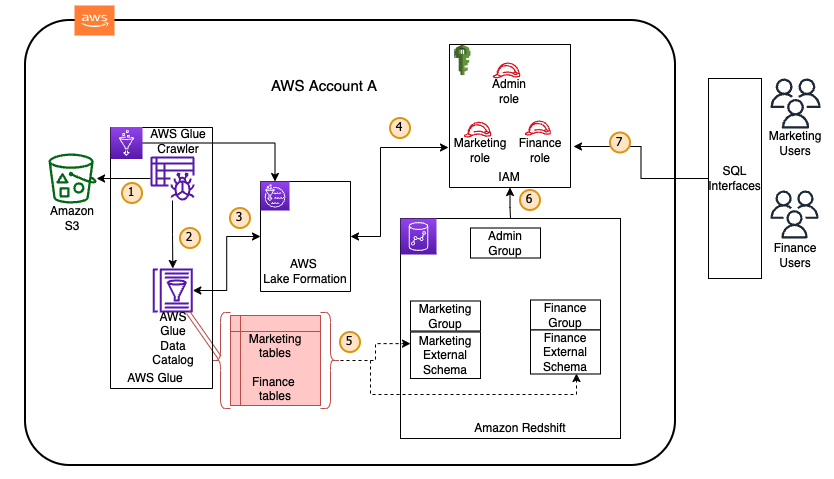
To query S3 data from Redshift, several AWS services must work together. The implementation relies on creating a logical link between your Redshift cluster and your data lake's metadata catalog.
Here are the core components:
- Amazon Redshift Cluster: The query engine.
- Amazon S3: Your data lake, where the data files (e.g., Parquet, ORC, CSV) are stored.
- AWS Glue Data Catalog: A central metadata repository. A Glue Crawler typically scans your S3 data to automatically infer the schema and create table definitions in the catalog.
- IAM Role: The security glue that grants the Redshift cluster permission to access the Glue Data Catalog and the underlying data in S3.
This diagram illustrates the relationship between the components:
3. Implementing Redshift Spectrum: A Step-by-Step Guide
Implementing Spectrum involves a clear, four-step process. The AWS documentation provides a definitive guide, and a video demonstration will walk us through the practical application of these steps.
First, let's get familiar with the official process.
Getting started with Amazon Redshift Spectrum
The official AWS documentation, 'Getting started with Amazon Redshift Spectrum', lays out the entire process. We will use this as our reference guide for the implementation steps.
Read the section 'Getting started with Redshift Spectrum step by step'. Focus on understanding the purpose of each of the four main steps: Create an IAM role for Amazon Redshift. Associate the IAM role with your cluster. Create an external schema and an external table. Query your data in Amazon S3.
Now that you have reviewed the official steps, let's see them in action. The same video we watched earlier provides a complete hands-on demonstration.
AWS Tutorials - Access Glue Catalog using Amazon Redshift Spectrum
This portion of the video walks through the entire implementation process, from cataloging data to running queries in the Redshift Query Editor. It's a perfect practical complement to the documentation.
Watch the video from 13:40 to the end (31:32). Follow along as the presenter executes each of the four steps we've identified: Step 1 (in video): Catalog S3 data. The presenter uses a Glue Crawler. (18:08 - 21:45) Step 2 (in video): Create an IAM role. Note the two policies attached: AmazonS3ReadOnlyAccess and AWSGlueConsoleFullAccess. (21:45 - 23:40) Step 3 (in video): Launch a Redshift cluster and associate the role. (23:40 - 25:40) Step 4 (in video): Create the external schema and query the data. Pay close attention to the CREATE EXTERNAL SCHEMA SQL command. (26:41 - end)
Let's recap the most critical part: the SQL command that creates the bridge.
The CREATE EXTERNAL SCHEMA Command
This is the command that connects your Redshift cluster to your Glue Data Catalog.
CREATE EXTERNAL SCHEMA spectrum_schema_name
FROM DATA CATALOG
DATABASE 'glue_database_name'
IAM_ROLE 'arn:aws:iam::123456789012:role/YourRedshiftSpectrumRole'
CREATE EXTERNAL DATABASE IF NOT EXISTS;
Let's break it down:
CREATE EXTERNAL SCHEMA spectrum_schema_name: This defines a new schema inside your Redshift database. This schema will contain pointers to your S3 tables, not the actual data.FROM DATA CATALOG DATABASE 'glue_database_name': This tells Redshift which database in your AWS Glue Data Catalog to map to.IAM_ROLE '...': This specifies the ARN of the role you created, which gives Redshift the necessary permissions to perform the action.
Once this command is executed, all the tables defined in your Glue database 'glue_database_name' will appear as tables within the Redshift schema spectrum_schema_name. You can then query them directly.
Test your understanding!
You have a data warehouse in Redshift with a local dimension table called public.stores.
Your data lake in S3 contains a large historical sales dataset in Parquet format, located at s3://my-data-lake/sales_history/. You have already run a Glue Crawler, which created a database named sales_db and a table named transactions in the AWS Glue Data Catalog.
An IAM role with the ARN arn:aws:iam::123456789012:role/RedshiftS3Access has been created and attached to your cluster.
Your task is to find the total sales amount for the 'Boston' store by joining your local Redshift table with the external S3 data. Write the two SQL statements required to achieve this.
- The statement to create the necessary external schema.
- The
SELECTstatement to perform the join and calculate the total sales.
Show answer
1. Create the External Schema
First, you need to create the external schema in Redshift to map to the Glue database.
CREATE EXTERNAL SCHEMA sales_external
FROM DATA CATALOG
DATABASE 'sales_db'
IAM_ROLE 'arn:aws:iam::123456789012:role/RedshiftS3Access';
2. Write the Query
Now you can write a standard SQL query that joins the local public.stores table with the newly accessible external sales_external.transactions table.
SELECT
    SUM(t.sale_amount) as total_sales
FROM
    sales_external.transactions t
JOIN
    public.stores s ON t.store_id = s.store_id
WHERE
    s.store_city = 'Boston';
This query seamlessly combines data stored physically in your Redshift cluster with data stored in S3, which is the core value proposition of Redshift Spectrum.
Conclusion
In this lesson, we explored how to break down the barrier between your data warehouse and your data lake. Redshift Spectrum is a powerful feature for data engineers, enabling flexible, cost-effective, and powerful analytical queries across your entire data estate.
Key Takeaways:
- Redshift Spectrum allows you to query data in S3 directly from your Redshift cluster, enabling a "lake house" architecture.
- It is ideal for querying large, infrequently accessed datasets and for joining "hot" data in Redshift with "cold" data in S3.
- The implementation requires four key steps: cataloging S3 data in AWS Glue, creating an IAM role with S3 and Glue permissions, associating the role with your cluster, and creating an
EXTERNAL SCHEMAthat points to the Glue database. - Once the external schema is created, you can query S3 data and join it with local Redshift tables using standard SQL.
Next Up:
Now that we can execute both fast, local queries and potentially long-running external queries against S3, managing cluster resources becomes even more important. In our next lesson, we will dive into how to "Configure workload management (WLM) queues for query prioritization and resource allocation," ensuring that critical queries get the resources they need to meet performance SLAs.