Welcome back! In our last lesson, we focused on the crucial task of designing optimal Redshift tables using distribution styles and sort keys. We established that these design choices are fundamental to achieving high query performance by minimizing data movement and I/O.
Now that we have our well-designed tables, the next logical step is to load them with data. This lesson addresses the learning outcome: Load data into Redshift from S3 using the COPY command with appropriate parameters.
The COPY command is the workhorse for bulk data ingestion in Redshift. Mastering its syntax and options is a non-negotiable skill for a data engineer working with AWS, and you can be certain that your ability to choose the right parameters for a given scenario will be tested on the certification exam.
1. Why COPY? The Power of Parallel Ingestion
Before diving into the syntax, it's essential to understand why the COPY command is the standard for loading data into Redshift. While you can use standard SQL INSERT statements, they are highly inefficient for loading data at scale.
INSERTstatements are processed by the leader node as single-threaded operations. Loading millions of rows one by one (or even in small batches) creates a massive bottleneck.- The
COPYcommand is designed to leverage Redshift's Massively Parallel Processing (MPP) architecture. It instructs each compute node to load a portion of the data from S3 directly and in parallel.
The performance difference is not subtle; it's orders of magnitude.

2. The Anatomy of a COPY Command
At its core, a COPY command requires just three pieces of information: the target table, the data source, and the authorization to access that source. Let's watch a practical video that walks through the entire process of building and executing a COPY command to load a CSV file from S3.
How to load (import) CSV files from S3 into Redshift using the COPY command
This video from Majestic.cloud provides a concise, step-by-step demonstration of using the COPY command. It clearly shows the basic syntax and, importantly, the two methods for handling authentication.
Watch the video from 02:12 to the end (11:21). Pay close attention to: The two authentication methods: key-based and role-based. The AWS best practice recommendation to use IAM roles. The basic parameters used, such as DELIMITER, IGNOREHEADER, and TIMEFORMAT 'auto'.
As you saw in the video, the basic structure looks like this:
COPY table_name
FROM 's3://your-bucket-name/folder/file_prefix'
CREDENTIALS 'aws_iam_role=arn:aws:iam::123456789012:role/YourRedshiftRole'
[options];
The most critical parts are:
FROM: Specifies the S3 path to your data. This can be a specific file, a prefix to load multiple files, or a manifest file.CREDENTIALS: Provides the authorization for Redshift to access S3. Using an IAM role is the secure, recommended best practice. It avoids hardcoding access keys and simplifies permission management.
3. Optimizing COPY for Maximum Performance
To truly unlock the power of the COPY command, you need to prepare your data in a way that maximizes parallelism.
Split Your Files
The single most effective optimization is to split your source data into multiple files in S3. The ideal number of files is a multiple of the number of slices in your Redshift cluster. This allows each slice to work on a file concurrently.
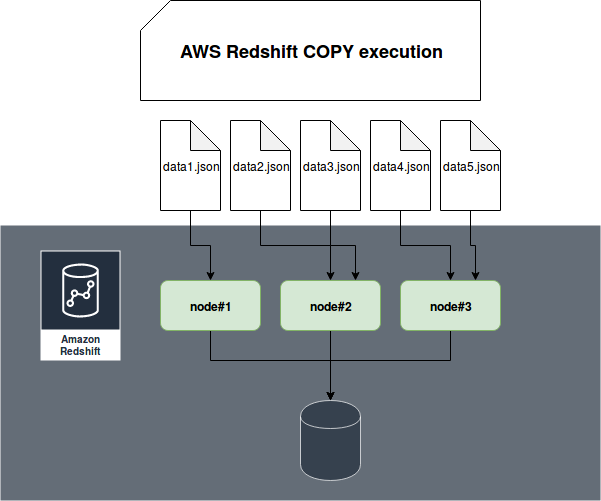
Let's watch a short clip that explains this concept perfectly.
AWS re:Invent 2020: Deep dive on best practices for Amazon Redshift
This segment from an AWS re:Invent session on Redshift best practices provides a clear, visual explanation of why splitting files is so critical for COPY performance.
Watch from 14:28 to 15:12. Notice how loading a single file utilizes only one slice, while loading multiple files engages all slices in parallel.
Key Guidelines for File Splitting:
- Aim for a file size between 1 MB and 1 GB after compression.
- The number of files should be a multiple of your cluster's slice count. You can find the slice count for different node types in the AWS documentation.
Compress Your Data
Always compress your data files using a supported format like GZIP, ZSTD, or BZIP2. The COPY command automatically uncompresses the files during the load. This has two benefits:
- Reduces storage costs in S3.
- Reduces the amount of data transferred from S3 to Redshift, which speeds up the load.
4. Handling Diverse Formats with COPY Parameters
Real-world data is rarely perfect. The COPY command provides a rich set of parameters to handle different file formats, data quirks, and errors. The official AWS tutorial on this topic is the best resource for learning these options.
Tutorial: Loading data from Amazon S3
The official AWS documentation provides a step-by-step tutorial on loading data, demonstrating how to use various COPY options to handle different scenarios and troubleshoot errors. We will focus on the section that details the command parameters.
Read the entire section 'Step 5: Run the COPY commands'. This section is the core of our lesson. As you read, focus on understanding the purpose of each parameter demonstrated: CSV and DELIMITER for different file formats. NULL AS to correctly interpret null values. FIXEDWIDTH for legacy data formats. MAXERROR and querying STL_LOAD_ERRORS for troubleshooting. MANIFEST to ensure you load only the exact files you want. DATEFORMAT 'auto' for handling inconsistent date formats. GZIP and COMPUPDATE for performance.
The tutorial you just read is dense with practical information. For the exam, you should be comfortable combining these parameters to solve a specific data loading problem.
Test your understanding!
You are tasked with loading a dataset into the product_reviews table. The data is located in an S3 bucket (s3://my-data-lake/reviews/) as a collection of 50 GZIP-compressed files.
The files are comma-separated (.csv), contain a header row, and use the string N/A to represent null values. The review_date column is formatted as YYYY-MM-DD. However, the S3 folder also contains old .bak files that should not be loaded.
Construct the COPY command to correctly load this data. You can assume an IAM role named RedshiftS3AccessRole is attached to the cluster.
Show answer
There are two excellent ways to solve this.
Method 1: Using a Prefix (Simpler)
This method relies on the fact that all valid files share a .csv.gz extension pattern that the .bak files do not.
COPY product_reviews
FROM 's3://my-data-lake/reviews/product_reviews.csv.gz' -- The prefix will match all files starting with this name
CREDENTIALS 'aws_iam_role=arn:aws:iam::[ACCOUNT_ID]:role/RedshiftS3AccessRole'
FORMAT AS CSV
GZIP
IGNOREHEADER 1
NULL AS 'N/A'
DATEFORMAT 'YYYY-MM-DD';
Note: This assumes your files are named something like product_reviews.csv.gz.001, product_reviews.csv.gz.002, etc.
Method 2: Using a MANIFEST File (More Explicit and Robust)
This is the most reliable method when file names are inconsistent or you need to be absolutely certain which files are loaded.
First, you would create a reviews.manifest file in S3:
{
  "entries": [
    {"url":"s3://my-data-lake/reviews/file_01.csv.gz", "mandatory":true},
    {"url":"s3://my-data-lake/reviews/file_02.csv.gz", "mandatory":true},
    ...
    {"url":"s3://my-data-lake/reviews/file_50.csv.gz", "mandatory":true}
  ]
}
Then, your COPY command would be:
COPY product_reviews
FROM 's3://my-data-lake/reviews/reviews.manifest'
CREDENTIALS 'aws_iam_role=arn:aws:iam::[ACCOUNT_ID]:role/RedshiftS3AccessRole'
FORMAT AS CSV
GZIP
IGNOREHEADER 1
NULL AS 'N/A'
DATEFORMAT 'YYYY-MM-DD'
MANIFEST;
This version explicitly tells COPY which files to ingest, completely ignoring the .bak files.
Conclusion
In this lesson, we focused on the most efficient and scalable method for getting data into Amazon Redshift. By mastering the COPY command and its rich set of parameters, you can build robust and performant data ingestion pipelines.
Key Takeaways:
- The
COPYcommand is the standard for bulk data loading due to its use of Redshift's MPP architecture. - Always use an IAM role for secure, manageable credentials.
- For optimal performance, split data into multiple, compressed files to enable parallel loading.
- Use parameters like
FORMAT AS CSV,DELIMITER,IGNOREHEADER,NULL AS, andDATEFORMATto match the structure of your source data. - For troubleshooting, use
MAXERRORin combination with querying theSTL_LOAD_ERRORStable. For precise control over which files are loaded, use aMANIFESTfile.
Next Up:
We have now designed our tables and loaded them with data from S3. But what if you want to query data in S3 without loading it into Redshift first? This is a common requirement in a modern data lakehouse architecture. In our next lesson, we will explore this by learning how to "Implement Redshift Spectrum to query data directly in your S3 data lake." This will bridge the gap between your data warehouse and your data lake.