Hello! Welcome to the next lesson in our journey through Amazon EMR.
In the previous lesson, we focused on EMR's role as a powerful platform for large-scale batch processing. You learned how to submit a PySpark application as an EMR step and monitor its execution using the Spark UI. This is a core pattern for data transformation and ETL.
This lesson explores a different, but equally important, facet of EMR. We will shift from batch jobs to interactive analysis, addressing the learning outcome: Implement Hive or Presto on EMR for interactive SQL-like querying of data in S3. We'll cover how to configure an EMR cluster with these powerful SQL engines and enable data analysts and engineers to explore massive datasets in your S3 data lake using the language of SQL.
1. From Batch Processing to Interactive Querying
While Spark is excellent for transforming large datasets in a predefined, programmatic way, there's a frequent need for more ad-hoc, exploratory analysis. Data analysts or data scientists might want to quickly run SQL queries to check data quality, understand distributions, or test a hypothesis without writing a full Spark application. EMR facilitates this by supporting distributed SQL query engines like Apache Hive and Presto.
AWS Glue ETL Vs EMR - Which one should I use?
To start, let's watch a short clip from the video 'AWS Glue ETL Vs EMR' by Johnny Chivers that frames this exact use case.
Watch from 06:57 to 07:28. The key takeaway is that when you need to directly 'interrogate data like a data analyst' on your cluster, using SQL engines like Presto or Hive is the way to go. This is a distinct use case from running a Glue ETL job.
You are already highly proficient with Amazon Athena, which also provides serverless SQL querying over S3. So, when would you choose to run Hive or Presto on a dedicated EMR cluster?
- Control and Customization: EMR gives you full control over the underlying cluster's instance types, scaling, and software configuration. This is useful for performance tuning or installing custom libraries.
- Consistent Performance: For a team of analysts running frequent, complex queries, a provisioned EMR cluster can offer more predictable and consistent performance than Athena's shared, on-demand model.
- Ecosystem Integration: If you are already using EMR for other Hadoop ecosystem tools (like HBase or Spark), keeping your interactive query layer on the same platform can simplify your architecture.
A Quick Look at Hive vs. Presto
- Apache Hive: The classic SQL-on-Hadoop tool. It takes your SQL query and translates it into a series of jobs (originally MapReduce, now often Tez or even Spark). It's robust and excellent for large, complex SQL batch jobs but can have higher latency for interactive use.
- Presto (and its open-source successor, Trino): A distributed SQL query engine designed from the ground up for high-performance, low-latency interactive analytics. It executes queries in memory across the cluster, making it much faster for the kind of ad-hoc exploration we're discussing. It can also query data from multiple sources (e.g., S3, MySQL, Kafka) in a single query.
For the Data Engineer exam, you should understand that Presto is generally the preferred choice for fast, interactive querying, while Hive is a viable option for longer-running SQL batch tasks.
2. The Central Role of a Metastore: AWS Glue Data Catalog
For any SQL engine to query data in S3, it needs to know the data's schema: database names, table definitions, column names, data types, and partition information. This metadata is stored in a metastore.
While an EMR cluster can run its own local Hive metastore on the primary node, this has a major drawback: it is transient. When you terminate the cluster, the metastore and all your table definitions are lost.
The modern, recommended, and most testable solution is to use the AWS Glue Data Catalog as a persistent, external metastore.
Using Presto with the AWS Glue Data Catalog
The AWS documentation page 'Using Presto with the AWS Glue Data Catalog' explains why this is the best practice.
Please read the introduction section of this document. It highlights the key benefits: the Glue Data Catalog is a persistent, shared repository that can be used by different clusters and services like EMR, Athena, and Redshift Spectrum.
Using the Glue Data Catalog means that you can terminate your EMR query cluster to save costs, and when you spin up a new one, it can immediately connect to the catalog and have access to all the same table definitions. This decouples your compute (EMR) from your metadata (Glue).
3. Implementation: Configuring EMR for Interactive SQL
Let's walk through the key steps to implement an interactive query cluster. The following article provides a fantastic, condensed overview of the practical steps involved.
Presto and Hive on AWS EMR. Purpose
The article 'Presto and Hive on AWS EMR. Purpose' by Kateryna Babich serves as a practical guide for this section. We will refer to its key points as we structure our implementation plan.
Please read the sections 'EMR cluster', 'EMR cluster host', and 'EMR cluster security groups'. These sections cover the core configuration components we'll discuss: selecting applications, ensuring a stable connection endpoint, and setting up firewall rules.
Synthesizing this information, here is the blueprint for setting up your cluster:
Step 1: Launch the Cluster with Correct Applications and Configuration
When creating an EMR cluster, you must:
- Select the applications: Choose Presto and/or Hive, in addition to the default Hadoop and Spark.
- Enable Glue Data Catalog Integration: This is the most critical step. You do this by providing a specific configuration classification when launching the cluster.
The AWS documentation (LINK) shows the exact JSON configuration needed. For a modern EMR version, you would use the presto-connector-hive classification to tell Presto to use Glue as its metastore.
[
    {
        "Classification": "presto-connector-hive",
        "Properties": {
            "hive.metastore": "glue"
        }
    }
]
This configuration JSON is passed during cluster creation to instruct the Presto application on EMR to use the AWS Glue Data Catalog as its metastore, instead of a local, transient one.
Step 2: Configure IAM Permissions
The EC2 instances in your EMR cluster need permission to interact with other AWS services. The EMR_EC2_DefaultRole instance profile must have a policy that allows AWS Glue actions (e.g., glue:GetTable, glue:GetPartitions). If you're using the default role, these permissions are typically included. If you use a custom role, you must add them explicitly.
Step 3: Configure Network and Security
BI tools and SQL clients need a stable endpoint to connect to. Since the primary node's IP address can change if the cluster is restarted, you need a static host. The article you read mentions three approaches, with the Application Load Balancer (ALB) being the most robust and secure.
Crucially, you must also configure the EMR primary node's security group to allow inbound traffic on the correct ports from your client machine or network:
- Port 8889: For Presto connections.
- Port 10001: For Hive Server 2 connections.
- Port 22: For SSH access (for administration).
The architectures you are building would look like this:
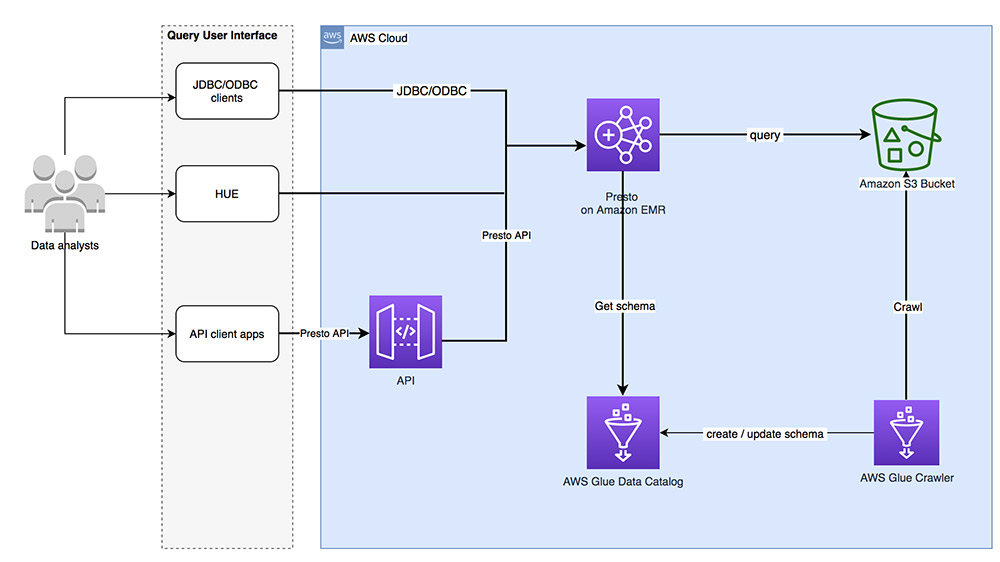

4. Connecting and Querying
Once the cluster is running and correctly configured, you can connect to it using any client that supports JDBC/ODBC.
Presto and Hive on AWS EMR. Purpose
Let's refer back to the 'Presto and Hive on AWS EMR. Purpose' article for the specific connection details.
Review the 'Presto' and 'Hive' sections to see the connection strings and special instructions for each service.
Connecting to Presto:
- You can connect using a JDBC URL like
jdbc:presto://<EMR-Primary-DNS>:8889. - You can also SSH into the primary node and use the command-line interface with the command
presto-cli.
Connecting to Hive:
- Hive requires an extra step. The HiveServer2 Thrift service, which listens for client connections, is not started by default. You must first SSH into the primary node and run:
/usr/lib/spark/sbin/start-thriftserver.sh. - Once the service is running, you can connect using a JDBC URL like
jdbc:hive2://<EMR-Primary-DNS>:10001.
Test your understanding!
A data analyst reports they cannot connect their BI tool to the new EMR cluster you just launched. They are using the correct DNS name for the EMR primary node. They have tried connecting to both Presto and Hive, but both attempts time out. What are the two most likely misconfigurations you should investigate first?
Show answer
-
Security Group Inbound Rules: The most common cause of connection timeouts is a misconfigured security group. You should immediately check the inbound rules on the security group attached to the EMR primary node. Verify that there are rules allowing TCP traffic on port
8889(for Presto) and port10001(for Hive) from the source IP address or security group of the analyst's BI tool. -
Hive Thrift Server Not Started: For the Hive connection specifically, a timeout can occur if the HiveServer2 Thrift service is not running. You should SSH into the primary node and check if the process is active. If not, you need to start it manually using the
/usr/lib/spark/sbin/start-thriftserver.shcommand. This is a common operational step that is easy to forget.
Conclusion
Today, you've expanded your understanding of EMR beyond batch ETL. You now see it as a versatile analytics platform that can also serve interactive SQL queries at scale.
Key Takeaways:
- EMR can host SQL engines like Hive and Presto for interactive querying of data in S3.
- Presto is optimized for low-latency, ad-hoc queries, making it a common choice for data exploration.
- Using the AWS Glue Data Catalog as an external, persistent metastore is a critical best practice that decouples metadata from your compute cluster.
- Implementation requires three key configuration areas: selecting the right applications (Presto/Hive) with Glue integration, ensuring correct IAM permissions, and setting up network security (Security Groups and ports
8889/10001).
Next Up:
In this lesson, we focused on setting up different applications on EMR. In the next lesson, we will dive deeper into troubleshooting and optimization by learning how to "Identify performance bottlenecks in EMR Spark jobs by analyzing job history and logs." While our focus today was on Hive and Presto, the principles of analyzing execution plans and understanding resource usage are universal across the EMR ecosystem.