Introduction
In our last lesson, we laid the groundwork for data persistence by learning how to open, read from, and write to text files. We saw the basic Open -> Write/Read -> Close workflow using functions like fopen, fprintf, and fgets. While functional, our examples included only a minimal check for whether a file opened successfully, deferring a more thorough approach.
This lesson addresses that gap. We will move from simply detecting an error to diagnosing and reporting it in a useful way. You will learn how to implement robust error handling for file operations, a non-negotiable skill for building reliable applications like your game. We'll explore C's mechanisms for error reporting—errno, perror, and stderr—and conclude with a professional pattern for managing resources and errors in a clean, structured way. This will ensure your game's save/load system is resilient, not fragile.
Why "File Not Opened" Isn't Enough
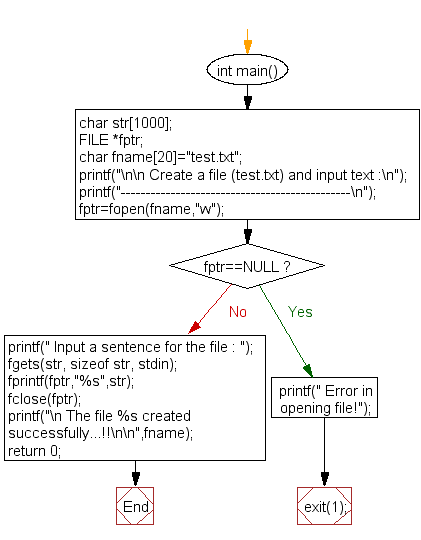
In the previous lesson, we used a simple if (file_pointer == NULL) check. This is the first and most critical step, but it doesn't tell us why the operation failed. Did the file not exist? Did the program lack the necessary permissions to read or create it? Did we try to open a directory?
For a user, and especially for you as the developer, a generic "Error opening file!" message is unhelpful. We need more detail to debug the problem effectively. The flowchart below illustrates the common, basic check we're about to expand upon.
The Error Channel: errno, strerror, and perror
C provides a standard mechanism for reporting more specific error conditions from library functions. When a standard library function like fopen fails, it not only returns a value indicating failure (like NULL), but it also often sets a global integer variable named errno.
This errno variable, accessible by including the <errno.h> header, is set to a code that corresponds to the specific error that occurred. However, these codes are just numbers (2 for "No such file or directory", 13 for "Permission denied", etc.) and aren't intuitive on their own.
To make errno useful, we have two key functions:
strerror(): Found in<string.h>, this function takes an error number and returns a human-readable string describing it.perror(): Found in<stdio.h>, this function is even more convenient. It prints a custom message you provide, followed by a colon, a space, and the human-readable error message corresponding to the current value oferrno.
The following video provides an excellent demonstration of how to use these tools to build a more informative error-handling workflow.
Handling Errors in C/Unix (perror, strerror, errno)
This video, "Handling Errors in C/Unix" from the Jacob Sorber channel, clearly explains the standard error handling pattern.
Please watch from the beginning to the end of the perror section. The video will guide you through: The problem of "silent failure". How system calls indicate errors (e.g., returning -1 or NULL). The role of the errno global variable. Using strerror to get a descriptive message. Using perror as a convenient, one-stop function for printing error messages.
As you saw, perror is a powerful and simple tool. A check for fopen can be improved like this:
FILE *fp = fopen("non_existent_file.txt", "r");
if (fp == NULL) {
    // perror will automatically append the right error, e.g., "No such file or directory"
    perror("Error opening save file");
    return 1; // Or handle the error appropriately
}
Standard Error (stderr) vs. Standard Output (stdout)
You might have noticed that perror prints its output, but where does it print to? It prints to a special stream called standard error, or stderr. This is distinct from standard output (stdout), which is where functions like printf send their output by default.
Think of it this way:
stdoutis for the program's normal, expected results.stderris a dedicated channel for error messages, warnings, and diagnostics.
This distinction is crucial in command-line environments. A user might redirect your game's normal output to a file (e.g., my_game > game_log.txt), but they would still want to see any error messages appear on their screen. Because stderr is not redirected by default, this separation works perfectly. It's a best practice to always send error messages to stderr. While perror does this automatically, if you build a custom error message, you should use fprintf to direct it to stderr:
fprintf(stderr, "ERROR: Could not load level %d from file %s\n", level_num, filename);
The next video provides a concise explanation of stderr and demonstrates how to use fprintf with it.
Error Handling | C Programming Tutorial
This clip from Portfolio Courses explains the concept of stderr and how to write to it.
Watch the segment on standard error. It will reinforce why separating normal output from error output is a good practice.
Errors Beyond Opening: ferror and fclose
Errors aren't limited to fopen. A write operation with fprintf or fwrite could fail mid-process if the disk runs out of space. A read operation could fail due to a media error. Even fclose can fail if the final flush of its buffer to disk is unsuccessful.
ferror(): After performing read or write operations (especially in a loop), you can callferror(file_pointer). It returns a non-zero value if an error has occurred on that stream.fclose(): This function returns0on success andEOFon failure. It's rare to fail, but for mission-critical data, checking its return value is wise.
The following article provides examples for these and other common file errors.
Error Handling During File Operations in C
This article from GeeksForGeeks provides a quick survey of different file I/O error scenarios.
Read the sections titled Handle Disk Full Error and File Closing Error. These demonstrate the use of ferror() to check for write errors and how to check the return value of fclose().
A Structured Pattern for Error Handling and Cleanup
Imagine your save function needs to open two files, allocate dynamic memory, and then perform several write operations. If an error occurs halfway through, you must ensure that any resources already acquired (open files, allocated memory) are properly released. This can lead to a messy chain of nested if-else blocks.
In C, a clean and widely accepted solution for this is the goto cleanup pattern. While goto is often considered harmful, this is one of its praised and idiomatic uses for creating robust functions.
The pattern works like this:
- Initialize all resource variables (like file pointers) to
NULL. - As you perform operations, check for errors. If an error occurs,
gotoa single cleanup label at the end of the function. - The code under the cleanup label checks each resource variable. If it's not
NULL, it means the resource was successfully acquired and now needs to be released. - A status variable tracks whether the function succeeded or failed.
This pattern centralizes all cleanup logic, making the code much easier to read, maintain, and correctly modify. A Stack Overflow post provides a "perfect" example of this pattern.
How to write perfect error handling in C?
This discussion and code example from Stack Overflow demonstrate a professional-grade error handling and resource cleanup pattern using goto.
First, read the question to understand the author's goal of the basic design. Then, carefully study the copy_file() function in the provided code. Trace the logic: see how input_file and output_file are initialized to NULL, how goto handle_error is used, and how the free_resources block unconditionally cleans up anything that was opened.
This disciplined structure is invaluable for writing complex functions that interact with files and memory, and aligns perfectly with the goal of achieving C mastery.
Conclusion
You have now moved beyond simple error detection and are equipped with the tools to write truly robust file I/O code. This is a significant step up in C programming maturity.
Key Takeaways:
- A
NULLreturn fromfopenis just the start; you must diagnose why it failed. - The
errnoglobal variable holds a numeric code for the last error. - Use
perror("Descriptive message")to print a helpful, specific error message to the standard error stream (stderr). stderris the dedicated channel for errors, separate from the normal program output onstdout.- Functions like
ferror()and checking the return offclose()are necessary for handling errors that occur after a file is opened. - For complex functions with multiple resources, the
gotocleanup pattern provides a clean, centralized, and robust way to handle errors and prevent resource leaks.
With these techniques, you are now prepared for the next step. In our upcoming lesson, you will apply what you've learned to a practical and essential feature for your game: saving your linked-list-based inventory to a file.