Hello! Welcome to the tenth module of our course.
In the previous modules, we've explored the architecture of 4G and 5G networks and discussed various theoretical attack vectors, such as IMSI catching, downgrade attacks, and vulnerabilities in the 5G Service-Based Architecture and network slicing. Now, it's time to transition from theory to practice and begin building our own 5G security test lab.
Today's lesson is the first crucial step in that journey. Our goal is to configure Open5GS and srsRAN for a basic 5G Standalone (SA) network. This setup will serve as the foundation for the hands-on experiments and attacks we'll conduct in the upcoming lessons. We will be installing all the necessary software and preparing the configuration files, but we won't launch the network until our next session.
This process will leverage your proficiency with Linux and networking, as we'll be working entirely within a command-line environment to set up the core network and radio components on a single machine.
5G Lab Architecture
Before we start installing software, let's look at the architecture of the lab we're building. We will simulate an entire 5G network—from the user's device to the core—on a single Linux system.
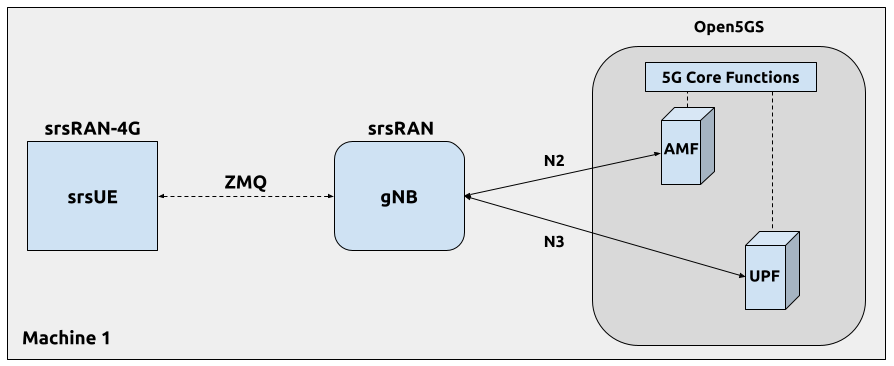
Here are the key components you see in the diagram:
- Open5GS (5G Core): This is an open-source implementation of the 5G Core network. It contains several network functions, but for now, we'll focus on two primary ones we've discussed before:
- AMF (Access and Mobility Management Function): Manages the connection, authentication, and mobility of the user. It communicates with the gNB over the N2 interface.
- UPF (User Plane Function): Handles routing the actual user data (e.g., your web traffic) to and from the internet. It communicates with the gNB over the N3 interface.
- srsRAN: This is an open-source software radio suite. We will use two of its components:
- srsRAN Project (gNB): This will act as our 5G base station, called a gNodeB or gNB.
- srsRAN 4G (srsUE): This will act as our User Equipment (UE)—the simulated mobile phone. Although it's from the srsRAN 4G project, it has been updated to support 5G SA mode, which is what we will use.
- ZeroMQ (ZMQ): Instead of using a physical SDR and antennas, the gNB and UE will communicate with each other by sending radio samples over a ZMQ virtual interface. This simplifies our initial setup immensely, as it removes the complexities of real-world radio frequency configuration.
Our goal today is to install these components and create the basic configuration files that define how they connect and operate.
Step 1: System Preparation and Software Installation
We will follow a well-structured guide to get everything installed. The guide uses an Ubuntu 22.04 system as its base, so a virtual machine running this OS is recommended. The following reading provides a complete, end-to-end recipe for the setup. We will work through its initial steps in this lesson.
ngkore/Open5GS-srsRAN - GitHub
This GitHub repository by 'ngkore' provides a fantastic step-by-step guide for setting up an end-to-end 5G SA network with Open5GS and srsRAN. We will use it as our primary reference.
First, read the introduction under 'srsRAN-Project-E2E' to understand the project's goal. Then, look at the 'Architecture Overview' and the 'Hardware and Software Requirements' sections to confirm the components we just discussed.
Now, let's get our hands dirty. Follow the instructions in the guide to install all prerequisites. This involves installing system packages, setting up Docker for the Open5GS core, and compiling both the srsRAN Project (for our gNB) and srsRAN 4G (for our UE).
Execute the following steps on your Ubuntu 22.04 system:
- Install System Packages: Run the
apt installcommand shown in the "Prerequisites -> System Packages" section of the GitHub guide. These packages include build tools and libraries required by srsRAN. - Install Docker: Follow the instructions under "Docker Installation (for Open5GS)". Docker is a containerization platform that makes running the multi-component Open5GS core much simpler.
- Build srsRAN 4G (for srsUE): Follow the commands in the "Build srsRAN 4G (for srsUE)" section. This will download and compile the srsUE software.
- Build srsRAN Project (for 5G gNB): Follow the commands in the "Build srsRAN Project (for 5G gNB)" section. This compiles the 5G gNB software.
These build steps might take several minutes to complete, depending on your machine's performance.
Step 2: Deploy and Configure the 5G Core (Open5GS)
With the prerequisites installed, the next step is to deploy the Open5GS core network. The GitHub guide simplifies this by providing a docker-compose.yaml file that defines all the necessary core network functions and their connections.
- Deploy Open5GS: Follow the instructions in the "Deploy Open5GS 5G Core (Docker)" section of the GitHub guide to clone the repository and launch the core network using
docker-compose. Although we are deploying it now, we will stop it and restart it in the next lesson to watch the logs. - Verify Deployment: You can run
docker psto see all the Open5GS services running in their containers (e.g.,open5gs-amf,open5gs-upf, etc.).
The default configuration provided in this repository is sufficient for our initial setup. Later, we may need to modify files like amf.yaml and upf.yaml for more advanced scenarios.
One crucial part of the core network is the subscriber database. Open5GS has a WebUI for managing subscribers, but the docker-compose setup we are using comes with a pre-configured user. The credentials for this user (IMSI, keys) are defined in the srsUE configuration file we'll see next. This is how the network will recognize and authenticate our simulated phone.
Step 3: Configure the Radio Access Network (srsRAN)
Now we need to configure our gNB and UE to communicate with each other and with the Open5GS core we just deployed.
First, download the reference configuration files as instructed in the "Configuration Files (ZMQ)" section of the GitHub guide. This will give you a set of working configs that we can inspect.
To understand what these configurations mean, let's consult the official srsRAN documentation. It provides excellent context for the key parameters.
5G SA End-to-End — srsRAN 4G 23.11 documentation
The official srsRAN documentation, in this application note titled '5G SA End-to-End', explains the specific configuration changes needed to enable 5G SA mode. It's a great resource for understanding the 'why' behind the settings.
Read through the 'Configuration' section, paying close attention to the subsections on 'srsUE', 'srsENB' (which corresponds to our gNB), and 'Core'. You don't need to apply these changes manually since we are using pre-made configs, but focus on understanding what each parameter does.
Let's break down the most important settings in the configuration files you downloaded from the ngkore repository.
gNB Configuration (gnb_zmq.yaml)
This file configures our 5G base station. Open it and find these key parameters:
amf_addr: This IP address (e.g.,127.0.0.5) points to the AMF in our Open5GS core. This is how the gNB establishes the N2 control plane connection.gtp_bind_addr: This is the gNB's local IP address for the GTP tunnel, which carries user data to the UPF (the N3 interface).plmn: The Public Land Mobile Network section, withmcc(Mobile Country Code) andmnc(Mobile Network Code). For a private network, these can be custom values, but they must be identical across the UE, gNB, and core network. Here, it's set to MCC999and MNC70.pciandtac: The Physical Cell ID (pci) and Tracking Area Code (tac). Thetacis especially important, as it must match the tracking area configured in the AMF. A mismatch here is a common cause of connection failures.rf_driver: This is set tozmqto tell the gNB to use the ZeroMQ virtual RF interface instead of a real SDR.
UE Configuration (ue_zmq.conf)
This file configures our simulated phone.
[usim]section: This is critical for authentication.imsi: The International Mobile Subscriber Identity. This unique ID must match a subscriber entry in the Open5GS database.k,opc,algo: These are the cryptographic key, operator code, and algorithm (milenage) used for the AKA protocol. These credentials also must match what's in the Open5GS database for that IMSI.
[rat.nr]and[rrc]sections: These settings ensure the UE operates in 5G SA mode (release = 15).[rf]section: Like the gNB, thedevice_nameis set tozmq, anddevice_argsare configured to connect the UE's ZMQ endpoint to the gNB's ZMQ endpoint.[nas]section: This defines theapn(Access Point Name), such assrsapn. The APN tells the core network which data network the UE wants to connect to.
Take a few moments to locate these parameters in your own downloaded configuration files to familiarize yourself with them.
Conclusion
Congratulations on completing the first major step in building our 5G lab! We have laid all the necessary groundwork for a fully functional, simulated 5G Standalone network.
Key Takeaways:
- A 5G SA lab can be built on a single Linux machine using Open5GS for the core and srsRAN for the radio components (gNB and UE).
- ZeroMQ (ZMQ) allows us to create a virtual RF link between the gNB and UE, removing the need for physical hardware in this initial setup.
- Configuration is key. Critical parameters like the PLMN (MCC/MNC), Tracking Area Code (TAC), and subscriber credentials (IMSI/keys) must be consistent across all components for the network to function.
- Docker and
docker-composesignificantly simplify the deployment of the complex, multi-service 5G core.
Preview of the Next Lesson:
In our next lesson, we will bring our network to life. We will verify the 5G SA attach procedure using srsUE and Open5GS logs. You will launch the components in the correct order—Core, gNB, then UE—and watch the logs to see the UE successfully discover the cell, authenticate with the core, and establish a data session. This will be our first "hello, world" moment in the 5G lab.