Introduction
In our last lesson, we saw how setTimeout schedules a function to run in the future, which helped us understand the loop variable capture problem. This behavior is a direct consequence of JavaScript's underlying execution model. Today, we'll delve into that model to understand a core principle of the language: its single-threaded nature and how that profoundly impacts application design for both browsers and Node.js.
As a software engineer, you're familiar with concepts like threads and processes. JavaScript's approach to concurrency is unique and powerful. It uses a single thread for your code but leverages an event-driven architecture to handle many operations at once without blocking. By the end of this lesson, you will be able to explain this model, understand its trade-offs, and know the single most important rule for writing performant JavaScript applications.
One Thread, One Call Stack
At its heart, the JavaScript runtime is single-threaded. This means it has only one call stack and can only execute one piece of code at a time. The call stack is a data structure that tracks where the program is in its execution. When a function is called, it's pushed onto the stack. When it returns, it's popped off.
To truly grasp this, the following video by Philip Roberts is a classic and exceptionally clear explanation of the core components of the JavaScript runtime.
What the heck is the event loop anyway? | Philip Roberts | JSConf EU
This famous talk from JSConf EU, "What the heck is the event loop anyway?", provides a brilliant visual explanation of JavaScript's execution model.
Start by watching the segment on the call stack. Pay close attention to how he visualizes function calls being pushed onto and popped off the stack. The examples of a stack trace from an error and "blowing the stack" with infinite recursion will be familiar concepts.
This "one thing at a time" model is simple and eliminates many concurrency issues found in multi-threaded environments (like race conditions on shared memory), as you never have two pieces of your JavaScript code running at the exact same moment.
The Problem: Blocking the Thread
The simplicity of a single thread comes with a significant challenge: what happens when a task is slow? If a long-running, synchronous operation is on the call stack, the entire application freezes. Nothing else can happen until that task completes. This is called blocking.
- In a browser, a blocked thread means an unresponsive user interface. The user can't click buttons, scroll the page, or interact with the application in any way.
- In a Node.js server, a blocked thread means the server cannot handle any new incoming requests. It becomes unavailable, leading to high latency and poor performance.
Let's return to Philip Roberts' talk to see a demonstration of this problem.
What the heck is the event loop anyway? | Philip Roberts | JSConf EU
The presenter now demonstrates why blocking is a critical issue in a browser context.
Watch the section from "what happens when things are slow?". His demo of a synchronous (blocking) request freezing the browser UI is a powerful illustration of the core problem we need to solve.
This brings us to the fundamental design constraint of JavaScript: you must not block the thread. But if network requests, file operations, and timers are inherently slow, how can we possibly avoid blocking?
The Solution: An Asynchronous, Non-Blocking Model
The answer is that JavaScript almost never waits for slow operations to finish. Instead of blocking, it uses an asynchronous, non-blocking model. When you initiate a slow operation (like an API call with fetch or a timer with setTimeout), JavaScript offloads that task to the underlying environment (the browser or Node.js) and immediately moves on to the next line of code. It provides a callback function to be executed later, once the operation is complete.
This is possible because the JavaScript runtime doesn't operate in a vacuum. It's part of a larger environment that includes several key components:
- JavaScript Engine (e.g., V8): Contains the Call Stack (where code executes) and the Heap (where memory is stored).
- Web APIs / C++ APIs: These are provided by the environment, not the JS engine. They handle asynchronous tasks like
setTimeout, DOM events, HTTP requests (fetch), and file system operations (fsin Node.js). These operations often run on separate threads managed by the environment. - Event Queue (or Callback Queue): When an asynchronous operation finishes, its associated callback function is placed in this queue.
- Event Loop: This is the orchestrator. Its job is simple: continuously check if the call stack is empty. If it is, it takes the first event (callback) from the queue and pushes it onto the call stack to be executed.
This architecture allows a single JavaScript thread to manage thousands of concurrent operations, creating the illusion of multi-threading.
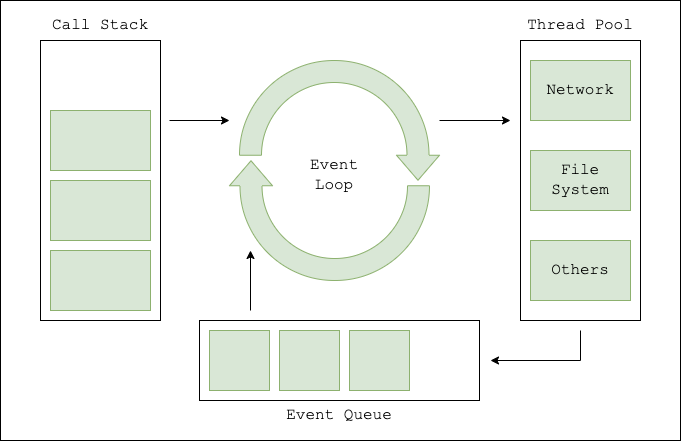
The following segment of the "What the heck is the event loop anyway?" talk brilliantly visualizes this entire process.
What the heck is the event loop anyway? | Philip Roberts | JSConf EU
This is the core of the talk, where all the pieces come together to explain asynchronous execution.
Watch from the introduction of async callbacks to the end of the AJAX example. This will walk you through: How setTimeout is handed off to the Web API. How the callback is placed in the queue when the timer finishes. How the Event Loop waits for the stack to be empty before moving the callback to the stack. Why setTimeout(fn, 0) works to defer execution. How other async operations like AJAX requests follow the same pattern.
Impact on Application Design: I/O vs. CPU
Understanding this model leads to a critical insight for application design: JavaScript, and particularly Node.js, excels at I/O-bound applications but performs poorly with CPU-bound tasks.
-
I/O-Bound Tasks: These are tasks that spend most of their time waiting for input/output operations to complete (e.g., reading/writing files, making database queries, handling network requests). For a web server, this is the vast majority of the work. The non-blocking model is perfect here, as the single thread can delegate thousands of I/O tasks and efficiently handle their results as they complete, without ever being idle.
-
CPU-Bound Tasks: These are tasks that require heavy computation (e.g., complex calculations, image processing, data compression). If you run a long, synchronous computation, it will sit on the call stack, block the event loop, and make your application unresponsive.
The following article provides an excellent practical demonstration of this trade-off in a Node.js context.
A simple guide to JavaScript concurrency in Node.js
This article from TSH.io uses a server-side example to contrast blocking and non-blocking I/O and shows the danger of CPU-intensive work.
Read from the beginning down to the heading "What about non I/O operations?". Pay close attention to: The explanation of Node.js's single-threaded approach. The difference between blocking and non-blocking I/O. The performance benchmark comparing a synchronous vs. asynchronous file-reading endpoint. The results are dramatic. The brief explanation of how the Event Loop manages callbacks. Finally, read the section on non-I/O operations to see how a CPU-intensive task can make the entire API unresponsive.
As the article demonstrates, the guiding principle is to always favor non-blocking, asynchronous APIs for I/O operations. For unavoidable CPU-bound work, modern JavaScript environments provide escape hatches like Worker Threads, which allow you to run heavy computations on a separate thread without blocking the main event loop. We will touch on these advanced features later in the course.
Conclusion
In this lesson, we explored the core of JavaScript's concurrency model. Despite being single-threaded, it achieves high performance for I/O-heavy applications through a clever event-driven architecture.
Key Takeaways:
- JavaScript has a single thread of execution and a single call stack.
- Slow, synchronous operations block the thread, making applications unresponsive. The cardinal rule of JavaScript performance is: Don't block the event loop.
- Concurrency is achieved through an asynchronous, non-blocking model involving the call stack, Web/C++ APIs, an event queue, and the event loop.
- This model makes JavaScript exceptionally well-suited for I/O-bound applications (like web servers and UIs) but poorly suited for CPU-bound tasks unless mechanisms like Worker Threads are used.
We've now completed our foundational look at JavaScript's execution model. In our next lesson, we will begin a new module, "Functions as First-Class Citizens," and explore the different ways functions can be defined and used in JavaScript, starting with the distinctions between function declarations, function expressions, and arrow functions.