Introduction
Welcome to the first lesson of our module on "Functions as First-Class Citizens." In the previous module, we established a solid foundation for how JavaScript executes code, exploring the call stack, event loop, and the crucial concept of hoisting. Now, we shift our focus from how code runs to the different ways we can write one of JavaScript's most fundamental building blocks: functions.
Today's goal is to differentiate between the three primary ways of defining functions: function declarations, function expressions, and arrow functions. As a software engineer, you'll recognize that syntax often carries significant semantic weight, and this is certainly true in JavaScript. We'll examine how the choice of function syntax impacts behavior, specifically regarding hoisting and the binding of the this keyword. This understanding is critical for writing predictable and maintainable code.
Function Declarations vs. Function Expressions
In JavaScript, functions are "first-class citizens," meaning they can be treated like any other value: stored in variables, passed as arguments, and returned from other functions. This property gives rise to two classic ways of defining them.
Function Declarations
This is likely the most familiar syntax for defining a function. It's a standalone statement that begins with the function keyword.
// Function Declaration
function calculateArea(width, height) {
  return width * height;
}
The most important characteristic of a function declaration is that it is hoisted. As we touched upon in Module 1, hoisting means the JavaScript engine moves the entire function definition to the top of its scope during the compile/creation phase, before any code is executed. This allows you to call a function before it appears in your code.
console.log(calculateArea(10, 5)); // Outputs: 50

function calculateArea(width, height) {
  return width * height;
}
This behavior can be useful for organizing code, allowing you to place primary logic at the top of a file and helper functions at the bottom.
Function Expressions
A function expression defines a function as part of a larger expression, typically a variable assignment. The function can be named, but it's often anonymous.
// Function Expression
const calculateArea = function(width, height) {
  return width * height;
};
Unlike declarations, function expressions are not hoisted in the same way. The variable declaration itself (const calculateArea) is hoisted, but its assignment (the function body) is not. The variable remains uninitialized until the line of assignment is executed.
- If you use
constorlet, the variable enters a "Temporal Dead Zone" (TDZ) from the start of the scope until its declaration, and attempting to access it results in aReferenceError. - If you (in older code) use
var, the variable is hoisted and initialized withundefined. Calling it before assignment results in aTypeError, because you are trying to invokeundefined.
// console.log(calculateArea(10, 5)); // Throws ReferenceError: Cannot access 'calculateArea' before initialization

const calculateArea = function(width, height) {
  return width * height;
};
To see this distinction in action, the following video provides a clear, hands-on demonstration.
JavaScript Hello World - Function Declaration vs Function Expression | Hoisting | Arrow Functions
The "Coding Garden" channel offers a practical look at these concepts. This video explains the syntax and, crucially, the hoisting behavior.
Watch the following segments: Function Declaration: The classic syntax. Function Expression: Assigning a function to a variable. Hoisting Differences: This is the key part. Pay close attention to the explanation of the ReferenceError with const and the TypeError with var.
For a more formal and detailed reference, the MDN Web Docs are an excellent resource.
Functions - JavaScript - MDN Web Docs
This guide provides the canonical explanation for function definitions in JavaScript.
Please read the following sections: In "Defining functions", read the subsection on Function declarations for the basic syntax. Continue to the next subsection on Function expressions to see how they differ syntactically. Finally, read the subsection Function hoisting, which directly contrasts the two types and explains why one can be called before it's defined and the other cannot.
The key differences are neatly summarized in the following table.

Arrow Functions (ES6+)
Introduced in ES6, arrow functions provide a more concise syntax and, more importantly, a different behavior for the this keyword.
An arrow function is always an expression and is syntactically compact.
// Arrow Function
const calculateArea = (width, height) => {
  return width * height;
};

// With an implicit return for single-expression bodies:
const calculateAreaConcise = (width, height) => width * height;
Like function expressions, arrow functions are not hoisted. Their main differentiators lie elsewhere.
Key Difference 1: Lexical this Binding
This is the most significant difference and the primary reason for their introduction.
- In a regular function (declaration or expression), the value of
thisis determined dynamically when the function is called. It depends on how it's called (e.g., as a method of an object, as a standalone function). This dynamic nature can be a common source of bugs, especially with callbacks. - In an arrow function,
thisis bound lexically. This means it inherits thethisvalue from its surrounding code block (the enclosing scope). It does not have its ownthiscontext.
This lexical binding solves a classic problem in JavaScript. Consider this common scenario with setTimeout:
function Person() {
  this.age = 0;

  // Using a regular function as a callback
  setInterval(function growUp() {
    // `this` here is NOT the Person instance. In non-strict mode, it's the global object (window/global).
    // Therefore, `this.age` is `undefined` or `window.age`, not the person's age.
    this.age++;
    console.log(this.age); // NaN
  }, 1000);
}

const p = new Person();
With an arrow function, the problem disappears because this is inherited from the Person function's scope:
function Person() {
  this.age = 0;

  setInterval(() => {
    // `this` is lexically bound to the Person instance.
    this.age++;
    console.log(this.age); // 1, 2, 3...
  }, 1000);
}

const p = new Person();
The following video from Web Dev Simplified masterfully illustrates this exact point.
JavaScript ES6 Arrow Functions Tutorial
This video, "JavaScript ES6 Arrow Functions Tutorial," clearly explains the crucial difference in this binding.
Watch the section from "what really makes arrow functions important". The example using a Person class and setTimeout is a canonical demonstration of why lexical this is so powerful.
Key Difference 2: No arguments Object
Regular functions have access to a special, array-like object named arguments that contains all arguments passed to the function. Arrow functions do not have this. Instead, you should use modern rest parameters.
// Regular function
function logArgs() {
  console.log(arguments);
}
logArgs(1, 'test', true); // Logs: [Arguments] { '0': 1, '1': 'test', '2': true }

// Arrow function
const logArgsArrow = (...args) => {
  // console.log(arguments); // ReferenceError: arguments is not defined
  console.log(args);
};
logArgsArrow(1, 'test', true); // Logs: [1, 'test', true]
The freeCodeCamp article below provides a great summary of these and other differences.
Arrow Functions vs Regular Functions in JavaScript
This article offers a clear breakdown of the practical differences between arrow functions and regular functions.
Focus on these sections: Start with this binding. It reinforces the concept with another set of examples. Read section 5, on hoisting, to confirm that arrow functions behave like expressions. Finally, read section 1, No arguments object, to understand this secondary but important distinction.
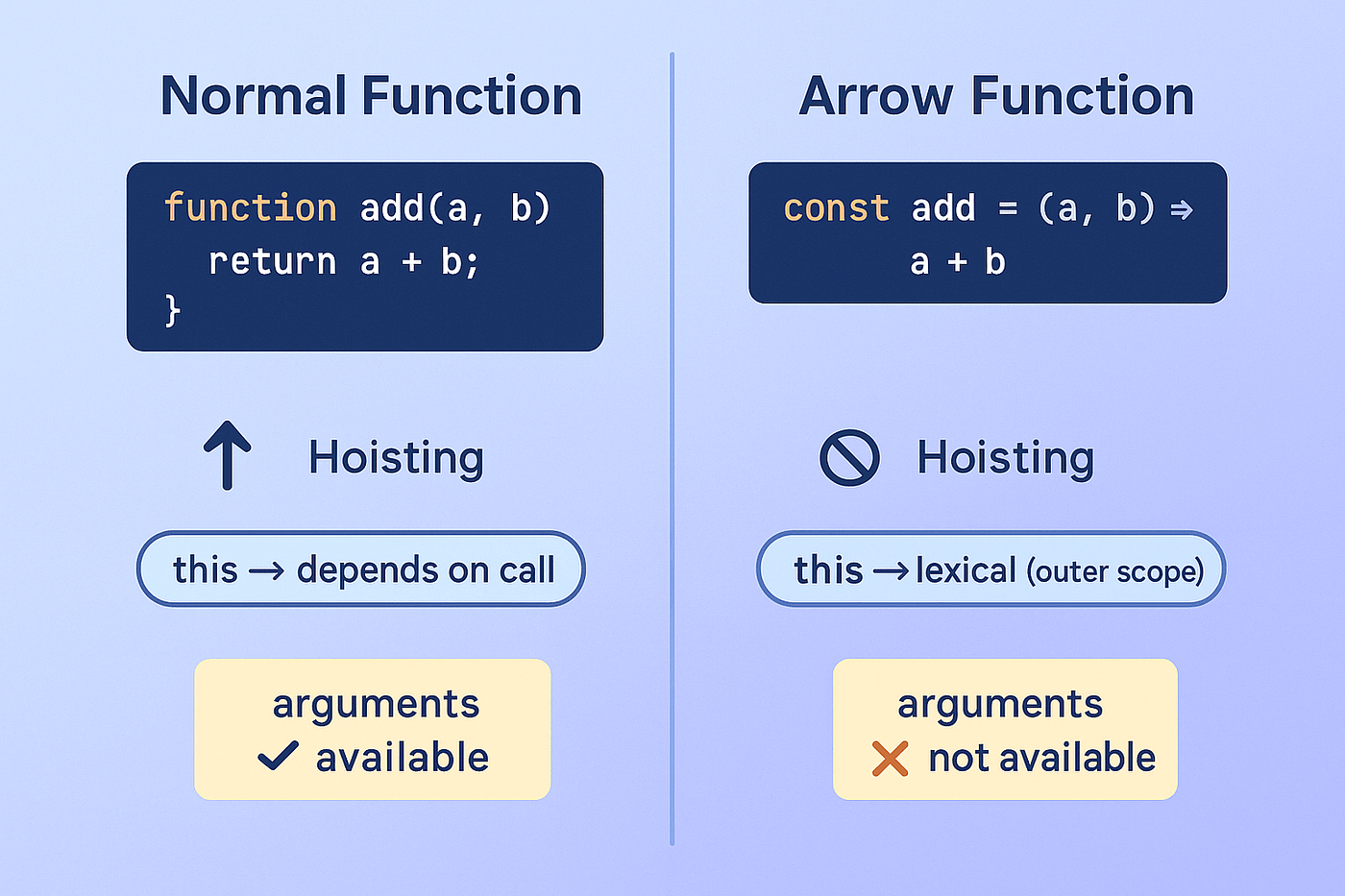
The image below provides a quick visual recap of the differences between normal functions and arrow functions.
When to Use Each
With these differences in mind, here is some practical guidance:
- Function Declarations: Use for top-level or standalone utility functions within a module. Their hoisted nature can improve code organization.
- Function Expressions: Less common now, but still useful if you need to conditionally define a function or pass a named function for better debug stack traces.
- Arrow Functions: Your modern default for most cases, especially for any function passed as a callback (e.g., to
map,filter,reduce,setTimeout, event listeners). Their lexicalthisis less error-prone and their syntax is more concise. Avoid them for object methods where you rely on dynamicthis(e.g.,myObject.myMethod()) and as constructor functions (they cannot be called withnew).
Conclusion
Today, we've dissected the three ways to define a function in JavaScript. Understanding their nuances is not just academic; it directly impacts the correctness and readability of your code.
Key Takeaways:
- Function Declarations (
function name() {}) are hoisted completely, making them available throughout their scope. They have a dynamicthis. - Function Expressions (
const name = function() {}) are not hoisted (only the variable declaration is). The variable cannot be accessed before its assignment. They also have a dynamicthis. - Arrow Functions (
const name = () => {}) are also expressions and not hoisted. Their defining features are a more concise syntax and a lexicalthis, which inherits its context from the surrounding scope. They also lack their ownargumentsobject.
In our next lesson, we will immediately apply this knowledge as we explore higher-order functions like map, filter, and reduce. These functions are built on the principle of passing other functions as arguments, a scenario where the concise syntax and lexical this of arrow functions shine.