Introduction
Welcome to the next lesson in our journey to master JavaScript. In our previous session, we focused on refining function interfaces using default parameters and destructuring, making them more readable and robust. We saw how to define what a function accepts. Today, we'll explore a different aspect of functions: using them to define when code runs.
This lesson addresses a cornerstone of JavaScript programming: implementing callbacks to handle results in both synchronous and asynchronous scenarios. As a software engineer, you're familiar with the concept of sequential execution. However, much of modern application development, from handling user input to fetching data from a server, doesn't happen in a neat, predictable order. Callbacks are the fundamental mechanism JavaScript uses to manage this complexity. We will see how they work in simple, synchronous cases and, more importantly, how they enable JavaScript's non-blocking, asynchronous execution model.
1. The Core Idea: Functions as Arguments
At its heart, a callback is simply a function that you pass as an argument to another function, with the expectation that it will be "called back" later. Since JavaScript treats functions as first-class citizens, they can be passed around just like any other value (e.g., numbers or strings).
This pattern is common even in synchronous code. A perfect example is the forEach method for arrays, which you've likely used before. It executes a provided function once for each array element.
To see this in action and understand how it works under the hood, this short video is an excellent starting point.
JavaScript Callbacks Explained in 5 Minutes (Essential for asynchronous code!)
The presenter, James Q Quick, first shows a familiar use case and then builds a custom version from scratch, which is a great way to solidify the concept.
First, watch the demonstration of a synchronous callback with the forEach method. Then, pay close attention to the next segment where he builds a custom myForEach function. This will demystify what a higher-order function like forEach is actually doing internally: it iterates and then calls back the function you provided.
As you can see, the function that accepts the callback (myForEach) is in complete control of when and with what arguments the callback is executed. This simple idea is the key to managing more complex asynchronous flows.
2. Why Asynchronicity Needs Callbacks
JavaScript runs on a single thread. This means it can only do one thing at a time. If it has to wait for a slow operation, like a network request or a timer, the entire program would freeze. This is called "blocking." For a web browser, this would mean a frozen UI where the user can't click, scroll, or type.
To solve this, JavaScript environments (like browsers and Node.js) use an event loop. When you start an asynchronous operation (e.g., setTimeout), you provide a callback function. The operation is handed off to the environment's APIs, which run outside of your main JavaScript thread. Once the operation is complete, your callback is placed in a queue. The event loop's job is to continuously check if the main call stack is empty. If it is, it takes the first item from the queue and pushes it onto the stack to be executed.
This diagram illustrates the key components involved.
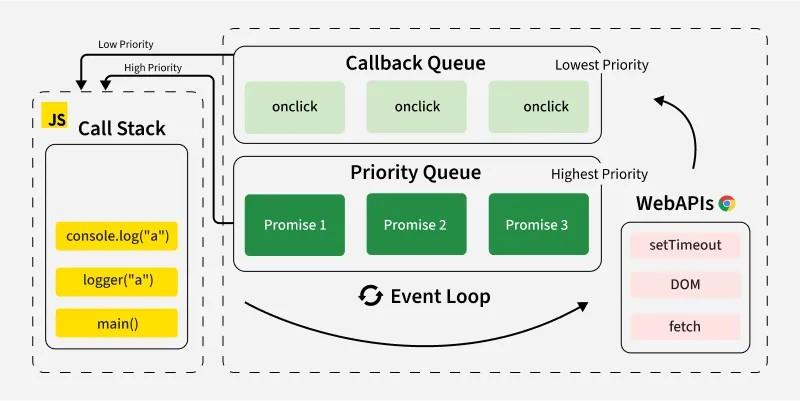
The following reading provides a clear explanation of this model, which is essential for understanding how your asynchronous code actually runs.
Understanding the Event Loop, Callbacks, Promises, and ...
This article from DigitalOcean explains the mechanics of JavaScript's concurrency model.
Read the section titled The Event Loop. Focus on understanding the distinct roles of the call stack (what's running now), the Web APIs (where async tasks live), and the callback queue (where completed tasks wait).
3. Implementing Asynchronous Callbacks
Now, let's put this theory into practice. The classic asynchronous function is setTimeout. By passing it a callback, we can delay the execution of code without blocking the main thread.
Understanding the Event Loop, Callbacks, Promises, and ...
This section of the DigitalOcean article demonstrates how to use a callback to control the execution order of asynchronous code.
Read the section on Callback Functions. The example refactors a set of functions to use a callback, ensuring that third() only runs after the setTimeout in second() has finished.
A common point of confusion arises when you need to pass arguments to your callback function. If you write setTimeout(myFunction(arg), 1000), you are calling myFunction immediately and passing its return value to setTimeout, which is not what you want. The correct way is to wrap it in another function.
This video from Ania Kubów explains this critical detail perfectly.
Callbacks in JavaScript Explained!
This video clearly demonstrates the common mistake and its solution.
Watch the segment from this point, where she explains why passing parameters directly invokes the function and how to correctly use an anonymous arrow function to defer the execution.
4. Handling Results: The Error-First Pattern
In real-world applications, asynchronous operations don't just happen; they produce a result or an error. A robust convention is needed to handle both outcomes. In the JavaScript world, particularly in Node.js, the standard is the error-first callback.
In this pattern, a callback function's first argument is always reserved for an error object. If the operation succeeds, this argument is null. If it fails, it contains an error object. Any subsequent arguments are for the successful result data.
// Node.js example of reading a file
const fs = require('fs');

fs.readFile('/path/to/my.file', 'utf8', (err, data) => {
  // 1. Always check for the error first.
  if (err) {
    console.error('Failed to read file:', err);
    return; // Stop execution
  }

  // 2. If err is null, proceed with the data.
  console.log('File content:', data);
});
This pattern enforces a clean, predictable way to handle both success and failure states. The Node.js documentation provides a concise explanation.
JavaScript Asynchronous Programming and Callbacks | Node.js Learn
This is the canonical explanation of the error-first pattern from the Node.js official learning platform.
Read the short section Handling errors in callbacks. The fs.readFile example is the classic demonstration of this essential pattern.
5. The Downside: Callback Hell
While callbacks are powerful, relying on them exclusively for complex, sequential asynchronous operations leads to a well-known problem: the "Pyramid of Doom," or "Callback Hell." When each operation depends on the result of the previous one, you end up with deeply nested callbacks that are difficult to read, debug, and maintain.
Understanding the Event Loop, Callbacks, Promises, and ...
This final section from the DigitalOcean article illustrates the problem that led to the creation of modern asynchronous tools like Promises.
Read the section on the Pyramid of Doom. The code example with multiple nested asynchronousRequest calls effectively demonstrates how quickly the code structure can degrade.
Understanding this limitation is crucial, as it provides the context for why Promises and async/await were introduced into JavaScript—topics we will master in a future module.
Conclusion
In this lesson, we've dissected the callback, the foundational building block of asynchronous JavaScript. You've seen that it's simply a function passed as an argument, but when combined with the event loop, it becomes a powerful tool for managing non-blocking operations.
Key Takeaways:
- Callbacks are functions passed as arguments to be executed later.
- They are used in both synchronous (e.g.,
array.forEach) and asynchronous (e.g.,setTimeout, event listeners) contexts. - Asynchronous callbacks prevent blocking by working with the JavaScript environment's event loop, call stack, and callback queue.
- The error-first callback
(err, data) => {}is the standard convention, especially in Node.js, for handling results and errors robustly. - Over-nesting callbacks leads to the "Pyramid of Doom," which harms code readability and maintainability.
In our next and final lesson of this module, we will look at another powerful function-related pattern: the IIFE (Immediately Invoked Function Expression), and explore its use cases for creating private scopes before the advent of modern module systems.