Welcome back! In our previous lesson, we explored the theory behind vector databases, understanding why they are essential for overcoming the scalability challenges of semantic search. You learned that these specialized databases use Approximate Nearest Neighbor (ANN) indexing to find semantically similar documents with incredible speed, forming the core of modern AI retrieval systems.
Today, we transition from theory to practice. This lesson is all about implementation. Your learning outcome is to set up a local vector database (e.g., ChromaDB) to store and index document embeddings. We will install the necessary tools, create a persistent database on your machine, define a structure to hold our knowledge, and add our first pieces of information. This is a foundational step in building the "Retrieval" component for our AI tutor project.
1. Introduction to ChromaDB
For our project, we'll use ChromaDB. It's an open-source vector database designed specifically for AI applications, making it perfect for our needs. It is developer-friendly and allows us to get started quickly without complex server configurations.
ChromaDB can operate in different modes. For development and our current purpose, we will use it in a local, persistent mode. This means it will run directly within our Python application and save its data to a folder on your disk, ensuring our knowledge base persists between sessions.
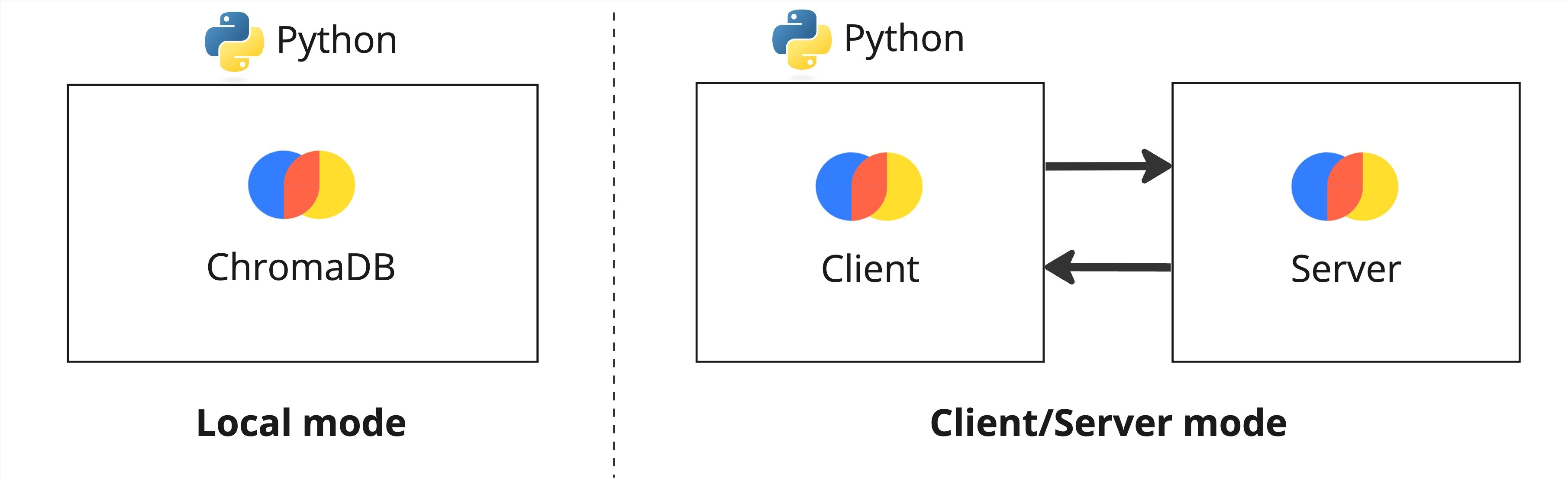
This image shows the two main ways to run ChromaDB. We will be using the "Local mode" on the left, where the database runs inside our Python script and saves data locally.
Let's start by exploring the core concepts and setup process.
Chroma DB Tutorial: A Step-By-Step Guide
This tutorial from DataCamp provides a great introduction to ChromaDB's features and setup.
Please read the following sections: "What is Chroma DB?" and "How does Chroma DB work?" to get a high-level overview. "Getting Started With Chroma DB". Focus on the installation command and the "Choosing a client mode" table. This section will guide you through initializing a PersistentClient, which is exactly what we need.
2. Setting Up Your First Vector Database
Now that you have an overview, let's get our hands dirty. The process involves three main steps:
- Install ChromaDB.
- Initialize a
PersistentClientto manage the database on your disk. - Create a collection, which is analogous to a table in a SQL database, to store our embeddings.
The following video provides a concise walkthrough of this entire process.
Getting Started with ChromaDB - Lowest Learning Curve Vector Database For Semantic Search
The video "Getting Started with ChromaDB" by Johnny Code is a quick, practical demonstration of the initial setup.
Watch from the beginning to the setup. This will show you the installation and the creation of a client and a collection.
Your Turn: Initial Setup
-
Open your project environment in your terminal and install ChromaDB:
pip install chromadbAs mentioned in the DataCamp article, ChromaDB requires SQLite version 3.35+. If you encounter issues and are using a Python version older than 3.11, installing
pysqlite3-binarycan help:pip install pysqlite3-binary. -
Create a new Python script (e.g.,
setup_db.py). Inside, let's initialize the client and create our first collection.import chromadb # 1. Initialize a PersistentClient. Data will be stored in the 'chroma_data' directory. client = chromadb.PersistentClient(path="chroma_data") # 2. Create a new collection or get it if it already exists. # We will use the default embedding function for now. collection = client.get_or_create_collection(name="ai_tutor_kb") print("✅ ChromaDB client initialized and collection 'ai_tutor_kb' is ready.") print(f"Number of items in collection: {collection.count()}")
When you run this script, ChromaDB will create a chroma_data directory in your project folder. This is your vector database!
3. Adding Documents to the Collection
With our collection ready, we can now add data to it. The collection.add() method is the primary way to do this. It requires three key arguments:
documents: A list of strings containing the text you want to store.ids: A list of unique string identifiers for each document. This is crucial for updating or deleting specific items later.metadatas: A list of dictionaries, where each dictionary contains metadata associated with a document (e.g., source, chapter, topic).
Let's see how this works in detail. The following resource provides a clear, complete example.
Embeddings and Vector Databases With ChromaDB
This section from a Real Python article gives a thorough, hands-on example of setting up a collection and adding documents.
Read the section "Meet ChromaDB for LLM Applications". Pay close attention to the code block where documents, genres (as metadata), and ids are defined and then passed to collection.add().
ChromaDB handles the embedding process for you automatically. When you call add(), it takes the documents, passes them through its default embedding model (all-MiniLM-L6-v2), and stores the resulting vectors.
Your Turn: Adding Your First Documents
Now, let's expand your setup_db.py script to add some initial data to our "knowledge base."
import chromadb

client = chromadb.PersistentClient(path="chroma_data")
collection = client.get_or_create_collection(name="ai_tutor_kb")

# Define the documents, metadata, and IDs
docs = [
    "A vector database is a database designed to store, manage, and search embedding vectors.",
    "ChromaDB is an open-source vector database for building AI applications.",
    "The 'add' method is used to insert documents into a ChromaDB collection.",
    "Semantic search retrieves information based on meaning rather than keywords."
]

meta = [
    {'source': 'lesson_9', 'topic': 'Vector DB'},
    {'source': 'lesson_9', 'topic': 'ChromaDB'},
    {'source': 'lesson_9', 'topic': 'ChromaDB'},
    {'source': 'lesson_8', 'topic': 'Semantic Search'}
]

ids = [
    "doc1",
    "doc2",
    "doc3",
    "doc4"
]

# Add the data to the collection
# Note: if you run this multiple times, ChromaDB will upsert the data if the IDs already exist.
collection.add(
    documents=docs,
    metadatas=meta,
    ids=ids
)

print("✅ Documents added to the collection.")
print(f"Number of items in collection: {collection.count()}")

# Optional: You can inspect an item
retrieved_item = collection.get(ids=["doc1"])
print("Retrieved item:")
print(retrieved_item)
Run this script. You should see the count increase to 4. If you run it again, the count will remain 4 because ChromaDB recognizes the existing IDs and updates the entries instead of creating duplicates. This upsert behavior is incredibly useful.
4. The Importance of Deterministic IDs
In the simple example above, we used static IDs like "doc1". In a real RAG system where you ingest hundreds of documents, you need a systematic way to generate unique and deterministic IDs. A deterministic ID is one you can recreate from the document's properties. For example, you could create an ID from the file name, page number, and chunk number: filename-page_4-chunk_2.
This is critical because it allows you to check if a document chunk is already in the database before adding it, preventing duplicates and enabling you to update or delete specific pieces of content reliably.
The following video explains this concept clearly.
Python RAG Tutorial (with Local LLMs): AI For Your PDFs
This clip from the "Python RAG Tutorial" by pixegami gives an excellent explanation of why and how to create deterministic IDs for your document chunks.
Watch the segment from unique IDs. Focus on the logic of combining source path, page number, and chunk index to create an ID that is both unique and reproducible.
We will implement this ID generation strategy in our next lesson when we ingest a larger corpus of documents. For now, understanding the concept is the key takeaway.
Conclusion
Congratulations! You have successfully set up your first local vector database. You've moved from the abstract concept of a vector database to a tangible, working implementation on your own machine.
Key Takeaways:
- ChromaDB is a powerful yet easy-to-use vector database for local development.
- The
PersistentClientensures your data is saved to disk and persists across sessions. - A collection acts like a table, storing your documents, their embeddings, unique IDs, and metadata.
- The
collection.add()method handles both embedding and storing documents, with an automaticupsertbehavior based on document IDs. - Creating unique and deterministic IDs is crucial for managing the database as it grows.
You have now built the foundational storage layer of our RAG system.
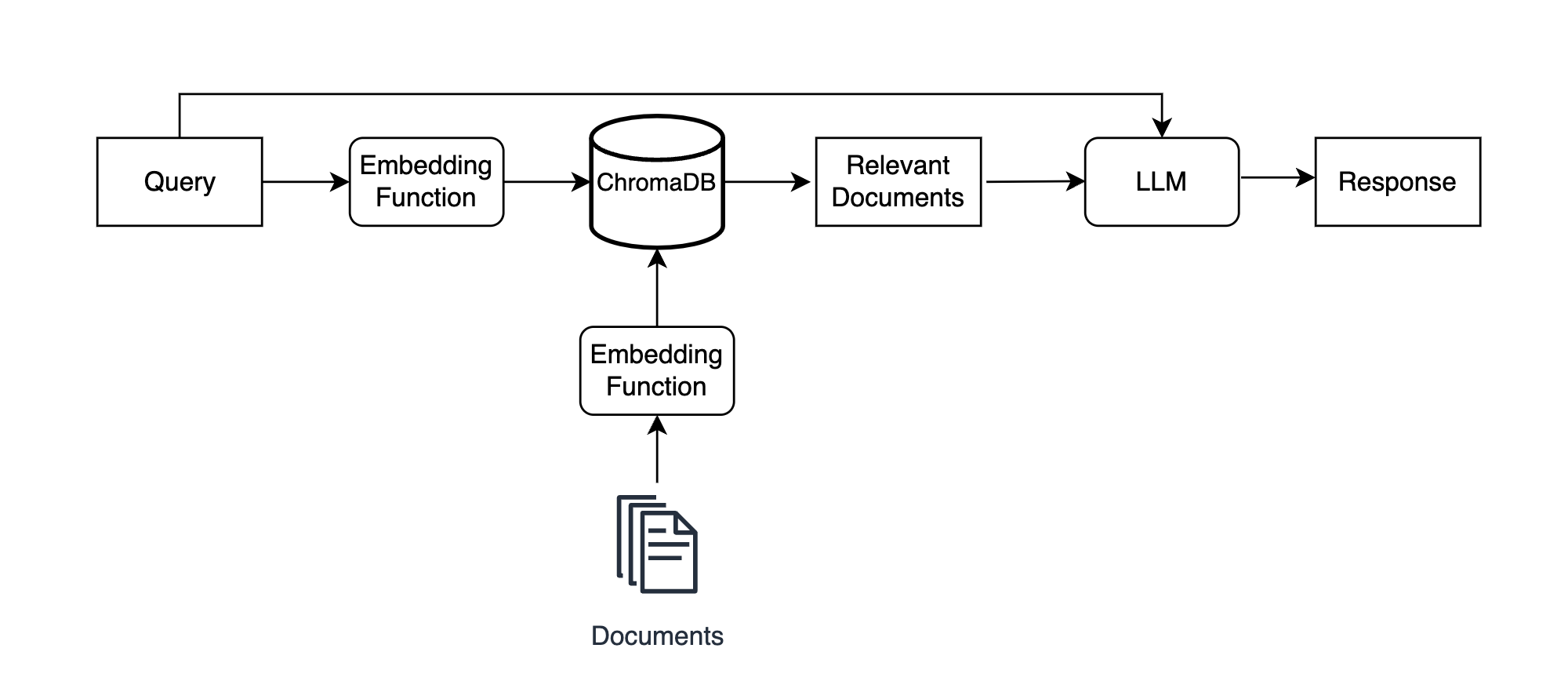
In the RAG architecture, you have just implemented the "ChromaDB" component. It is now ready to be filled with knowledge.
In the next lesson, we will focus on the pipeline that feeds this database. We'll take a set of source documents, learn how to split them into effective chunks, and then perform a bulk ingestion into the ChromaDB collection you created today.