In our last lesson, you built the foundation for our AI Tutor's knowledge base by setting up a persistent ChromaDB vector store. You learned how to initialize the database, create a collection, and manually add a few pieces of information. This gave you a hands-on feel for the "storage" component of our system.
Today, we will build the automated pipeline that feeds this database. Your learning outcome is to ingest a corpus of text documents, chunk them, and store their embeddings in the vector database. We'll move from manually adding single documents to processing an entire folder of knowledge, a crucial step in making our RAG system scalable and useful.
This process, known as the "ingestion pipeline," involves three key stages: loading the raw data, splitting it into manageable pieces (chunking), and finally, converting those pieces into embeddings to be stored.

This diagram shows the "Data preparation" workflow we will build today: taking reliable data sources, breaking them into chunks, and storing them in our vector store.
1. The "Why" of Chunking
Before we write code, it's essential to understand why we need to chunk documents. We can't simply take a large text file, create a single embedding for it, and store it. There are two main reasons for this:
- Context Window Limits: Large Language Models have a finite context window—the amount of text they can consider at one time. If we retrieve an entire 10-page document for a very specific question, most of that text will be irrelevant noise, and it might not even fit into the model's context window.
- Retrieval Precision: Semantic search works by finding text that is most similar in meaning to a query. A small, focused query will get lost if compared against a massive, diverse document. By breaking the document into smaller, thematically coherent chunks, we increase the chances of finding a highly relevant, concise piece of information that directly answers the user's question.
The goal is to create chunks that are small enough to be precise but large enough to retain their semantic meaning.
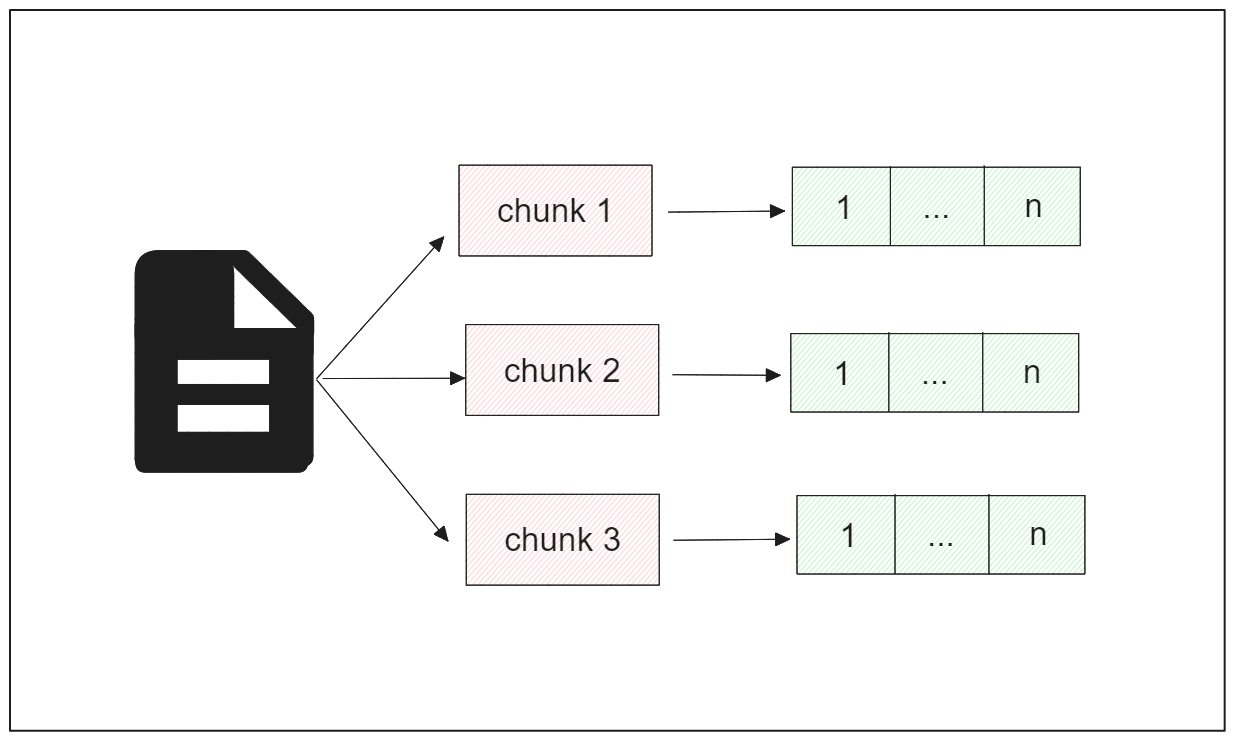
This image illustrates our goal: to take a document, split it into smaller chunks, and convert each chunk into its own numerical vector (embedding) for storage.
2. Chunking Strategies
There are many ways to split text. A naive approach, like splitting every 1000 characters, could cut sentences in half and destroy the meaning. A more intelligent approach is needed.
The video below explores various chunking strategies, from basic character splitting to more advanced semantic methods. For our purposes, we will focus on Recursive Character Splitting, which is a robust and widely used default strategy. It tries to split text along natural boundaries (like paragraphs, then sentences) to keep related content together.
Chunking Strategies in RAG: Optimising Data for Advanced AI Responses
The video "Chunking Strategies in RAG" by Mervin Praison provides an excellent conceptual overview of why chunking is important and demonstrates several techniques.
Watch these two segments to build your intuition: Why chunking is important: This explains the problems with poor chunking. Character and Recursive Splitting: This section demonstrates the difference between naive character splitting and the more intelligent recursive method. Pay attention to how recursive splitting preserves sentence structure and the role of chunk_size and chunk_overlap.
3. Building the Ingestion Pipeline with LangChain
Now, let's put these concepts into practice. We'll use the LangChain framework, which provides convenient tools that handle much of the boilerplate code for us. Our pipeline will have three steps:
- Load: Use a
DirectoryLoaderto read all.txtfiles from a specified folder. - Split: Use
RecursiveCharacterTextSplitterto chunk the loaded documents. - Store: Use
Chroma.from_documents()to automatically generate embeddings for the chunks and save them to our persistent database.
The following video demonstrates this exact workflow. It's a concise, practical guide to implementing the entire ingestion pipeline.
LangChain Retrieval QA Over Multiple Files with ChromaDB
Sam Witteveen's tutorial, "LangChain Retrieval QA Over Multiple Files," directly shows the process we are about to implement.
Watch these two key segments: Loading and Splitting: See how to use DirectoryLoader and a text splitter to prepare documents. Creating the Vector Store: This shows how to initialize embeddings and use Chroma.from_documents to create and persist the database in one step.
4. Your Turn: Ingesting the Knowledge Base
It's time to build this pipeline for our AI Tutor project.
Step 1: Prepare Your Knowledge Source
First, we need some documents for our tutor to learn from. Since the ultimate goal is an AI tutor that can help with technical subjects, let's use SQL documentation as our source material.
- In your project directory, create a new folder named
knowledge_base. - Inside this folder, create 3-4 new text files (e.g.,
01_select.txt,02_joins.txt,03_groupby.txt). - Go to an online SQL tutorial (like W3Schools or the PostgreSQL official documentation) and copy-paste the content about
SELECTstatements,JOINs, andGROUP BYinto your respective text files. The more content you add, the more knowledgeable your RAG system will be.
Step 2: Write the Ingestion Script
Now, create a new Python script named ingest.py. This script will contain our full pipeline.
First, ensure you have the necessary libraries installed. Your background with Python frameworks will make this familiar. We need LangChain and its integrations.
pip install langchain langchain-community langchain-chroma openai tiktoken
Note: We install openai because we will use their embedding model, which is a common and high-performing choice. You will need an OpenAI API key.
Here is the complete script for ingest.py.
import os
import shutil
from langchain_community.document_loaders import DirectoryLoader
from langchain.text_splitter import RecursiveCharacterTextSplitter
from langchain_community.vectorstores import Chroma
from langchain_community.embeddings import OpenAIEmbeddings

# --- Configuration ---
# You must have an OPENAI_API_KEY environment variable set for this to work.
# You can set it in your terminal before running the script, e.g.:
# export OPENAI_API_KEY='your_api_key_here'

KNOWLEDGE_BASE_PATH = "knowledge_base"
CHROMA_DB_PATH = "chroma_data"

def main():
    """
    Main function to run the ingestion pipeline.
    """
    # 1. Clean up old database directory
    if os.path.exists(CHROMA_DB_PATH):
        print(f"🧹 Deleting old database at {CHROMA_DB_PATH}")
        shutil.rmtree(CHROMA_DB_PATH)

    # 2. Load documents from the knowledge base directory
    print(f"📚 Loading documents from {KNOWLEDGE_BASE_PATH}")
    loader = DirectoryLoader(KNOWLEDGE_BASE_PATH, glob="**/*.txt")
    documents = loader.load()
    print(f"Loaded {len(documents)} documents.")

    # 3. Split documents into chunks
    print("🔪 Splitting documents into chunks...")
    text_splitter = RecursiveCharacterTextSplitter(
        chunk_size=1000,
        chunk_overlap=200,
        length_function=len,
        add_start_index=True, # Adds the start index of the chunk in the original document
    )
    chunks = text_splitter.split_documents(documents)
    print(f"Split documents into {len(chunks)} chunks.")

    # You can inspect a chunk to see its content and metadata
    # print("\n--- Sample Chunk ---")
    # print(chunks[0].page_content)
    # print(chunks[0].metadata)
    # print("--------------------\n")

    # 4. Create and persist the vector store
    print("💾 Creating and persisting vector store...")
    db = Chroma.from_documents(
        chunks,
        OpenAIEmbeddings(),
        persist_directory=CHROMA_DB_PATH
    )
    print(f"✅ Vector store created successfully with {db._collection.count()} items.")


if __name__ == "__main__":
    main()
Before you run the script, make sure to set your OPENAI_API_KEY as an environment variable in your terminal.
Execute the script:
python ingest.py
You should see output indicating that documents were loaded, split into chunks, and finally stored in your chroma_data directory. Congratulations, you have successfully ingested your first knowledge base!
For more details on document loading and chunking strategies within LangChain, the following tutorial is an excellent resource for deeper study.
Build Your First RAG System Step-by-Step - LangChain Tutorials
This LangChain tutorial provides a comprehensive guide to building a RAG system, with detailed code and explanations for each step.
Focus on these sections to solidify your understanding: "How to Load Documents for RAG": This explains the DirectoryLoader in more detail. "How to Chunk Documents for RAG - Best Practices Guide": This section offers valuable rules of thumb for choosing chunk_size and chunk_overlap. "How to Create Vector Stores with ChromaDB": This reinforces the process of creating the vector store and explains what happens under the hood.
Conclusion
In this lesson, you have built a critical piece of our AI Tutor: the automated ingestion pipeline. You now have a repeatable process to transform a directory of text files into a structured, searchable knowledge base.
Key Takeaways:
- The Ingestion Pipeline: Consists of three steps: loading documents, chunking them, and storing their embeddings.
- Chunking is Crucial: It improves retrieval precision and manages the LLM's context window. The
RecursiveCharacterTextSplitteris a smart default choice that respects text structure. - LangChain Simplifies the Process: Tools like
DirectoryLoaderandChroma.from_documentsabstract away complex logic, allowing you to build a powerful pipeline with minimal code. - Persistent Knowledge: Your vector store is saved to disk, meaning you only need to run the ingestion process when your source documents change.
You have now prepared all the data for the "Retrieval" part of Retrieval-Augmented Generation.
In our next lesson, we will complete the loop. You will learn how to take a user's question, convert it into an embedding, and use it to perform a semantic search against the database you just created to find the most relevant chunks of information.