Hello! In our last session, we successfully converted text into meaningful numerical representations called embeddings using sentence-transformers. We also saw how to measure semantic similarity using cosine similarity. However, you likely noticed that our practice exercise involved a linear scan: comparing the query embedding to every single embedding in our knowledge base. This approach works for five sentences but would be far too slow for the millions of documents we might encounter in a real-world application.
This lesson directly addresses that scalability challenge. Our goal is to explain the concept of a vector database and its role in semantic search. You will learn how these specialized databases are designed to store and efficiently search through massive collections of embeddings, forming the backbone of the "Retrieval" step in our AI tutor's RAG architecture.
1. The Problem: Searching for Meaning
Traditional databases, which you're familiar with through SQL, are excellent at structured data retrieval. They find exact matches or patterns based on keywords. However, they struggle with understanding semantics or meaning. A query for "what are the clothing rules?" would fail to find a document that talks about the "office dress code" because the keywords don't match. This disconnect is often called the "semantic gap."
To see this limitation in action, and to understand how vector databases are proposed as the solution, let's watch the beginning of this video.
How does a Vector Database work?
The video "How does a Vector Database work?" from KodeKloud provides a clear introduction to the problem.
Watch from the beginning up to the introduction. Pay close attention to the contrast between searching by "value" (traditional SQL) and searching by "meaning" (vector databases).
As the video highlights, the goal is to shift from keyword matching to meaning-based retrieval.
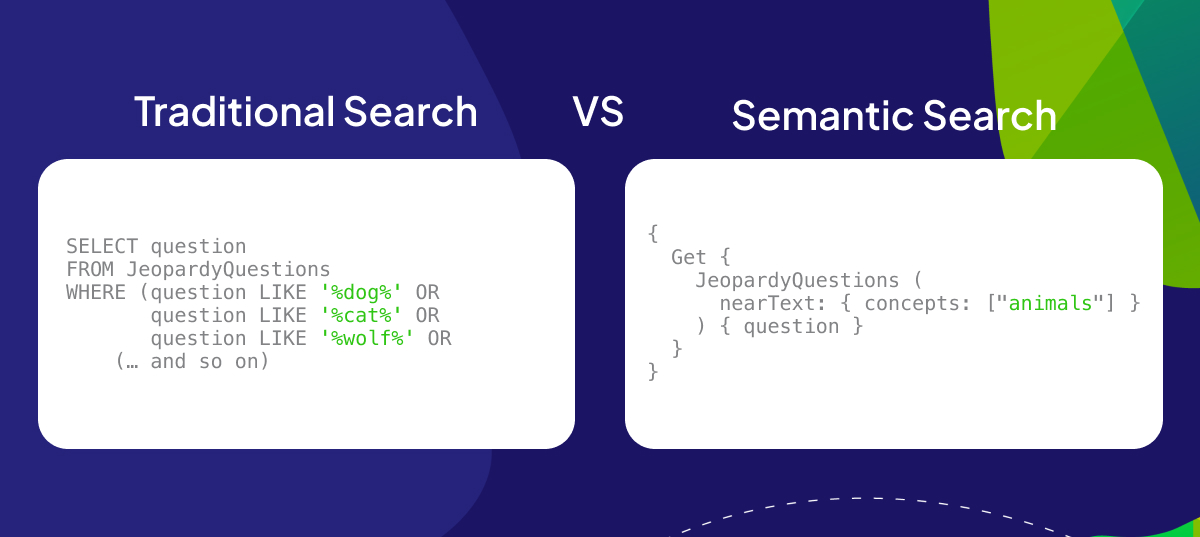
This ability to search by concept is precisely what vector databases are built for.
2. What is a Vector Database?
A vector database is a type of database specifically designed to store, manage, and search high-dimensional vectors, like the text embeddings we created in the last lesson.
Unlike a traditional database that indexes data based on its value (e.g., in a B-Tree), a vector database creates special indexes on the vectors themselves. This allows it to perform incredibly fast similarity searches to find the vectors that are "closest" to a given query vector.
For a formal definition and to understand its role in modern AI applications, please read the following excerpt.
What is a Vector Database & How Does it Work? Use ...
This article from Pinecone, a leading vector database provider, offers a clear and concise definition.
Read the section "What is a Vector Database?". Focus on its core function: indexing embeddings for fast retrieval and similarity search. Note the key difference it points out between vector databases and traditional scalar-based databases.
3. How Vector Search Works: From Intuition to Implementation
The core idea behind vector search is geometric. Since embeddings represent meaning as points in a high-dimensional space, finding similar documents is equivalent to finding the nearest points in that space.
This process involves two main phases:
- Ingestion (Write Path): Taking your documents (text, images, etc.), converting them into embeddings, and storing them in an indexed structure.
- Search (Query Path): Taking a user's query, converting it into an embedding, and using the index to find the most similar stored embeddings.
Let's break this down.
Step 1: Turning Meaning into Geometry
First, let's solidify the intuition that meaning can be represented as a position in space. The following guide is excellent for building this mental model without getting lost in complex mathematics.
Vectors, embeddings, and search: an intuition-first guide
This blog post by Nicolas Piplard provides one of the best intuitive explanations of vector search available.
Please read the following three sections: Start with "Everything starts as coordinates" to understand vectors as points in space. Continue to "Turning meaning into position" to see how these coordinates can represent semantic concepts. Finally, read "From intuition to real embeddings" and pay close attention to the paragraph that begins "Let's make it concrete." It perfectly describes the semantic search process.
The key takeaway is powerful: "We don’t compare text anymore. We compare distance."
Step 2: The Search Workflow
Now that you have the intuition, let's look at the complete architectural workflow. The ingestion and query processes rely on a few key components: an embedding model and the vector database itself, which handles indexing and search algorithms.
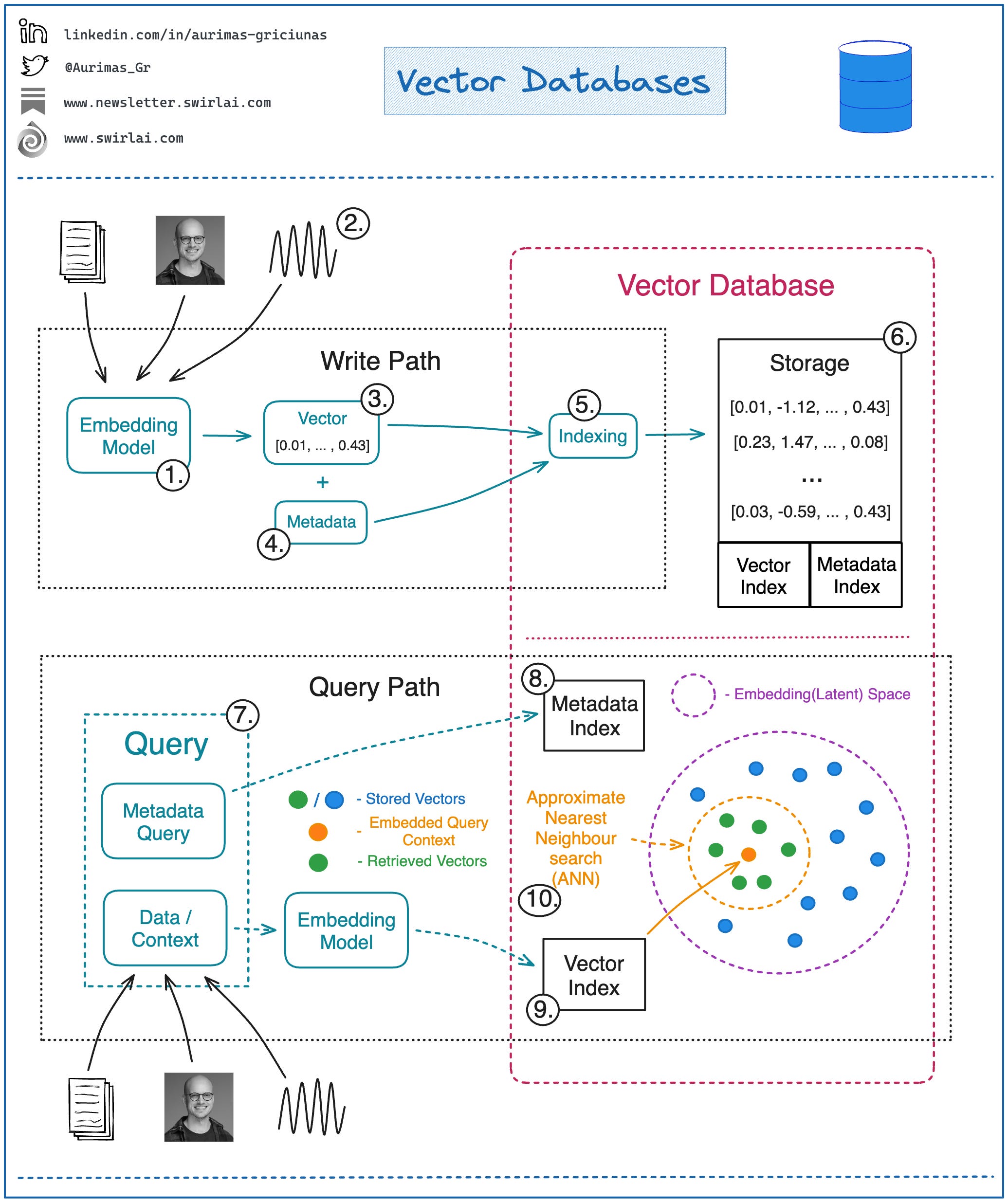
The "magic" that solves our scaling problem lies in the indexing algorithms used by the database, often referred to as Approximate Nearest Neighbor (ANN) algorithms. Given your background in algorithms and data structures, you can think of these as sophisticated data structures (like graphs or trees) that partition the high-dimensional vector space. Instead of comparing a query vector to every single point, the ANN algorithm can navigate this structure to quickly find the most likely nearest neighbors. This is a trade-off: it sacrifices perfect accuracy for a massive gain in speed, but modern ANN algorithms are so effective that the accuracy is often above 99%.
4. Key Concepts: Database vs. Index
It's important to distinguish between a vector index and a vector database.
- A vector index (e.g., FAISS from Meta AI) is a library that implements the core ANN search algorithm. It's just the search component.
- A vector database (e.g., Pinecone, ChromaDB, Weaviate) is a full-featured system built around a vector index. It provides a complete solution with APIs, data management (CRUD operations), metadata filtering, scalability, and security.
For our project, we will use a vector database because it provides a much more robust and developer-friendly experience.
What is a Vector Database & How Does it Work? Use ...
Let's return to the Pinecone article for a clear breakdown of this important distinction.
Read the section titled "What’s the difference between a vector index and a vector database?". This will clarify the value a full database provides over a simple index library.
Finally, as we've discussed, the notion of "closeness" is quantified by a similarity measure. You've already used Cosine Similarity. Other common measures include Euclidean Distance (the straight-line distance between two points) and Dot Product. The choice of measure depends on the embedding model and the specific use case, but Cosine Similarity is a very common and effective default for text embeddings.
Conclusion
In this lesson, we demystified the technology that makes large-scale semantic search possible. You've moved from understanding the limitations of traditional search to grasping the core concepts behind vector databases.
Key Takeaways:
- Traditional databases search by keywords (value), while vector databases search by semantic meaning.
- A vector database stores high-dimensional vector embeddings and uses specialized indexing algorithms (ANN) to find the "nearest neighbors" to a query vector with extreme speed.
- The fundamental workflow involves ingesting documents by embedding and indexing them, and then querying by embedding the query and searching the index.
- A vector database is a complete system that offers data management, APIs, and scalability on top of a core vector index.
You now have the conceptual framework for the "Retrieval" component of our RAG system. In the next lesson, we will put this theory into practice. You'll set up a local vector database, ChromaDB, ingest a corpus of documents by creating and storing their embeddings, and perform your first true semantic search at scale.