Welcome back! In our last lesson, we took a high-level tour of the Transformer architecture, the engine behind modern large language models. You learned about core concepts like tokenization, self-attention, and the decoder-only structure used in models like GPT.
Now, it's time to bridge the gap from theory to practice. This lesson focuses on a fundamental application of these models: creating text embeddings. Your learning outcome is to use a pre-trained model from Hugging Face to generate text embeddings. These embeddings are not just an abstract concept; they are the numerical representation of meaning that will power the knowledge retrieval for our AI tutor chatbot.
1. What Are Text Embeddings?
In the previous lesson, you saw that the first step in a Transformer is to convert input tokens into vectors. These vectors are called embeddings. A pre-trained model has already learned to create very rich, meaningful embeddings from processing vast amounts of text. Our goal is to leverage that pre-trained knowledge.
Think of an embedding as a coordinate in a high-dimensional "meaning space." Texts with similar meanings will have coordinates that are close to each other.
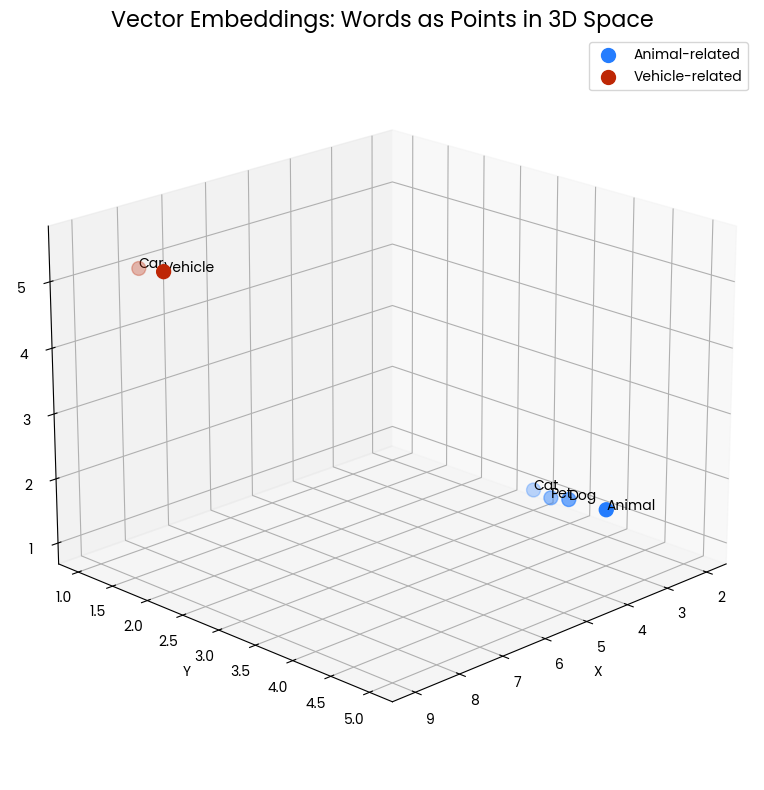
To build our intuition, let's start with a short reading that explains what embeddings are and distinguishes between older and modern approaches.
This article from OpenCV provides a great non-technical introduction to the concept of vector embeddings.
Please read the introduction and the section on "Text Embeddings". Focus on how modern models like BERT (which we will be using) create contextual embeddings, which are much more powerful than the static embeddings of older models.
The key takeaway is that we can use a pre-trained model to convert any piece of text into a dense vector of numbers that captures its semantic meaning.
2. Generating Embeddings with Hugging Face and sentence-transformers
Hugging Face is a company and an open-source community that provides a vast collection of pre-trained models and tools to work with them. It's often called the "GitHub of Machine Learning." While their transformers library is the standard, an even more convenient library called sentence-transformers is purpose-built for creating high-quality sentence and paragraph embeddings.
This library handles many complexities for us, making the process incredibly straightforward. The following video provides a practical, code-focused walkthrough.
Sentence Transformers: Sentence Embedding, Sentence Similarity, Semantic Search and Clustering |Code
This video by Pradip Nichite, "Sentence Transformers: Sentence Embedding...", demonstrates the core workflow we will use.
Watch these two segments to see how to get started: Installation and Model Loading: This part shows how to install the library and load a pre-trained model from the Hugging Face Hub. The model name, like 'all-MiniLM-L6-v2', is a unique identifier on the Hub. Encoding Sentences: Observe the use of the model.encode() method to convert a list of sentences into embeddings and inspect the resulting numerical vectors.
Let's codify this process. Here is the essential Python code to generate an embedding.
First, you'll need to install the library. You can do this in your terminal or a Jupyter notebook cell:
pip install sentence-transformers
Now, you can generate embeddings in just a few lines of Python:
from sentence_transformers import SentenceTransformer


# 1. Load a pre-trained model from the Hugging Face Hub
# The model is downloaded automatically and cached for future use.
model = SentenceTransformer('all-MiniLM-L6-v2')

sentences = [
    "The cat sits on the mat.",
    "Dogs are loyal companions."
]


# 2. Encode the sentences to get their embeddings
embeddings = model.encode(sentences)


# The result is a NumPy array, where each row is an embedding for a sentence.
print(embeddings.shape)


# Let's look at the embedding for the first sentence
print(embeddings[0])
Running this code will output the shape of the embeddings matrix (e.g., (2, 384)), indicating we have 2 embeddings, each with 384 dimensions. It will then print the 384 numbers that represent the first sentence.
3. Under the Hood: From Tokens to a Single Vector
You might recall from our last lesson that Transformer models actually output an embedding for every token in a sentence. So how does sentence-transformers produce a single vector for the entire sentence?
This is achieved through a pooling strategy. A common and effective method is mean pooling, where the model averages the token embeddings across the whole sentence.
Text embeddings & semantic search
This short clip from a Hugging Face video explains the concept of pooling visually.
Watch the segment from token embeddings to sentence embeddings. Pay attention to the distinction between the model's multi-vector output and the single-vector sentence embedding we need, and how mean pooling achieves this.
The sentence-transformers library automatically applies a pooling strategy that was determined to be best when the model was trained. For the all-MiniLM-L6-v2 model, this is mean pooling. Your background in data structures and algorithms might make you appreciate that this is essentially an averaging operation over a sequence of vectors, weighted by the attention mask to ensure padding tokens are ignored.
4. Application: Measuring Semantic Similarity
Now that we can convert sentences into vectors, what can we do with them? The most immediate application is to quantify how similar two sentences are in meaning. In the vector space, similarity is measured by "closeness." The standard metric for this is cosine similarity.
Cosine similarity measures the cosine of the angle between two vectors.
- A value of 1 means the vectors point in the exact same direction (identical meaning).
- A value of 0 means the vectors are orthogonal (unrelated meaning).
- A value of -1 means the vectors point in opposite directions (opposite meaning).
The sentence-transformers library provides a handy utility for this. Let's see it in action.
Sentence Transformers: Sentence Embedding, Sentence Similarity, Semantic Search and Clustering |Code
Let's return to the "Sentence Transformers" video to see how cosine similarity is used.
Watch the section from calculating cosine similarity. The video demonstrates calculating the similarity between two sentences and then between multiple pairs to find the most similar ones.
Here's a practical code example demonstrating this:
from sentence_transformers import SentenceTransformer, util

model = SentenceTransformer('all-MiniLM-L6-v2')


# Sentences with similar meaning
sentence1 = "A man is eating food."
sentence2 = "A man is eating a piece of bread."


# A sentence with a different meaning
sentence3 = "The girl is playing with a doll."


# Encode all sentences
embeddings = model.encode([sentence1, sentence2, sentence3])


# Calculate cosine similarity between sentence1 and sentence2
cos_sim_12 = util.cos_sim(embeddings[0], embeddings[1])
print(f"Similarity between '{sentence1}' and '{sentence2}': {cos_sim_12.item():.4f}")


# Calculate cosine similarity between sentence1 and sentence3
cos_sim_13 = util.cos_sim(embeddings[0], embeddings[2])
print(f"Similarity between '{sentence1}' and '{sentence3}': {cos_sim_13.item():.4f}")
You should see a high similarity score (e.g., > 0.75) for the first pair and a very low score for the second pair. This powerful capability is the foundation of semantic search, which is exactly what we need for our RAG chatbot.
Your Turn: Practice Semantic Search
Let's solidify your understanding with a small exercise.
Task:
Imagine you have a small knowledge base of sentences, and you want to find the sentence that is most relevant to a user's query.
- Create a new Python script or Jupyter Notebook.
- Copy and run the code block below.
- Analyze the output. Does the ranking of the results make sense?
from sentence_transformers import SentenceTransformer, util


# --- 1. Setup ---
model = SentenceTransformer('all-MiniLM-L6-v2')

query = "What is the capital of France?"

knowledge_base = [
    "The Eiffel Tower is a famous landmark in Paris.",
    "Paris is the capital and most populous city of France.",
    "The Louvre Museum in Paris is the world's largest art museum.",
    "Berlin is the capital of Germany.",
    "French is the official language spoken in France."
]


# --- 2. Generate Embeddings ---
# Encode the query and all knowledge base sentences
query_embedding = model.encode(query)
kb_embeddings = model.encode(knowledge_base)


# --- 3. Calculate Similarity ---
# Calculate cosine similarity between the query and all knowledge base sentences
similarities = util.cos_sim(query_embedding, kb_embeddings)


# --- 4. Find and Print the Best Match ---
# The result is a tensor of shape [1, num_sentences], so we access the first row
# We pair each sentence with its score
scored_results = []
for i, sentence in enumerate(knowledge_base):
    score = similarities[0][i].item()
    scored_results.append((score, sentence))


# Sort the results by score in descending order
scored_results.sort(key=lambda x: x[0], reverse=True)


# Print the ranked results
print(f"Query: {query}\n")
print("Top matching sentences:")
for score, sentence in scored_results:
    print(f"{score:.4f} - {sentence}")
This exercise simulates a miniature semantic search engine. You've just built the core component for the "Retrieval" part of Retrieval-Augmented Generation (RAG)!
Conclusion
In this lesson, you've made a significant leap from the theory of Transformers to their practical application. You now have a powerful tool in your NLP toolkit.
Key Takeaways:
- Text embeddings are numerical vectors that capture the semantic meaning of text.
- The Hugging Face Hub provides thousands of pre-trained models, and the
sentence-transformerslibrary makes it easy to use them. - The core workflow is to load a
SentenceTransformermodel and use the.encode()method to generate embeddings. - Cosine similarity is used to measure the "semantic distance" between embeddings, enabling powerful applications like semantic search.
You are now equipped to turn any text corpus into a searchable knowledge base. However, calculating similarity against every single document one by one doesn't scale to millions of documents. In our next lesson, we will solve this problem by exploring vector databases, which are specialized systems designed to store and search through massive collections of embeddings with incredible speed.