Welcome to the final lesson in our module on Pandas foundations! In our last session, we explored the power of groupby() to aggregate and summarize data, moving from raw tables to insightful summaries. However, the real world is messy. Aggregations like mean() or median() will fail or give incorrect results if your numbers are stored as text, your dates are inconsistent, or your categories are not standardized.
This lesson tackles that exact problem. We will focus on two crucial data cleaning skills: converting columns to their correct data types and handling messy or inconsistent string data. Mastering these techniques ensures your data is accurate, reliable, and ready for analysis. By the end of this lesson, you'll be able to transform chaotic raw data into a clean, structured format, paving the way for the next phase of our course: data visualization.
1. The Importance of Correct Data Types
Before we can perform any meaningful calculations, we must ensure our data is stored in the correct format. You can't find the average of a column of strings, even if those strings look like numbers (e.g., '$10.50'). Pandas has several data types, and using the right one is essential for both correctness and efficiency.
Data Type Conversion - Pandas Lesson 12
This article from DataTweets provides a concise introduction to the common data types in Pandas and illustrates the problems that arise when they are incorrect.
Read the sections "Converting Data Types" and "Understanding Data Types." This will give you a clear list of the common dtypes (object, int64, float64, etc.) and show a simple example of why you can't add numbers that are stored as strings.
2. Converting Data to the Right Type
Now, let's look at the main tools for fixing data types.
Converting to Numeric Types
The most common data type issue is numbers being stored as text (the object dtype). This often happens when a column contains currency symbols, commas, or text placeholders like 'N/A'.
While df['col'].astype(float) can work for clean data, it will fail if it encounters a single non-numeric value. A more robust and powerful tool is pd.to_numeric(). Its most important parameter is errors='coerce'. When you set errors='coerce', Pandas will automatically convert any value that cannot be turned into a number into NaN (Not a Number). This allows the conversion to succeed while flagging the problematic entries for you to handle later.
The following video provides a practical walkthrough of cleaning several messy columns, including those with text mixed in with numbers.
Clean Messy Data in Python (Step-by-Step for Beginners) | Pandas Tutorial 2025
The video "Clean Messy Data in Python" by Data Geek is my name demonstrates a complete cleaning workflow. We'll focus on the part where numeric columns are fixed.
Watch from ensuring numeric columns. Observe how the presenter first uses pd.to_numeric with errors='coerce' to handle text within a numeric column, and then fills the resulting NaN values with the column's mean.
Converting to Datetime
Similarly, dates are often loaded as strings. To perform any time-series analysis (like filtering by month or calculating the duration between two dates), you must convert them to a datetime object.
The function for this is pd.to_datetime(). It's very powerful and can intelligently parse most common date formats. Like pd.to_numeric(), it also has an errors='coerce' option, which will convert any unparseable date strings into NaT (Not a Time).

Converting to Boolean and Category Types
- Boolean: For columns with binary values like "Yes"/"No" or "True"/"False", you can convert them to a
booltype. The.map()method is perfect for this:df['is_manager'] = df['is_manager'].map({'yes': True, 'no': False}) - Category: For string columns with a limited set of unique, repeated values (like country names, status codes, or departments), converting the dtype to
categorycan significantly reduce memory usage and speed up operations likegroupby. Given your computer science background, you can think of this as replacing the strings with integer pointers to a unique lookup table.df['department'] = df['department'].astype('category')
3. Cleaning Messy String Data
Once your data types are correct, the next step is often to clean the content of your string columns. Pandas provides a special .str accessor that lets you apply a host of string manipulation methods to an entire Series at once.
Stripping Whitespace and Characters
Unwanted characters or whitespace at the beginning or end of a string are common. You can remove them with .str.strip(), .str.lstrip() (left strip), or .str.rstrip() (right strip).
The video below by Alex The Analyst provides a fantastic, step-by-step guide to cleaning a messy dataset. We'll start with his example of cleaning the 'Last Name' column, which has stray characters.
Data Cleaning in Pandas | Python Pandas Tutorials
In this video, "Data Cleaning in Pandas," Alex The Analyst tackles a messy customer dataset.
Watch from cleaning last names. Pay close attention to how he uses .str.strip() to remove unwanted characters like ... and / from the beginning and end of the names. Note the trick he shows at the end, where you can pass a single string containing all characters you want to strip.
Standardizing Case
Inconsistent capitalization (e.g., 'Male', 'male', 'MALE') can cause problems for grouping and analysis. You can easily standardize the case with .str.lower(), .str.upper(), or .str.title().
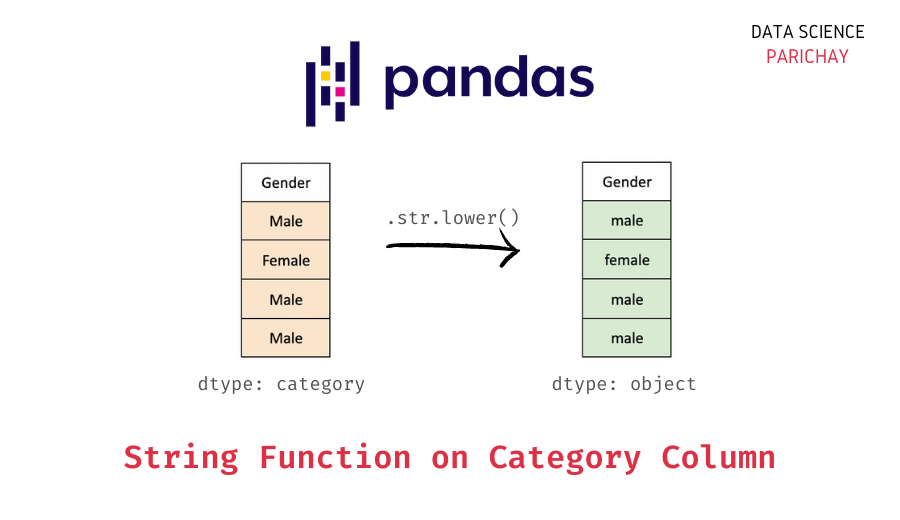
Splitting Columns
Sometimes, multiple pieces of information are packed into a single string column, such as a full address. The .str.split() method is perfect for separating these into distinct columns.
Let's return to the video from Alex The Analyst to see how he splits an address column into street, state, and zip code.
Data Cleaning in Pandas | Python Pandas Tutorials
We continue with the "Data Cleaning in Pandas" video.
Watch the segment from splitting the address. The key here is using expand=True, which tells Pandas to create new columns from the split results. Also, notice how he immediately assigns meaningful names to the new columns.
Advanced Cleaning with .str.replace() and Regular Expressions
The .str.replace() method is one of your most powerful tools. It can be used for simple substitutions (e.g., removing a currency symbol: df['Price'].str.replace('$', '')) or for complex pattern matching using regular expressions (regex).
Cleaning something like phone numbers, which come in many formats—(123)-456-7890, 123.456.7890, 1234567890—is a classic data cleaning challenge and a perfect use case for regex.
The next segment from the same video is a masterclass in this process. It's more complex, but the technique is invaluable for your data science toolkit.
Data Cleaning in Pandas | Python Pandas Tutorials
This is the most advanced part of our lesson, but also one of the most practical.
Watch carefully from cleaning phone numbers. Follow his two-step process: He first uses .str.replace(r'[^0-9]', '', regex=True) to remove all non-numeric characters, leaving only the digits. He then uses .apply() with a lambda function and string slicing to reformat all the numbers into a standard XXX-XXX-XXXX format. This is a fantastic real-world example of combining multiple techniques to solve a messy data problem.
Conclusion
You've now reached the end of our foundational module on Pandas. Data cleaning is not a one-time step but an iterative process of discovery and refinement. The cleaner your data, the more trustworthy your analysis will be.
Key Takeaways:
- Check Data Types First: Always start by using
df.info()ordf.dtypesto inspect the data types of your columns. - Use Robust Conversion Tools: Prefer
pd.to_numeric()andpd.to_datetime()witherrors='coerce'to handle errors gracefully during type conversion. - Leverage the
.strAccessor: Use methods like.str.strip(),.str.lower(),.str.split(), and.str.replace()to efficiently clean and standardize string data across entire columns. - Embrace Regular Expressions: For complex string patterns,
str.replace()with regex is an incredibly powerful combination. - Think in Workflows: Data cleaning often involves a sequence of steps: identify an issue, apply a transformation, and inspect the result.
With your data now clean and correctly formatted, you are ready to start uncovering the stories hidden within it. In our next lesson, we will begin the "Data Visualization and Exploratory Data Analysis (EDA)" module, where you'll learn to create compelling plots with Matplotlib and Seaborn to explore your data visually.