Welcome back! In our last lesson, we explored the power of vectorization in NumPy, understanding how it makes numerical computations in Python incredibly fast. This concept is the engine that drives Pandas, the library we'll be diving into today.
This lesson marks our official start with Pandas, the go-to tool for data manipulation and analysis in Python. We'll introduce the two core data structures, the Series and the DataFrame, and then focus on the most fundamental skill in data analysis: selecting the exact data you need. Today, you will learn to create, select, and manipulate data in Pandas Series and DataFrames using loc, iloc, and boolean indexing. Mastering these selection techniques is the first step toward performing any meaningful analysis.
1. The Building Blocks: Series and DataFrames
Before we can select data, we need to understand what we're selecting from. Pandas has two primary data structures:
Series: A one-dimensional array-like object that can hold any data type. It's essentially a column of data with an associated index, which provides labels for each element.DataFrame: A two-dimensional, size-mutable, tabular data structure with labeled axes (rows and columns). You can think of aDataFrameas a dictionary ofSeriesobjects, where eachSeriesis a column. This structure is analogous to a spreadsheet or an SQL table.
The following video provides an excellent introduction to these concepts and shows how you can construct a DataFrame from scratch, which should feel familiar given your programming experience with dictionaries.
Python Pandas Tutorial (Part 2): DataFrame and Series Basics - Selecting Rows and Columns
This video, "DataFrame and Series Basics" from Corey Schafer's highly-regarded Pandas tutorial series, clearly explains the core data structures.
Please watch the first two segments: What are DataFrames and Series? This part explains the concepts using a helpful analogy of a Python dictionary where values are lists. Focus on how a DataFrame is constructed from rows and columns, and how a single column represents a Series. Selecting Columns: Pay attention to the two ways of selecting columns: bracket notation (df['column']) and dot notation (df.column). The video also explains why bracket notation is generally safer and more versatile.
As you saw, a DataFrame is an intuitive object for holding tabular data, and selecting one or more columns is a straightforward first step.
2. Selection by Position and Label: iloc vs. loc
Pandas offers two primary methods for more advanced data selection, and understanding their distinction is crucial:
- .iloc (Integer Location): Selects data based on its integer position (from
0tolength-1of the axis). It behaves just like standard Python list slicing. - .loc (Location): Selects data based on its label. This uses the actual index values and column names.
This is a critical distinction: iloc cares about the position (is it the 1st, 2nd, 50th row?), while loc cares about the label (is the index label 'USA', '2023-01-01', or 49?).
The video you started watching provides a great walkthrough of both.
Python Pandas Tutorial (Part 2): DataFrame and Series Basics - Selecting Rows and Columns
Let's continue with the same Corey Schafer video to see iloc and loc in action.
Please watch the next two parts: Using iloc: Observe how iloc is used to select rows and columns using only integer positions. The syntax is df.iloc[rows, columns]. Using loc: Notice how loc uses index labels and column names. A key difference in slicing is that .loc is inclusive of the end label, whereas .iloc is exclusive.
To reinforce these concepts and have a handy reference, the image below provides a great summary.
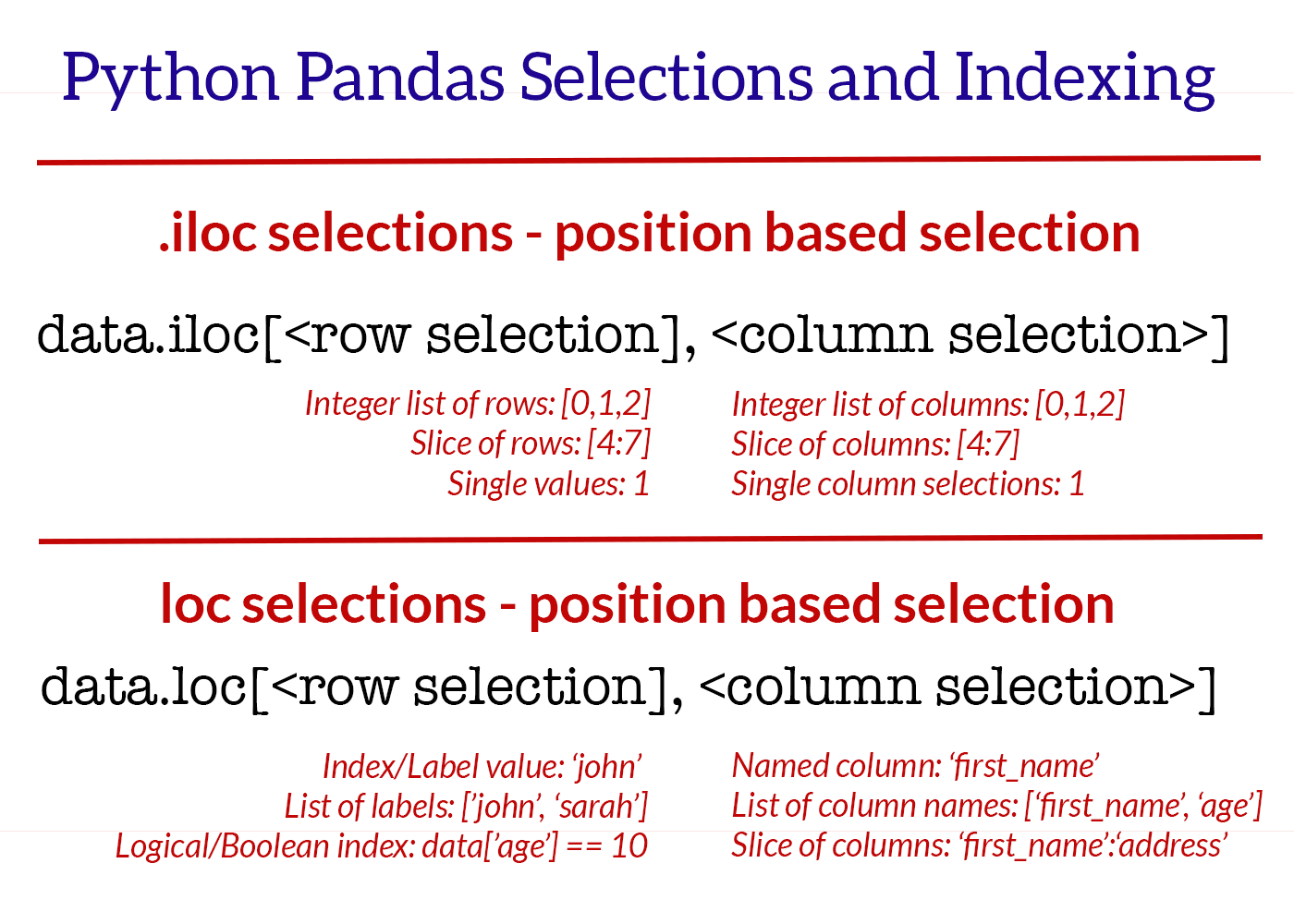
For a more detailed textual explanation that you can refer back to, the following article is an excellent resource.
Pandas iloc and loc – quickly select data in DataFrames
This article by Shane Lynn provides clear, concise examples for both .iloc and .loc.
Focus on these two sections: "Pandas iloc data selection": Reinforces the concept of integer-location based indexing. "Pandas loc data selection": Read subsection 2a. Label-based / Index-based indexing using .loc. This will solidify your understanding of how to use labels for selection. We will cover the boolean indexing part next.
3. Filtering with Boolean Indexing
The most powerful and common method for selecting data is boolean indexing. This is conceptually similar to using a WHERE clause in SQL. The process involves creating a "mask"—a Series of True/False values—and then using that mask to filter the DataFrame.
The steps are:
- Write a conditional expression that evaluates to
TrueorFalsefor each row (e.g.,df['age'] > 30). This produces the boolean mask. - Pass this mask to
.locto select only the rows where the mask isTrue(e.g.,df.loc[df['age'] > 30]).
You can combine multiple conditions using the following bitwise operators:
&for AND|for OR~for NOT
Important: Each condition must be wrapped in parentheses due to Python's operator precedence rules.
This next video demonstrates filtering from basic principles to more complex, real-world examples.
Python Pandas Tutorial (Part 4): Filtering - Using Conditionals to Filter Rows and Columns
This video, "Filtering - Using Conditionals to Filter Rows and Columns," also by Corey Schafer, is a complete guide to boolean indexing.
Watch from the beginning to see how these filters are built and applied: Boolean Masks: Understand what a boolean mask is and how it's generated from a conditional. Applying Masks with .loc: See how to apply the mask and why .loc is a good choice for this. Combining Conditions (&, |, ~): This is a critical part. Pay close attention to the syntax and the use of parentheses. Real-World Examples: The rest of the video applies these techniques to a larger, more realistic dataset, showing how to filter on numeric values, lists of values (.isin()), and string content (.str.contains()).
Your Turn: Practice Selection
Let's put this all together. Here is a small DataFrame. Your task is to write the code to answer each of the questions below.
import pandas as pd

data = {'name': ['Alice', 'Bob', 'Charlie', 'David', 'Eva'],
        'year': [2020, 2021, 2020, 2022, 2021],
        'role': ['Engineer', 'Analyst', 'Engineer', 'Manager', 'Analyst'],
        'salary': [80000, 65000, 82000, 105000, 70000]}
df = pd.DataFrame(data, index=['ID1', 'ID2', 'ID3', 'ID4', 'ID5'])

print("Original DataFrame:")
print(df)
print("-" * 30)


# 1. Select the 'name' and 'salary' for all rows.
name_and_salary = df.loc[:, ['name', 'salary']]
print("\n1. Name and Salary:")
print(name_and_salary)
print("-" * 30)


# 2. Select the first two rows of the DataFrame using their integer position.
first_two_rows = df.iloc[0:2]
print("\n2. First two rows (iloc):")
print(first_two_rows)
print("-" * 30)


# 3. Select the row with the index label 'ID4'.
row_id4 = df.loc['ID4']
print("\n3. Row with index 'ID4' (loc):")
print(row_id4)
print("-" * 30)


# 4. Select all Engineers who were hired in 2020.
engineers_2020 = df.loc[(df['role'] == 'Engineer') & (df['year'] == 2020)]
print("\n4. Engineers from 2020:")
print(engineers_2020)
print("-" * 30)


# 5. Select all Analysts OR anyone with a salary greater than $100,000.
analysts_or_high_salary = df.loc[(df['role'] == 'Analyst') | (df['salary'] > 100000)]
print("\n5. Analysts or high earners:")
print(analysts_or_high_salary)
print("-" * 30)
Try to predict the output of each step before running the code. Experiment by changing the conditions to solidify your understanding.
Conclusion
In this lesson, you've learned the fundamental techniques for selecting and filtering data in Pandas, a skill you will use in every single data analysis project.
Key Takeaways:
- A
Seriesis a 1D labeled array (a column), and aDataFrameis a 2D labeled structure (a table). - Use
.ilocto select data by its integer position, which is useful for tasks like grabbing the first or last N rows. - Use
.locto select data by its index and column labels, which is more explicit and often more readable. - Boolean indexing is the most powerful method for filtering rows based on data content, using conditional expressions and operators
&(AND),|(OR), and~(NOT).
These selection methods are the foundation upon which more complex data manipulations are built. In our next lesson, we will learn how to read data from common file formats like CSVs, which will allow us to start working with larger, real-world datasets. We will also cover how to handle missing data and perform initial data inspection—essential first steps in any analysis pipeline.