Welcome back! In our previous lesson, we gave our AI Tutor its core personality and pedagogical style using a detailed system prompt. By implementing the RTRI framework and Socratic questioning, we moved from a simple Q&A bot to an interactive tutor that guides the user.
Now, we'll focus on enhancing its teaching capabilities even further. A great tutor doesn't just ask questions; they also provide clear, structured explanations. This lesson is dedicated to developing prompts that guide the LLM to deliver detailed, step-by-step explanations, all grounded in the factual context retrieved by our RAG pipeline. This is the key to teaching complex SQL concepts effectively.
1. The Power of "Thinking Step by Step"
One of the most effective techniques to improve the quality and reasoning of an LLM's output is Chain-of-Thought (CoT) prompting. Instead of asking for an answer directly, you instruct the model to first break down the problem and "think" through the steps required to solve it. This methodical approach forces the model to construct a more logical and transparent response, which is exactly what we need for explanations.
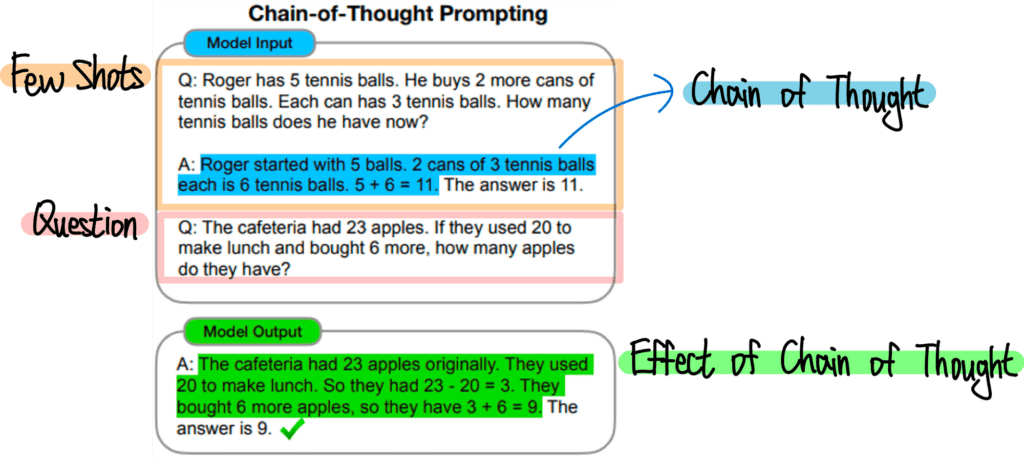
We can adapt this for our RAG system to make our tutor's explanations more robust.
Top 5 LLM Prompts for Retrieval-Augmented Generation (RAG)
This article from Scoutos provides several excellent prompt templates for RAG systems. We'll focus on the one that is most relevant for creating explanations.
Please read the section titled "Prompt #2: Chain-of-Thought for Complex Context." Pay close attention to how the prompt explicitly asks the LLM to perform a sequence of actions: summarize the query, select relevant chunks, create an outline, and then draft the answer. This is a powerful way to structure the model's "thought process."
By using a CoT approach, we guide the LLM to:
- Deconstruct the user's question.
- Filter the retrieved context for the most relevant information.
- Structure an explanation logically.
- Synthesize the information into a coherent, step-by-step answer.
This reduces the chance of hallucination and ensures the explanation is directly tied to the source material.
2. Crafting a Prompt for a Master Tutor
Now let's go beyond a generic CoT prompt and design one specifically for tutoring. A good tutor doesn't just list steps; they check for understanding, use analogies, and adapt to the learner. We can program this behavior into our LLM.
The ADVANCED 2025 Guide to Prompt Engineering - Master the Perfect Prompt...
The video "The ADVANCED 2026 Guide to Prompt Engineering" offers powerful techniques for creating sophisticated AI interactions. We'll look at a few clips that are directly applicable to building our tutor.
Please watch the following segments: Step-by-step mastery: This section shows how to turn a complex request into a guided, step-by-step consultation. Notice the instruction to "wait for my response before moving to step two," which introduces an interactive element we can use. Thought reasoning: This reinforces the CoT concept, showing how forcing the model to reveal its thought process leads to better, more transparent results. Study mode mastery: This is a goldmine for our project. It presents a complete prompt for turning an LLM into a personalized tutor that assesses knowledge, uses practical examples, and checks for understanding. We will borrow heavily from this structure.
These techniques provide a blueprint for our tutor's explanation module. We can combine the persona, the Socratic method from our last lesson, and these new step-by-step instructions into a single, powerful system prompt.
The image below provides a great high-level framework for designing prompts for an AI tutor. We are essentially filling out the "Step by Step" and "Pedagogy" sections with greater detail.

3. Grounding Explanations in the RAG Context
Finally, we must ensure our tutor's brilliant explanations are based on the documents we've provided, not its own pre-trained (and potentially outdated or incorrect) knowledge. As you'll recall from our previous work, this involves carefully structuring the final prompt that is sent to the LLM.
Let's review the structure for combining the user's query with the retrieved context.
Combining Retrieved Context with Prompts in RAG
This article from ApX Machine Learning provides a clear, concise overview of how to structure a prompt for a RAG system.
Read the sections "The Role of Prompt Engineering in RAG" and "Structuring the Augmented Prompt". The key is the f-string example, which shows a template that explicitly tells the LLM to answer only based on the provided documents. This is a crucial instruction to prevent the LLM from "going rogue."
Your Python script already combines the context and question into a single prompt string before sending it to the LLM. The techniques we're discussing today are about making the instructional part of that string much more sophisticated.
4. Your Task: Upgrade the Tutor's Teaching Skills
It's time to put this into practice. Your task is to upgrade the system prompt you created in the last lesson. You will refine the INSTRUCTIONS section to guide the LLM in providing high-quality, step-by-step explanations.
Instructions:
-
Review Your Current Prompt: Open the system prompt you drafted in the previous lesson. It should look something like this, with a basic
INSTRUCTIONSsection:# ROLE You are an expert SQL tutor named Codey... # TASK Your task is to help the user understand and write SQL queries... # REQUIREMENTS - Use Provided Context: You MUST ground your answers in the context provided... - Socratic Method: Do not give the user the final SQL query directly... ... # INSTRUCTIONS 1. When the user asks a question, first analyze the provided context... 2. If the user asks for a solution, start by asking what they have tried... ... --- Context: {context} --- Question: {question} Helpful Answer: -
Draft an Enhanced
INSTRUCTIONSSection:
Create a new, more detailed set of instructions specifically for handling requests for explanations. This should be a separate subsection within your main prompt. Use the principles of CoT and the "Study Mode" prompt as your guide.Here is an example of what this new section could look like. You can use this as a starting point and adapt it.
# INSTRUCTIONS FOR EXPLANATIONS When the user asks for an explanation of a concept (e.g., "What is a LEFT JOIN?"), you MUST follow this procedure: 1. **Analyze and Plan**: Silently review the retrieved context to understand the concept. Formulate a step-by-step teaching plan. Your plan should start with a simple analogy, followed by the formal definition and a code example from the context. 2. **Start with an Analogy**: Begin your explanation with a simple, relatable analogy to give the user an intuitive understanding. 3. **Check for Understanding**: After providing the analogy, pause and ask the user if it makes sense. Do not proceed until they confirm they understand. 4. **Provide Formal Definition**: Once the user confirms, provide the formal definition of the concept, citing the retrieved context. For example: "According to the documentation..." 5. **Show a Code Example**: Next, present a clear, simple code example from the context. 6. **Explain the Code**: Break down the code example line by line or clause by clause, explaining what each part does. 7. **Conclude with a Summary**: Finish by summarizing the key takeaway of the concept in one or two sentences. -
Integrate and Test:
- Add this new
INSTRUCTIONS FOR EXPLANATIONSsection to your main system prompt. You can place it alongside the existingINSTRUCTIONSfor Socratic dialogue. The LLM is capable of understanding different instruction sets for different scenarios. - Update the
PromptTemplatein your Python script with this new, comprehensive system prompt. - Run your script and test it with a conceptual question, like:
"Can you explain what a window function is in SQL?" - Observe the response. Does it follow the step-by-step procedure? Does it start with an analogy? Does it wait for your confirmation? The difference in output quality should be significant.
- Add this new
By completing this task, you'll have an AI tutor that can not only guide users through problems but also teach them the underlying concepts in a structured, pedagogical way.
Conclusion
In this lesson, you've learned how to elevate your AI tutor's instructional abilities by engineering prompts for step-by-step explanations. You now have a more sophisticated understanding of how to control an LLM's output and guide its reasoning process.
Key Takeaways:
- Chain-of-Thought (CoT) prompting forces an LLM to think methodically, leading to more logical and transparent answers.
- By providing a detailed, multi-step procedure in the prompt, you can program an LLM to act as a personalized tutor that uses analogies, checks for understanding, and explains code.
- A well-designed prompt explicitly instructs the LLM to base its explanations on the retrieved context, ensuring the information is factual and reliable.
- You can include multiple sets of instructions in a single system prompt to handle different user intents (e.g., asking for a solution vs. asking for an explanation).
Preview of the Next Lesson:
Our AI Tutor is now a highly skilled educator, but it's still living in the command line. In our next lesson, we will finally bring it to life by building an interactive web interface using Streamlit. We will also implement conversational memory, allowing our tutor to remember the history of the conversation and handle follow-up questions—a critical feature for making our new interactive, step-by-step explanations truly effective.