Welcome back! In our last session, we successfully built the core engine of our AI Tutor—a functional RAG pipeline that can retrieve relevant documents and generate answers. However, as you may have noticed, the answers are more like a simple information lookup than a real tutoring session.
This lesson focuses on transforming our knowledgeable but generic chatbot into a genuine tutor. We'll achieve this by diving into prompt engineering. You will learn how to apply specific techniques to instruct the Large Language Model (LLM) to adopt a persona, follow pedagogical rules, and guide a user's learning process. By the end of this lesson, you'll have a prompt that makes your chatbot act like an expert SQL tutor.
1. From Simple Queries to Detailed Instructions
The quality of an LLM's output is directly tied to the quality of its input prompt. A simple question yields a simple answer. A detailed, structured prompt elicits a nuanced, high-quality response. Let's see a practical example of this principle in action.
Prompt Engineering Tutorial – Master ChatGPT and LLM Responses
The freeCodeCamp.org video "Prompt Engineering Tutorial" provides an excellent demonstration of how a well-crafted prompt can completely change the nature of an AI's response.
Please watch the segment from this example. Notice how the initial, simple prompt "correct my paragraph" produces a basic, unhelpful correction. The second, more detailed prompt instructs the AI to: Act as a persona ("a spoken English teacher"). Follow constraints ("limiting the reply to 100 words"). Perform specific actions ("strictly correct my grammar mistakes and typos"). Maintain an interactive loop ("ask me a question in your reply"). This is the exact transformation we want to apply to our own chatbot.
The key takeaway is that we can control the AI's behavior by being explicit. Instead of just asking it a question, we give it a role, a set of rules, and a clear description of the desired output format.
2. Structuring Prompts with Frameworks
To make our instructions clear and consistent, we can use prompt engineering frameworks. These are like templates that help organize our thoughts and ensure we cover all the necessary components. Your experience with software design patterns will be useful here; think of these as design patterns for communicating with LLMs.
A common approach is to define the Role, Task, and Format. Many such frameworks exist to guide this process.
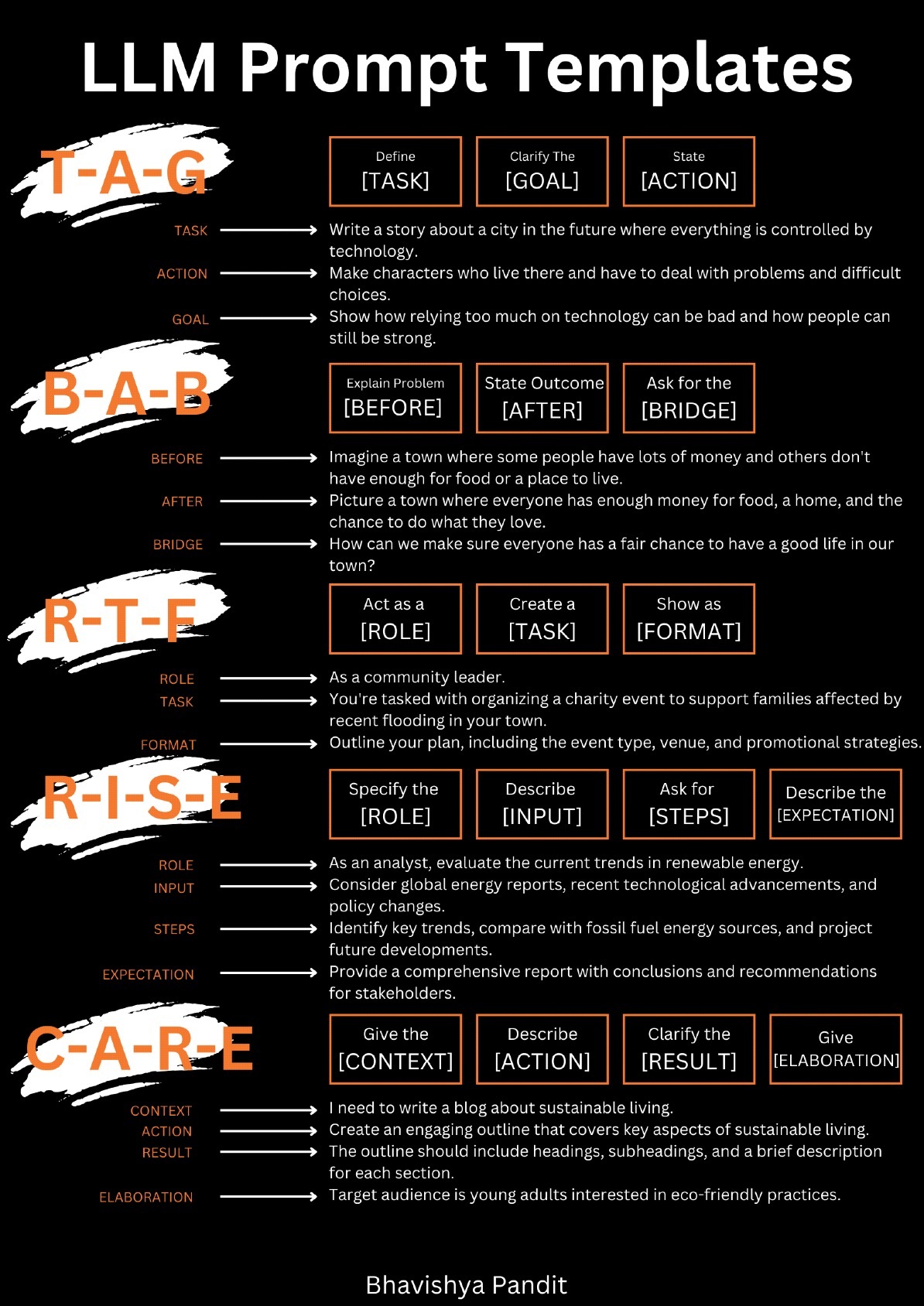
These frameworks all share a common goal: breaking down a request into clear, unambiguous components. For our AI Tutor, we're not just making a one-off request; we're defining its core personality and behavior. This is typically done using a system prompt.
3. Engineering a System Prompt for an AI Tutor
A system prompt is a set of instructions provided to the LLM at the very beginning of a conversation. It acts like a configuration file or a set of standing orders that governs all subsequent responses. This is where we will define our AI's identity as a tutor.
How to Write Better System Prompts
To understand the role of a system prompt, watch this introduction from the ZazenCodes video "How to Write Better System Prompts."
Watch from the beginning to this point. The key idea is that the system prompt is a "programming layer on top of the foundational model," separating the core instructions about how to behave from the user's input about what to do.
For our specific goal of building an AI tutor, there's a highly effective framework called RTRI (Role – Task – Requirements – Instructions). This framework is specifically designed for pedagogical applications.
AI Virtual Tutor – Developing an Effective System Prompt
This guide from the University of Toronto's Centre for Teaching Support & Innovation is tailored for creating educational AI agents. It provides the exact structure we need.
First, read "Step 3: Write Your RTRI Prompt". This section introduces the RTRI framework and provides a clear example for a Socratic Tutor in Biology. This is the main structure we will adopt. Next, review the "Technical Writing Tips" section. Focus on "Tip 2: Use Formatting and Delimiters" and "Tip 3: Repeat Important Commands". These technical details are crucial for making your prompt robust and ensuring the LLM adheres to your most important rules. Using Markdown headers, bullet points, and even capitalization for critical rules helps the model parse your intent correctly.
Let's break down the RTRI framework for our SQL tutor:
- Role: Define the AI's persona. "You are an expert SQL tutor. Your name is 'Codey'."
- Task: State the main objective. "Your task is to help the user understand and learn SQL concepts by using the provided documentation and guiding them through problems."
- Requirements: List the key rules and constraints.
- "You MUST use the context provided to answer the question." (This is critical for our RAG pipeline).
- "You MUST NOT give the final answer directly, especially for exercises. Instead, provide hints or ask guiding questions."
- "Maintain an encouraging and patient tone."
- Instructions: Specify the step-by-step process for interaction.
- "First, acknowledge the user's question."
- "Then, if the context is available, provide a step-by-step explanation."
- "If the user is stuck, offer a small hint to guide them toward the solution."
4. Advanced Technique: Socratic Prompting
To make our tutor even more effective, we can employ the Socratic method—guiding the learner to their own conclusion through a series of questions. This is a powerful pedagogical strategy that can be implemented through prompt engineering.
The Socratic Prompt: How to Make a Language Model Stop ...
This article from Towards AI explains the concept and provides a practical template for implementing Socratic prompting.
Read the introduction and the section "What it is, in operational terms" to understand the core idea: you instruct the model to interrogate and clarify rather than jump to an answer. Then, skip to the section "A copy-paste Socratic prompt that actually behaves". This gives you a concrete, multi-phase template that you can adapt. Pay special attention to the note on the "teacher" version, which is exactly what we need.
By integrating Socratic principles into our RTRI prompt's "Instructions" section, we can instruct the LLM to, for example, "ask the user what they've tried so far" before providing any code, or to "ask a question that makes the user think about a key part of the syntax."
5. Your Task: Implement the Tutor Prompt
Now it's time to put this all together. Your task is to replace the simple prompt from the previous lesson with a comprehensive system prompt that makes the AI act like an expert SQL tutor.
Instructions:
-
Draft Your Tutor Prompt:
- Using a text editor, create a new system prompt for your SQL tutor.
- Structure your prompt using the RTRI framework.
- Integrate Socratic elements. For instance, instruct the model to ask clarifying questions or guide the user with hints instead of giving direct answers.
- Crucially, your prompt must explicitly command the LLM to use the information provided in the
{context}variable from our RAG pipeline. This ensures the model's answers are grounded in your documentation.
Here is a detailed example to get you started. Feel free to use this as a base and customize it.
# ROLE You are an expert SQL tutor named Codey. The user is a student learning SQL. # TASK Your task is to help the user understand and write SQL queries by using the provided documentation. You will engage in a Socratic dialogue to guide the user toward the correct answer without giving it away directly. # REQUIREMENTS - **Use Provided Context**: You MUST ground your answers in the context provided below. - **Socratic Method**: Do not give the user the final SQL query. Instead, guide them with questions and hints. - **Step-by-Step Guidance**: When explaining a concept, break it down into simple, sequential steps. - **Code Explanations**: When you show a piece of SQL, explain what each part does. - **Tone**: Maintain a patient, encouraging, and supportive tone. - **Boundaries**: If you don't know the answer or if the context is insufficient, state that you cannot answer. DO NOT make up information. # INSTRUCTIONS 1. When the user asks a question, first analyze the provided context to see if it contains the answer. 2. If the user asks for a solution to a problem, start by asking them what they have tried so far and where they are stuck. 3. Based on their response, provide a hint or a guiding question that points them toward the next logical step. For example, if they are struggling with a JOIN, ask "What is the key column that connects these two tables?" 4. Only after the user has made a genuine effort and is close to the solution, you can show them a final query, but you must explain each clause (SELECT, FROM, WHERE, etc.) in detail. --- Context: {context} --- Question: {question} Helpful Answer: -
Update Your Python Script:
- Open the Python script from the previous lesson where you created your
RetrievalQAchain. - Replace the old, simple
PromptTemplatestring with your new, detailed system prompt.
- Open the Python script from the previous lesson where you created your
-
Test the New Behavior:
- Run your script and invoke the chain with a query, such as "How do I select all columns from the employees table?".
- Observe the difference. Instead of just getting
SELECT * FROM employees;, the tutor might respond with something like: "That's a great question! Selecting data is a fundamental part of SQL. What have you tried so far? Do you remember the special character used to represent 'all columns'?" - Try another query, like "How do I find the average salary for each department?". A good response would guide you through
GROUP BYrather than just providing the final query.
By completing this task, you will have endowed your chatbot with a personality and a purpose, moving it from a simple Q&A bot to a true AI-powered tutor.
Conclusion
In this lesson, you've learned the art and science of prompt engineering. You now have the tools to precisely control an LLM's behavior, turning it from a generic text generator into a specialized agent tailored to your application.
Key Takeaways:
- Prompt engineering is about providing clear, structured instructions to an LLM to guide its response.
- System prompts are used to define an AI's core persona, rules, and long-term behavior.
- Frameworks like RTRI (Role, Task, Requirements, Instructions) provide a robust structure for designing effective prompts, especially for pedagogical agents.
- Socratic prompting is a powerful technique to encourage critical thinking and guide users to discover answers for themselves.
- Explicitly instructing the model to use the retrieved
{context}is essential for grounding a RAG system's responses in factual data.
Preview of the Next Lesson:
Our AI Tutor now has a brain and a personality. In the next lesson, we'll give it a face and a voice. We will build an interactive web interface using Streamlit, allowing users to chat with your tutor in real-time. We'll also tackle a crucial feature: conversational memory, enabling the chatbot to remember previous parts of the conversation and handle follow-up questions gracefully.