Introduction
Welcome to the lesson. In our previous sessions, we took a detailed look at hypervisors, first by defining Type 1 (bare-metal) hypervisors and then by exploring Type 2 (hosted) hypervisors. You now understand their individual architectures, key examples, and primary use cases.
This lesson brings that knowledge together to address a very common and important exam topic, as stated in our learning outcome: Compare Type 1 and Type 2 hypervisors in a tabular format across performance, security, and use cases.
Our goal is to create a comprehensive comparison that clearly outlines the differences between these two technologies. We will examine their architecture, performance characteristics, security posture, and the specific scenarios where each one excels. This will provide you with a structured, exam-ready answer.
The Fundamental Architectural Difference: A Quick Recap
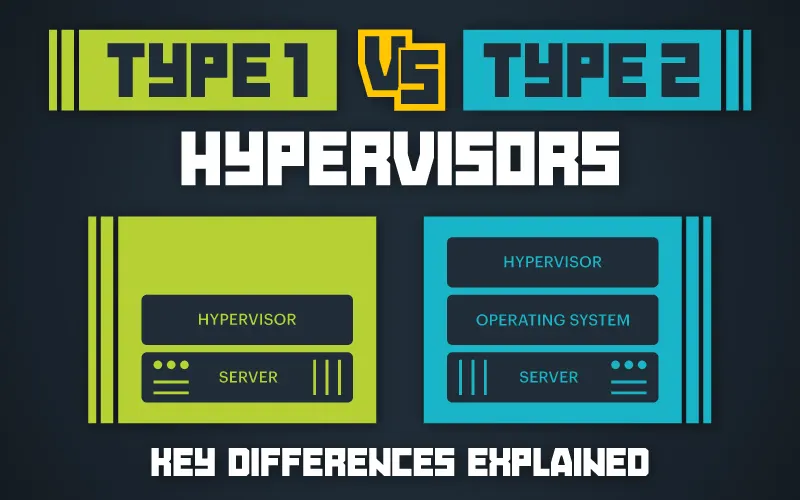
As we've discussed, the core difference between Type 1 and Type 2 hypervisors lies in their relationship with the physical hardware.
- Type 1 (Bare-Metal) Hypervisor: Installs and runs directly on the server's hardware, just like an operating system would. It has direct access to all hardware resources.
- Type 2 (Hosted) Hypervisor: Installs and runs as a standard software application on top of an existing host operating system (like Windows or macOS). It must go through the host OS to access hardware resources.
This architectural distinction is the root cause of all other differences in performance, security, and complexity. The following diagram provides a clear visual summary of this fundamental difference.
Video Overview of the Comparison
To begin, let's watch a short video that walks through the main points of comparison. This will provide a good narrative overview before we dive into the detailed tabular breakdown.
Lec-14: Type 1 vs Type 2 Virtualization Explained: A Complete Guide for Cloud Computing Beginners
The 'Gate Smashers' channel provides a concise and clear comparison that is well-suited for exam revision. This video covers the architectural differences and then directly compares performance, security, and use cases.
Please watch the video from 00:32 to 05:16. Focus on how the absence or presence of a host OS impacts performance, security, complexity, and the typical environments (enterprise vs. personal) where each type is used.
Detailed Comparison: Performance, Security, and Use Cases
Now, let's build the detailed, tabular comparison required for your exam. The best way to approach this is to break down the comparison into key attributes. The following resources provide excellent, structured tables that we can use to build our comprehensive view.
First, let's look at a detailed article that provides clear comparative tables.
Bare Metal Hypervisors: Benefits and Use Cases - DigitalOcean
The article 'Bare Metal Hypervisors: Benefits and Use Cases' from DigitalOcean contains several excellent tables that directly compare Type 1 and Type 2 hypervisors on the exact criteria we need.
Please review the three tables in this article: The main comparison table under the heading 'Bare Metal Hypervisor(Type-1) vs. Hosted Hypervisor(Type-2)'. This gives a great overview. The table under 'Which One Should You Choose?' This is excellent for understanding use cases. The table under 'Technical Performance Differences'. This adds technical depth to the performance comparison.
Next, let's consult another resource that elaborates on these differences.
Type 1 vs. Type 2 Hypervisor: What's the Difference?
This article from Sangfor, 'Type 1 vs. Type 2 Hypervisor', provides another excellent comparison table and expands on each point with clear explanations.
First, study the table under the heading 'Key Differences Between Type 1 and Type 2 Hypervisors'. Then, read the subsections below it ('Architecture and Deployment', 'Performance and Use Cases', 'Security and Management') which explain each point in more detail. Finally, review the section 'When Should You Use Type 1 Hypervisors vs. Type 2 Hypervisors?' to solidify your understanding of their applications.
Summary Comparison Table for Exams
Based on the resources we've just reviewed, here is a comprehensive table that you can use as a reference for your exams. It summarizes all the key points of comparison.
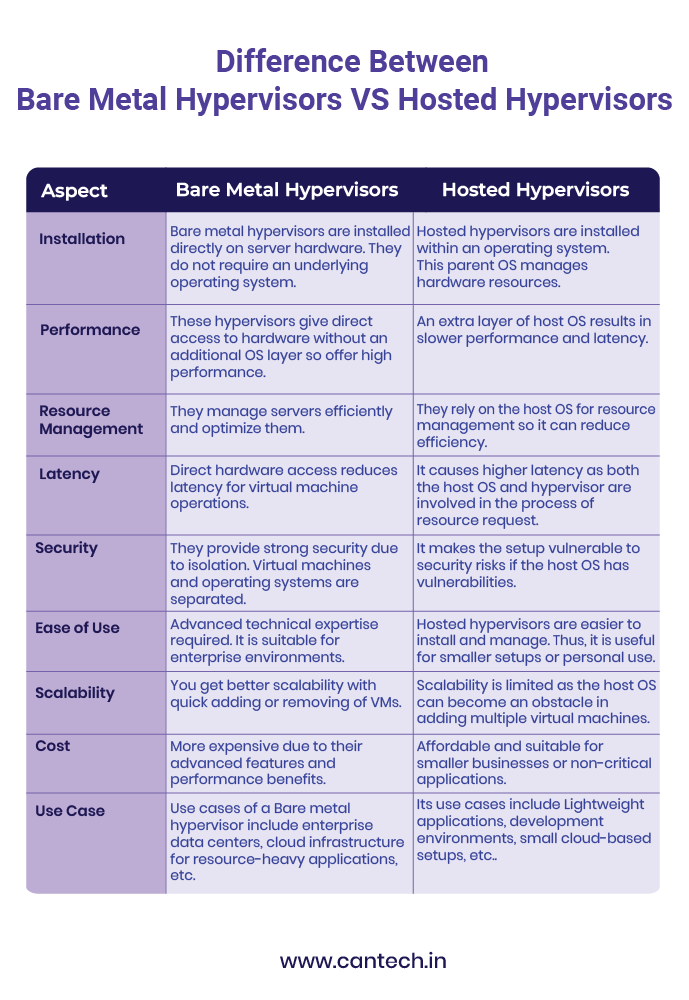
| Feature | Type 1 (Bare-Metal) Hypervisor | Type 2 (Hosted) Hypervisor |
|---|---|---|
| Architecture | Installs and runs directly on the physical hardware. | Installs and runs as an application on top of a host operating system. |
| Performance | High. Direct access to hardware results in minimal latency and overhead. | Lower. Requests for resources must pass through the host OS, adding latency. |
| Security | Higher. Has a smaller attack surface as there is no underlying host OS to compromise. | Lower. Security depends on the host OS, which introduces vulnerabilities. |
| Use Cases | Enterprise data centers, cloud computing providers (e.g., AWS, Azure), IaaS, mission-critical applications. | Desktop virtualization, development & testing environments, education, running multiple OSs on a personal computer. |
| Isolation | Strong isolation between VMs. A problem in one VM is unlikely to affect others. | Weaker isolation. A vulnerability in the host OS can potentially affect all VMs. |
| Complexity & Management | More complex to set up and manage. Requires dedicated hardware. | Easy to install and manage, similar to any other desktop application. |
| Cost | Often higher initial cost due to licensing and need for powerful, dedicated server hardware. | Lower cost. Many are free or low-cost and can run on existing desktop hardware. |
| Resource Efficiency | Very efficient. The hypervisor's sole job is to manage VMs. | Less efficient. Hardware resources are shared between the host OS and the VMs. |
| Examples | VMware ESXi, Microsoft Hyper-V, KVM (Kernel-based Virtual Machine), Xen Project. | Oracle VM VirtualBox, VMware Workstation, Parallels Desktop. |
You can also refer to this summary image which presents the comparison in a slightly different format, which may also be helpful for revision.
Conclusion
In this lesson, we have systematically compared Type 1 and Type 2 hypervisors, fulfilling our learning objective and equipping you with a detailed, structured answer for your exams.
Key Takeaways:
- The core trade-off is Performance & Security vs. Flexibility & Ease of Use.
- Type 1 (Bare-Metal) hypervisors offer superior performance and security by running directly on hardware. They are the standard for production environments like data centers and public clouds.
- Type 2 (Hosted) hypervisors offer great flexibility and are easy to use by running as an application on a standard OS. They are ideal for individual use cases like software development, testing, and education on a personal computer.
- The presence of the Host OS in Type 2 architecture is the key reason for its lower performance and larger security attack surface compared to Type 1.
Preview of the Next Lesson:
Having established the foundational concepts of virtualization and hypervisors, we will now move on to two important related topics from your syllabus: resource management and security. Our next lesson will focus on Resource Pooling, where we will define the concept and explain how cloud providers use it to securely serve multiple customers (tenants) from a shared pool of physical resources. We will also begin looking at specific security threats in virtualized environments.