Introduction
Welcome to the next lesson in our module on hypervisors. In the previous session, we did a deep dive into Type 1 (bare-metal) hypervisors. We established that they are installed directly on the physical hardware, offering the highest level of performance and security, which is why they form the backbone of enterprise data centers and cloud platforms like AWS and Azure.
Today, we will cover the second major category of hypervisor technology. This lesson is designed to address the learning outcome: Explain Type 2 (hosted) hypervisors with an architecture diagram and examples (e.g., VMware Workstation, Oracle VirtualBox).
We will define what a Type 2 hypervisor is, examine its distinct layered architecture, identify its most common examples, and understand the specific scenarios where it is the preferred choice.
Defining Type 2 (Hosted) Hypervisors
A Type 2 hypervisor is fundamentally different from its bare-metal counterpart. Instead of running directly on the hardware, it is installed and runs as a software application on top of a conventional operating system (like Windows, macOS, or Linux). This host operating system manages the underlying hardware, and the hypervisor interacts with the hardware through the host OS.
Because the hypervisor is "hosted" by the operating system, it is commonly known as a hosted hypervisor or an embedded hypervisor.
For a concise, exam-ready definition and a list of key characteristics, please review the following resource.
The article from GeeksforGeeks provides a direct and clear explanation of Type 2 hypervisors, which is perfect for building your exam notes.
Please read the section titled '2. Type 2 Hypervisor'. Focus on the definition, how it runs on a conventional OS, its primary use cases (desktop virtualization, development, testing), and the listed pros and cons.
From this reading, we can formalize a definition:
Definition: A Type 2 Hypervisor, also known as a hosted hypervisor, is a virtualization software that runs as an application on top of a host operating system. It relies on the host OS to manage and access the underlying hardware resources, which it then allocates to guest virtual machines.
Architecture of a Type 2 Hypervisor
The architecture of a Type 2 hypervisor involves an additional layer compared to the Type 1 model. This has significant implications for performance and resource management.
The architectural stack is layered as follows:
- Physical Hardware: The server or personal computer (CPU, RAM, storage).
- Host Operating System (Host OS): The primary OS installed on the hardware (e.g., Windows 11, macOS, Ubuntu Linux).
- Type 2 Hypervisor: Runs as a standard application within the Host OS (e.g., VMware Workstation, VirtualBox).
- Guest Virtual Machines (VMs): Each VM has its own Guest Operating System (Guest OS) and applications.
The most critical aspect of this architecture is that the hypervisor does not have direct access to the physical hardware. It must make requests for CPU, memory, and network resources to the host OS, which then schedules and fulfills these requests. This "negotiation" with the host OS introduces latency and performance overhead.
The following diagram clearly illustrates this layered structure.
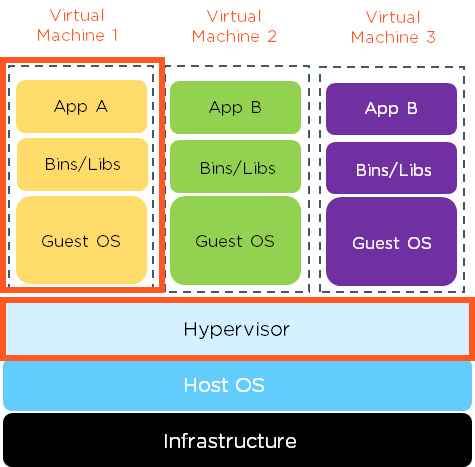
To see this architecture explained in a different way, the following video provides a clear, animated walkthrough.
This clip from the PowerCert Animated Videos channel gives a very straightforward explanation and visual representation of the Type 2 hypervisor's architecture and its typical use case.
Watch the segment from 05:06 to 05:46. Pay close attention to how it explains that the hypervisor is 'installed and runs on top of an existing operating system' and is 'typically used on personal computers'.
Common Examples and Use Cases
Unlike Type 1 hypervisors that dominate the enterprise server market, Type 2 hypervisors are primarily used in desktop and development environments. Their ease of installation and management makes them ideal for individual users.
Key Examples:
- Oracle VM VirtualBox: A popular, open-source, and free Type 2 hypervisor that runs on Windows, macOS, and Linux.
- VMware Workstation Pro / Workstation Player: A widely-used commercial hypervisor for Windows and Linux hosts (Workstation Player is free for non-commercial use).
- Parallels Desktop: A leading commercial hypervisor for macOS hosts, known for its tight integration with the host OS to run Windows and other operating systems.
- Microsoft Virtual PC: An older example from Microsoft, largely superseded by Hyper-V technology (which can function in both Type 1 and Type 2 modes, though its primary form is Type 1).
Primary Use Cases:
- Development and Testing: Developers can run multiple operating systems on a single laptop to test how their applications perform on different platforms (e.g., testing a web application on Windows, Linux, and macOS).
- Running Legacy or Incompatible Software: If you need to run an application that only works on an older OS (like Windows XP), you can run it inside a VM on your modern computer.
- Education and Training: Students and IT professionals can experiment with different operating systems and network configurations in a safe, isolated environment without affecting their primary machine.
- Security Research: Security analysts can analyze malware inside a "sandboxed" virtual machine, preventing the malicious code from infecting the host computer.
The following resource provides a clear summary of these use cases.
What's the Difference Between Type 1 and Type 2 Hypervisors? - AWS
This article from AWS clearly outlines when to use Type 2 hypervisors, confirming their role in desktop and development contexts.
Please read the section that begins with 'Type 2 hypervisors are most often used in desktop and development environments...'. This confirms the use cases we've just discussed.
Conclusion
In this lesson, we have focused on Type 2 hypervisors, understanding their architecture and role, which is distinct from the Type 1 hypervisors we covered previously.
Key Takeaways for Your Exam:
- Definition: A Type 2 hypervisor, or hosted hypervisor, is virtualization software that runs as an application on a host operating system.
- Architecture: It has a layered architecture (
Hardware -> Host OS -> Hypervisor -> Guest OS) where it must request resources through the host OS, leading to performance overhead. - Key Examples: Oracle VM VirtualBox, VMware Workstation, and Parallels Desktop.
- Primary Use Case: Desktop and development environments where ease of use is more important than raw performance. They are ideal for running multiple OSs on a single personal computer for testing, education, or compatibility purposes.
Preview of the Next Lesson:
Now that we have covered both Type 1 and Type 2 hypervisors in detail, the next logical step is to directly compare them. In our next lesson, we will create a comprehensive tabular comparison of Type 1 vs. Type 2 hypervisors, evaluating them across critical parameters like performance, security, cost, and typical use cases. This is a very common and important topic for university exams.