Introduction
Welcome back! In our last lesson, we defined the hypervisor as the fundamental software layer that makes virtualization possible by creating, managing, and isolating virtual machines. We established that its core functions are resource abstraction, VM lifecycle management, and ensuring security between VMs.
As promised, this lesson delves into the first of two major hypervisor architectures. Our focus is to fulfill the learning outcome: Explain Type 1 (bare-metal) hypervisors with an architecture diagram and examples (e.g., VMware ESXi, KVM).
We will define what makes a hypervisor "Type 1," examine its architecture, look at key examples like VMware ESXi and KVM, and understand why this type is the standard for enterprise data centers and cloud computing platforms.
Defining Type 1 (Bare-Metal) Hypervisors
The defining characteristic of a Type 1 hypervisor is its placement within the system stack. Unlike other software that runs on top of an operating system, a Type 1 hypervisor is installed directly onto the physical server's hardware. This is why it is often called a bare-metal hypervisor.
To get a clear and detailed definition, let's start with a foundational reading.
Bare Metal Hypervisors: Benefits and Use Cases
The following article from DigitalOcean provides a precise, exam-ready definition and explanation of how bare-metal hypervisors work. This is a core concept for your exams.
Please read the sections titled 'Introduction', 'What is a Bare Metal Hypervisor?', and 'How Does a Bare Metal Hypervisor Work?'. Focus on the key phrases: 'installed directly on computing hardware', 'doesn’t require a separate operating system', and 'primary layer between the hardware and the virtual machines'.
Based on this reading, we can formulate a clear definition for your notes:
Definition: A Type 1 Hypervisor, also known as a bare-metal or native hypervisor, is a layer of virtualization software that is installed and runs directly on the host machine's physical hardware. It does not require a host operating system. It is responsible for directly managing hardware resources (CPU, memory, storage) and allocating them to multiple, independent virtual machines.
For a quick visual and auditory reinforcement of this concept, the following short video clip is very helpful.
This clip from IBM Technology clearly explains the placement of a Type 1 hypervisor and lists some common examples you'll need to know.
Watch the segment from 01:04 to 01:45. Note how the speaker emphasizes that it is 'installed directly on top of the physical server' and is the most common type used in enterprise settings.
The Architecture of a Type 1 Hypervisor
The architecture is simple in concept but powerful in practice. Because the hypervisor runs directly on the hardware, it avoids the performance overhead and potential security vulnerabilities of an intermediary host operating system.
The basic architectural stack is as follows:
- Physical Hardware: The server itself (CPU, RAM, storage, network cards).
- Type 1 Hypervisor: The thin software layer installed on the hardware.
- Virtual Machines: Each with its own Guest Operating System and applications.
This direct access to hardware is what gives Type 1 hypervisors their superior performance, making them the choice for demanding environments like cloud data centers.
Example 1: VMware ESXi Architecture
VMware ESXi is one of the most widely used Type 1 hypervisors in enterprise environments. Its architecture is centered around a core component called the VMkernel.

To understand this diagram better, let's explore its components.
[PDF] The Architecture of VMware ESXi
This official VMware whitepaper explains the architecture of ESXi. It's a technical document, but the section we'll focus on clearly describes the role of the VMkernel and other key components shown in the diagram.
In the PDF, please read the sections 'Components of ESXi' and 'VMkernel' (pages 3-4). Focus on understanding that the VMkernel is a specialized operating system designed by VMware to run VMs efficiently. It controls all hardware and manages resources.
Key Architectural Points of ESXi:
- VMkernel: This is not a general-purpose OS like Windows or Linux. It's a microkernel specifically designed for virtualization. It handles resource scheduling (deciding which VM gets CPU time), memory management, and I/O operations.
- Direct Console User Interface (DCUI): A simple, low-level interface on the physical server for basic configuration (like setting an IP address).
- APIs and Agents: Management is done remotely through APIs (like the VI API) and agents, not through a local command-line interface on a host OS. This minimizes the hypervisor's footprint and attack surface.
Example 2: KVM (Kernel-based Virtual Machine) Architecture
KVM is a leading open-source Type 1 hypervisor. Its architectural approach is different from ESXi. Instead of being a standalone microkernel, KVM is integrated directly into the Linux kernel. It turns the Linux kernel itself into a hypervisor.
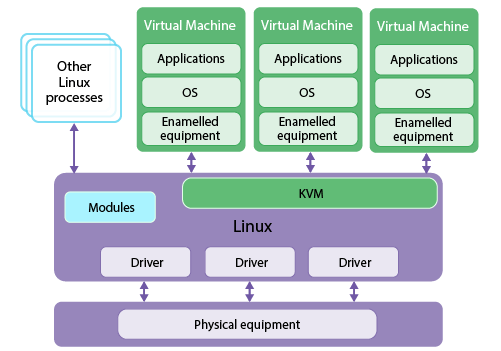
Key Architectural Points of KVM:
- Kernel Module: KVM exists as a loadable kernel module (
kvm.ko). When loaded, it gives the Linux kernel hypervisor capabilities. - Leverages Linux: KVM uses the existing, mature, and powerful features of the Linux kernel for many of its functions, such as the process scheduler, memory management, and device drivers.
- VM as a Process: From the perspective of the host Linux system, each running virtual machine is simply a regular Linux process. This allows for excellent management and security using standard Linux tools.
Common Examples and Use Cases
For your exam, you should be able to list several Type 1 hypervisors and explain where they are used.
| Hypervisor | Description | Common Use Case |
|---|---|---|
| VMware ESXi | A market-leading, enterprise-grade commercial hypervisor known for its robust features and management tools (vSphere). | Large enterprise data centers, private clouds. |
| KVM | A powerful, open-source hypervisor built into the Linux kernel. It is the foundation for many cloud platforms. | Public and private clouds (e.g., OpenStack, Google Cloud Platform), large-scale virtualization. |
| Microsoft Hyper-V | Microsoft's hypervisor, which is integrated with Windows Server and can also be installed as a standalone product (Hyper-V Server). | Windows-centric environments, hybrid cloud with Azure. |
| Xen Project | An open-source hypervisor known for its early influence on cloud computing. It was the basis for Amazon Web Services' (AWS) EC2 for many years. | Cloud providers (AWS), large server virtualization deployments. |
Due to their performance and security, Type 1 hypervisors are the foundation of virtually all Infrastructure as a Service (IaaS) cloud offerings. When you provision a virtual machine from AWS, Azure, or GCP, you are using a VM running on a Type 1 hypervisor.
Conclusion
In this lesson, we have focused exclusively on Type 1 hypervisors, which are essential for building scalable and efficient virtualized infrastructure.
Key Takeaways for Your Exam:
- Definition: A Type 1 hypervisor, or "bare-metal" hypervisor, is installed directly on the physical hardware without a host operating system.
- Architecture: It consists of a thin software layer that sits between the hardware and the virtual machines, providing direct resource management. This results in high performance and enhanced security.
- Key Examples:
- VMware ESXi: A commercial product with a dedicated microkernel called VMkernel.
- KVM: An open-source solution that turns the Linux kernel into a hypervisor.
- Other examples include Microsoft Hyper-V and Xen.
- Primary Use Case: Enterprise data centers and cloud computing platforms, where performance, scalability, and security are critical.
Preview of the Next Lesson:
Now that we have a firm grasp of Type 1 hypervisors, our next lesson will cover their counterpart: Type 2 (hosted) hypervisors. We will define their architecture, provide examples (like VMware Workstation and VirtualBox), and create a detailed tabular comparison to highlight the differences in performance, security, and use cases between Type 1 and Type 2.