Introduction
In the previous lesson, we concluded our detailed comparison of Type 1 (bare-metal) and Type 2 (hosted) hypervisors. You learned how their architectures differ and how that impacts their performance, security, and ideal use cases. Both types of hypervisors are core to the concept of virtualization, where we partition the resources of a single computer to create multiple isolated environments.
This lesson addresses a closely related but fundamentally different concept: emulation. It is very common for these two terms to be confused, making their distinction a classic exam question. Our learning outcome is to define emulation and distinguish it from virtualization, providing an example for each.
We will break down what emulation truly means, explain its core mechanism, and then place it side-by-side with virtualization to create a clear, comprehensive comparison you can use for your exams.
What is Emulation?
Emulation is the process where one computer system (the host) is made to behave or imitate another, entirely different computer system (the guest). The goal is to run software or use peripherals designed for the guest system on the host system, even if they are fundamentally incompatible.
The key to emulation is translation. An emulator is a specialized software program that acts like a real-time interpreter. It intercepts instructions meant for the guest system's CPU and translates them into instructions that the host system's CPU can understand and execute.
Think of it this way: Virtualization is like dividing a large office building into smaller, private office suites. Everyone is still in the same building and uses the same infrastructure. Emulation is like hiring a live translator to read a foreign-language book to you. The translator must read each sentence in the foreign language, process it, and then speak it to you in a language you understand. It works, but it introduces a layer of overhead and is naturally slower.
To formalize this concept, let's turn to a resource that defines emulation and its underlying mechanism.
Difference between Emulation and Virtualization - TutorialsPoint
The article 'Difference between Emulation and Virtualization' from TutorialsPoint provides a direct and easy-to-understand definition of emulation, explaining the host/guest relationship and the role of an interpreter.
Please read the section titled 'What is Emulation?'. Pay close attention to the definition and the role of the 'interpreter' in translating the guest system's code for the host system.
This translation process—often called binary translation—is what allows you to, for example, play a game designed for a '90s ARM-based game console on your modern x86-based PC.
The Core Difference: Instruction Set Architecture (ISA)
The most critical factor that distinguishes virtualization from emulation is the Instruction Set Architecture (ISA). The ISA is the fundamental "language" that a CPU speaks; it defines the set of commands the processor can execute.
-
Virtualization: In a typical virtualization scenario, the guest virtual machine and the host physical machine share the same ISA. For example, you run a Linux VM on a Windows PC. Both the guest OS (Linux for x86) and the host hardware (an Intel or AMD CPU) use the x86 ISA. The hypervisor doesn't need to translate instructions; its main job is to securely partition and manage access to the hardware resources (CPU time, memory, storage).
-
Emulation: Emulation is necessary when the guest software is compiled for a different ISA than the host hardware. The emulator must translate every instruction from the guest ISA to the host ISA. For example, you run an Android app (compiled for ARM ISA) on a Windows PC (with an x86 ISA) using the BlueStacks emulator.
This distinction is highlighted in the following diagram, which shows "Full Emulation" as a separate category from virtualization. In emulation, the guest OS and its instructions are processed by an emulation engine before reaching the host.

Detailed Comparison: Emulation vs. Virtualization
For your exams, having a clear tabular comparison is essential. Let's build a comprehensive table that summarizes the key differences. The following resource provides an excellent starting point.
Difference between Emulation and Virtualization - TutorialsPoint
This section of the TutorialsPoint article contains a detailed table comparing emulation and virtualization across more than a dozen different parameters. It's an ideal resource for exam preparation.
Study the table under the heading 'Emulation vs Virtualization'. Focus on the differences in function, underlying software, hardware access, speed, and how code is handled. Notice the examples provided for each.
Synthesizing from this resource and our discussion, here is a definitive comparison table.
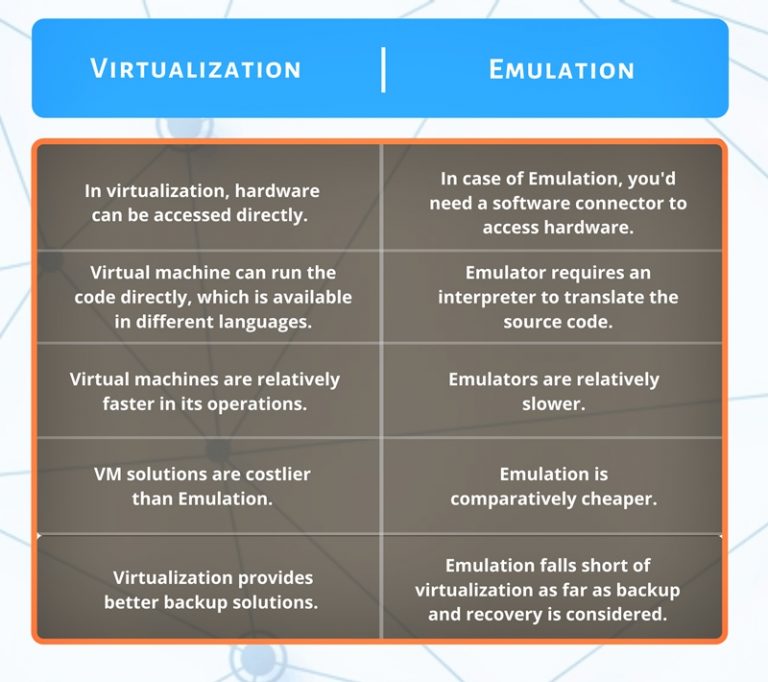
| Parameter | Emulation | Virtualization |
|---|---|---|
| Primary Goal | To imitate the functionality of a foreign hardware system. | To partition the resources of a single hardware system. |
| ISA (Instruction Set) | The guest and host have different ISAs. | The guest and host have the same ISA. |
| Core Mechanism | An emulator (interpreter/translator) translates guest instructions. | A hypervisor (VMM) manages and allocates hardware resources. |
| Performance | Slower, due to the overhead of real-time instruction translation. | Faster, near-native speed as instructions execute directly on the CPU. |
| Code Execution | Guest code is translated by the emulator before being executed. | Guest code runs directly on the host hardware. |
| Hardware Access | Indirect. The emulator software manages access to host hardware. | Direct. The hypervisor provides controlled, direct access to hardware. |
| Use Case | Running legacy software, mobile app development, cross-platform gaming, running software for a different CPU architecture. | Server consolidation, cloud computing (IaaS), creating isolated development/test environments, running multiple OSs on one PC. |
| Example | Running a Nintendo game on a PC using the Dolphin emulator. Running Android apps on a PC with BlueStacks. | Running a Linux VM on a Windows PC using VirtualBox. Deploying a Windows Server VM in Microsoft Azure. |
You can also use the following image as a quick visual summary of these key differences.
Conclusion
In this lesson, we have clearly defined emulation and differentiated it from virtualization, a crucial distinction for your exams.
Key Takeaways:
- Emulation is about imitating a different hardware system. It is necessary when the guest software's ISA does not match the host hardware's ISA. This requires a software layer (an emulator) to perform instruction translation, which results in a performance penalty.
- Virtualization is about partitioning a single hardware system. It is used when the guest and host share the same ISA. A hypervisor manages resources, allowing guest code to run directly on the hardware for high performance.
- The deciding factor is the Instruction Set Architecture (ISA): if they are different, you need emulation; if they are the same, you use virtualization.
Preview of the Next Lesson:
We have now covered system virtualization (Type 1/2 hypervisors) and emulation. There is a third, very important related concept: High-Level Language Virtual Machines. In the next lesson, we will explore what these are (e.g., the Java Virtual Machine - JVM) and explain how they differ from the system virtual machines we've been discussing so far.