Introduction
In our last lesson, we drew a clear line between virtualization and emulation, establishing that the key difference lies in whether the guest software and host hardware share the same Instruction Set Architecture (ISA). We focused on what are formally known as System Virtual Machines, which are created by hypervisors like VMware or VirtualBox to run entire guest operating systems.
This lesson drills down into a different, yet equally important, type of virtual machine that you've likely encountered in your programming courses. Our learning outcome is to explain what a high-level language virtual machine (e.g., JVM, CLR) is and how it differs from a system virtual machine.
We will define this second category of VM, explore its architecture and purpose, and then create a detailed, exam-ready comparison between the two types.
Two Categories of Virtual Machines
At a high level, virtual machines are divided into two distinct types based on the scope of what they virtualize. The first type, which we have been discussing, virtualizes an entire computer. The second type virtualizes an environment for a single application.
Let's get the formal definitions for these two categories.
What is a Virtual Machine? Types, Benefits, and Use Cases
The article 'What is a Virtual Machine? Types, Benefits, and Use Cases' provides a concise and clear distinction between the two primary types of VMs. This will serve as the foundation for our lesson.
Please read the section titled 'Types of Virtual Machines'. It contains two subsections: 'System virtual machines' and 'Process virtual machines'. Pay close attention to the definition and purpose of each.
As the reading clarifies:
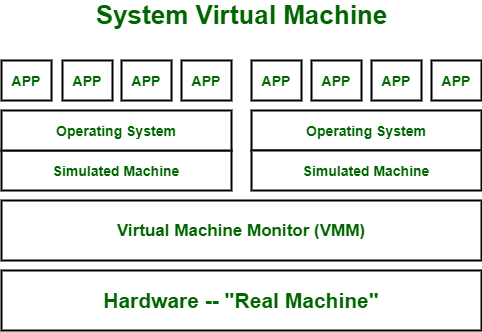
- System Virtual Machine: Emulates a complete hardware system, capable of running a full operating system. This is the focus of cloud computing's IaaS model.
- Process Virtual Machine: (Also known as an Application Virtual Machine or High-Level Language (HLL) Virtual Machine) Provides a platform-independent environment to execute a single program or application.
Let's visualize the architecture of a System VM, which should be familiar from our previous lessons.
Now, let's contrast this with the architecture and purpose of an HLL Virtual Machine.
High-Level Language (HLL) Virtual Machines
An HLL virtual machine is not designed to run an entire operating system. Its primary goal is to abstract away the underlying operating system and hardware details to achieve platform independence. This is the foundation of the famous "write once, run anywhere" paradigm.
The process works like this:
- A developer writes source code in a high-level language (like Java or C#).
- A compiler translates this source code not into machine code for a specific CPU, but into an intermediate, platform-neutral format. This intermediate code is often called bytecode (in Java) or Intermediate Language (IL) (in .NET).
- The HLL virtual machine, which is a software program installed on a specific OS and hardware, then takes this bytecode and either interprets it or compiles it into native machine code that the host CPU can execute.
This architecture enables the same compiled application (the bytecode) to run on any system—Windows, macOS, Linux—as long as the appropriate HLL VM is installed.

To solidify this concept, let's explore how this process works in practice with the Java Virtual Machine (JVM).
7.4 Programming Language Implementation - OpenStax
This reading from OpenStax provides a detailed explanation of the 'process VM' concept, using the Java Virtual Machine (JVM) as its prime example. It connects the HLL VM to the goal of hardware and OS independence.
Please read the subsection titled 'Virtual Machines' (located under the main 'Runtime Program Management' heading). Focus on how it distinguishes a 'process VM' from a 'system VM' and explains the role of the JVM in processing bytecode.
Key Examples: JVM and CLR
The two most prominent examples of HLL VMs are:
-
Java Virtual Machine (JVM): The runtime engine for the Java platform. It executes Java bytecode. Besides interpretation, modern JVMs use a Just-In-Time (JIT) compiler to translate frequently executed bytecode into native code at runtime for improved performance. The JVM also manages memory automatically through a process called garbage collection.
-
Common Language Runtime (CLR): The virtual machine component of Microsoft's .NET Framework. It serves the same role for .NET languages like C#, F#, and VB.NET. It compiles an intermediate language called Common Intermediate Language (CIL) into native code using a JIT compiler and also provides services like garbage collection and security management.
These two systems are conceptually very similar.
7.4 Programming Language Implementation - OpenStax
The JVM and CLR share many design principles. This brief excerpt highlights their common features, which are useful points for an exam answer.
Read the two paragraphs directly following the 'Virtual Machines' section you just studied. They begin with 'A JVM manages the runtime...' and discuss the similarities between the JVM and Microsoft's CLR.
Comparison: System VM vs. HLL VM
For your exam, a clear, tabular comparison is the most effective way to present this information. The table below synthesizes the concepts we've discussed.
| Parameter | System Virtual Machine | High-Level Language (HLL) Virtual Machine |
|---|---|---|
| Primary Goal | Virtualize a complete hardware environment to run an entire operating system. | Provide a platform-independent runtime environment for a single application. |
| Abstraction Level | Abstracts the physical hardware from a guest OS. | Abstracts the host OS and hardware from an application. |
| Scope | Emulates a full computer (CPU, memory, storage, network). Heavyweight. | Manages a single process. Lightweight. |
| Input | A disk image containing a bootable operating system (e.g., .iso, .vmdk). | A file containing compiled intermediate code (e.g., Java .class file with bytecode). |
| Underlying Software | A Hypervisor or Virtual Machine Monitor (VMM). | A software runtime environment (e.g., JVM, CLR). |
| Isolation | Strong. Each VM has its own isolated OS kernel, memory space, and file system. | Weaker. The process runs on the host OS and shares the host kernel. |
| Resource Usage | High. Each VM consumes significant RAM and CPU resources for its own OS. | Low. The VM itself is a process on the host OS, and resources are shared. |
| Use Cases | Cloud computing (IaaS), server consolidation, software testing across different OSs. | Cross-platform application execution ("write once, run anywhere"), secure sandboxing. |
| Examples | VMware ESXi, Oracle VirtualBox, Microsoft Hyper-V, KVM. | Java Virtual Machine (JVM), Common Language Runtime (CLR), Parrot VM. |
Conclusion
In this lesson, we have distinguished between the two major classes of virtual machines: system VMs and high-level language (process) VMs.
Key Takeaways:
- System VMs virtualize hardware to run an entire, isolated operating system. They are managed by a hypervisor.
- HLL VMs provide a runtime environment to execute a single application's intermediate code (bytecode). They abstract the operating system and hardware to achieve platform independence.
- The core difference is the scope and level of abstraction: an entire machine vs. a single process.
Preview of the Next Lesson:
Now that we have a complete understanding of system virtual machines, we will move on to an advanced and critical feature they enable: live migration. In the next lesson, we will define live migration and explain its importance in cloud environments for achieving high availability and performing maintenance with zero downtime.