Introduction
In our previous lesson, we distinguished between system virtual machines (which run entire operating systems) and high-level language virtual machines (like the JVM, which run single applications). We concluded by noting that a key capability of system VMs in a cloud context is the ability to be moved between physical hosts.
This lesson focuses on that exact capability. Our objective is to define live migration of virtual machines and explain its role in achieving high availability and zero-downtime maintenance.
To ensure you are well-prepared for your exam, we will cover:
- A precise definition of live migration.
- The key motivations behind it, directly linking it to concepts like high availability and fault tolerance.
- A high-level look at how it works, including the critical performance metrics of downtime and total migration time.
- A comparison of the main techniques used (pre-copy vs. post-copy).
This topic is a cornerstone of cloud infrastructure management, enabling the flexibility and reliability that cloud providers promise.
What is Live Migration?
At its core, live migration is the process of moving a running virtual machine (VM) from one physical host server to another without interrupting the services it is providing. The "live" aspect is crucial: from the perspective of an end-user accessing an application on the VM, the move is transparent and seamless, with minimal to zero noticeable service disruption.

For this process to work, several components of the VM's state must be transferred from the source host to the destination host:
- Memory: The entire content of the VM's RAM must be copied over. This is often the most time-consuming part of the migration.
- CPU State: The contents of the CPU registers must be captured and transferred to be loaded into the CPU on the destination host.
- Network State: Active network connections must be maintained. This is typically handled by updating network switches to redirect traffic to the new physical location of the VM, often using gratuitous Address Resolution Protocol (ARP) messages.
- Storage Access: Live migration almost always assumes that the VM's disk storage is on a shared network device (like a Storage Area Network - SAN, or Network Attached Storage - NAS). This way, the large disk files do not need to be copied; the destination host simply takes over access to them.
The Role of Live Migration: High Availability and Zero-Downtime Maintenance
Live migration is not just a technical curiosity; it is a fundamental enabler of robust and efficient data center operations. For your exam, you must be able to clearly articulate why it is so important.
To understand its purpose, let's study the primary motivations for performing a live migration.
A Performance Perspective of Live Migration of Virtual Machine in Cloud Data Center
The paper 'A Performance Perspective of Live Migration of Virtual Machine in Cloud Data Center' provides an excellent, exam-focused summary of the reasons for using live migration. This section directly addresses the 'why' part of our learning outcome.
Please read the section titled 'The motivations behind the live virtual migration' (located within section 1, 'Introduction'). Focus on the four bullet points: Load-balancing, Server consolidation, Online maintenance, and The sharing of resources.
Based on the reading, we can summarize the key roles of live migration, which you should be prepared to explain:
-
Online Maintenance (Achieving Zero-Downtime): This is arguably the most direct benefit. If a physical host requires maintenance (e.g., hardware upgrades, software patching, or replacement of a failing component), all VMs running on it can be migrated to other hosts before it is taken offline. This ensures that services remain continuously available, achieving zero-downtime maintenance.
-
Load Balancing (Achieving High Availability and Performance): In a data center, workloads can be dynamic. One physical host might become overloaded (a "hotspot"), leading to poor performance for all VMs on it. Live migration allows system administrators to move VMs from an overloaded host to an underutilized one, balancing the load across the infrastructure. This prevents performance degradation and potential failures, thereby ensuring high availability.
-
Server Consolidation for Energy Saving: During periods of low demand (e.g., overnight), VMs can be consolidated onto a smaller number of physical hosts. The now-empty hosts can then be powered down, saving significant energy. Live migration makes this process dynamic and non-disruptive.
-
Proactive Fault Tolerance: If monitoring systems predict an imminent hardware failure on a host (e.g., rising temperatures, disk errors), VMs can be proactively migrated away from the failing host before a crash occurs. This prevents catastrophic service failure and data loss.
How Live Migration Works: The Process and Key Metrics
To understand the trade-offs involved in live migration, we need to look at the process timeline and the two most important performance metrics.
The Migration Timeline
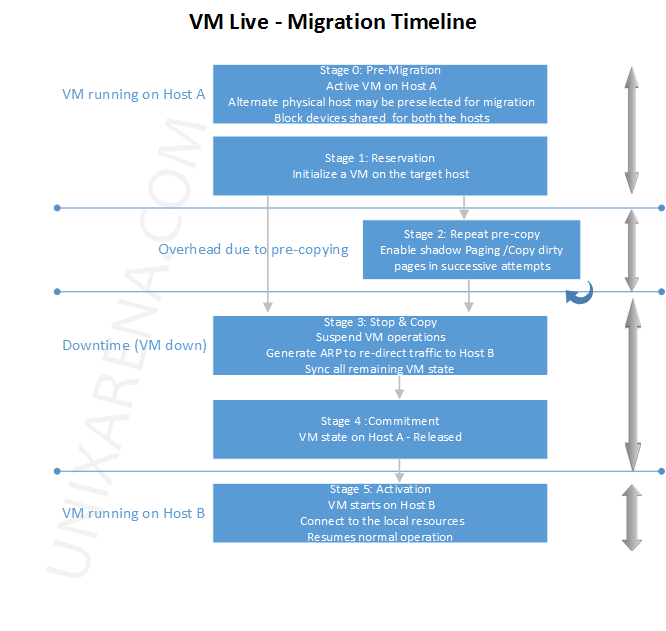
The process can be broken down into several stages, as shown in the diagram below. The most critical part for our discussion is Stage 3: Stop & Copy, as this is when the VM is momentarily unresponsive.
Key Performance Metrics
As mentioned in the resources, the success of a live migration is judged by two metrics:
- Downtime: The period during which the service running on the VM is completely unresponsive. This is the "stop and copy" phase. For live migration to be effective, downtime must be in the range of milliseconds, making it imperceptible to most users.
- Total Migration Time: The total duration from the start to the end of the migration process. While a long total migration time doesn't affect the user directly (as the service is running for most of it), it consumes network bandwidth and management resources.
The primary challenge for any live migration algorithm is to minimize both of these values.
Core Techniques: Pre-copy vs. Post-copy
There are two main strategies for migrating the VM's memory, each with different trade-offs regarding downtime and total migration time.
A Performance Perspective of Live Migration of Virtual Machine in Cloud Data Center
This same paper provides a concise explanation of the two dominant migration techniques: pre-copy and post-copy. The included comparison table is excellent material for an exam answer.
Please read section '2.1 The Standard Live Pre-Copy...', section '2.2 Post-copy technique', and section '2.3 Post-copy vs. pre-copy mechanism'. Pay close attention to the timeline diagram (Fig. 1) and the comparison table (Table 1). Finally, look at Table 2 in section '4. Live Virtual Machine Migration Services' to see which techniques are used by real-world hypervisors.
Here is a summary of the two approaches, perfect for a comparative exam question:
1. Pre-copy Migration
This is the most common approach, used by technologies like VMware vMotion and Xen's XenMotion.
- Process:
- Round 1: The hypervisor copies all of the VM's memory from the source to the destination while the VM is still running.
- Iterative Rounds: While the first round was happening, the running VM modified some of its memory pages (these are called "dirty" pages). The hypervisor then copies only these dirty pages. This process repeats in several rounds.
- Stop and Copy: Once the number of dirty pages remaining is very small, the hypervisor briefly pauses the VM, copies the final set of dirty pages and the CPU state, and then resumes the VM on the destination host.
- Trade-offs:
- Low Downtime: The downtime is very short because the VM is only paused for the final, quick transfer.
- Potentially High Total Migration Time: For applications that write to memory very frequently (high dirtying rate), the iterative phase can take a long time and consume significant network bandwidth as the same pages are sent over and over.
2. Post-copy Migration
This approach works in the opposite way.
- Process:
- Stop and Copy (Minimal): The hypervisor immediately pauses the VM on the source and copies a minimal execution state (CPU state and a small, non-pageable part of memory) to the destination.
- Resume: The VM is immediately resumed on the destination host.
- Demand Paging: When the resumed VM tries to access a memory page that hasn't been copied yet, it triggers a "page fault." The hypervisor on the destination then requests that specific page from the source host across the network. This is known as demand paging. In the background, the source host may also proactively "push" the remaining memory pages to the destination.
- Trade-offs:
- Low Total Migration Time: Each memory page is transferred only once, which is very efficient.
- Potentially Higher Performance Impact during Migration: The performance of the VM on the destination can be slow at first because it has to constantly wait for memory pages to be fetched across the network. There's also a higher risk if the source host fails before all pages are transferred.
Comparison Table
| Feature | Pre-copy Migration | Post-copy Migration |
|---|---|---|
| Downtime | Very low | Potentially higher (or more performance degradation) |
| Total Migration Time | Can be high, especially for write-intensive workloads | Lower and more predictable |
| Pages Transferred | Can be high (pages may be sent multiple times) | Low (each page is sent only once) |
| Fault Tolerance | More robust; source VM is a complete fallback until the final step | Less robust; failure of source host after migration begins is critical |
| Complexity | Simpler to implement robustly | More complex due to network page faulting |
| Common Use | VMware vMotion, Citrix XenMotion, KVM Migration | Less common in commercial products, primarily academic/research |
Conclusion
This lesson covered the critical concept of live migration, a cornerstone of modern virtualized data centers.
Key Takeaways:
- Definition: Live migration is the process of moving a running VM from one physical host to another with minimal or no service interruption.
- Primary Role: Its main purpose is to enable high availability and zero-downtime maintenance by allowing for load balancing, proactive fault tolerance, and hardware servicing without taking applications offline.
- Key Metrics: Performance is measured by downtime (service unresponsive period) and total migration time (overall process duration).
- Core Techniques: The most common method is pre-copy, which iteratively copies memory before a final, brief pause, optimizing for low downtime. The alternative is post-copy, which moves the VM first and pulls memory pages on demand, optimizing for low total data transfer.
Preview of the Next Lesson:
Now that we understand how VMs are created, managed, and moved, we must address the inherent risks and management challenges. In our next lesson, we will begin our exploration of Module 6: Virtualization Security and Resource Pooling. We will define what resource pooling is and then identify and explain key virtualization security threats, such as VM escape and hyperjacking.