Introduction
Welcome to your next lesson in Cloud Computing. In our previous session, we established a framework for choosing the right cloud deployment model (Public, Private, Hybrid, Community) based on business needs like cost, security, and scalability. We concluded that the choice of where to deploy services is only half the story.
This lesson transitions from the "where" to the "what." We will explore the three fundamental cloud service models that define what kind of service you actually consume from a cloud provider. Your learning outcome for this session is to: Define and explain Infrastructure as a Service (IaaS), Platform as a Service (PaaS), and Software as a Service (SaaS) with examples.
This is one of the most foundational topics in cloud computing and a frequent subject of exam questions, especially those requiring you to define and compare the models. We will focus on clear definitions, the level of management and control each model offers, and concrete examples to ensure you can build a comprehensive and high-scoring answer.
Understanding the Application Stack
Before we can differentiate between IaaS, PaaS, and SaaS, we must first understand the components required to deliver any application. Think of these as layers in a stack, from the physical hardware at the bottom to the application you interact with at the top.
A typical application stack includes:
- Networking: Routers, firewalls, and connectivity.
- Storage: Hard drives and storage systems for data.
- Servers: The physical or virtual computers providing processing power.
- Virtualization: The technology (like a hypervisor) that creates virtual machines from physical hardware.
- Operating System (OS): The software that manages the hardware, such as Windows or Linux.
- Middleware: Software that bridges the OS and applications (e.g., database management systems, message queues).
- Runtime: The environment where the application code executes (e.g., Java Virtual Machine, .NET Framework).
- Data: The information the application uses and generates.
- Application: The actual code and user interface that provides the business logic.
The core difference between IaaS, PaaS, and SaaS lies in which of these layers you manage versus which layers the cloud provider manages for you.
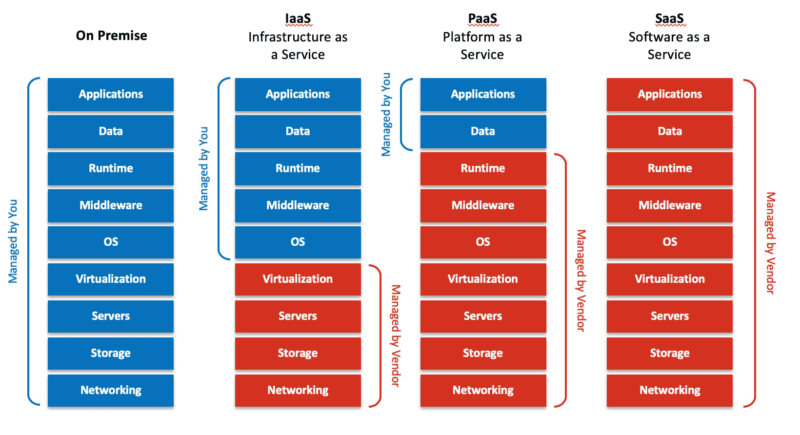
This concept is formally known as the Shared Responsibility Model, which we will explore in greater detail in the next lesson. For now, use this diagram as a mental map as we define each service model.
Infrastructure as a Service (IaaS)
Definition: Infrastructure as a Service (IaaS) is a cloud computing model that provides on-demand access to fundamental computing resources—servers, storage, and networking—over the internet on a pay-as-you-go basis.
In the IaaS model, you are essentially renting the hardware infrastructure. The cloud provider manages the physical data center, virtualization, servers, storage, and networking. You are responsible for everything above that, including the operating system, middleware, runtime, data, and the application itself.
- What you manage: Operating System, Middleware, Runtime, Data, Applications.
- What the provider manages: Virtualization, Servers, Storage, Networking.
This gives you the highest level of control and flexibility among the three service models. It's analogous to leasing a car: you don't own the car, but you decide where to drive it, how fast to go, and who rides with you.
Key Use Cases:
- Migrating existing on-premise applications to the cloud ("lift-and-shift").
- Hosting websites and applications where you need full control over the environment.
- Development and testing environments.
- Big data analysis and high-performance computing.
- Backup and disaster recovery.
Examples:
- Amazon Web Services (AWS): Elastic Compute Cloud (EC2) for virtual servers, Simple Storage Service (S3) for storage.
- Microsoft Azure: Azure Virtual Machines, Azure Disk Storage.
- Google Cloud Platform (GCP): Google Compute Engine (GCE).
- DigitalOcean, Linode, Rackspace.
Platform as a Service (PaaS)
Definition: Platform as a Service (PaaS) provides a framework for developers to build, test, and deploy applications without the complexity of building and maintaining the underlying infrastructure.
In the PaaS model, the provider manages not only the infrastructure (IaaS) but also the platform components like the operating system, middleware, and runtime. Your only focus is on your application code and data. This greatly simplifies the development lifecycle.
- What you manage: Applications, Data.
- What the provider manages: Runtime, Middleware, OS, Virtualization, Servers, Storage, Networking.
This is analogous to ordering a meal kit: the ingredients are prepped and the recipe is provided. You just have to do the cooking (write the code) and enjoy the meal (run the application).
Key Use Cases:
- Agile software development and rapid application deployment.
- When multiple developers need to collaborate on a single project.
- Building custom applications without the overhead of infrastructure management.
- API development and management.
Examples:
- Heroku
- AWS Elastic Beanstalk
- Google App Engine
- Microsoft Azure App Services
- Red Hat OpenShift
Software as a Service (SaaS)
Definition: Software as a Service (SaaS) is a delivery model where ready-to-use software applications are provided to users over the internet, typically on a subscription basis. This is the most common cloud service model.
In the SaaS model, the provider manages the entire stack, from the hardware all the way up to the application software. You simply access the software through a web browser or an app and use it. You don't worry about updates, maintenance, or any underlying infrastructure.
- What you manage: Nothing. You are an end-user of the software.
- What the provider manages: Everything, including the application itself.
This is analogous to dining out at a restaurant: you just show up, order your food, eat, and pay. The restaurant handles everything else, from sourcing ingredients to cooking and cleaning.
Key Use Cases:
- Business productivity applications (email, office suites, collaboration tools).
- Customer Relationship Management (CRM) systems.
- Enterprise Resource Planning (ERP) systems.
- Any situation where you need a turnkey solution to a business problem with minimal IT involvement.
Examples:
- Google Workspace (Gmail, Google Docs)
- Microsoft Office 365
- Salesforce (CRM)
- Dropbox (File Storage)
- Netflix (Video Streaming)
Bringing It All Together
To solidify your understanding, the following video provides a clear, step-by-step explanation of each model using a helpful analogy.
Lec-9: SaaS, PaaS & IaaS - Cloud Computing Made Simple!
The video 'SaaS, PaaS & IaaS - Cloud Computing Made Simple!' from Gate Smashers is excellent for exam preparation. It breaks down the application stack and uses the popular 'pizza as a service' analogy to explain the difference in management and control for each model.
Please watch from 00:38 to 08:28. Pay close attention to: The breakdown of the application 'building blocks' (00:38). The explanation and pizza analogy for SaaS (04:02). The explanation and pizza analogy for PaaS (04:48). The explanation and pizza analogy for IaaS (06:00). The summary of examples for each model (07:48).
Comparison for Exam Success
For your exams, being able to compare IaaS, PaaS, and SaaS in a structured format is crucial. A table is the most effective way to present this information clearly. The following reading provides detailed definitions and, most importantly, a comprehensive comparison table.
IaaS vs PaaS vs SaaS Explained: A Complete Guide
The article 'IaaS vs PaaS vs SaaS Explained' from Ringover provides concise definitions and a fantastic head-to-head comparison table that is perfect for study and revision.
First, read the sections defining each service model: 'IaaS (Infrastructure as a Service) Explained', 'PaaS (Platform as a Service) Explained', and 'SaaS (Software as a Service) Explained'. Then, carefully study the table under the heading 'IaaS vs PaaS vs SaaS: A Head-to-Head Comparison'. This table is a key study tool, as it clearly outlines the differences in management, flexibility, and use cases.
This table is your template for answering "compare and contrast" questions on your exam. Make sure you are comfortable explaining each point.
Conclusion
In this lesson, we have defined and distinguished the three primary cloud service models: IaaS, PaaS, and SaaS. You now understand how they differ based on the level of abstraction and management they provide.
Key Takeaways:
- IaaS (Infrastructure as a Service): Provides raw computing infrastructure (servers, storage, networking). You manage the OS and everything above it. Offers the most control. Examples: AWS EC2, Azure VMs.
- PaaS (Platform as a Service): Provides a platform for developing and deploying applications. You manage your application code and data. Offers a balance of control and convenience. Examples: Heroku, Google App Engine.
- SaaS (Software as a Service): Provides ready-to-use software. The provider manages everything. Offers the most convenience and least control. Examples: Salesforce, Google Workspace, Netflix.
- The fundamental difference between them is who manages what in the application stack.
Preview of the Next Lesson:
We've introduced the concept of "who manages what," which is central to understanding cloud services. In our next lesson, we will formalize this by taking a deep dive into the Shared Responsibility Model. We will use diagrams to illustrate exactly which components are the user's responsibility versus the provider's responsibility for IaaS, PaaS, and SaaS, a topic that is critical for understanding cloud security and operations.