Introduction
Welcome to the next lesson in our series on Containerization and Orchestration. In the previous lesson, we examined the high-level architecture of Kubernetes, distinguishing between the Control Plane (the brain) and the Worker Nodes (the muscle). We established that the Control Plane manages the cluster, while the Worker Nodes execute the containerized applications.
Now, we will zoom in on the most fundamental component that runs on these worker nodes. Your syllabus points to the core objects in Kubernetes, starting with the Pod. This lesson is dedicated to answering two critical questions for your exam:
- What exactly is a Kubernetes Pod?
- Why is it considered the smallest deployable unit, and what role does it play?
We will move beyond the container itself to understand the abstraction layer Kubernetes builds on top of it. By the end of this lesson, you will be able to define a Pod and explain its function as the basic building block of any Kubernetes application.
1. Defining the Pod
In the world of Docker and container runtimes, the fundamental unit is the container. However, Kubernetes introduces a higher-level concept: the Pod.
Definition: A Pod is the smallest and simplest deployable object in Kubernetes. It represents a single instance of an application running in your cluster. A Pod encapsulates one or more tightly coupled containers, along with shared storage (volumes) and network resources (a unique IP address).
You can think of a Pod as a "logical host" or a wrapper around your containers. While a Pod can contain multiple containers, the most common scenario is the "one-container-per-Pod" model.
The following diagram illustrates the structure of a Pod.
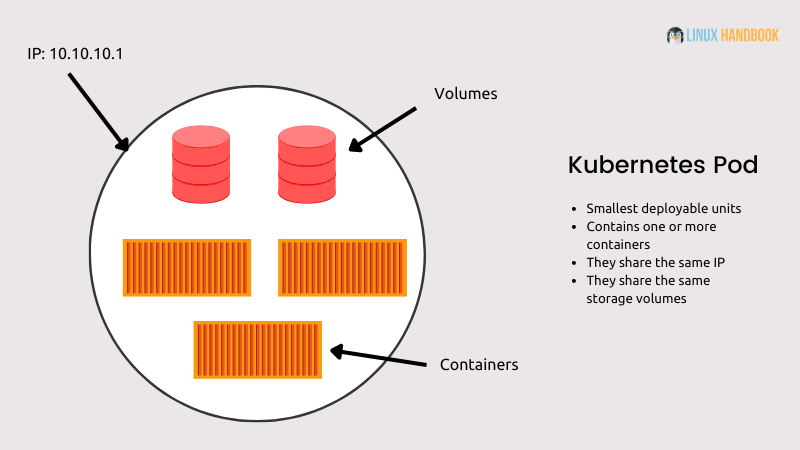
To get a formal definition and understand its core characteristics, please review the introductory sections of the following resource.
What are Kubernetes Pods? Steps to Create, Kill & Models Of Pod
The article 'What are Kubernetes Pods?' from K21Academy provides clear, exam-oriented definitions and diagrams. This section will give you the foundational definition of a Pod.
Read the sections 'What are Pods in Kubernetes?' and 'Key Characteristics of Pods'. Pay close attention to the definition and the role of Pods as the unit of scaling, replication, and resource allocation. You will also see a helpful diagram there.
2. The Role of the Pod: Why Not Just Manage Containers Directly?
A crucial question for understanding Kubernetes architecture is: why did its designers create the Pod abstraction instead of just managing containers directly? The Pod exists to solve specific challenges that arise in a distributed, containerized environment.
The two primary reasons are simplified networking and the ability to group tightly coupled processes.
A. Solving the Networking Challenge
If Kubernetes scheduled individual containers directly onto worker nodes, it would create a significant networking complexity. Each container would need to have its ports mapped to the host node's ports, leading to a high risk of port conflicts. Managing which ports are free across a large cluster would become a logistical nightmare.
Kubernetes elegantly solves this with the Pod model.
- Every Pod is assigned its own unique IP address within the cluster.
- All containers inside a single Pod share this same network namespace (the same IP address and port space).
- This means containers within a Pod can communicate with each other using
localhost, just as if they were processes running on the same machine.
The following video explains this concept exceptionally well.
Pods and Containers - Kubernetes Networking | Container Communication inside the Pod
TechWorld with Nana provides excellent visual explanations. This clip will demonstrate the port conflict problem and show precisely how the Pod's networking model solves it.
Watch the segment from 00:47 to 03:52. Focus on understanding the challenge of container port mapping and how giving each Pod its own IP address resolves this issue.
B. Grouping Tightly Coupled Processes and Sharing Resources
The "logical host" model of a Pod allows it to house more than one container. This is essential for applications that require tightly coupled helper processes. These are often called sidecar containers.
A common example is having a main application container (like a web server) and a sidecar container that scrapes logs or metrics from the main application. Because they are in the same Pod, they can easily communicate over localhost and share storage volumes.
This reading further clarifies why the Pod is the smallest unit, focusing on the concepts of localhost communication and shared storage.
Kubernetes Pods Fundamentals: Complete Guide to Pod Lifecycle
The article 'Kubernetes Pods Fundamentals' gives a deeper architectural perspective on why the Pod exists.
Read the sections 'What is a Pod?' and 'Why is the Pod the Smallest Deployable Unit?'. Focus on the explanations for 'The Need for Localhost Communication' and 'Shared Storage Volumes'.
3. Pod Models: Single-Container vs. Multi-Container
Based on the role of the Pod, two primary usage patterns emerge:
-
Single-Container Pod: This is the most common model in Kubernetes. The Pod acts as a simple wrapper around a single container. If you need to scale your application, you create more Pods, not more containers within the same Pod.
-
Multi-Container Pod: This model is used for co-locating tightly coupled processes that need to share resources. The containers in the Pod are managed as a single entity, sharing a lifecycle (they are created and destroyed together). Common patterns include:
- Sidecar: A helper container that assists the main application container (e.g., logging, monitoring, service mesh proxy).
- Adapter: A container that standardizes or modifies the output of the main container.
- Ambassador: A container that proxies network traffic to and from the main container.
The following video segment demonstrates a practical use case for a multi-container Pod.
Pods and Containers - Kubernetes Networking | Container Communication inside the Pod
Let's return to the video from TechWorld with Nana to see an example of a multi-container Pod in action.
Watch the segment from 05:58 to 07:32. This part explains when you might need more than one container in a Pod and how these containers communicate via localhost.
4. Summary for Exams: Pod vs. Container
For your exams, being able to clearly articulate the difference between a Pod and a container is essential. The following table summarizes their key distinctions.
| Feature | Pod | Container |
|---|---|---|
| Definition | The smallest deployable unit in Kubernetes. An abstraction layer or "logical host". | A lightweight, standalone, executable package of software. |
| Unit of... | Deployment & Scaling in Kubernetes. You scale an app by adding/removing Pods. | Execution. The runtime engine (e.g., containerd) runs containers. |
| Contents | Encapsulates one or more containers. | Contains an application and its dependencies. |
| Networking | Each Pod gets its own unique IP address. Containers within a Pod share this IP. | Has no networking capabilities on its own; relies on its host (the Pod). |
| Storage | Can have shared storage volumes that are accessible to all its containers. | Has its own isolated filesystem, which is ephemeral by default. |
| Lifecycle | All containers within a Pod share the same lifecycle (start, stop, restart together). | Has its own lifecycle, but it is managed as part of the Pod's lifecycle in K8s. |
Conclusion
In this lesson, we have focused on the foundational unit of Kubernetes: the Pod. We've moved beyond the basic container to understand the crucial layer of abstraction that Kubernetes provides to simplify application deployment and management.
Key Takeaways:
- A Pod is the smallest deployable unit in Kubernetes, acting as a logical host for one or more containers.
- Kubernetes manages Pods, not containers directly. This design choice solves major challenges in networking (by giving each Pod a unique IP) and resource sharing.
- Containers within the same Pod share a network namespace (communicating via
localhost) and can share storage volumes. - The most common pattern is a single-container Pod, but the multi-container Pod model is powerful for applications with tightly coupled helper processes (sidecars).
Preview of the Next Lesson:
While Pods are the basic building blocks, we rarely create and manage them individually in a real-world or production scenario. If a node fails, the Pods on it are lost. To achieve self-healing and manage application scaling, we need a higher-level controller. In the next lesson, we will explore the Deployment object in Kubernetes, which manages the lifecycle of Pods, ensuring that a specified number of replicas are always running.