Introduction
In our previous lesson, you learned how a Kubernetes Deployment provides a robust way to manage your application's lifecycle. You now understand that a Deployment ensures a desired number of Pods are always running (self-healing) and handles application updates gracefully with zero downtime (rolling updates).
However, a critical problem remains. The Pods managed by a Deployment are ephemeral—they can be destroyed and recreated at any time, and each new Pod gets a new, unpredictable IP address. This raises two essential questions:
- How can other applications within the cluster reliably communicate with your application Pods if their IPs are always changing?
- How can you expose your application to users outside the cluster?
This lesson will answer these questions by focusing on the Kubernetes Service. You will learn the formal definition of a Service and, most importantly, understand its fundamental role in providing a stable network endpoint for a set of ever-changing Pods, thereby exposing your application both internally and externally.
1. What is a Kubernetes Service? The Need for Abstraction
The core problem a Service solves is decoupling the network endpoint of an application from the volatile Pods that run it. Without a Service, every time a Pod dies and is replaced, any client communicating with it would need to be updated with the new Pod's IP address. This is unmanageable.
A Service acts as a stable abstraction layer. It gets its own IP address and DNS name that remain constant, regardless of what happens to the individual Pods behind it.
Definition: A Kubernetes Service is an abstract way to expose an application running on a set of Pods as a network service. It provides a single, stable IP address and DNS name (an endpoint) that intelligently routes and load-balances traffic to the correct backend Pods, even as they are created and destroyed.
To understand this core concept, the following video provides a clear explanation of the problem (ephemeral Pods) and how a Service acts as the solution.
Kubernetes Services explained | ClusterIP vs NodePort vs LoadBalancer vs Headless Service
Watch the beginning of this video from TechWorld with Nana to grasp why Services are essential in Kubernetes.
Watch the segment from 00:33 to 02:14. Focus on how a Service provides a 'stable or static IP address' that acts as a persistent access point for a group of ephemeral Pods and also provides load balancing.
For a text-based definition that you can use in your exams, please review the following resource.
Kubernetes - ClusterIP vs NodePort vs LoadBalancer - GeeksforGeeks
The article from GeeksforGeeks provides an excellent, exam-friendly definition of a Kubernetes Service.
Read the section 'What is a Kubernetes Service?'. Pay close attention to the key phrases: 'exposing a network application', 'static IP address', 'provides load balancing', and 'good abstraction for loose coupling'.
2. How a Service Finds its Pods: Labels and Selectors
A Service doesn't magically know which Pods to send traffic to. It uses a simple but powerful mechanism: Labels and Selectors.
- Labels: These are key-value pairs that you attach to Kubernetes objects, like Pods. For example, you might label all your web server Pods with
app: my-webapp. - Selector: In the Service's configuration, you define a
selectorthat matches a specific label. The Service will then continuously scan the cluster for Pods with that label.
This creates a dynamic relationship. Any Pod with a matching label automatically becomes a part of the Service's group of endpoints. This is how the Service knows which Pod IPs are currently valid targets for traffic.
Additionally, a Service needs to know which ports to use:
port: The port that the Service itself exposes.targetPort: The port on the container inside the Pod where the traffic should be sent.
The video segment below explains this crucial mechanism in detail.
Kubernetes Services explained | ClusterIP vs NodePort vs LoadBalancer vs Headless Service
Let's return to the 'TechWorld with Nana' video. This next part explains exactly how selectors and port mappings work.
Watch the segment from 06:54 to 09:29. This section visually demonstrates how the selector in a Service's YAML file matches the labels on the Pods. It also clarifies the difference between the Service's port and the Pod's targetPort.
3. Exposing Your Application: The Three Main Service Types
The primary role of a Service is to expose your application. How it's exposed—whether just inside the cluster or to the outside world—depends on its type. For your exam, you must know the three main types: ClusterIP, NodePort, and LoadBalancer.
The following diagram provides a high-level overview of how these types control traffic flow.
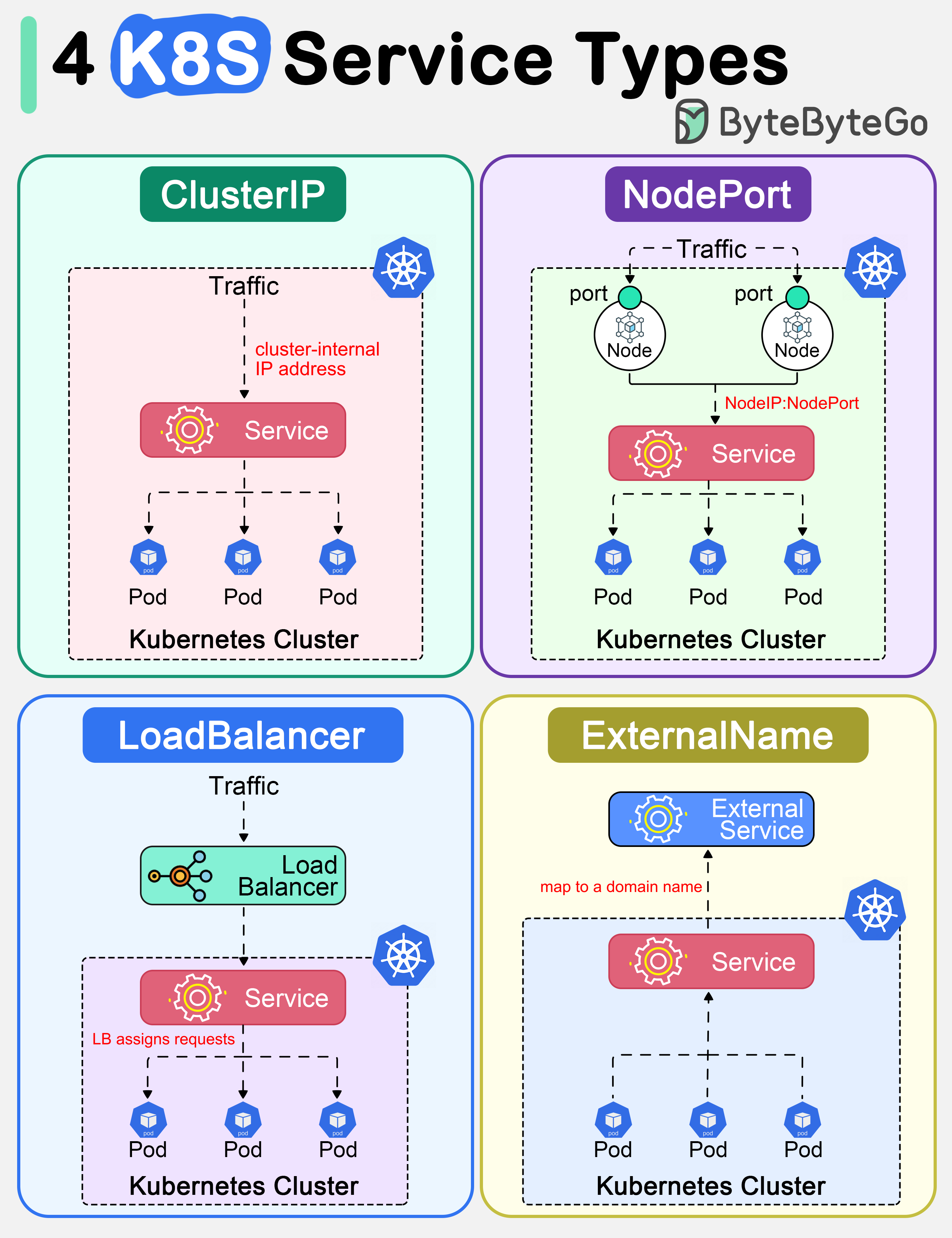
a) ClusterIP
- Definition: Exposes the Service on an IP address that is only accessible from within the cluster. This is the default Service type if you don't specify one.
- Role/Use Case: Used for internal communication between different components of your application. For example, a frontend service communicating with a backend database service. It does not expose the application to the internet.
b) NodePort
- Definition: Exposes the Service on a static port on each Worker Node's IP address. This port is typically in the range of 30000-32767. A ClusterIP service is automatically created, and the NodePort service routes traffic to it.
- Role/Use Case: Allows external access to the service for development, testing, or demo purposes. You can access the application by hitting
<Node-IP>:<Node-Port>. It's generally not recommended for production because you have to manage the Node IPs yourself.
c) LoadBalancer
- Definition: Exposes the Service externally using a cloud provider's load balancer (e.g., an AWS Elastic Load Balancer or an Azure Load Balancer). This is the standard and preferred method for exposing production applications to the internet.
- Role/Use Case: When you create a Service of type
LoadBalancer, the cloud platform automatically provisions a load balancer, gives it a public IP address, and configures it to send traffic to your Service's NodePort on your worker nodes. It builds on top of bothNodePortandClusterIPservices.
To cement your understanding, this resource provides clear definitions and a valuable comparison table.
Kubernetes Service – What It is, Types & Examples
The Spacelift blog gives concise descriptions and a fantastic summary table for comparing the different service types.
First, read the subsections '1. ClusterIP Services', '2. NodePort Services', and '3. LoadBalancer Services'. Then, carefully study the summary table under 'Which Service type should I use?'. Focus on the rows for 'Accessibility' and 'Use case' for ClusterIP, NodePort, and LoadBalancer.
4. Summary for Exams: Service Types Comparison
For your semester exam, being able to compare these service types in a tabular format is crucial for scoring full marks. Here is a consolidated table based on the key characteristics.
| Feature | ClusterIP | NodePort | LoadBalancer |
|---|---|---|---|
| Exposure | Internal (within the cluster only) | External | External |
| Accessibility | Reachable via the Service's internal IP and DNS name. | Reachable via NodeIP:NodePort from outside the cluster. |
Reachable via a stable, public IP address provided by the cloud provider's load balancer. |
| Default Type | Yes | No | No |
| Primary Use Case | Internal communication between microservices (e.g., frontend to backend). | Exposing services for development, testing, or when a cloud load balancer is not available. | Standard way to expose production applications to the internet with high availability. |
| Infrastructure | No extra infrastructure needed. | Opens a port on every node in the cluster. | Automatically provisions a (usually billable) load balancer from a cloud provider. |
| Traffic Flow | Client → ClusterIP → Pod | External Client → NodeIP:NodePort → ClusterIP → Pod |
External Client → Load Balancer IP → NodeIP:NodePort → ClusterIP → Pod |
Conclusion
In this lesson, you have learned how the Kubernetes Service object solves the critical problem of network communication with ephemeral Pods. A Service acts as a stable entry point, using labels and selectors to dynamically find and load-balance traffic to the correct set of Pods.
Key Takeaways:
- A Service provides a stable IP address and DNS name for a group of Pods, decoupling the network endpoint from the Pods themselves.
- Services use labels on Pods and a selector in their own definition to identify which Pods to forward traffic to.
- The Service Type determines how an application is exposed:
- ClusterIP (default): For internal communication only.
- NodePort: Exposes the application on a port on each node, useful for development.
- LoadBalancer: The standard way to expose production applications to the internet via a cloud provider's load balancer.
Preview of the Next Lesson:
We have now covered how to run our application using a Deployment and how to expose it using a Service. But how do we define these objects? You've seen snippets of YAML files in this lesson. The next lesson, as per your syllabus, will focus on the Kubernetes YAML file. We will break down its structure and explain its purpose as the primary way to declaratively define and manage all Kubernetes resources.