Introduction
In our last lesson, we explored how Kubernetes Services provide a stable network endpoint for your applications. You learned that we define objects like Deployments and Services to manage our applications. But how do we actually tell Kubernetes what to create? We don't typically do it with a series of interactive commands. Instead, we use configuration files to declare the state we want.
This lesson directly addresses the final part of the "Containerization" module in your syllabus: the Kubernetes YAML file. You will learn about the fundamental purpose of these files and their basic structure. Understanding this is crucial, as every object in Kubernetes—from Pods to Deployments and Services—is defined using this format. Our goal is to equip you to read, understand, and structure a basic Kubernetes configuration file, a skill essential for your exams.
1. The Purpose of YAML: Declarative Configuration
Before diving into the syntax, it's vital to understand why Kubernetes uses files to define objects. The core principle is declarative configuration.
Instead of giving Kubernetes a series of imperative commands (e.g., "run this container," then "expose this port," then "scale to three copies"), you write a manifest file. This file describes the final desired state you want for your application. You give this file to Kubernetes, and its job is to make the cluster's current state match your desired state.
- Manifest: A file, typically written in YAML, that describes a Kubernetes object like a Pod, Deployment, or Service.
- Desired State (
spec): What you define in the manifest. For example, "I want three replicas of my Nginx application." - Current State (
status): The actual state of the objects in the cluster at any given moment, which Kubernetes continuously monitors and reports.
If the current state deviates from the desired state (e.g., a Pod crashes), Kubernetes automatically takes action to fix it (e.g., starts a new Pod). This is the basis of Kubernetes' self-healing capability.
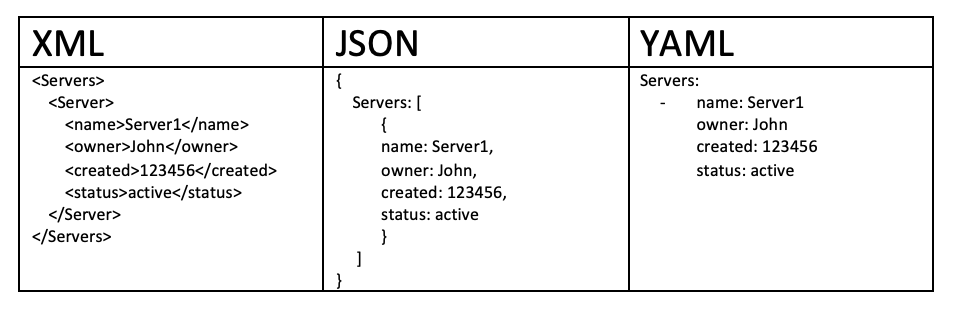
To begin, let's clarify what YAML is. YAML stands for "YAML Ain't Markup Language" and is a human-readable data serialization format. It's often preferred over formats like JSON or XML for configuration files because its use of indentation makes it clean and easy to read.
The official Kubernetes documentation provides an excellent definition of this core concept.
Please read this section from the official Kubernetes documentation. It formally introduces the concept of Kubernetes objects and the critical distinction between the spec (desired state) and status (current state).
Read the section titled 'Understanding Kubernetes objects'. Focus on the definitions of 'desired state', 'spec', and 'status'. Pay attention to the example of a Deployment and how Kubernetes responds to a failure.
2. The Basic Structure of a Kubernetes Manifest
Every Kubernetes manifest file, regardless of the object it defines, has a consistent top-level structure. For your exam, you must memorize the four essential fields:
apiVersionkindmetadataspec
The following video from KodeKloud provides a clear, step-by-step walkthrough of these four fields by building a manifest for a Pod.
Learn & Implement Kubernetes: Kubernetes POD Definition with YAML
This video is an excellent guide to the fundamental structure of a Kubernetes YAML file. It clearly explains each of the four required top-level fields.
Watch from 00:24 to 05:51. The video will introduce the four mandatory fields and then detail what each one is for, using a Pod definition as an example. Pay close attention to the YAML syntax, especially the use of indentation for dictionaries and dashes (-) for lists.
Now, let's break down each field with definitions suitable for your exam answers.

Field Breakdown
| Field | Purpose | Example |
|---|---|---|
apiVersion |
Specifies which version of the Kubernetes API to use to create this object. Different objects are part of different API groups. For example, core objects like Pods and Services use v1, while objects like Deployments and ReplicaSets use apps/v1. |
apiVersion: v1 apiVersion: apps/v1 |
kind |
Specifies the type of Kubernetes object you want to create. This tells Kubernetes whether the manifest is for a Pod, Deployment, Service, ReplicaSet, etc. The kind must be a valid type within the specified apiVersion. |
kind: Pod kind: Deployment |
metadata |
Data that helps uniquely identify the object. This is a dictionary that includes at least the object's name. It can also contain labels (key-value pairs for grouping objects) and other identifying information. |
metadata:name: my-app-podlabels:app: my-app |
spec |
The specification or desired state of the object. This is the most important section and varies greatly depending on the kind of object. For a Pod, the spec defines the containers to run. For a Deployment, it defines the number of replicas and the Pod template. |
spec:containers:- name: nginx-containerimage: nginx |
To reinforce these concepts, the official documentation provides a concise list of these required fields.
This short section from the official documentation explicitly lists and describes the four required fields. It serves as a definitive reference.
Read the section titled 'Required fields'. This will quickly solidify your understanding of the four essential components of a manifest.
3. The status Field: The Reconciliation Loop
While you define the apiVersion, kind, metadata, and spec, there is a fifth top-level field that Kubernetes adds and manages automatically: status.
The status field describes the current state of the object as observed by the cluster. Kubernetes constantly works to make the status match the spec. This process is called the reconciliation loop.
For example, in your Deployment's spec, you might state replicas: 3. Kubernetes will then update the status to reflect how many replicas are actually running. If the status.readyReplicas is 2, Kubernetes knows it needs to create one more Pod to reconcile the state.
Understanding this dynamic is key to grasping how Kubernetes achieves its robustness.
Kubernetes YAML File Explained - Deployment and Service | Kubernetes Tutorial 19
This clip from TechWorld with Nana explains the relationship between the spec and the status, and how it forms the basis of Kubernetes' self-healing features.
Watch from 01:45 to 03:36. Focus on how Kubernetes automatically generates the status section and continuously compares it with the spec to detect and fix discrepancies.
4. A Complete Example: Deployment Manifest
Let's tie everything together by looking at a complete YAML manifest for a Deployment, which you learned about in a previous lesson. Note how the four essential fields are present and how the spec contains details specific to a Deployment, including a template for the Pods it will manage.
# 1. API Version for Deployments
apiVersion: apps/v1


# 2. Kind of object
kind: Deployment


# 3. Metadata for the Deployment
metadata:
  name: nginx-deployment
  labels:
    app: nginx


# 4. Specification (Desired State) for the Deployment
spec:
  replicas: 2 # Tells the Deployment to run 2 Pods
  selector:
    matchLabels:
      app: nginx # Finds which Pods to manage by matching labels
  template: # This is a blueprint for the Pods the Deployment will create
    metadata:


      # Pods will get this label, which matches the selector above
      labels:
        app: nginx
    spec:
      containers:
      - name: nginx
        image: nginx:1.14.2 # The container image to run
        ports:
        - containerPort: 80 # The port the container will listen on
This manifest declaratively tells Kubernetes: "Ensure that there are always two Pods running, created from a template that uses the nginx:1.14.2 image, and label them with app: nginx."
Conclusion
In this lesson, you've learned the purpose and fundamental structure of Kubernetes YAML files, which are the cornerstone of managing applications on the platform.
Key Takeaways:
- Kubernetes uses YAML manifests for declarative configuration, where you define the desired state (
spec) of your application. - Kubernetes works to make the current state (
status) of the cluster match the desired state you've defined. - Every Kubernetes manifest must contain four top-level fields:
apiVersion: The API group and version.kind: The type of object (e.g.,Pod,Deployment).metadata: Identifying data, including the object'sname.spec: The detailed specification of the desired state.
- The YAML format is indentation-sensitive and uses key-value pairs, with lists (arrays) denoted by a leading dash (
-).
Preview of the Next Lesson:
Having completed the foundational modules on Cloud Computing, Virtualization, and Containerization, we will now move to the next major topic in your syllabus: Cloud Architectures and Major Platforms. The next lesson will introduce the formal NIST Cloud Reference Architecture and explore the architecture of key open-source cloud platforms like Eucalyptus and OpenStack.