Introduction
In our previous lesson, we established the role of Kubernetes as a container orchestrator and outlined its key benefits, such as self-healing, automated scaling, and simplified deployments. We answered the what and why of Kubernetes. Now, it's time to delve into the how. How does Kubernetes actually manage to perform all these complex tasks?
The answer lies in its architecture. This lesson directly addresses your syllabus objective of understanding the structure of a Kubernetes cluster. We will dissect the high-level architecture, distinguishing between its two fundamental parts: the Control Plane (the brain) and the Worker Nodes (the muscle). You will learn the specific components that make up each part and understand their individual responsibilities.
By the end of this lesson, you will be able to explain the high-level architecture of Kubernetes, clearly distinguishing between the Control Plane and Worker Nodes, and illustrate this structure with a diagram.
1. Kubernetes Cluster Architecture: An Overview
At the highest level, a Kubernetes environment is a cluster.
Definition: A Kubernetes cluster is a set of machines, called nodes, that work together to run containerized applications. This cluster-based architecture allows you to manage a group of machines as a single, unified system, providing the fault tolerance and scalability we discussed in the last lesson.
This architecture is fundamentally divided into two main parts:
- The Control Plane: This is the brain of the cluster. It makes all the global decisions, such as scheduling applications and responding to cluster events (like a node failing). It is responsible for maintaining the desired state of the cluster. In older terminology, the nodes running the control plane were often called Master Nodes.
- Worker Nodes: These are the machines that do the actual work. They are the "hands" or "muscle" of the cluster, responsible for running the application containers.
The following diagram provides a clear visual separation of these two parts and their core components, which we will explore in detail.

To quickly grasp this master-worker model, the following article provides a concise introduction.
Kubernetes Architecture Explained: Nodes, Pods, and Clusters
The article 'Kubernetes Architecture Explained' by KodeKloud provides a solid overview of the cluster-based architecture. Reading the introduction will set the stage for understanding the roles of the Control Plane and Worker Nodes.
Read the section titled 'What Is Kubernetes Architecture? (Big Picture Overview)'. Focus on the definition of the Control Plane as the 'brain' and the Worker Nodes as the 'hands' of the system.
2. The Control Plane: The Brain of the Cluster
The Control Plane's job is to manage the cluster. It acts as the orchestration layer, ensuring that your applications and the cluster itself are running in the state you declared. For high availability in production environments, the control plane components are typically replicated across multiple machines.
The Control Plane consists of several key components that run on one or more master nodes.
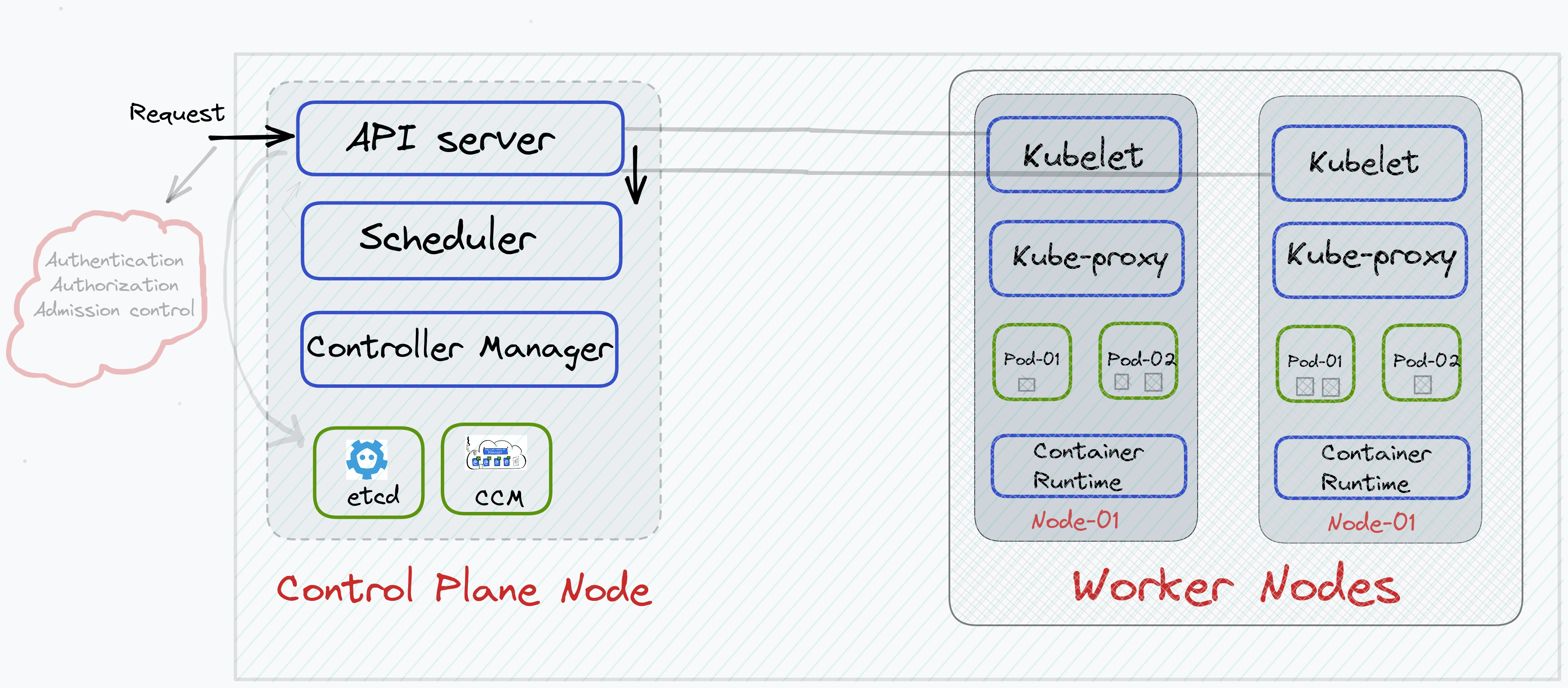
Let's break down each component.
Control Plane Components
| Component | Description |
|---|---|
kube-apiserver |
The front door of the Control Plane. It exposes the Kubernetes API. All communication from users, management tools (kubectl), and other components is handled by the API server. It validates and processes requests, then updates the cluster's state in etcd. |
etcd |
The database or "memory" of the cluster. It is a consistent and highly-available key-value store that holds all Kubernetes cluster data, including its configuration, state, and desired state. It is the single source of truth for the cluster. |
kube-scheduler |
The matchmaker. It watches for newly created Pods (which we'll cover next lesson) that have no assigned node, and selects a Worker Node for them to run on. It makes this decision based on resource requirements, hardware constraints, and other policies. |
kube-controller-manager |
The autopilot. This component runs controller processes that constantly monitor the cluster's state. If the current state doesn't match the desired state stored in etcd, the controller manager takes corrective action. For example, the Node Controller handles node failures, and the Replication Controller ensures the correct number of pods are running. |
cloud-controller-manager |
An optional component that integrates with a specific cloud provider's API. It manages cloud-specific resources like load balancers and storage volumes. |
To see how these components work together in practice, the following video offers a concise walkthrough.
kubernetes Architecture explained in 5 minutes
The video 'kubernetes Architecture explained in 5 minutes' from SKSecOps provides a fast and clear explanation of the components of both the master and worker nodes.
Watch the section on master node components from 00:35 to 03:30. This will give you a dynamic overview of the roles of etcd, kube-scheduler, kube-api-server, and kube-controller-manager.
3. The Worker Nodes: The Muscle of the Cluster
Worker Nodes are where your application containers are actually deployed and run. Each worker node is managed by the Control Plane and contains the necessary services to run containers.
Worker Node Components
| Component | Description |
|---|---|
kubelet |
An agent that runs on each worker node. It communicates with the kube-apiserver to receive instructions and ensures that containers described in Pod specifications are running and healthy on its node. It's the local supervisor. |
kube-proxy |
A network proxy that runs on each worker node. It maintains network rules on the node, which allow for network communication to your Pods from inside or outside the cluster. It is essential for service discovery and load balancing. |
| Container Runtime | The engine that runs the containers. This is the underlying software responsible for pulling container images from a registry, and starting and stopping them. Examples include containerd and CRI-O. (Note: Docker was historically used but is now being phased out in favor of runtimes that use the Container Runtime Interface - CRI). |
Continuing with the same video will clarify the roles of these worker components.
kubernetes Architecture explained in 5 minutes
Let's continue with the same video from SKSecOps to understand the worker node components.
Now, watch the section on worker node components from 03:30 to 04:42. This covers the kubelet, container runtime, and kube-proxy.
4. Distinguishing Between Control Plane and Worker Nodes
For your exams, being able to clearly compare and contrast the roles of the Control Plane (Master Node) and Worker Nodes is critical. The key distinction is management vs. execution.
- The Control Plane manages the cluster.
- The Worker Nodes execute the workloads.
The following table, adapted from the KodeKloud article, provides a perfect summary for exam revision.
| Feature / Role | Master Node (Control Plane) | Worker Node |
|---|---|---|
| Primary Function | Manages the cluster and makes decisions | Runs workloads and executes containers |
| Key Components | kube-apiserver, etcd, kube-scheduler, kube-controller-manager |
kubelet, kube-proxy, Container Runtime |
| Workload Execution | No (management only) | Yes (runs Pods and containers) |
| State Management | Maintains the global desired and actual state of the cluster in etcd |
Reports its local state back to the control plane via the kubelet |
| Failure Response | Detects failures and reschedules workloads on healthy nodes | Executes the commands from the control plane to start/stop containers |
To solidify these definitions and distinctions, the following reading is highly recommended.
Kubernetes Architecture Explained: Nodes, Pods, and Clusters
The KodeKloud article provides detailed, exam-ready definitions for each component and features an excellent comparison table.
Please read the following three sections: 'Control Plane Components - The Brain of Kubernetes': For detailed definitions of each master component. 'Worker Node Components - The Hands of Kubernetes': For detailed definitions of each worker component. 'Master Node vs Worker Node - Key Differences': Review this section and the comparison table to consolidate your understanding.
Conclusion
In this lesson, we have dissected the high-level architecture of Kubernetes, fulfilling a core requirement of your syllabus. You now understand how a Kubernetes cluster is structured and the specific roles of its main components.
Key Takeaways:
- A Kubernetes Cluster consists of a Control Plane and multiple Worker Nodes.
- The Control Plane is the "brain" that manages the cluster. Its core components are the
kube-apiserver(front door),etcd(database),kube-scheduler(matchmaker), andkube-controller-manager(autopilot). - Worker Nodes are the "muscle" that run the actual applications. Their core components are the
kubelet(local agent),kube-proxy(network manager), and aContainer Runtime(engine). - The fundamental distinction is that the Control Plane is for management and decision-making, while Worker Nodes are for workload execution.
Preview of the Next Lesson:
Now that we understand the overall structure of the house (the cluster), the management team (Control Plane), and the factory floor (Worker Nodes), it's time to look at the actual thing being built. In our next lesson, we will define the Pod, which is the smallest and most fundamental deployable unit in Kubernetes. We'll explore what a Pod is and why Kubernetes uses this abstraction instead of running containers directly.