Introduction
In our previous lessons, we learned how to package an application into a portable image using a Dockerfile and how to share that image using a container registry like Docker Hub. This workflow is perfect for single-container applications or for development environments.
However, modern applications are rarely that simple. They are often built as microservices, where an application is split into many independent, containerized services (e.g., frontend, backend, database, payment service). This brings up a critical question: How do you manage hundreds or even thousands of containers running across multiple servers, ensure they can communicate, and keep them healthy? Doing this manually is impossible.
This lesson directly addresses your syllabus topic on Container Deployment and answers that question. Our learning outcome is to: Define container orchestration and explain why it is necessary for managing containerized applications at scale.
1. The Challenge of Managing Containers at Scale
Imagine a simple web application with three containerized microservices: a frontend, a backend, and a database. On a single machine, this is manageable. But in a production environment with heavy traffic, you face several complex challenges:
- Deployment & Scheduling: On which server (or "node") should each container run? How do you ensure you're placing containers efficiently based on the available CPU and memory?
- Scaling: If traffic to your frontend spikes, how do you quickly launch more frontend containers to handle the load? How do you remove them when the traffic subsides to save costs?
- Networking & Service Discovery: When a frontend container needs to talk to a backend container, how does it find its IP address? This is difficult because containers can be stopped, restarted, or moved, often getting a new IP address each time. How do you balance incoming user traffic across multiple identical container replicas?
- Health Monitoring & Self-Healing: What happens if a container crashes or the server it's running on fails? How do you detect this failure and automatically restart the container or move it to a healthy server to avoid downtime?
Attempting to script solutions for all these problems is incredibly complex and error-prone. This is the core problem that container orchestration solves.
To see these challenges explained visually, watch the following video.
Container Orchestration Explained
The video 'Container Orchestration Explained' by IBM Technology provides an excellent overview of the operational complexities that arise when moving from a developer's view of a few containers to a production-scale deployment.
Watch the segment from 00:16 to 05:49. The first part (until 01:55) sets up the scenario with a multi-container application. The second part details the challenges that an operations team faces, specifically around deploying, scaling, and networking containers at scale.
2. Defining Container Orchestration
Now that we understand the problem, we can define the solution.
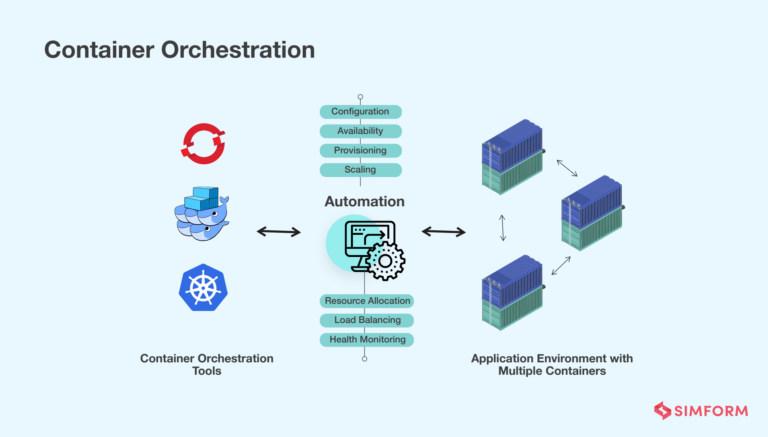
Container Orchestration is the automated process of managing, deploying, scaling, networking, and ensuring the availability of containerized applications across a cluster of server nodes. It handles the complete lifecycle of a container, from its initial placement to its eventual removal.
For an exam-friendly analogy, think of an orchestra conductor.
Lec-37: What is Kubernetes☸️? Full Architecture🏗️with Real Life Examples
The video 'Lec-37: What is Kubernetes?' from Gate Smashers uses the classic orchestra analogy to explain orchestration. This is a very common and effective way to describe the concept in an exam.
Watch from 00:54 to 01:59. Notice how the video explains that with just a few containers, management is easy, but with thousands, an 'orchestration tool' is needed to manage them all, just as a conductor manages many musicians.
An orchestration tool acts as the "brain" of your containerized environment, making intelligent decisions to keep your application running smoothly according to the state you define (e.g., "I always want 3 replicas of my web server running").
To get a precise definition, please read the following material.
Docker vs Kubernetes: Key Differences in Containerization and Orchestration
The article 'Docker vs Kubernetes' from CloudOptimo clearly defines containerization and then introduces orchestration as the solution for managing containers at scale. This provides the exact definitions you need for your exam.
Read the sections 'Docker vs Kubernetes' (the introduction) and 'Overview of Containerization, Docker, and Kubernetes'. Focus on the distinction: Docker is for creating and running individual containers, while an orchestrator like Kubernetes is for managing them at scale.
3. Why Orchestration is Necessary: Key Functions
Orchestration is necessary because it provides automated solutions to the scaling challenges we identified earlier. Here are the core functions that an orchestration platform provides, making it indispensable for production environments.
| Function | Description | Why It's Necessary |
|---|---|---|
| Automated Scheduling | Intelligently places containers onto available nodes in a cluster based on resource requirements (CPU, RAM) and other constraints. | Avoids manual placement of containers and ensures efficient use of hardware resources across the cluster. |
| Auto-Scaling | Automatically increases or decreases the number of running container instances based on CPU utilization or other metrics. | Ensures the application can handle traffic spikes without manual intervention and saves costs by scaling down during off-peak hours. |
| Self-Healing | Monitors the health of containers and nodes. If a container fails, it is automatically restarted. If a node fails, its containers are rescheduled onto healthy nodes. | Provides high availability and resilience, minimizing application downtime without needing a human to detect and fix the issue. |
| Service Discovery & Load Balancing | Provides a stable network endpoint (a single DNS name or IP) for a group of container replicas. It automatically distributes incoming network traffic among them. | Solves the problem of changing container IP addresses and ensures traffic is spread evenly, preventing any single container from being overloaded. |
| Automated Rollouts & Rollbacks | Manages the process of updating an application to a new version. It can perform rolling updates to deploy the new version without downtime and can automatically roll back to the previous version if an issue is detected. | Simplifies and de-risks the process of application updates, allowing for frequent and safe deployments (CI/CD). |
The IBM Technology video you watched earlier also covers these points well, particularly self-healing (referred to as "insight" from 05:49 onwards) and service discovery/networking.
4. Distinguishing Automation and Orchestration
For your exams, it's useful to understand the precise difference between "automation" and "orchestration." While related, they are not the same.
- Automation refers to making a single task repeatable without human intervention (e.g., a script to start one container).
- Orchestration is the process of arranging and coordinating multiple automated tasks into a cohesive workflow to achieve a larger goal (e.g., deploying, scaling, and managing a multi-container application).
Think of it this way: automating the deployment of one container is automation. Orchestration is the intelligence that decides when and where to run that automated task, how many times to run it, and how to connect it to other tasks.

For further clarification, the following resource provides an excellent, detailed comparison.
Automation vs. Orchestration: The Key Differences
The article 'Automation vs. Orchestration' from BMC offers a clear, tabular comparison that is perfect for exam preparation. It helps you understand the scope and complexity that orchestration handles.
Read the sections 'What is orchestration?', 'The key differences: A side-by-side comparison', and the FAQ question 'How does container orchestration (e.g., Kubernetes) fit in?'. This will solidify the distinction and directly link the general concept of orchestration to container management.
Conclusion
In this lesson, we have established the fundamental need for container orchestration when managing modern, large-scale applications. While Docker provides the tool to create and run containers, orchestration platforms provide the "brain" to manage them.
Key Takeaways:
- The Problem: Managing multi-container applications at scale is complex, involving challenges in deployment, scaling, networking, and health monitoring.
- The Solution: Container Orchestration is the automated management of the entire lifecycle of containerized applications across a cluster.
- Necessity: Orchestration is necessary to achieve scalability, high availability (self-healing), and resilience for production applications. It automates key functions like scheduling, scaling, service discovery, and load balancing.
- Orchestration vs. Automation: Automation handles single tasks, while orchestration coordinates multiple automated tasks into a complete workflow.
Preview of the Next Lesson:
Now that you understand why orchestration is critical, we will dive into the most popular and powerful container orchestration tool in the world: Kubernetes. In the next lesson, we will explore its core benefits and its high-level architecture, including the roles of the Control Plane and Worker Nodes, as outlined in your syllabus.