Introduction
Welcome to the next lesson in our series on containerization. In our last session, we drew a clear distinction between a static, read-only container image (the blueprint) and a live, running container (the instance). We also previously covered the fundamentals of virtualization and hypervisors in an earlier module.
Today, we will synthesize this knowledge to tackle one of the most fundamental and frequently asked exam questions in cloud computing. This lesson is designed to help you compare virtualization with containerization in a tabular format across key characteristics like resource usage, boot time, performance, and isolation. Mastering this comparison is essential for a deep understanding of modern application deployment and for scoring well on your semester exams.
1. The Fundamental Architectural Difference
Everything about the comparison between virtualization and containerization stems from one core architectural difference: how they use the operating system.
-
Virtualization creates entire virtual machines (VMs) that are fully isolated from each other and the host system. It achieves this by using a hypervisor to abstract the physical hardware. Crucially, each VM includes a full copy of its own guest operating system.
-
Containerization, on the other hand, operates at the OS level. It uses a container engine (like Docker) to allow multiple containers to run on a single host. All containers share the host operating system's kernel. They only package the application code and its specific dependencies (libraries, binaries).
To visualize this key architectural difference, let's watch a short animated video that clearly explains both setups.
Virtual Machines vs Containers
The video 'Virtual Machines vs Containers' by PowerCert Animated Videos provides an excellent high-level overview of both technologies and their architectures. It's a great starting point for our comparison.
Please watch these two segments: 01:16 - 02:42: Focus on the architecture of Virtual Machines. Note the layers: Hardware -> Hypervisor -> Guest OS -> Application. 04:56 - 05:23: Now, observe the container architecture. Notice the layers are different: Hardware -> Host OS -> Container Engine -> Applications. Pay close attention to how the hypervisor is replaced by a container engine and there is no separate Guest OS for each application.
This architectural difference is perfectly captured in the following diagram, a format you should aim to reproduce in an exam.

2. A Deeper Comparison of Key Characteristics
Now that we have established the architectural foundation, let's analyze how it leads to significant differences in performance, resource usage, and security.
The following video provides a more technical breakdown of these differences. It will help you understand the why behind each point in our final comparison table.
Virtual Machines vs LXC vs Docker: What’s the Real Difference?
The video 'Virtual Machines vs LXC vs Docker' from Lawrence Systems offers a detailed technical comparison that explores the nuances of performance, memory management, and security.
Watch the following segments, focusing on these key points: Abstraction & OS (02:01 - 04:08): Reinforces the core difference. VMs emulate everything and have an independent guest kernel. Containers share the host kernel and isolate the 'userland'. Density, Startup, & I/O (05:01 - 06:15): This is a critical section. Note the comments on higher density for containers, the massive difference in startup times (minutes for VMs vs. fast for containers), and the performance bottleneck of VMs due to block-level emulation vs. direct I/O access for containers. Memory Management (06:21 - 08:00 & 09:02 - 10:09): Pay attention to how memory is handled. VMs typically have static, pre-allocated RAM, leading to the 'noisy neighbor' problem being eliminated but lower density. Containers use memory elastically from a shared pool, which is more efficient but requires careful management. Security & Fault Isolation (13:57 - 15:30): This is a crucial point for exams. A kernel panic in a VM only crashes that guest OS. Strong isolation. A kernel panic in a container can crash the entire host. Weaker isolation.
Based on these videos and the architectural model, we can systematically compare the two technologies across the characteristics required by your syllabus.
Key Characteristics Breakdown:
-
Resource Usage:
- VMs: High resource overhead. Each VM runs a full guest OS, which consumes significant CPU, RAM, and storage (often gigabytes in size). This leads to lower server density (fewer VMs can run on a single physical server).
- Containers: Low resource overhead. They share the host kernel and only package the application binaries and libraries. This makes them extremely lightweight (megabytes in size), allowing for much higher server density.
-
Boot Time:
- VMs: Slow. Booting a VM involves starting a complete operating system, which can take several minutes.
- Containers: Extremely fast. A container is just a process on the host OS. It can start in seconds or even milliseconds because there is no OS to boot.
-
Performance:
- VMs: Suffer from performance overhead. The hypervisor introduces a layer of emulation between the application and the physical hardware, which can create bottlenecks, especially for I/O operations.
- Containers: Near-native performance. Applications inside a container run directly on the host kernel, enjoying performance almost identical to running natively on the host.
-
Isolation and Security:
- VMs: Strong isolation. Each VM is a completely separate entity with its own kernel. A security vulnerability or crash within one VM is completely isolated from the host and other VMs. This is a significant advantage for multi-tenant environments.
- Containers: Weaker isolation. All containers share the same host kernel. While namespaces provide process-level isolation, a critical vulnerability in the host kernel (a "kernel exploit") could potentially allow a container to "escape" and affect the host or other containers.
3. The Definitive Comparison Table for Your Exam
For your exams, presenting your answer in a clear, tabular format is the best way to earn full marks. The following table summarizes all the essential differences between virtualization and containerization.
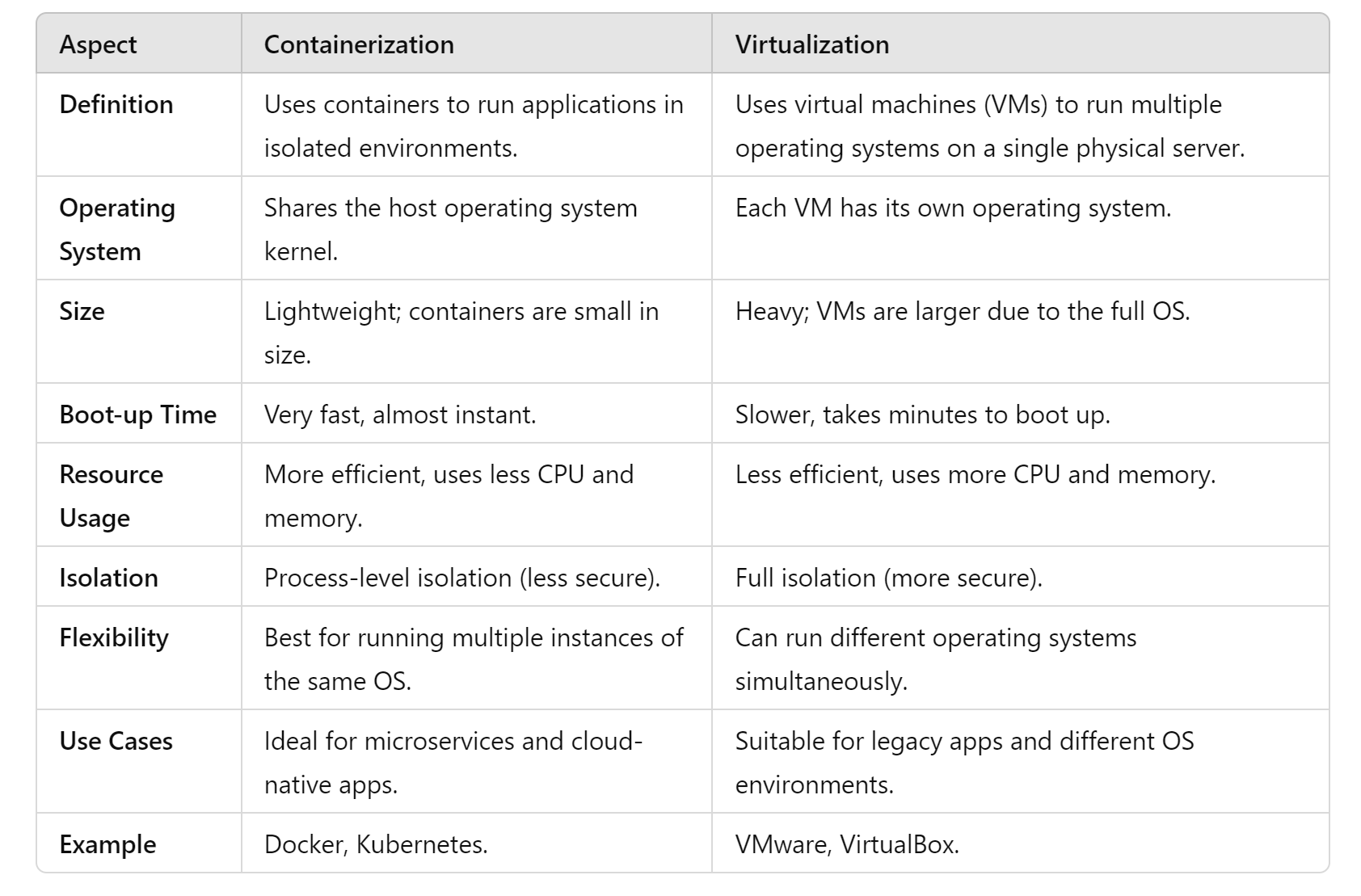
To give you the exact content for a detailed exam answer, I recommend studying the table in the following resource. It perfectly aligns with the learning outcome and your goal of mastering exam-relevant material.
Containerization vs Virtualization: 9 Key Differences
The article 'Containerization vs Virtualization: 9 Key Differences' from SentinelOne provides a perfect, comprehensive comparison table that you should use as a model for your exam answers.
Navigate to the section titled 'Containerization vs Virtualization: 9 Key Differences'. Study this table carefully. It breaks down the comparison across nine critical aspects: Architecture, Boot Time, Resource Utilization, Isolation, Portability, Performance, Scalability, Security, and Use Cases. Memorizing these points will prepare you thoroughly for any question on this topic.
For reinforcement, the article "What's the difference between Virtualization vs Containerization?" (LINK) also contains several excellent tables in its sections "Key Differences Between Virtual Machines and Containers" and "Pros and Cons of Virtualization vs Containerization for DevOps Teams" that you can review.
Conclusion
This lesson has provided a comprehensive, exam-focused comparison between virtualization and containerization. Understanding this distinction is not just academic; it explains why containers have become the standard for modern cloud-native applications.
Key Takeaways:
- The core difference is that VMs virtualize hardware (each has its own OS), while containers virtualize the OS (they share the host OS kernel).
- Virtual Machines offer strong isolation and the ability to run different operating systems, but at the cost of high resource overhead and slow startup times.
- Containers offer lightweight efficiency, rapid startup, and near-native performance, but with weaker isolation compared to VMs.
- Your choice between the two depends on the trade-off: prioritize security and legacy OS support (VMs) or speed, efficiency, and portability (containers).
Preview of the Next Lesson:
Now that you have a firm grasp of what containers are and how they differ from VMs, we will turn our attention to the platform that made containerization mainstream: Docker. In the next lesson, we will explore the role of Docker as a containerization platform, break down the purpose of a Dockerfile, and understand the function of a container registry like Docker Hub.