Introduction
Welcome back! In our previous lesson, we established a foundational understanding of containerization. We defined it as a lightweight method of OS-level virtualization, explored the container architecture where all containers share the host OS kernel, and discussed how namespaces and cgroups provide isolation and resource management.
Today, we will address a very common point of confusion that is a frequent topic in exams: the difference between a container image and a running container. This lesson directly addresses the learning outcome: Differentiate between a container image and a running container. Mastering this distinction is crucial for understanding how containerized applications are built, shared, and executed.
1. The Blueprint: Container Image
First, let's define the Container Image. Think of it as a static, unchangeable blueprint or a template. In object-oriented programming terms, an image is like a class: it defines all the characteristics and behaviors, but it isn't a living object itself.
A Container Image is a lightweight, standalone, executable package that includes everything needed to run a piece of software, including:
- The application code
- A runtime (e.g., Python, Node.js)
- System tools and libraries
- Configuration settings
The most critical characteristic of an image is that it is immutable and read-only. Once an image is built, it cannot be changed. If you need to make a change, you must build a new image.
Images are typically created from a set of instructions in a text file called a Dockerfile. The image itself is composed of a series of read-only layers stacked on top of each other. Each instruction in the Dockerfile creates a new layer.
The diagram below shows the typical workflow, from a Dockerfile to a stored Image, which is then used to run a Container.

2. The Running Instance: Container
Now, let's define the Container. If the image is the blueprint (the class), the container is the actual house built from that blueprint (the object or instance).
A Container is a live, running instance of an image. When you command the container engine (like Docker) to run an image, it creates a container.
Here is the most important technical distinction:
When a container is launched from an image, the container engine takes all the read-only layers of the image and adds one more thin layer on top: a writable layer.
This shows that a Container consists of the read-only layers from the base Image plus a new, writable "Container layer" on top. All changes made during the container's runtime, such as writing logs or creating temporary files, are stored in this writable layer.
This architecture means:
- Mutability: The container is mutable. You can make changes inside a running container (e.g., install software, modify files).
- Isolation: Any changes are written only to that container's specific writable layer. They do not affect the underlying image.
- Efficiency: Multiple containers can share access to the same underlying image layers, which are read-only. Only the changes unique to each container are stored in their respective writable layers, saving significant disk space.
A container is a live process that consumes system resources like CPU and memory. An image, on the other hand, is just a passive file on a disk.
3. Analogies and a Practical Demonstration
To make this distinction crystal clear, let's watch a video that uses simple analogies and then provides a practical demonstration of creating an image and running a container from it.
Lec-36: Image vs Container with Real Life Example & Demo
The video 'Image vs Container with Real Life Example & Demo' from Gate Smashers effectively explains the concept using analogies like a blueprint vs. a house and a recipe vs. a pizza. It then demonstrates the difference using Docker commands.
Please watch the following segments: 00:22 - 01:42: Focus on the analogies (blueprint, recipe) and the key terms: image is a static template and is immutable, while a container is a running instance and is mutable. 02:52 - 06:41: Observe the demo. Notice how docker pull nginx only downloads the image (the template), which doesn't do anything on its own. Then, see how docker run nginx actually creates and starts the container, which is a running web server you can access in your browser. This directly shows the image as a prerequisite for the running container.
This demo perfectly illustrates the relationship: you first need the blueprint (the image), and only then can you build the house (the container).
4. How an Image Becomes a Container
We've established the "what," but let's briefly touch on the "how." How does the system turn a static image file into an isolated, running process? This ties back to the concepts of namespaces and cgroups from our last lesson.
The following short video explains this instantiation process technically.
What is a Container? | What is an Image? | Docker Containers and Images | Geekific
The video 'What is a Container? | What is an Image?' from Geekific gives a concise technical explanation of how an image is used to create a container.
Watch the segment from 04:21 to 05:12. This section explains the steps: the kernel isolates resources, the image's file system is placed into this isolated space, and the image's startup command is executed to create the containerized process.
In summary, the container engine uses the image's file system snapshot and startup command, and then leverages the host OS kernel's features (namespaces and cgroups) to wrap the resulting process in an isolated environment.
5. Tabular Comparison for Your Exam
For your semester exams, comparison tables are an excellent way to structure answers. The difference between an image and a container is a classic comparison question.
Here is a visual summary of the key differences:
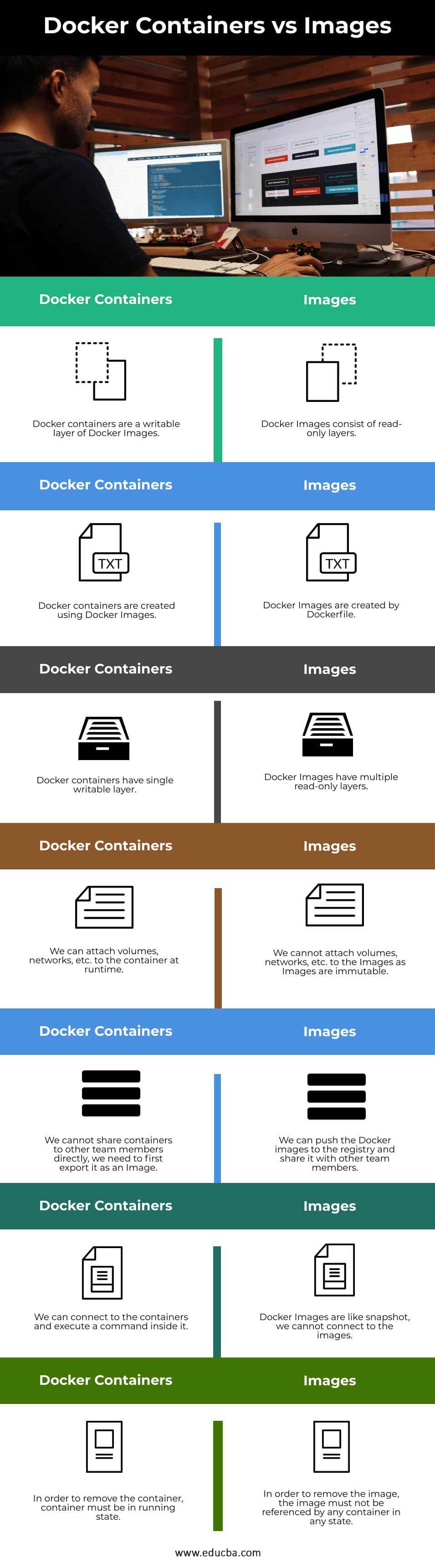
To give you the detailed points for a long-form answer, the following article provides a perfect table.
Difference between Docker Image and Container
The GeeksForGeeks article 'Difference between Docker Image and Container' contains a comprehensive table that is ideal for exam preparation. It breaks down the differences across several key features.
Read the section titled 'Difference between Docker Images and Containers'. Focus on memorizing the contents of the table, as it covers all the essential points: Analogy, Nature, Mutability, Resource consumption, Creation, and Existence.
The AWS article, "What's the Difference Between Docker Images and Containers?" (LINK), also provides a similar high-quality summary table in its final section, which you can use for reinforcement.
Conclusion
In this lesson, we have thoroughly dissected the relationship between a container image and a running container. This is a fundamental concept in containerization, and being able to explain it clearly is essential.
Key Takeaways:
- Image: A static, immutable, read-only template containing the application and its dependencies. It's the blueprint, analogous to a class in OOP. It exists as files on a disk.
- Container: A live, running instance of an image. It is mutable because it includes a thin writable layer on top of the image's read-only layers. It's the actual running application, analogous to an object. It is a process that consumes CPU and memory.
- Relationship: You run an image to create a container. One image can be used to create many containers.
Preview of the Next Lesson:
Now that you have a solid understanding of both virtual machines (from the previous module) and containers, our next lesson will focus on a critical, high-yield exam topic: a direct, tabular comparison of Virtualization vs. Containerization. We will leverage what you've learned to highlight the key trade-offs in resource usage, performance, boot time, and isolation.