Introduction
Welcome to your next lesson. In our previous session, we established that a core principle of FinOps is to leverage the cloud's variable cost model to maximize business value. To do this effectively, you must understand the different pricing options your cloud provider offers. Choosing the right model for the right workload is fundamental to cost optimization.
This lesson directly addresses the learning outcome: Compare cloud pricing models: on-demand, reserved instances, and spot instances, explaining the ideal use case for each. This is a frequent topic in university exams, often requiring you to present your answer in a clear, comparative format. We will break down each model, define its characteristics, and then synthesize this information into comparison tables and analogies to ensure you can recall it easily.
1. The Three Core Cloud Pricing Models
Most major cloud providers, like AWS, Azure, and GCP, structure their compute pricing around three primary models. Each model represents a different trade-off between cost, flexibility, and commitment.
To start, let's get a quick overview of the main pricing models for Amazon's EC2, which are representative of the industry standard.
Amazon/AWS EC2 Pricing Simply Explained | On-Demand, Spot, Reserved, Savings Plans
This video from Tiny Technical Tutorials provides a concise side-by-side comparison of the key pricing models. We will focus on the first three for now.
Watch from 00:24 to 02:15. This segment will introduce you to On-Demand, Spot, and Reserved Instances, giving you a foundational understanding of each.
Now, let's examine each of these models in detail, focusing on the definitions, advantages, disadvantages, and use cases you'll need for your exam.
2. On-Demand Instances: Maximum Flexibility
On-Demand is the default, most straightforward pricing model. You pay for compute capacity by the hour or second with no long-term commitments or upfront payments.
Definition: On-Demand instances allow you to provision and terminate compute resources at any time and pay a fixed rate only for the time you use them.
This model offers the greatest flexibility, making it ideal for applications with unpredictable or spiky usage patterns.
On-Demand vs Spot vs Reserved Instances
The article 'On-Demand vs Spot vs Reserved Instances' by nOps provides a clear definition, use cases, and a list of pros and cons for On-Demand instances.
Read the section 'On-Demand Instances' up to (but not including) 'Reserved Instances'. Pay close attention to the 'Best for' section and the lists of pros and cons.
Based on the reading, here is a summary for your notes:
| On-Demand Instances | |
|---|---|
| Ideal Use Cases | • Short-term, irregular workloads. • Applications being developed or tested for the first time. • Applications with unpredictable traffic spikes. |
| Pros | • Ultimate Flexibility: Start and stop anytime with no lock-in. • No Commitment: Pay only for what you use. • Simple Billing: Easy to understand and manage. |
| Cons | • Highest Cost: You pay a premium for flexibility. • Unpredictable Bills: Costs can vary significantly with usage. • Not Cost-Efficient for Steady Workloads: Expensive for applications that run 24/7. |
3. Reserved Instances (RIs): Commitment for Savings
For workloads that are stable and predictable, making a long-term commitment can lead to significant savings. This is the principle behind Reserved Instances.
Definition: Reserved Instances (RIs) provide a significant discount (up to 75%) compared to On-Demand pricing in exchange for a commitment to use a specific instance type in a particular region for a one or three-year term.
On-Demand vs Spot vs Reserved Instances
Let's return to the nOps article to explore Reserved Instances.
Read the section 'Reserved Instances' up to (but not including) 'Spot Instances'. Note the difference between Standard and Convertible RIs, as this is a key detail.
Here is a summary table for Reserved Instances:
| Reserved Instances (RIs) | |
|---|---|
| Ideal Use Cases | • Steady-state, predictable workloads (e.g., production databases, application servers). • Applications with baseline usage that is always on. • When you need to guarantee capacity in a specific zone. |
| Pros | • Deep Discounts: Significant savings for long-running workloads. • Predictable Spending: Fixed cost makes budgeting easier. • Capacity Reservation: Guaranteed access to resources when needed (with Zonal RIs). |
| Cons | • Lock-in: 1-3 year commitment reduces agility. • Forecasting Risk: You pay for the committed resources even if you don't use them. • Management Overhead: Requires careful planning and management to maximize value. |
A note on Savings Plans: Cloud providers like AWS are now encouraging the use of Savings Plans over Reserved Instances. Savings Plans offer similar discounts but provide more flexibility. Instead of committing to a specific instance type, you commit to a certain amount of hourly spend (e.g., $10/hour) for a 1 or 3-year term. This discount is then automatically applied to any matching compute usage, regardless of instance family or even service (e.g., it can apply to EC2, Fargate, and Lambda).
4. Spot Instances: The Biggest Savings with a Catch
The final model, Spot Instances, allows you to access unused cloud capacity at the steepest discounts.
Definition: Spot Instances let you bid on and use spare compute capacity at discounts of up to 90% off On-Demand prices. The "catch" is that the cloud provider can reclaim these instances with very short notice (typically two minutes) if the capacity is needed for On-Demand customers.
Amazon EC2 Instance Launch Types : On Demand, Reserved, Spot Instances and Dedicated host.
This video from Cloud Champ provides an excellent, concise explanation of Spot Instances and includes a memorable analogy we will revisit later.
Watch from 02:55 to 03:42. Focus on the type of workload that is suitable for Spot Instances.
Here is a summary for your notes:
| Spot Instances | |
|---|---|
| Ideal Use Cases | • Fault-tolerant workloads that can handle interruptions. • Batch processing jobs, big data analytics, and high-performance computing (HPC). • CI/CD pipelines and testing environments. |
| Pros | • Massive Savings: The cheapest pricing model, with up to 90% discounts. • Scale Affordably: Enables huge-scale computing for a fraction of the cost. |
| Cons | • Interruption Risk: Instances can be terminated at any time. • Unsuitable for Critical Workloads: Cannot be used for stateful or uninterruptible applications. • Requires Resilient Architecture: Applications must be designed to handle failure and restart. |
5. Direct Comparison: On-Demand vs. Reserved vs. Spot
For your exam, being able to directly compare these three models across key features is essential. The following table provides the concise, high-density information perfect for a comparative answer.
On-Demand vs Spot vs Reserved Instances
The nOps article provides a powerful summary table that contrasts the three models directly. This is a crucial resource for exam preparation.
Study the table in the section 'Detailed Comparison: On-Demand vs Spot vs Reserved Instances'. This format is ideal for answering comparison questions.
Here is that comparison, which you should aim to reproduce in an exam:
| Feature | On-Demand | Reserved Instances | Spot Instances |
|---|---|---|---|
| Cost / Discount | Highest cost; no discount. | Significant discount (up to 75%) vs. On-Demand. | Deepest discount (up to 90%) vs. On-Demand. |
| Commitment / Risk | No commitment, no risk. | 1 or 3-year commitment; risk of paying for unused capacity. | No commitment, but high risk of interruption. |
| Billing Model | Pay-as-you-go (per hour/second). | Upfront, partial, or no upfront payment for term. | Pay the "spot price" which fluctuates with supply/demand. |
| Availability/Reliability | Highly reliable and always available. | Guaranteed capacity (if Zonal). | Unreliable; capacity can be reclaimed by the provider. |
| Best for Workloads | Short-term, spiky, or unpredictable workloads. | Stable, predictable, long-running workloads. | Fault-tolerant, stateless, or non-urgent batch jobs. |
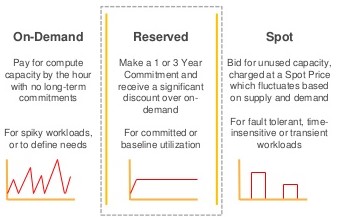
This image provides another excellent visual summary of the models and their typical workload patterns.
A Simple Analogy: The Hotel Stay
To make these concepts easier to remember, let's use a simple analogy of booking a hotel room.
Amazon EC2 Instance Launch Types : On Demand, Reserved, Spot Instances and Dedicated host.
The Cloud Champ video offers a simple and effective analogy comparing these pricing models to staying in a hotel. This is a great mnemonic device for exams.
Watch from 04:34 to 05:28 to hear the hotel analogy.
- On-Demand is like walking into a hotel and getting a room for the night at the standard rate. You can leave whenever you want. It's flexible but expensive.
- Reserved Instances are like leasing an apartment for a year. You get a much cheaper rate because you've committed to a long stay, but you have to pay for it even if you're not there.
- Spot Instances are like getting a massive discount on an unsold hotel room for one night. It's incredibly cheap, but the hotel can kick you out if a full-paying customer shows up.
Conclusion
Understanding the trade-offs between On-Demand, Reserved, and Spot instances is a cornerstone of effective cloud financial management. By aligning your workload characteristics with the appropriate pricing model, you can significantly reduce costs while maintaining the required performance and availability.
Key Takeaways:
- On-Demand: Use for flexibility with unpredictable workloads. Highest cost, no commitment.
- Reserved Instances: Use for stability with predictable, long-running workloads. Lower cost, requires a 1 or 3-year commitment.
- Spot Instances: Use for fault-tolerant batch jobs that can be interrupted. Lowest cost, no reliability guarantee.
- Best Practice: A common strategy is to use a mix of all three: RIs for baseline capacity, On-Demand for handling unpredictable spikes, and Spot for non-critical, cost-sensitive tasks.
Preview of the Next Lesson:
In this lesson, we explored the "what" and "why" of cloud pricing models. In our next two lessons, we will focus on the "how," addressing the numerical problems you requested. We will start by examining a key component of cloud contracts, the Service Level Agreement (SLA), and learn how to perform essential calculations related to it. Our next lesson will cover the learning outcome: Calculate service downtime given an SLA uptime percentage (e.g., downtime per month for 99.9% uptime).