Introduction
Welcome to your lesson on cloud cost calculation. In our previous two lessons, we explored the financial aspects of cloud management, first with Service Level Agreements (SLAs) and then by comparing the core pricing models: On-Demand, Reserved Instances, and Spot Instances. You learned the strategic trade-offs between flexibility and cost for each model.
This lesson addresses your request for numerical problems and covers the learning outcome: Calculate the cost of running a virtual machine for a specific period using a simplified on-demand pricing example. This is a fundamental skill that demonstrates a practical understanding of how cloud billing works and is a common type of question in semester exams. We will break down the components of VM pricing and walk through a step-by-step calculation that you can replicate to secure full marks.
1. The Components of Virtual Machine Cost
A common mistake is to think that the cost of a virtual machine (VM) is just the price of its CPU and memory. In reality, a VM's total cost is a sum of several distinct components. For an exam, clearly itemizing these components before starting your calculation shows a thorough understanding.
To begin, let's explore an article that breaks down the primary cost drivers for a cloud VM.
Understanding Google Cloud VM Cost: A Practical Guide to ...
The article 'Understanding Google Cloud VM Cost' provides an excellent breakdown of the 'four pillars' of VM pricing. This will form the foundation of our calculation formula.
Read the section titled 'How Google Compute Engine pricing works'. Focus on identifying the four main components that contribute to the total cost.
As the article explains, the total cost is an aggregate of several factors. The following image provides a clear visual summary of these cost components.
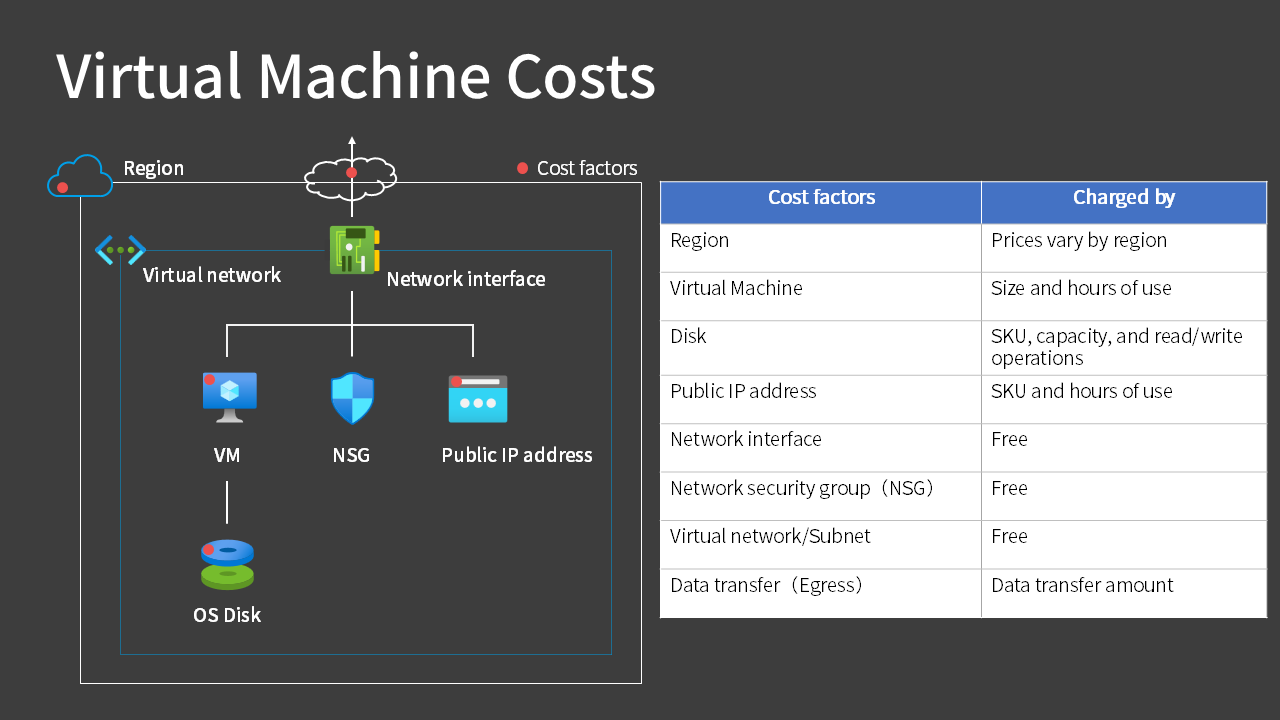
Based on this, here are the key cost components you must consider for your exam answers:
- Compute Cost: This is the charge for the virtual CPU (vCPU) and memory (RAM) allocated to your VM. It is typically priced per hour or per second of use. Cloud providers bundle these into predefined "instance types" (e.g.,
t2.micro,n2-standard-2). - Storage Cost: This is the charge for the persistent disk (like an SSD or HDD) attached to your VM. It is usually priced per gigabyte per month (GB-month).
- Data Transfer Cost (Egress): This is the charge for data moving out of the cloud provider's network to the internet. Data transfer into the cloud (ingress) is almost always free. This is priced per gigabyte (GB).
- Other Costs: This can include charges for static public IP addresses, specialized hardware like GPUs, or premium support. For most exam questions, you can assume these are zero unless specified.
2. The Formula for On-Demand VM Cost Calculation
For exam purposes, you need a straightforward formula. Based on the components above, we can construct a general formula for calculating the monthly cost of a single VM using the On-Demand model.
The total cost is the sum of its parts:
Total Cost = Compute Cost + Storage Cost + Data Transfer Cost
Let's expand each term:
- Compute Cost = (Hourly Rate for Instance) × (Total Hours of Use)
- Storage Cost = (Price per GB per Month) × (Disk Size in GB)
- Data Transfer Cost = (Price per GB) × (Data Egress in GB)
Combining these, the full formula is:
You should write down this formula or its components in your exam answer before substituting the values.
3. Worked Example: Calculating Monthly VM Cost
This is the core of the lesson. Let's apply the formula to a typical exam-style problem.
Problem:
A company needs to host a web application on a single cloud virtual machine. Calculate the total cost for running this VM for one full month (assume a 30-day month) using the On-Demand pricing model with the following specifications:
- Instance Type: A general-purpose VM with an on-demand hourly rate of $0.05 per hour.
- Storage: The VM is configured with a 40 GB standard persistent disk. The storage cost is $0.08 per GB-month.
- Data Transfer: The application is expected to generate 200 GB of data egress traffic during the month. The data egress cost is $0.09 per GB.
Solution:
Let's calculate the cost step-by-step, showing our work clearly.
Step 1: Calculate the total hours in the billing period.
A 30-day month has:
Step 2: Calculate the Compute Cost.
Using the hourly rate for the instance:
Step 3: Calculate the Storage Cost.
Using the per GB-month rate for the disk:
(Note: Since the period is one month, we use the monthly rate directly. If the period were different, this calculation would need to be prorated.)
Step 4: Calculate the Data Transfer Cost.
Using the per GB rate for egress traffic:
Step 5: Calculate the Total Monthly Cost.
Sum the costs from the previous steps:
Final Answer: The total estimated cost for running the virtual machine for one month is $57.20.
4. Using Cloud Pricing Calculators
While manual calculation is essential for exams, in a professional setting, you would use a cloud provider's official pricing calculator. These tools allow you to configure all the components we've discussed and get a detailed estimate. Understanding how these calculators work reinforces the concepts.
This image shows the Google Cloud Pricing Calculator, where you can input the number of instances, machine type, disk size, and location—all factors in our formula.

Now, let's watch a brief demonstration of how the AWS Pricing Calculator is used to estimate the cost of an EC2 instance (the AWS term for a VM).
How to Estimate AWS Costs with the AWS Pricing Calculator | Tutorial for Beginners
This video from Tiny Technical Tutorials shows how to use the AWS Pricing Calculator. It demonstrates how a user selects the instance type, quantity, and storage options to build a cost estimate.
Watch from 01:13 to 03:41. Notice how the user configures the number of instances, instance type (e.g., t2.xlarge), payment option (On-Demand), and storage (EBS). This directly mirrors the manual calculation we just performed.
This practical view confirms that the core of cost estimation—whether manual or with a tool—lies in correctly identifying and quantifying the key billable components: compute, storage, and networking.
For context, the code snippet below from the resource "Comprehensive Guide to Cloud Service Pricing" shows how these calculations can be automated in a script. Notice the line ec2_monthly = ec2_hourly_rate * 730 * 10. This is the same (Rate * Hours * Instances) logic we used in our manual calculation.
# AWS cost calculation script
# ...
# EC2 costs (m5.xlarge on-demand)
 ec2_hourly_rate = 0.192 # per instance
 ec2_monthly = ec2_hourly_rate * 730 * 10 # 10 instances


# S3 costs
 s3_storage = 5 * 1024 * 0.023 # 5 TB at $0.023/GB


# Data transfer costs
 data_transfer = 2 * 1024 * 0.09 # 2 TB at $0.09/GB


# ...
Conclusion
In this lesson, you have learned the systematic process for calculating the cost of a cloud virtual machine. This fulfills a key requirement for your exam preparation by providing you with a clear, replicable method for solving numerical problems related to cloud costs.
Key Takeaways:
- VM cost is not a single number; it's the sum of Compute, Storage, and Data Transfer costs.
- The general formula is: Total Cost = (Instance Rate × Hours) + (Storage Rate × Size) + (Egress Rate × Data).
- For exams, always show your work step-by-step: calculate each component cost separately before summing them for the final answer.
- On-Demand pricing provides the baseline cost. Other models, like Reserved Instances, apply a discount to the hourly compute rate, but the fundamental calculation structure remains the same.
Preview of the Next Lesson:
Having covered cloud financial management, we will now shift our focus to the core technologies that make cloud computing possible. As per your syllabus, we will begin our study of virtualization. In the next lesson, we will address the learning outcome: Define virtualization and explain its role as a foundational technology for cloud computing through the concept of abstraction. You will learn how virtualization allows a single physical server to run multiple, isolated virtual machines, a concept that underpins the very idea of resource pooling and IaaS.