Introduction
Welcome to your next lesson in the "Cloud Monitoring and Financial Management" module. In the previous lesson, we established that a Service Level Agreement (SLA) is a formal contract, with service availability (uptime) being its most critical component. You learned to define an SLA and identify its key parts, such as performance metrics and penalties.
Today, we will move from theory to practice. This lesson focuses on a core numerical skill essential for your exams: calculating the real-world impact of an SLA's uptime promise. Your learning outcome is to calculate service downtime given an SLA uptime percentage (e.g., downtime per month for 99.9% uptime).
We will walk through the exact formula and steps to convert percentages like "99.9%" into concrete units of time—minutes and seconds—that a service is allowed to be unavailable. This skill is not just crucial for scoring marks but also for understanding the tangible value of a cloud contract.
1. The Core Formula for Calculating Downtime
The fundamental principle is that downtime is the portion of time that a service is not available. Therefore, to find the allowed downtime, you first calculate the "unavailability" percentage and then apply it to a specific time period.
To start, let's review the key concepts and the primary formula for this calculation.
How to Calculate SLA for Cloud Services
The article 'How to Calculate SLA for Cloud Services' from Baeldung on Ops clearly defines the key terms and presents the formula for determining allowed downtime. This will form the basis of our calculations.
First, review the section '3. Key Concepts Behind SLA Calculation' to refresh your understanding of Uptime, Downtime, and Measurement Period. Then, read section '4.5. Determining Allowed Downtime' to see the main formula we will be using.
As explained in the article, the calculation involves two simple steps:
-
Find the Downtime Percentage: This is the inverse of the promised uptime.
-
Calculate the Allowed Downtime: Multiply the total time in the measurement period by the downtime percentage.
For your exam calculations, you'll need to know the total time in common measurement periods, converted to a consistent unit like minutes or seconds.
| Measurement Period | Total Time in Minutes | Total Time in Seconds |
|---|---|---|
| 1 Day | 1,440 minutes | 86,400 seconds |
| 1 Week (7 days) | 10,080 minutes | 604,800 seconds |
| 1 Month (30 days) | 43,200 minutes | 2,592,000 seconds |
| 1 Year (365 days) | 525,600 minutes | 31,536,000 seconds |
Note: For monthly calculations in exams, using a 30-day month is standard unless specified otherwise. Some providers, like Microsoft Azure, use an average of ~730 hours/month (~43,800 minutes).
2. Step-by-Step Calculation Guide
Let's see this formula in action. The following video demonstrates a practical calculation for a monthly SLA.
AZ-900 Episode 38 | SLA and Composite SLA in Azure
This clip from Adam Marczak's 'Azure for Everyone' series provides a clear, concise walkthrough of calculating downtime in minutes from an SLA percentage. Pay close attention to how he applies the unavailability percentage to the total time in a month.
Watch the segment from 06:59 to 07:48. The example calculates the monthly downtime for a 99.95% SLA.
Based on the video and our formula, here is a step-by-step process you can follow for any SLA calculation problem in your exam.
Problem: A cloud service has a 99.9% uptime SLA per month. Calculate the maximum allowed downtime in minutes and seconds for a 30-day month.
Step 1: Calculate the Downtime Percentage
Subtract the uptime percentage from 100%.
To use this in a calculation, convert it to a decimal: .
Step 2: Determine the Total Time in the Period
The measurement period is one month. We will use a 30-day month for this calculation.
Step 3: Calculate the Total Allowed Downtime in Minutes
Multiply the total time by the downtime percentage (in decimal form).
Step 4: Convert to a More Readable Format (Minutes and Seconds)
The result is 43.2 minutes. To get a precise answer for an exam, convert the decimal part to seconds.
- The whole number is the minutes: 43 minutes.
- The decimal part is of a minute. To convert to seconds, multiply by 60.
Final Answer: A 99.9% uptime SLA allows for a maximum of 43 minutes and 12 seconds of downtime per month.
3. Practice Problems
To solidify your understanding, let's work through another example and then you can try one on your own.
Example: Daily Downtime for a 99% SLA
Let's follow the steps from another useful resource that breaks down daily calculations.
How to calculate simple and composite service SLAs availability.
This blog post by Aliasger Jaffer provides several clear, step-by-step calculations for different time periods. We will look at the daily calculation for a 99% SLA.
Read the section under the heading 'Now that we know what the percent means, how do we calculate the actual minutes the service will be down?'. Focus on the first calculation for 99% uptime per day.
As the article shows:
- Downtime %: (or 0.01).
- Total Time: 1 day = 1,440 minutes.
- Allowed Downtime: minutes.
- Convert: 14 minutes and seconds.
- Answer: 14 minutes and 24 seconds per day.
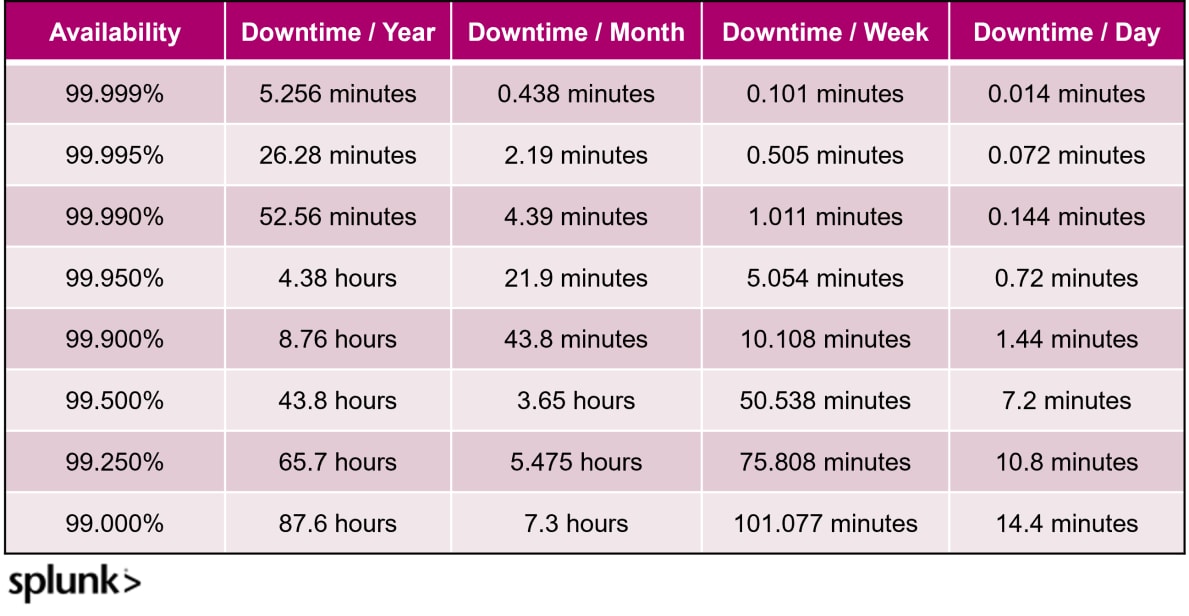
4. Downtime Reference Table for Quick Revision
For exams, it's useful to be familiar with the downtime associated with common SLA tiers. The "nines" have a dramatic impact on reliability. A 99% SLA allows for over 7 hours of downtime per month, while a 99.99% SLA allows for less than 5 minutes.
This table gives you a quick reference for the most common SLA values. Memorizing the values for 99.9% and 99.99% per month is highly recommended.
Conclusion
In this lesson, you've acquired the practical, numerical skill of translating an abstract SLA uptime percentage into a concrete measure of allowed downtime. This is a frequently tested concept and is fundamental to evaluating the quality of a cloud service.
Key Takeaways:
- The core formula for allowed downtime is: Total Time in Period × (100% - Uptime %).
- The calculation process is a simple four-step method:
- Find the downtime percentage.
- Identify the total time in the measurement period (in minutes or seconds).
- Multiply to find the total allowed downtime.
- Convert the result into a clear format (e.g., hours, minutes, seconds).
- Even a small change in uptime percentage (e.g., from 99.9% to 99.99%) has a significant impact on the acceptable amount of service unavailability.
Preview of the Next Lesson:
Now that we have covered the contractual promise of an SLA and how to calculate its availability component, the next logical step is to understand how a provider (and customer) can track whether these promises are being met. In the next lesson, we will address the learning outcome: Explain the purpose of cloud monitoring and list key metrics for compute, storage, and network resources.